I have a problem installing vista (2nd OS) on Windows 7

speeddial

New member
Local time
9:20 AM
Messages
14
hello,
i have problem installing vista (2nd OS) on Windows 7. i managed to install Vista but when my pc reboot and i select Vista to complete the installation it will not continue boot just black screen. am i missing something?

same with XP , after pressing any key to boot from CD, it will inspect my hardware configuration blah blah and then black screen.. pls help..:(
 

My Computer My Computer

At a glance

Windows7 Ultimate
OS
Windows7 Ultimate
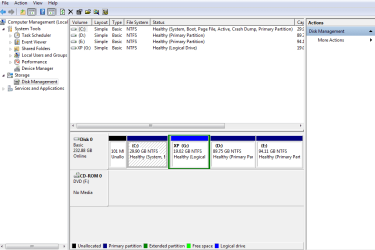
Please post back a screenshot of your maximized full Disk Mgmt drive map, using Snipping Tool in Start Menu. Label what is located where and tell us again what you want to do.

Have you tried adding Vista from Win7 using EasyBCD 2.0?

Are you booting XP to try install? If you don't have a floppy drive to insert SATA controller drivers into XP at the F6 prompt during file loading, It may require slipstreaming SATA drivers into the ancient XP installer: http://www.sevenforums.com/tutorials/72185-sata-drivers-slipstream-into-windows-xp-cd.html?ltr=S
 
after the initial installation, the computer will automatically reboot. at this point you should NOT press any key to boot from the cd drive. also, when you get the black screen, you may have to wait quite awhile. i would give it at least half an hour. during installation, you shouldnt have to choose an operating system either. only after installation is complete.
and when possible, its best to install the oldest operating system first. just dont choose the upgrade option. and dont start installing from within windows. place the disc in the drive, cancel any windows that open, and restart the computer.
 

My Computer My Computer

At a glance

windows 7 ultimate 64bitIntel Core2 Extreme x9000 2.8GHZ4Gig2 NVidia GeForce 8800M GTX (SLi)
Computer Manufacturer/Model Number
Alienware AREA-51 M17x
OS
windows 7 ultimate 64bit
CPU
Intel Core2 Extreme x9000 2.8GHZ
Motherboard
Asus P965 Intel chipset
Memory
4Gig
Graphics Card(s)
2 NVidia GeForce 8800M GTX (SLi)
Sound Card
onboard
Monitor(s) Displays
17in. built-in, 47in JVC LCD
Screen Resolution
1080p
Hard Drives
2 250Gig Hitachi (RAID 0) @ 7200RPM
Case
17in. laptop
Mouse
touchpad, Logitech Anywhere Mouse cordless laser
Internet Speed
cable
Hello speeddial, welcome to Seven Forums!


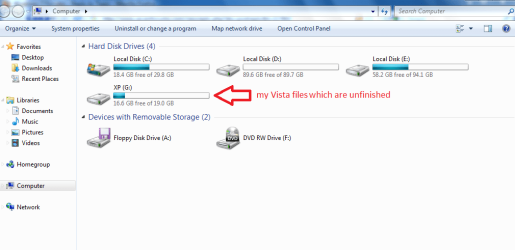
Just to double-check, you are referring to the G: partition correct?

You may need to do a partition specific Wipe "secure erase" that is out-lined in Step Three in this tutorial at the link below; I will tell you this that partition is kind of small for a Vista install though.

Partition Wizard : Use the Bootable CD


Do the wipe and start the Vista install again and be sure to post back with any further questions you may have and to keep us informed.
 

My Computer My Computer

At a glance

W 7 64-bit UltimateIntel Q9550 Yorkfield8GB Dominator 8500C5DATI : XFX 5870
Computer Manufacturer/Model Number
* BFK Customs *
OS
W 7 64-bit Ultimate
CPU
Intel Q9550 Yorkfield
Motherboard
ASUS P5Q Pro
Memory
8GB Dominator 8500C5D
Graphics Card(s)
ATI : XFX 5870
Sound Card
Realtek HD Audio 7-1
Monitor(s) Displays
1x 47" LCD HDMI & 3x 26" LCD HDMI
Screen Resolution
1920x1080P & 1920x1200
Hard Drives
1x 80GB Intel X25-M G2 SSD : 1x 500GB & 1x 640GB WD Caviar Black(s)
PSU
Corsair 620HX
Case
Cooler Master RC-690
Cooling
Tuniq Tower 120, 2x 140mm and 3x 120mm case fans
Keyboard
Microsoft 500
Mouse
Razer Diamondback 3G
Internet Speed
14 Mb/s
Other Info
1x Koutech 3Gb/s SATA HDD Hot Swap Rack
What I would do is use Partition Wizard CD to rightclick G>Modify>Convert to Primary, OK.

Then I would follow Ted's advice to rightclick G>Modify>Wipe, OK. Apply all steps.

Once these steps complete consider using the PW Resizing function to change your partition sizes.

Then boot the Vista installer to try install again to G.
 
Good idea Greg, I didn't think to convert it to a primary while in Partition Wizard for the wipe; the convert out-line is Step Four in this same tutorial.


Partition Wizard : Use the Bootable CD
 

My Computer My Computer

At a glance

W 7 64-bit UltimateIntel Q9550 Yorkfield8GB Dominator 8500C5DATI : XFX 5870
Computer Manufacturer/Model Number
* BFK Customs *
OS
W 7 64-bit Ultimate
CPU
Intel Q9550 Yorkfield
Motherboard
ASUS P5Q Pro
Memory
8GB Dominator 8500C5D
Graphics Card(s)
ATI : XFX 5870
Sound Card
Realtek HD Audio 7-1
Monitor(s) Displays
1x 47" LCD HDMI & 3x 26" LCD HDMI
Screen Resolution
1920x1080P & 1920x1200
Hard Drives
1x 80GB Intel X25-M G2 SSD : 1x 500GB & 1x 640GB WD Caviar Black(s)
PSU
Corsair 620HX
Case
Cooler Master RC-690
Cooling
Tuniq Tower 120, 2x 140mm and 3x 120mm case fans
Keyboard
Microsoft 500
Mouse
Razer Diamondback 3G
Internet Speed
14 Mb/s
Other Info
1x Koutech 3Gb/s SATA HDD Hot Swap Rack
You may want to convert his empty 100mb to Sys Reserved if that doesn't work.
 
You don't really have much of a reason to dual-boot two similar OSes, so if there's something you need to do in Vista, that's Vista specific, why not just virtualize is? You shouldn't need both OSes for compatibility reasons. That's just wasting drive space and over-complicating the system.
 

My Computer My Computer

At a glance

Windows 7 Ultimate x64 SP1Intel Core i7-260012 GB Patriot Extreme DDR3-1333Nvidia GTX 470
OS
Windows 7 Ultimate x64 SP1
CPU
Intel Core i7-2600
Motherboard
Gigabyte GA-P67A-UD3P-B3
Memory
12 GB Patriot Extreme DDR3-1333
Graphics Card(s)
Nvidia GTX 470
Monitor(s) Displays
Dell UltraSharp 2209WA
Hard Drives
OCZ Agility3 240 GB, WD5001AALS, WD7501AALS
PSU
OCZ ModStream 700W
Case
CoolerMaster HAF 912 Advanced
Cooling
CoolerMaster Hyper 212 Plus
hello guys i just woke up, i will try all your suggestions but i have to read and read those tutorials because am not good in computer, to avoid mistake :p

@DeaconFrost supposed to be that was XP but it failed

thanks a lot for your reply..
 

My Computer My Computer

At a glance

Windows7 Ultimate
OS
Windows7 Ultimate
Back
Top