I have a problem

anksin

New member
Local time
9:54 AM
Messages
9
Hi all frnz
I have a broadband connection & i have to dialup for browsing
Now the problem is that when i stay online surf & download it works fine
The movement I switch my monitor off & let it download on its own my internet gets disconnected!!

& I have to connect it again to continue downloading
One more thing how do i save my username & password in the dialup ??

I tried checking the remember id & password but doesnt work!!

I donno know if this is the rite place where i wil get the solution but if any body can help me than nothing like it

Regards

Thnx in advance
 

My Computer

OS
Windows XP
CPU
AMD Phenom
Motherboard
ASUS
Memory
2 GB
Monitor(s) Displays
17"
Hard Drives
250 GB
Why would you have to use dial-up if you gave a broadband connection:confused:
 

My Computer

Computer Manufacturer/Model Number
Cheap $399.00 E-Machine
OS
Windows 7 Pro & Vista Home Premium
CPU
Athlon 64 3800+ (Orleans) 2.40GHz
Motherboard
Winfast
Memory
2GB DDR2 RAM DIMM
Graphics Card(s)
NVIDIA GeForce 8500 GT 512 MB memory HDMI out
Sound Card
creative X-Fi Exteme 7..1 channel
Monitor(s) Displays
Acer V223W 22" widescreen DVI
Screen Resolution
1680x1050
Hard Drives
WDC WD5 500GB
WDC WD25 250GB
PSU
OCZ 550 watt
Case
Gateway
Cooling
2 fans
Keyboard
Dell
Mouse
Sony Vaio
Internet Speed
18MB/s down - .72MB /s up
actually i its not direct plug & browse i have to give my username & password so its has to be done through dialup I can so u the type of dial up i use
 

My Computer

OS
Windows XP
CPU
AMD Phenom
Motherboard
ASUS
Memory
2 GB
Monitor(s) Displays
17"
Hard Drives
250 GB
No,. your broadband connection can be used for browsing.

Did you setup some new connection,. like a VPN or dial-up connection.

If so,. they are not necessary.
 

My Computer

Computer Manufacturer/Model Number
Cheap $399.00 E-Machine
OS
Windows 7 Pro & Vista Home Premium
CPU
Athlon 64 3800+ (Orleans) 2.40GHz
Motherboard
Winfast
Memory
2GB DDR2 RAM DIMM
Graphics Card(s)
NVIDIA GeForce 8500 GT 512 MB memory HDMI out
Sound Card
creative X-Fi Exteme 7..1 channel
Monitor(s) Displays
Acer V223W 22" widescreen DVI
Screen Resolution
1680x1050
Hard Drives
WDC WD5 500GB
WDC WD25 250GB
PSU
OCZ 550 watt
Case
Gateway
Cooling
2 fans
Keyboard
Dell
Mouse
Sony Vaio
Internet Speed
18MB/s down - .72MB /s up
hi i dont know if its allowed to upload the file in this thred but i wil upload the steps wat i do to connect to the net so that would be easier for u to know the same
 

Attachments

My Computer

OS
Windows XP
CPU
AMD Phenom
Motherboard
ASUS
Memory
2 GB
Monitor(s) Displays
17"
Hard Drives
250 GB
It was very difficult to see,. but did you setup a connection manually.

Try disabling the dial-up connection and see if you can connect through the broadband connection
 

My Computer

Computer Manufacturer/Model Number
Cheap $399.00 E-Machine
OS
Windows 7 Pro & Vista Home Premium
CPU
Athlon 64 3800+ (Orleans) 2.40GHz
Motherboard
Winfast
Memory
2GB DDR2 RAM DIMM
Graphics Card(s)
NVIDIA GeForce 8500 GT 512 MB memory HDMI out
Sound Card
creative X-Fi Exteme 7..1 channel
Monitor(s) Displays
Acer V223W 22" widescreen DVI
Screen Resolution
1680x1050
Hard Drives
WDC WD5 500GB
WDC WD25 250GB
PSU
OCZ 550 watt
Case
Gateway
Cooling
2 fans
Keyboard
Dell
Mouse
Sony Vaio
Internet Speed
18MB/s down - .72MB /s up
You can save the connection credentials to your router and never have to give them again. That way you can also stay always connected.

Please tell what make and model your router is, so we can show you how to do this.

Kari
 

My Computer

Computer type
Laptop
Computer Manufacturer/Model Number
HP ENVY 17-1150eg
OS
Windows 10 Pro x64 EN-GB
CPU
1.6 GHz Intel Core i7-720QM Processor
Memory
6 GB
Graphics Card(s)
ATI Mobility Radeon HD 5850 Graphics
Sound Card
Beats sound system with integrated subwoofer
Monitor(s) Displays
17" laptop display, 22" LED and 32" Full HD TV through HDMI
Screen Resolution
1600*900 (1), 1920*1080 (2&3)
Hard Drives
Internal: 2 x 500 GB SATA Hard Disk Drive 7200 rpm
External: 2TB for backups, 3TB USB3 network drive for media
Cooling
As Envy runs a bit warm, I have it on a Cooler Master pad
Keyboard
Logitech diNovo Media Desktop Laser (bluetooth)
Mouse
Logitech Performance Mouse MX
Internet Speed
50/10 Mbps VDSL
Antivirus
Windows Defender 4.3.9431.0
Browser
Maxthon 3.5.2., IE11
theres no router for my ISP
theres a wire direct to my pc i have to make a dial up broadband conexon
See if u r using win 7 then chckcthis out

Create a new connection or network

then it asks for broadband ppoe
asks for username password

this is wat i did

plz help
 

My Computer

OS
Windows XP
CPU
AMD Phenom
Motherboard
ASUS
Memory
2 GB
Monitor(s) Displays
17"
Hard Drives
250 GB
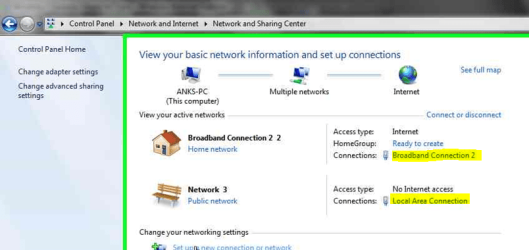
Attached is an image from your Problem Stepa Recorder file. Click both connections (marked yellow) and in the connection properties windows, click Details. Copy that window or make a screenshot, then post those screenshots here.

Kari
 

Attachments

  • Anksin.PNG
    Anksin.PNG
    62.2 KB · Views: 11

My Computer

Computer type
Laptop
Computer Manufacturer/Model Number
HP ENVY 17-1150eg
OS
Windows 10 Pro x64 EN-GB
CPU
1.6 GHz Intel Core i7-720QM Processor
Memory
6 GB
Graphics Card(s)
ATI Mobility Radeon HD 5850 Graphics
Sound Card
Beats sound system with integrated subwoofer
Monitor(s) Displays
17" laptop display, 22" LED and 32" Full HD TV through HDMI
Screen Resolution
1600*900 (1), 1920*1080 (2&3)
Hard Drives
Internal: 2 x 500 GB SATA Hard Disk Drive 7200 rpm
External: 2TB for backups, 3TB USB3 network drive for media
Cooling
As Envy runs a bit warm, I have it on a Cooler Master pad
Keyboard
Logitech diNovo Media Desktop Laser (bluetooth)
Mouse
Logitech Performance Mouse MX
Internet Speed
50/10 Mbps VDSL
Antivirus
Windows Defender 4.3.9431.0
Browser
Maxthon 3.5.2., IE11
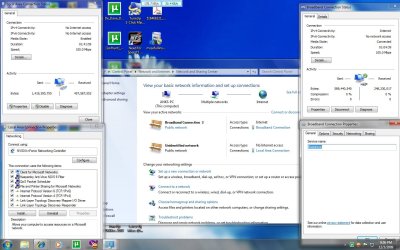
check the snapshot of the same as u had asked
 

Attachments

  • problem.jpg
    problem.jpg
    159 KB · Views: 17

My Computer

OS
Windows XP
CPU
AMD Phenom
Motherboard
ASUS
Memory
2 GB
Monitor(s) Displays
17"
Hard Drives
250 GB
May be you need to check in power settings . When you turn off the monitor ... check if there is any time limit for harddisk turn off !
 

My Computer

Computer Manufacturer/Model Number
Lenova 550
OS
windows 7
CPU
Lenova
Motherboard
Lenova
Memory
4 gb
Graphics Card(s)
Intel graphics card
Sound Card
Realtek
Hard Drives
one hard disk - Laptop -320 gb
I still don't get it.

What company provides your broadband, and what company provides dial-up service.

In dial-up,. I mean the old modems that require a telephone line.

Is that you setup?

Are you paying two companies?
 

My Computer

Computer Manufacturer/Model Number
Cheap $399.00 E-Machine
OS
Windows 7 Pro & Vista Home Premium
CPU
Athlon 64 3800+ (Orleans) 2.40GHz
Motherboard
Winfast
Memory
2GB DDR2 RAM DIMM
Graphics Card(s)
NVIDIA GeForce 8500 GT 512 MB memory HDMI out
Sound Card
creative X-Fi Exteme 7..1 channel
Monitor(s) Displays
Acer V223W 22" widescreen DVI
Screen Resolution
1680x1050
Hard Drives
WDC WD5 500GB
WDC WD25 250GB
PSU
OCZ 550 watt
Case
Gateway
Cooling
2 fans
Keyboard
Dell
Mouse
Sony Vaio
Internet Speed
18MB/s down - .72MB /s up
I asked you to post screenshot of the details view. You have about everything else there but not what I need to see.

See the attached image. Click the buttons marked yellow and post those.

Kari
 

Attachments

  • Anksin1.PNG
    Anksin1.PNG
    125.8 KB · Views: 9

My Computer

Computer type
Laptop
Computer Manufacturer/Model Number
HP ENVY 17-1150eg
OS
Windows 10 Pro x64 EN-GB
CPU
1.6 GHz Intel Core i7-720QM Processor
Memory
6 GB
Graphics Card(s)
ATI Mobility Radeon HD 5850 Graphics
Sound Card
Beats sound system with integrated subwoofer
Monitor(s) Displays
17" laptop display, 22" LED and 32" Full HD TV through HDMI
Screen Resolution
1600*900 (1), 1920*1080 (2&3)
Hard Drives
Internal: 2 x 500 GB SATA Hard Disk Drive 7200 rpm
External: 2TB for backups, 3TB USB3 network drive for media
Cooling
As Envy runs a bit warm, I have it on a Cooler Master pad
Keyboard
Logitech diNovo Media Desktop Laser (bluetooth)
Mouse
Logitech Performance Mouse MX
Internet Speed
50/10 Mbps VDSL
Antivirus
Windows Defender 4.3.9431.0
Browser
Maxthon 3.5.2., IE11
It sounds like the person has a DSL connection, that requires manual PPPoE dial-out from the computer, to connect to the internet.

It sounds like power settings are interfering. You should check the power settings of the network adapter in Device Manager and ensure that the box saying something along the lines of "turn off this device to save power" is NOT checked.

For the saving of the username and password, I can only say check the properties of the connection (right click > properties) and ensure that the check box is checked there.

Hopes this help.
 
Last edited:

My Computer

OS
Windows 7
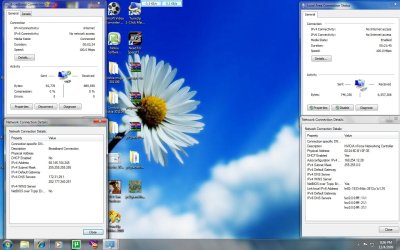
yes thats right basebalplyr345 has said is right thats wat i have it i m uploading the image kari has asked for .

as said i will also check with the properties ofpower settings of adapter

& for password saving i have to chck it

thnx again
 

Attachments

  • prblm1.jpg
    prblm1.jpg
    147 KB · Views: 9

My Computer

OS
Windows XP
CPU
AMD Phenom
Motherboard
ASUS
Memory
2 GB
Monitor(s) Displays
17"
Hard Drives
250 GB
Sorry,. but I'll leave this up th\o the Networking gurus.
At least this post will bump it back to the top.
 

My Computer

Computer Manufacturer/Model Number
Cheap $399.00 E-Machine
OS
Windows 7 Pro & Vista Home Premium
CPU
Athlon 64 3800+ (Orleans) 2.40GHz
Motherboard
Winfast
Memory
2GB DDR2 RAM DIMM
Graphics Card(s)
NVIDIA GeForce 8500 GT 512 MB memory HDMI out
Sound Card
creative X-Fi Exteme 7..1 channel
Monitor(s) Displays
Acer V223W 22" widescreen DVI
Screen Resolution
1680x1050
Hard Drives
WDC WD5 500GB
WDC WD25 250GB
PSU
OCZ 550 watt
Case
Gateway
Cooling
2 fans
Keyboard
Dell
Mouse
Sony Vaio
Internet Speed
18MB/s down - .72MB /s up
Back
Top