I Have a Problem

TheLoneWarrior

New member
Local time
6:33 AM
Messages
1
When I try to install any gadgets a message comes up saying-"Command line option syntax error. Type Command /? for Help." I have Windows 7. I would greatly enjoy this help.
 

My Computer

OS
Windows 7

My Computer

Computer type
PC/Desktop
Computer Manufacturer/Model Number
Dell XPS 420
OS
Windows 10, Home Clean Install
CPU
Intel Core2 processsor Q8200(2.33Ghz 1333FSB) Quad Core Tech
Motherboard
Dell
Memory
6 gb
Graphics Card(s)
ATI Radeon 256MB HD3650
Sound Card
Intergrated 7.1 Channel Audio
Monitor(s) Displays
Dell SP2009W 20"
Hard Drives
640 GB Serial ATA Hard drive
Cooling
Fan
Keyboard
Dell USB Keyboard
Mouse
Dell Premium Optical USB
Internet Speed
DSL 2.85
Welcome to Seven Forums Warrior
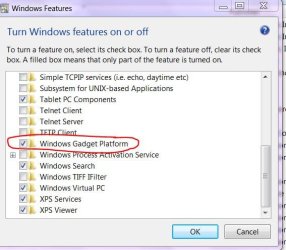
You could try turning your gadget platform off and then back on to reset it, you need to restart Windows after unselecting the gadget platform.
gadget turn on.JPG
 

My Computer

Computer Manufacturer/Model Number
Gateway GT5692
OS
Windows 7 Ulti. x64
CPU
AMD Phenom 8450 triple-core 2.10 ghz
Memory
4GB
Graphics Card(s)
ATI Radion HD 3200
Monitor(s) Displays
Gateway FPD1775W
Screen Resolution
1280x720
Hard Drives
465.6613 Gibibytes
When I try to install any gadgets a message comes up saying-"Command line option syntax error. Type Command /? for Help." I have Windows 7. I would greatly enjoy this help.

Hello !!

I have seen this before with Office i used to happen if the its had a UNC path i.e the path that has "\\server\.." so if you have one change it to local path and see if that works. If you have trouble reset the User shell location to Default values download Microsoft Fixit#9708107 it would help you resetting the User Shell location to default entries http://go.microsoft.com/?linkid=9708107


1. Click Start Menu, type "cmd" (without quotation marks) in the Start Search box.
2. Right-click the exe file and choose "run as administrator".
3. Input the following commands in the DOS prompt window and press ENTER at the end of each line:

CD C:\Program Files\Windows Sidebar
REGSVR32 ATL.DLL
REGSVR32 SBDROP.DLL
REGSVR32 WLSRVC.DLL


NOTE: the following steps will remove all downloaded Gadgets.

Hope this helps,
Captain
 

My Computer

Computer Manufacturer/Model Number
Samsung NP550P5C-S02IN
OS
Windows 7 Ultimate - 64-bit | Windows 8 Pro - 64-bit
CPU
Intel® Core™ i7 Processor 3,610QM (2.30Hz, 6MB L3 Cach
Memory
8 GB
Graphics Card(s)
NVIDIA® GeForce® GT 650M 2GB Graphics, Optimus™ techno
Sound Card
SoundAlive™ JBL 3 Speakers (With sub-Woofer)
Monitor(s) Displays
39.62cm (15.6) SuperBright 300nit HD+ LED Display
Screen Resolution
1,600 x 900, Anti-Reflective
Hard Drives
1TB S-ATA II Hard Drive (5,400RPM)
Back
Top