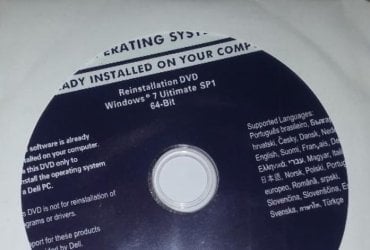
i have another dell e6430 core i5 was a university laptop

2009joseph

Member
Member
VIP
Local time
10:40 PM
Messages
250
hello windows 7 forum i hope everyone is well i have a quick question im running into i bought another dell e6430 core i5 2.7ghz well it was a university laptop and i cleaned it up well as my wife would like it for things it has to have a windows 7 pr sticker on it but says ademic use only i think on it with no product code and well i came with win 10 pro and has a sticker on the back of it with the product code on it .tbh i abslutly hate the lay out and all the crapware that comes with it as tracks you asks to be ligged in to a email and sends news feeds plus its dam slow on the laptop i hate it win 7 is the best for this laptop it dose what it dose and thats it but when i try to set it up threw bios like my other one with a ssd it is the same all good but the problem i run into is when i put on the new win 7 iso file it loads up but when i try to load the drivers for my wifi comes up with a error kernel32.dll and i can for the life of me get it to connect .plus i cant find the original win 7 product key for it so to get it going i have to put in wnd load$r ;) wink wink its the only way .i just wonder do you guys have any idea why i cant connect to my wifi to set up the laptop
 

My Computer My Computer

At a glance

WINDOWS 7 64BIT ultimate8GB
Computer type
Laptop
Computer Manufacturer/Model Number
dell latitude e6430
OS
WINDOWS 7 64BIT ultimate
Memory
8GB
Hard Drives
sandisk extreme pro 480gb ssd
Antivirus
free avast
first thing i'd do reset bios to defaults..
is there a COA in the battery compartment
 

My Computer My Computer

At a glance

W7 home premium 32bit/W7HP 64bit/w10 tp insid...E5300 dual core3gbNvidia Geforce 7100 Nforce 630i
Computer type
PC/Desktop
Computer Manufacturer/Model Number
medionl/Aspire 6930G/acer x55a
OS
W7 home premium 32bit/W7HP 64bit/w10 tp insider ring
CPU
E5300 dual core
Motherboard
medion MS7366
Memory
3gb
Graphics Card(s)
Nvidia Geforce 7100 Nforce 630i
Monitor(s) Displays
avixc
Internet Speed
n (isp resticted to 72)
Antivirus
mse/pands
Browser
palemoon
Other Info
Belkin Fd7050 n USB using Railink RT2870 drivers, more upto date
i set up the bios to match a ssd like my other dell e6430 i have its the fame laptop maybe one got a nivida chip and other one i have dont go it do you think if i change bios to default i have updated bios to the newist one out i think its number 24 but if i do that you think will connect to the internet and dont come up with that error .il try it now thanks so much torchwood. plus forgot to say that the win 7 pro sticker in the battery compartment it says academic only oa but there is a tracking id a long number
 

My Computer My Computer

At a glance

WINDOWS 7 64BIT ultimate8GB
Computer type
Laptop
Computer Manufacturer/Model Number
dell latitude e6430
OS
WINDOWS 7 64BIT ultimate
Memory
8GB
Hard Drives
sandisk extreme pro 480gb ssd
Antivirus
free avast
Hi

reseting bios to default wont hurt..... whichever version
dont know why your getting the kernal error unless the Iso is corrupted

follow this link (not sure if its still available)
Microsoft Windows and Office ISO Download Tool

USE THE DELL install option for a new clean install
 

My Computer My Computer

At a glance

W7 home premium 32bit/W7HP 64bit/w10 tp insid...E5300 dual core3gbNvidia Geforce 7100 Nforce 630i
Computer type
PC/Desktop
Computer Manufacturer/Model Number
medionl/Aspire 6930G/acer x55a
OS
W7 home premium 32bit/W7HP 64bit/w10 tp insider ring
CPU
E5300 dual core
Motherboard
medion MS7366
Memory
3gb
Graphics Card(s)
Nvidia Geforce 7100 Nforce 630i
Monitor(s) Displays
avixc
Internet Speed
n (isp resticted to 72)
Antivirus
mse/pands
Browser
palemoon
Other Info
Belkin Fd7050 n USB using Railink RT2870 drivers, more upto date
the link dont work my friend and i have a good windows iso as i have loaded this loads of times on a few machines i have like toshibas and other dells plus loads of times doing fresh install on my own dell e6430 i have .whatever it is with this one spacific dell e6430 now i have that i got dont seem to give me problems i never came across before . i think thats the link of the windows i might have got my windows before as microsoft was doing away with windows 7 and i downloaded it a long time ago and saved it to my hardrives and external hard drives plus i made a few cd copys of it as well . this one i have is a genuine Microsoft windows 7 unlimate to match my laptops product code
 

My Computer My Computer

At a glance

WINDOWS 7 64BIT ultimate8GB
Computer type
Laptop
Computer Manufacturer/Model Number
dell latitude e6430
OS
WINDOWS 7 64BIT ultimate
Memory
8GB
Hard Drives
sandisk extreme pro 480gb ssd
Antivirus
free avast
the link dont work my friend and i have a good windows iso as i have loaded this loads of times on a few machines i have like toshibas and other dells

I just tried it and Torchwood's link works fine. Click his link and find the link to download "Windows-ISO-Downloader.exe". You need to run the downloader exe to get the iso, as you won't find the iso directly on the Heidoc webpage.

If you have your own Windows iso you'll also need the product key that goes with it. We can't help you if you don't have that. The link Torchwood gave you allows you to download a special iso that is bios-locked to Dell, which you can install (on a Dell) without needing to enter any product key.

Download and launch the "Windows-ISO-Downloader.exe". Select "DELL" for the Windows version. Select "Latitude E6430" for the Model. Note you only have a choice of Win7 Professional x32 or x64, as those were the only versions Dell provided with the E6430. (If you have a different version, it wasn't provided by Dell.) Click the [Copy Link] button, then paste that URL into your web browser to download the iso.

(Note: in my test, the [Download] button did nothing, but I'm not sure if that's a problem with the downloader or perhaps a problem with the way my security settings are set on my computer. Nevertheless, the [Copy Link] button worked fine.)

heidoc-dell.png
 

My Computer My Computer

At a glance

Windows 7/8.1/10 multibootIntel Core i7-770048GB (2x16GB Crucial DDR4-3200 + 2x8GB Hynix ...Intel HD630 + AMD Radeon R7 450 PCIe
Computer type
PC/Desktop
Computer Manufacturer/Model Number
Dell Optiplex 7050
OS
Windows 7/8.1/10 multiboot
CPU
Intel Core i7-7700
Motherboard
Dell, Intel Q270 chipset
Memory
48GB (2x16GB Crucial DDR4-3200 + 2x8GB Hynix DDR4-2400)
Graphics Card(s)
Intel HD630 + AMD Radeon R7 450 PCIe
Monitor(s) Displays
Asus VC279 (27")
Screen Resolution
1920x1080
Hard Drives
Toshiba M.2 NVMe (256GB),
Samsung 960 Evo (500GB),
WD Red Plus 80EFBX (8TB)
its a Double hit on heidoc.... first the downloader then the Dell option
(from memory if the download is unavailable it will tell you)

please tell us the exact model of the laptop
(not entirely sure if you go to the Dell website, input the serial no: it will give you a choice of W7 or W10 drivers)
 

My Computer My Computer

At a glance

W7 home premium 32bit/W7HP 64bit/w10 tp insid...E5300 dual core3gbNvidia Geforce 7100 Nforce 630i
Computer type
PC/Desktop
Computer Manufacturer/Model Number
medionl/Aspire 6930G/acer x55a
OS
W7 home premium 32bit/W7HP 64bit/w10 tp insider ring
CPU
E5300 dual core
Motherboard
medion MS7366
Memory
3gb
Graphics Card(s)
Nvidia Geforce 7100 Nforce 630i
Monitor(s) Displays
avixc
Internet Speed
n (isp resticted to 72)
Antivirus
mse/pands
Browser
palemoon
Other Info
Belkin Fd7050 n USB using Railink RT2870 drivers, more upto date
Thanks so much I must give it a try again. I never came across this internet connection problem before on my other dell e6430 laptop or others I had also.this is kina new to me running into this problem of internet connection when the laptop seems to be connected to my WiFi and it's hard to explain without if I can pictures I have taken.i even tried a cd windows 7 home premium iOS of my older Toyota laptop I had .but still come to the same problem.i must try to get my pics to show you what I'm going threw TBH I'm thinking it has to be something easy .I just need to find out the problem

- - - Updated - - -

thanks so much i was selecting the windows 7 pro without clicking dell like your pic there its working now i just have to try get it going on this laptop now thanks so much you guys for helping me thanks so much


I just tried it and Torchwood's link works fine. Click his link and find the link to download "Windows-ISO-Downloader.exe". You need to run the downloader exe to get the iso, as you won't find the iso directly on the Heidoc webpage.

If you have your own Windows iso you'll also need the product key that goes with it. We can't help you if you don't have that. The link Torchwood gave you allows you to download a special iso that is bios-locked to Dell, which you can install (on a Dell) without needing to enter any product key.

Download and launch the "Windows-ISO-Downloader.exe". Select "DELL" for the Windows version. Select "Latitude E6430" for the Model. Note you only have a choice of Win7 Professional x32 or x64, as those were the only versions Dell provided with the E6430. (If you have a different version, it wasn't provided by Dell.) Click the [Copy Link] button, then paste that URL into your web browser to download the iso.

(Note: in my test, the [Download] button did nothing, but I'm not sure if that's a problem with the downloader or perhaps a problem with the way my security settings are set on my computer. Nevertheless, the [Copy Link] button worked fine.)

View attachment 425121

- - - Updated - - -

Hi again sorry to bother you on my dell e6430 core i5 I have done what U said choose dell and windows 7 pro 64bit
I got to download the iso file which was about 7gb but when loading it onto my laptop when I did fresh install of my other ones the iso when loading Gave me a option to delete the partition on my SSD and so when loading will be on a fresh clean SSD but this iso did not give me that option plus it came up looking for drivers before it would go any further on loading onto my laptop .it would not go forward without the drivers and told me to shut down or restart
 

My Computer My Computer

At a glance

WINDOWS 7 64BIT ultimate8GB
Computer type
Laptop
Computer Manufacturer/Model Number
dell latitude e6430
OS
WINDOWS 7 64BIT ultimate
Memory
8GB
Hard Drives
sandisk extreme pro 480gb ssd
Antivirus
free avast
i was selecting the windows 7 pro without clicking dell like your pic there its working now

Heidoc won't give you Microsoft's Win7 downloads anymore. When you try to use the "Windows 7" option, Heidoc will apologize and explain that they can no longer provide those isos because Microsoft has pulled all Windows 7 downloads.

In contrast, when you select the "DELL" option the download is coming directly from Dell's website, not Microsoft's, so it's still available as long as Dell doesn't pull it from their website.


when I did fresh install of my other ones the iso when loading Gave me a option to delete the partition on my SSD [...] but this iso did not give me that option plus it came up looking for drivers before it would go any further

Sounds like you're running Setup two different ways. Did you burn the downloaded iso to a DVD? One way of running is to boot into Windows and then run Setup (from either the iso file or from a DVD) directly from Windows. The other way is to boot from the DVD and run Setup directly from the DVD, outside of Windows. You'll see slightly different screens, depending on which way you're doing it.


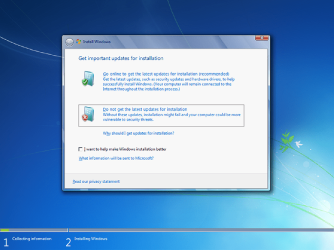
This is one of the early screens you'll see if Setup is run from within a booted Windows. You will not see this if booted from DVD.
dell7-setup-1.png
If you see this screen, do not go online for updates. If you do so, Setup will spin endlessly waiting for updates that Microsoft pulled a decade ago. Select the option to skip updates.


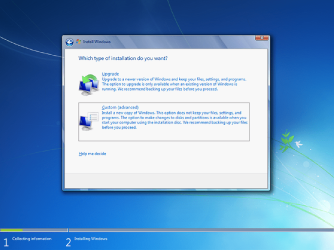
Eventually, you'll get to this screen -- which is the same as the first Setup screen you'll get if booted from DVD. Do not select "Upgrade". For a clean install, select "Custom".
dell7-setup-2.png


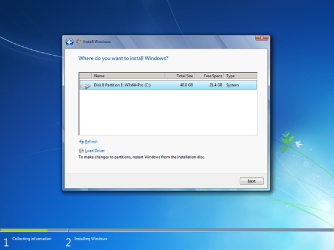
If running Setup from within Windows, the next screen will allow you to select the old Windows partition to overwrite with the fresh install. Note that running Setup from within Windows does not allow you any advanced options.
dell7-setup-3.png

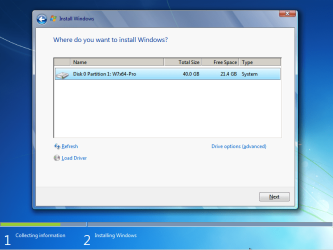
If running Setup from a DVD boot instead, you'll get the same screen but with a link to advanced options. Those advanced options allow you to create or delete any of the pre-existing partitions.
dell7-dvd-3.png


I prefer installing from a DVD boot, but with a 7GB iso that will require you to burn a dual-layer DVD. If you can't do that, I think it should still work the other way, as long as you follow the above quidelines.

All this does is install Windows. After Windows is installed, you'll still need to obtain and install Dell's drivers, and obtain and install Windows updates (I recommend the Simplix package). But first you have to finish the basic Win7 install.
 

My Computer My Computer

At a glance

Windows 7/8.1/10 multibootIntel Core i7-770048GB (2x16GB Crucial DDR4-3200 + 2x8GB Hynix ...Intel HD630 + AMD Radeon R7 450 PCIe
Computer type
PC/Desktop
Computer Manufacturer/Model Number
Dell Optiplex 7050
OS
Windows 7/8.1/10 multiboot
CPU
Intel Core i7-7700
Motherboard
Dell, Intel Q270 chipset
Memory
48GB (2x16GB Crucial DDR4-3200 + 2x8GB Hynix DDR4-2400)
Graphics Card(s)
Intel HD630 + AMD Radeon R7 450 PCIe
Monitor(s) Displays
Asus VC279 (27")
Screen Resolution
1920x1080
Hard Drives
Toshiba M.2 NVMe (256GB),
Samsung 960 Evo (500GB),
WD Red Plus 80EFBX (8TB)
thanks dg1261 for your info i will try and load this iso on 2 dvd instead and see if i can load it plus i will try to run this simplex update is it safe from this one
Download Simplix UpdatePack 7 25.9.10

when comes to dell drivers i have to see if i can get them loaded also thanks so much for your help i will tell you how i get on

- - - Updated - - -


hello my friend thanks so much for all you did to help me but i finally got it to work on windows 7 64bit this is the way i did it i could not for the life of me get the original dell os from where you said to download it to work kept stopping at the start looking dvd drivers and would not go any further so this is the way i got it to go

1) i loaded my win 7 ultimate iso file onto it as it goes through and loads on it great
2) i loaded Download Simplix UpdatePack 7 25.9.10 and put all the windows updates on the laptop second after the ios was loaded
3) i downloaded all the drivers from the dell website for my laptop and model and loaded them on the laptop .i put them all on there before putting on the wifi driver as i left that to the very last
4) i loaded firefox and chrome on the laptop also as i wanted that on the laptop
5) the last thing i did when i knew all was on the laptop and all working was to connect it to the wifi and internet as that was where i was getting all my errors and that fixed my problem

class job i now have another working win 7 ultimate 64bit . i must now get in contact with dell i hope as im hoping that they will give me the laptops original windows 7 ultimate key


Heidoc won't give you Microsoft's Win7 downloads anymore. When you try to use the "Windows 7" option, Heidoc will apologize and explain that they can no longer provide those isos because Microsoft has pulled all Windows 7 downloads.

In contrast, when you select the "DELL" option the download is coming directly from Dell's website, not Microsoft's, so it's still available as long as Dell doesn't pull it from their website.


Sounds like you're running Setup two different ways. Did you burn the downloaded iso to a DVD? One way of running is to boot into Windows and then run Setup (from either the iso file or from a DVD) directly from Windows. The other way is to boot from the DVD and run Setup directly from the DVD, outside of Windows. You'll see slightly different screens, depending on which way you're doing it.


This is one of the early screens you'll see if Setup is run from within a booted Windows. You will not see this if booted from DVD.
View attachment 425123
If you see this screen, do not go online for updates. If you do so, Setup will spin endlessly waiting for updates that Microsoft pulled a decade ago. Select the option to skip updates.


Eventually, you'll get to this screen -- which is the same as the first Setup screen you'll get if booted from DVD. Do not select "Upgrade". For a clean install, select "Custom".
View attachment 425124


If running Setup from within Windows, the next screen will allow you to select the old Windows partition to overwrite with the fresh install. Note that running Setup from within Windows does not allow you any advanced options.
View attachment 425126

If running Setup from a DVD boot instead, you'll get the same screen but with a link to advanced options. Those advanced options allow you to create or delete any of the pre-existing partitions.
View attachment 425125


I prefer installing from a DVD boot, but with a 7GB iso that will require you to burn a dual-layer DVD. If you can't do that, I think it should still work the other way, as long as you follow the above quidelines.

All this does is install Windows. After Windows is installed, you'll still need to obtain and install Dell's drivers, and obtain and install Windows updates (I recommend the Simplix package). But first you have to finish the basic Win7 install.
 

My Computer My Computer

At a glance

WINDOWS 7 64BIT ultimate8GB
Computer type
Laptop
Computer Manufacturer/Model Number
dell latitude e6430
OS
WINDOWS 7 64BIT ultimate
Memory
8GB
Hard Drives
sandisk extreme pro 480gb ssd
Antivirus
free avast
It would be slp activation which needs the dell xrm-ms file and the key for the edition. dell had an ultimate iso. They might provide it for you, or you can search the internet for it.

dell-win7-ultimate.jpg

Or you can use Pro instead.
 

My Computers My Computers

  • At a glance

    7 X64i5 84002x8gb 3200mhz
    Computer type
    PC/Desktop
    OS
    7 X64
    CPU
    i5 8400
    Motherboard
    gigabyte b365m ds3h
    Memory
    2x8gb 3200mhz
    Hard Drives
    various
    PSU
    pure power 11 400w cm
    Case
    Coolermaster
    Cooling
    cryorig m9i
  • At a glance

    7x64g54008gb ddr4 2400
    Computer type
    PC/Desktop
    OS
    7x64
    CPU
    g5400
    Motherboard
    ga b365m ds3h
    Memory
    8gb ddr4 2400
    PSU
    xfx pro 450w
from one problem to another im getting a bootsrap issue when loading my office and im having problems trying to install avast free antivirus i download it from the site but i click it and nothing happens :( any ideas you guys i have tried 3 things about the bootstrap online but did not work

- - - Updated - - -


thanks my friend the windows 7 64bit ultimate i am using is sp1 and i have it on my other dell e6430 i have and my other friends dell e6430 . whatever it is with this dell i haveit dont load as handy as the other 2 dell e6430 i have put windows on before plus i did the same way when i loaded other windows onto my other laptops i had toshiba ones that had windows 7 home premium on them . well i got the laptop going but im running into two new problems now i cant install avast free antivirus when i download it and click it to open the installer it dose nothing :( plus i have a older version on Microsoft work 2007 and i come up with a bootstrap error and i have tried the 3 ways i found online to no avail

It would be slp activation which needs the dell xrm-ms file and the key for the edition. dell had an ultimate iso. They might provide it for you, or you can search the internet for it.

View attachment 425137

Or you can use Pro instead.
 

My Computer My Computer

At a glance

WINDOWS 7 64BIT ultimate8GB
Computer type
Laptop
Computer Manufacturer/Model Number
dell latitude e6430
OS
WINDOWS 7 64BIT ultimate
Memory
8GB
Hard Drives
sandisk extreme pro 480gb ssd
Antivirus
free avast
Back
Top