Solved i have created non-administrative user based policies to the computer

expressions

New member
Local time
2:09 AM
Messages
23
in my company there are 15 computers no domain, i have created non-administrative user based policies to the computer and now i need to apply the same policies on all computers. is there any way to copy and paste or import the policies to all the computers step by step guide. it is a policy.msc file.

we have windows 7 ultimtae 64-BIt

i have tried these 3 methods and do not understand them.

http://www.chicagotech.net/netforums/viewtopic.php?f=4&t=3780


Florian's Blog » How can I export local Group Policy settings made in gpedit.msc?

https://social.technet.microsoft.co...olicies-to-another-computer?forum=winserverGP


there is one more issue i like to mention here if someone can help. i am trying to make an administrator account with complete administrator privilege. windows 7 does not allow me to do that. it says there can only be one administrator. i have give the user admin rights but they are not full rights
 
Last edited:

My Computer My Computer

At a glance

windows 7 64bit
Computer type
PC/Desktop
OS
windows 7 64bit

My Computer My Computer

At a glance

Windows 7 Ultimate x64 SP1AMD Phenom 2 1090T2x8GB Kingston HyperX Fury Black 1600Mhz Unga...MSI GTX 970 Gaming 4G
Computer type
PC/Desktop
Computer Manufacturer/Model Number
Custom Build
OS
Windows 7 Ultimate x64 SP1
CPU
AMD Phenom 2 1090T
Motherboard
Gigabyte GA-890FXA-UD5
Memory
2x8GB Kingston HyperX Fury Black 1600Mhz Unganged
Graphics Card(s)
MSI GTX 970 Gaming 4G
Sound Card
Realtek On-Board HD 7.1 Audio / Logitech G35
Monitor(s) Displays
3xAcer GD245HQ
Screen Resolution
1920x1080
Hard Drives
Samsung 850 Pro 512GB SSD - OS /
WD Caviar Black SATA 3 - 1 TBx2 - Dynamic RAID 0 /
WD Caviar Green SATA 2 - 640GBx2 - Dynamic RAID 0 /
WD Caviar Green SATA 2 - 640GB - Internal Backup /
Seagate Barracude SATA 3 - 3TB - External Backup/ Sync
PSU
HighPower 1000W
Case
Cooler Master HAF 932
Cooling
Noctua NH-D14
Keyboard
Logitech G19
Mouse
Logitech G500
Internet Speed
100/4 Mbit Cable (100GB quota)
Antivirus
ZoneAlarm Extreme Security / MBAM Pro / MBAE Free / SAS Free
Browser
IE 11 - Firefox - Chrome
Other Info
Logitech F710/ G27/ G940/ Z5500 // TrackIR 5 // Nvidia 3D Surround Vision
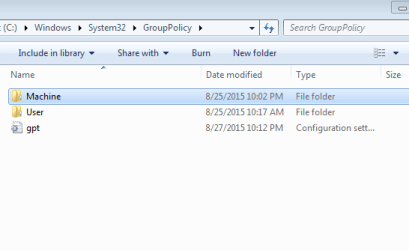
%systemroot%\system32\grouppolicy i see two folders machine and users and one file named gpt.in, in machine i see scripts folder and registry.pol. in script folder there are two empty folders restart and shutdown, and the USER folder is empty.

i dont understand where to paste GP.msc file or i need to change the .msc file to the .inf and then paste it . what will happen to the local security policies ? pasting .msc file of user policies is enough?
we dont have a domain its a standalone windows 7 ultimate workstation.
 
Last edited:

My Computer My Computer

At a glance

windows 7 64bit
Computer type
PC/Desktop
OS
windows 7 64bit
Ok, copy the two folders under "%systemroot%\system32\grouppolicy" on a machine you customized Group Policy and paste them to the same folder of another PC you want to use the same settings. Then either run the update command in the linked guide or simply restart the PC so new settings take effect.
 

My Computer My Computer

At a glance

Windows 7 Ultimate x64 SP1AMD Phenom 2 1090T2x8GB Kingston HyperX Fury Black 1600Mhz Unga...MSI GTX 970 Gaming 4G
Computer type
PC/Desktop
Computer Manufacturer/Model Number
Custom Build
OS
Windows 7 Ultimate x64 SP1
CPU
AMD Phenom 2 1090T
Motherboard
Gigabyte GA-890FXA-UD5
Memory
2x8GB Kingston HyperX Fury Black 1600Mhz Unganged
Graphics Card(s)
MSI GTX 970 Gaming 4G
Sound Card
Realtek On-Board HD 7.1 Audio / Logitech G35
Monitor(s) Displays
3xAcer GD245HQ
Screen Resolution
1920x1080
Hard Drives
Samsung 850 Pro 512GB SSD - OS /
WD Caviar Black SATA 3 - 1 TBx2 - Dynamic RAID 0 /
WD Caviar Green SATA 2 - 640GBx2 - Dynamic RAID 0 /
WD Caviar Green SATA 2 - 640GB - Internal Backup /
Seagate Barracude SATA 3 - 3TB - External Backup/ Sync
PSU
HighPower 1000W
Case
Cooler Master HAF 932
Cooling
Noctua NH-D14
Keyboard
Logitech G19
Mouse
Logitech G500
Internet Speed
100/4 Mbit Cable (100GB quota)
Antivirus
ZoneAlarm Extreme Security / MBAM Pro / MBAE Free / SAS Free
Browser
IE 11 - Firefox - Chrome
Other Info
Logitech F710/ G27/ G940/ Z5500 // TrackIR 5 // Nvidia 3D Surround Vision
Thanks i am gonna try this as soon as i go to my office in next 2 hours, i just need to copy the folders not the gpt.ini file ? what about the .msc file i have for non administrative users, can i just copy and past it to other computers? and it will work fine?
 

Attachments

  • 2015-08-27 22_59_26-GroupPolicy.png
    2015-08-27 22_59_26-GroupPolicy.png
    7 KB · Views: 18

My Computer My Computer

At a glance

windows 7 64bit
Computer type
PC/Desktop
OS
windows 7 64bit
On my machine I don't see anything special in the gpt.ini file, leave it out for now. Just copy the 2 folders.

You have mentioned policy.msc and then GP.msc, are these same? How did you get them?

Local Security Policies are a subset of Group Policy and will be copied when you copy the above 2 folders. See http://www.sevenforums.com/tutorials/7357-local-security-policy-editor-open.html for some more information.

Changing to inf file in the guide is for Security Templates.

Also to answer your question about administrator account, you can only have 1 user named "Administrator". However, you can create any number of admin accounts with other names. See http://www.sevenforums.com/tutorials/181024-user-account-create.html
 

My Computer My Computer

At a glance

Windows 7 Ultimate x64 SP1AMD Phenom 2 1090T2x8GB Kingston HyperX Fury Black 1600Mhz Unga...MSI GTX 970 Gaming 4G
Computer type
PC/Desktop
Computer Manufacturer/Model Number
Custom Build
OS
Windows 7 Ultimate x64 SP1
CPU
AMD Phenom 2 1090T
Motherboard
Gigabyte GA-890FXA-UD5
Memory
2x8GB Kingston HyperX Fury Black 1600Mhz Unganged
Graphics Card(s)
MSI GTX 970 Gaming 4G
Sound Card
Realtek On-Board HD 7.1 Audio / Logitech G35
Monitor(s) Displays
3xAcer GD245HQ
Screen Resolution
1920x1080
Hard Drives
Samsung 850 Pro 512GB SSD - OS /
WD Caviar Black SATA 3 - 1 TBx2 - Dynamic RAID 0 /
WD Caviar Green SATA 2 - 640GBx2 - Dynamic RAID 0 /
WD Caviar Green SATA 2 - 640GB - Internal Backup /
Seagate Barracude SATA 3 - 3TB - External Backup/ Sync
PSU
HighPower 1000W
Case
Cooler Master HAF 932
Cooling
Noctua NH-D14
Keyboard
Logitech G19
Mouse
Logitech G500
Internet Speed
100/4 Mbit Cable (100GB quota)
Antivirus
ZoneAlarm Extreme Security / MBAM Pro / MBAE Free / SAS Free
Browser
IE 11 - Firefox - Chrome
Other Info
Logitech F710/ G27/ G940/ Z5500 // TrackIR 5 // Nvidia 3D Surround Vision
in cmd i typed mmc and from there i added add remove snap in added group policy object BROWSE NOn administrators. after that i applied policies to the non administrators and saved it on my desktop with the file name as GP. the extension of file is .msc

i have checked the size of gpt file size its 4KB on other computer and 8KB on my computer where i have all the policies

and the complete size of "%systemroot%\system32\grouppolicy" where the folder and a gpt file exist have the same 8KB size which is equal to the gpt file size
 

My Computer My Computer

At a glance

windows 7 64bit
Computer type
PC/Desktop
OS
windows 7 64bit
Alright I see now :) I pointed you to that tutorial. You don't need that msc file, it is only to manage the Group Policy settings for specific users (in your case non-admins). The settings themselves should be stored within the 2 folders. So just copy them to another machine and test whether the settings are enforced yourself.
 

My Computer My Computer

At a glance

Windows 7 Ultimate x64 SP1AMD Phenom 2 1090T2x8GB Kingston HyperX Fury Black 1600Mhz Unga...MSI GTX 970 Gaming 4G
Computer type
PC/Desktop
Computer Manufacturer/Model Number
Custom Build
OS
Windows 7 Ultimate x64 SP1
CPU
AMD Phenom 2 1090T
Motherboard
Gigabyte GA-890FXA-UD5
Memory
2x8GB Kingston HyperX Fury Black 1600Mhz Unganged
Graphics Card(s)
MSI GTX 970 Gaming 4G
Sound Card
Realtek On-Board HD 7.1 Audio / Logitech G35
Monitor(s) Displays
3xAcer GD245HQ
Screen Resolution
1920x1080
Hard Drives
Samsung 850 Pro 512GB SSD - OS /
WD Caviar Black SATA 3 - 1 TBx2 - Dynamic RAID 0 /
WD Caviar Green SATA 2 - 640GBx2 - Dynamic RAID 0 /
WD Caviar Green SATA 2 - 640GB - Internal Backup /
Seagate Barracude SATA 3 - 3TB - External Backup/ Sync
PSU
HighPower 1000W
Case
Cooler Master HAF 932
Cooling
Noctua NH-D14
Keyboard
Logitech G19
Mouse
Logitech G500
Internet Speed
100/4 Mbit Cable (100GB quota)
Antivirus
ZoneAlarm Extreme Security / MBAM Pro / MBAE Free / SAS Free
Browser
IE 11 - Firefox - Chrome
Other Info
Logitech F710/ G27/ G940/ Z5500 // TrackIR 5 // Nvidia 3D Surround Vision
first i copy pasted both folders to other computer used the command gpupdate /force nothing happen, after that i pasted gpt file . and run the command gpupdate /force . still nothing, standard user has no restrictions.
 

My Computer My Computer

At a glance

windows 7 64bit
Computer type
PC/Desktop
OS
windows 7 64bit
Did you get the "Policy Updating" or a similar message when you run update command? Try restarting the PC just in case.
 

My Computer My Computer

At a glance

Windows 7 Ultimate x64 SP1AMD Phenom 2 1090T2x8GB Kingston HyperX Fury Black 1600Mhz Unga...MSI GTX 970 Gaming 4G
Computer type
PC/Desktop
Computer Manufacturer/Model Number
Custom Build
OS
Windows 7 Ultimate x64 SP1
CPU
AMD Phenom 2 1090T
Motherboard
Gigabyte GA-890FXA-UD5
Memory
2x8GB Kingston HyperX Fury Black 1600Mhz Unganged
Graphics Card(s)
MSI GTX 970 Gaming 4G
Sound Card
Realtek On-Board HD 7.1 Audio / Logitech G35
Monitor(s) Displays
3xAcer GD245HQ
Screen Resolution
1920x1080
Hard Drives
Samsung 850 Pro 512GB SSD - OS /
WD Caviar Black SATA 3 - 1 TBx2 - Dynamic RAID 0 /
WD Caviar Green SATA 2 - 640GBx2 - Dynamic RAID 0 /
WD Caviar Green SATA 2 - 640GB - Internal Backup /
Seagate Barracude SATA 3 - 3TB - External Backup/ Sync
PSU
HighPower 1000W
Case
Cooler Master HAF 932
Cooling
Noctua NH-D14
Keyboard
Logitech G19
Mouse
Logitech G500
Internet Speed
100/4 Mbit Cable (100GB quota)
Antivirus
ZoneAlarm Extreme Security / MBAM Pro / MBAE Free / SAS Free
Browser
IE 11 - Firefox - Chrome
Other Info
Logitech F710/ G27/ G940/ Z5500 // TrackIR 5 // Nvidia 3D Surround Vision
policy updating , policy updated successfully. these are the messages i get. i have restarted the computer twice, just to be sure and used gpupdate /force 3 times. after that that i went to mmc created the snap in group policy object for non administrator, and i cant see any policy pre defined
 

My Computer My Computer

At a glance

windows 7 64bit
Computer type
PC/Desktop
OS
windows 7 64bit
policy updating , policy updated successfully. these are the messages i get. i have restarted the computer twice, just to be sure and used gpupdate /force 3 times. after that that i went to mmc created the snap in group policy object for non administrator, and i cant see any policy pre defined
 

My Computer My Computer

At a glance

windows 7 64bit
Computer type
PC/Desktop
OS
windows 7 64bit
policy updating , policy updated successfully. these are the messages i get. i have restarted the computer twice, just to be sure and used gpupdate /force 3 times. after that that i went to mmc created the snap in group policy object for non administrator, and i cant see any policy pre defined
 

My Computer My Computer

At a glance

windows 7 64bit
Computer type
PC/Desktop
OS
windows 7 64bit
Did you get the "Policy Updating" or a similar message when you run update command? Try restarting the PC just in case.

policy updating , policy updated successfully. these are the messages i get. i have restarted the computer twice, just to be sure and used gpupdate /force 3 times. after that that i went to mmc created the snap in group policy object for non administrator, and i cant see any policy pre defined
 

My Computer My Computer

At a glance

windows 7 64bit
Computer type
PC/Desktop
OS
windows 7 64bit
I only have 1 Pro machine here at the moment, so I can't actually test copying myself.
 

My Computer My Computer

At a glance

Windows 7 Ultimate x64 SP1AMD Phenom 2 1090T2x8GB Kingston HyperX Fury Black 1600Mhz Unga...MSI GTX 970 Gaming 4G
Computer type
PC/Desktop
Computer Manufacturer/Model Number
Custom Build
OS
Windows 7 Ultimate x64 SP1
CPU
AMD Phenom 2 1090T
Motherboard
Gigabyte GA-890FXA-UD5
Memory
2x8GB Kingston HyperX Fury Black 1600Mhz Unganged
Graphics Card(s)
MSI GTX 970 Gaming 4G
Sound Card
Realtek On-Board HD 7.1 Audio / Logitech G35
Monitor(s) Displays
3xAcer GD245HQ
Screen Resolution
1920x1080
Hard Drives
Samsung 850 Pro 512GB SSD - OS /
WD Caviar Black SATA 3 - 1 TBx2 - Dynamic RAID 0 /
WD Caviar Green SATA 2 - 640GBx2 - Dynamic RAID 0 /
WD Caviar Green SATA 2 - 640GB - Internal Backup /
Seagate Barracude SATA 3 - 3TB - External Backup/ Sync
PSU
HighPower 1000W
Case
Cooler Master HAF 932
Cooling
Noctua NH-D14
Keyboard
Logitech G19
Mouse
Logitech G500
Internet Speed
100/4 Mbit Cable (100GB quota)
Antivirus
ZoneAlarm Extreme Security / MBAM Pro / MBAE Free / SAS Free
Browser
IE 11 - Firefox - Chrome
Other Info
Logitech F710/ G27/ G940/ Z5500 // TrackIR 5 // Nvidia 3D Surround Vision
policy updating , policy updated successfully. these are the messages i get. i have restarted the computer twice, just to be sure and used gpupdate /force 3 times. after that that i went to mmc created the snap in group policy object for non administrator, and i cant see any policy pre defined.
 

My Computer My Computer

At a glance

windows 7 64bit
Computer type
PC/Desktop
OS
windows 7 64bit
policy updating , policy updated successfully. these are the messages i get. i have restarted the computer twice, just to be sure and used gpupdate /force 3 times. after that that i went to mmc created the snap in group policy object for non administrator, and i cant see any policy pre defined
 

My Computer My Computer

At a glance

windows 7 64bit
Computer type
PC/Desktop
OS
windows 7 64bit
policy updating , policy updated successfully. these are the messages i get. i have restarted the computer twice, just to be sure and used gpupdate /force 3 times. after that that i went to mmc created the snap in group policy object for non administrator, and i cant see any policy pre defined
 

My Computer My Computer

At a glance

windows 7 64bit
Computer type
PC/Desktop
OS
windows 7 64bit
Ok, here is how you do it:
- Finish customizing Group Policy for Non-Admins
- Browse to C:\Windows\System32\GroupPolicyUsers (may be hidden)
- Copy the folder S-1-5-32-545 to the other machines C:\Windows\System32\GroupPolicyUsers folder
- Force update the new PC "gpupdate /force" (restart PC if this doesn't work)

Note 1: You will have to open mmc and add snap-in for non-admins as you previously did with the master PC with an admin account to see which settings have been applied.
Note 2: The SID S-1-5-32-545 belongs to the built-in Users group.

Hope this helps.
 

My Computer My Computer

At a glance

Windows 7 Ultimate x64 SP1AMD Phenom 2 1090T2x8GB Kingston HyperX Fury Black 1600Mhz Unga...MSI GTX 970 Gaming 4G
Computer type
PC/Desktop
Computer Manufacturer/Model Number
Custom Build
OS
Windows 7 Ultimate x64 SP1
CPU
AMD Phenom 2 1090T
Motherboard
Gigabyte GA-890FXA-UD5
Memory
2x8GB Kingston HyperX Fury Black 1600Mhz Unganged
Graphics Card(s)
MSI GTX 970 Gaming 4G
Sound Card
Realtek On-Board HD 7.1 Audio / Logitech G35
Monitor(s) Displays
3xAcer GD245HQ
Screen Resolution
1920x1080
Hard Drives
Samsung 850 Pro 512GB SSD - OS /
WD Caviar Black SATA 3 - 1 TBx2 - Dynamic RAID 0 /
WD Caviar Green SATA 2 - 640GBx2 - Dynamic RAID 0 /
WD Caviar Green SATA 2 - 640GB - Internal Backup /
Seagate Barracude SATA 3 - 3TB - External Backup/ Sync
PSU
HighPower 1000W
Case
Cooler Master HAF 932
Cooling
Noctua NH-D14
Keyboard
Logitech G19
Mouse
Logitech G500
Internet Speed
100/4 Mbit Cable (100GB quota)
Antivirus
ZoneAlarm Extreme Security / MBAM Pro / MBAE Free / SAS Free
Browser
IE 11 - Firefox - Chrome
Other Info
Logitech F710/ G27/ G940/ Z5500 // TrackIR 5 // Nvidia 3D Surround Vision
okay thanks i am gona apply this i hope this will work
 

My Computer My Computer

At a glance

windows 7 64bit
Computer type
PC/Desktop
OS
windows 7 64bit
Back
Top