I have errors in the Task Scheduler

blockie

New member
Member
VIP
Local time
11:54 AM
Messages
605
Location
in Assisted Care facility, Calif
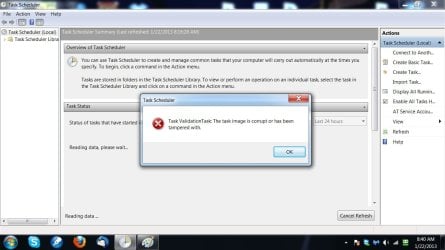
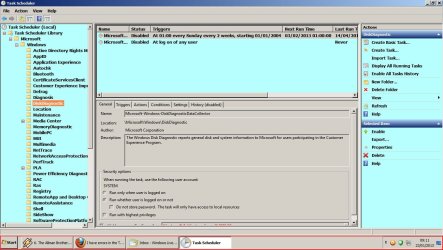
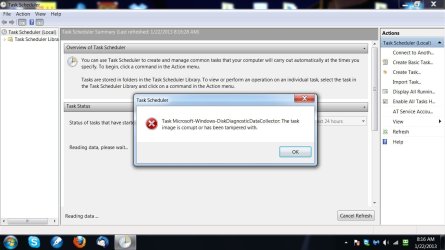
When I open the TS I get about 4 errors in a row before I get into the program. They all have to do with 4 different tasks being corrupted. Should I just delete the tasks or what?

Just looked and cannot find even one of the 4 subject tasks.
 
Last edited:

My Computer

Computer type
Laptop
Computer Manufacturer/Model Number
Asus
OS
W7 Ultimate
CPU
2.2 bh Intel Core i3-2330M
Motherboard
Asustek Computer Inc. P53E 1.0
Memory
4MB
Graphics Card(s)
On Board
Sound Card
On Board
Monitor(s) Displays
On Board
Screen Resolution
1366 X 768
Hard Drives
ST9500423AS
ST2000DM USB Backup Drive External
This morning I tried the snipping tool. Disn't work right. Usually when I "save as" I don't get a dialogue box. Tried the snipping tool on an area that I have captured before with the same results. So something is wrong. Any ideas?
Another question about task scheduler. What does the code "(0x2)" mean? Where can I get a list of codes for tasks completed?
 

My Computer

Computer type
Laptop
Computer Manufacturer/Model Number
Asus
OS
W7 Ultimate
CPU
2.2 bh Intel Core i3-2330M
Motherboard
Asustek Computer Inc. P53E 1.0
Memory
4MB
Graphics Card(s)
On Board
Sound Card
On Board
Monitor(s) Displays
On Board
Screen Resolution
1366 X 768
Hard Drives
ST9500423AS
ST2000DM USB Backup Drive External
This morning I tried the snipping tool. Disn't work right. Usually when I "save as" I don't get a dialogue box. Tried the snipping tool on an area that I have captured before with the same results. So something is wrong. Any ideas?
Another question about task scheduler. What does the code "(0x2)" mean? Where can I get a list of codes for tasks completed?
Code (0x2) means error. View attachment Snipping Tool.docx
 

My Computer

Computer Manufacturer/Model Number
Look in my Signature.
OS
Win7 H.Prem. 32bit+SP1

Attachments

  • ps1.jpg
    ps1.jpg
    98.4 KB · Views: 9
  • ps2.jpg
    ps2.jpg
    97.2 KB · Views: 5
  • ps3.jpg
    ps3.jpg
    98.3 KB · Views: 4
  • ps4.jpg
    ps4.jpg
    97.7 KB · Views: 4

My Computer

Computer type
Laptop
Computer Manufacturer/Model Number
Asus
OS
W7 Ultimate
CPU
2.2 bh Intel Core i3-2330M
Motherboard
Asustek Computer Inc. P53E 1.0
Memory
4MB
Graphics Card(s)
On Board
Sound Card
On Board
Monitor(s) Displays
On Board
Screen Resolution
1366 X 768
Hard Drives
ST9500423AS
ST2000DM USB Backup Drive External
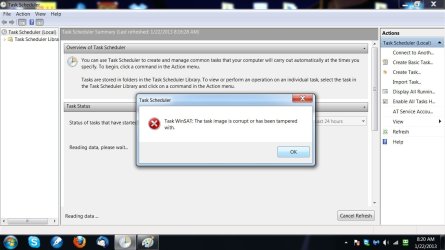
This is what my Task Scheduler shows as in your image No.1

Untitled.jpg
 

My Computer

Computer Manufacturer/Model Number
Look in my Signature.
OS
Win7 H.Prem. 32bit+SP1

My Computer

Computer type
PC/Desktop
Computer Manufacturer/Model Number
home built
OS
Multi-Boot W7_Pro_x64 W8.1_Pro_x64 W10_Pro_x64 +Linux_VMs +Chromium_VM
CPU
AMD Athlon II x4 620
Motherboard
Gigabyte GA-MA785G-UD3H
Memory
6GB GSkill DDR2 800
Graphics Card(s)
AMD 4670 GPU + AMD 4200 IGP
Sound Card
on board Realtek ALC889A
Monitor(s) Displays
RCA 40" LCD TV, Insignia 32" LCD TV, HP 15" LCD monitor
Screen Resolution
1680 x 1050
Hard Drives
OCZ Vertex 3 120GB,
Samsung F3 1TB (3),
Several others - WD, Seagate, Hitachi, ...
PSU
Corsair 500 W
Case
Rosewill mid tower
Cooling
CM 90mm rifle
Keyboard
Gyration wireless, Logitech wireless, Dell USB wired
Mouse
Gyration wireless, Logitech wireless, V7 USB wired
Internet Speed
Spectrum - 100Mbps D / 10Mbps U
Antivirus
Avast, MBAM3, EMET, WinPatrol
Browser
Pale Moon, Firefox, IE
Other Info
2 multi-boot PC's
Mainly HTPC/Office/Gen purpose (no gaming).
Trendnet USB KVM.
LG DVD burner/Blue Ray Player.
Tray system for removable SATA backup drives.

Not currently OCd, under-volted.
I use Hybrid sleep, rarely re-boot or shutdown.

Hauppauge HD-PVR, Avermedia PCIe TV Tuner, Hauppauge PCI TV Tuner.
Back
Top