I have Internet but "no network access"

mollyrelton

New member
Local time
10:12 PM
Messages
12
So I have an HP laptop and I'm trying to connect to a Brother wireless printer that I got for Christmas. The printer is fine, it's connected and full of ink etc. My laptop had automatically connected to it but it wasn't working and an error said something like "error connecting over network". So I then proceeded to try and delete it and reconnect, but now it isn't appearing when I try and connect to a device. I'm sat literally next to it. I'm not good with computers etc.
On the Conrol Panel it says I don't have network access:
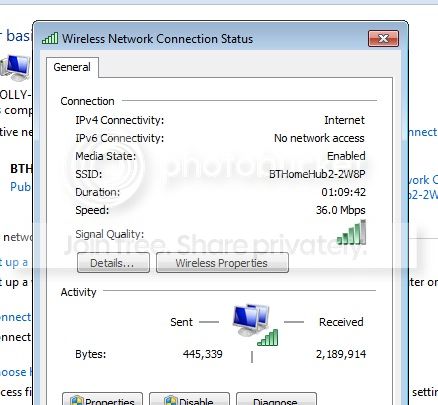
Untitled_zps51673ecb.jpg

So I'm not sure what to do because I just want to connect to my printer. Can someone help?
Also, like I said, I'm not good with computers so please word simply.
 

My Computer My Computer

OS
Windows 7 starter
Are you posting your message with the same PC? If so then your internet connection must be OK. You should have gotten a CD with the printer that had the drivers on it. They need to be installed. If no CD, then go to the Brother site and download the drivers. Let us know what happens.
 

My Computer My Computer

Computer type
PC/Desktop
Computer Manufacturer/Model Number
Custom Build
OS
Windows 7 Home Premium 32-Bit - Build 7600 SP1
CPU
Intel Core i3-2120 3.30Ghz
Motherboard
Asus P8Z68-V LX Intel Z68 Socket H2 ATX
Memory
Kingston 4 GB DDR3 1333 mhz
Graphics Card(s)
AMD Radeon HD6670
Sound Card
Sound Blaster Audigy SE 24-Bit
Monitor(s) Displays
Asus VE228
Screen Resolution
1440 X 900
Hard Drives
OCZ Vertex 3 120 GB Sata 3 SSD ==
Kingston SH103/S3 120 G Hyper X 120 GB SSD ==
Western Digital 500 GB Caviar Green 7200 RPM ==
PSU
Corsair CX600M == 600 Watt
Case
NZXT Apollo - Silver with Clear Side Panel
Cooling
Three 120 mm Fans
Keyboard
Microsoft Natural 4000
Mouse
Microsoft Custom Optical 3000
Internet Speed
AT&T Fiber Optic Wireless Network
Antivirus
Microsoft Security Essentials
Browser
Chrome
Other Info
120 mm Blue LED Fan -- Three Blue LED Lazer Light Sticks
Yep my internet is okay. I have installed the program that came with the printer it was on a disk, that all installed okay.
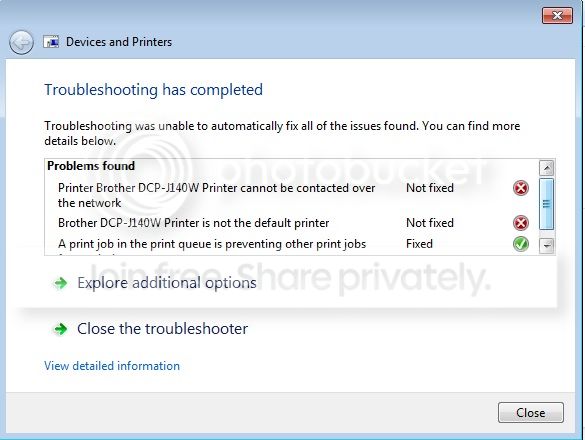
Untitledtroubleshooting_zps642619a9.jpg

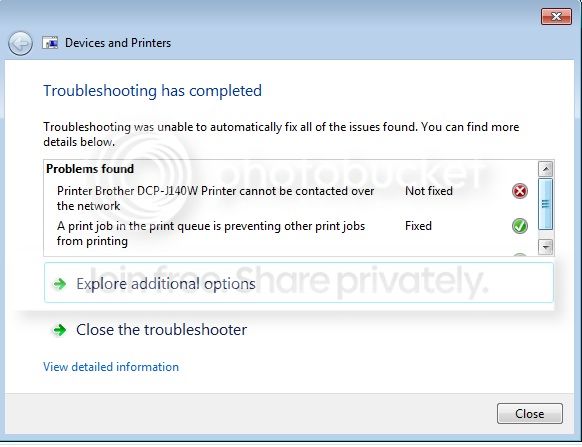
i managed to reconnect the printer manually but it still had an error, this happened when I troubleshooted. I did set it as default printer afterwards but the network issue is unresolved.
 

My Computer My Computer

OS
Windows 7 starter
Hi mollyrelton, Welcome to the forums, Along with the excellent advice given by bigmck ,make sure you have "file and printer sharing " turned on, you must install the software that came with the printer sometimes you even have to setup the printer using a USB cable connected the first time you set it up, that can be removed once installation is complete :)
 

My Computer My Computer

Computer type
PC/Desktop
Computer Manufacturer/Model Number
self build
OS
win 7 ultimate32bit, Win8.1pro wmc 32bit
CPU
amd phenom x4 9600
Motherboard
asus m2n32-sli deluxe
Memory
corsair twinxs 2x2gb
Graphics Card(s)
2x nvidia 1gb 8500gt
Sound Card
onboard
Monitor(s) Displays
23" PB Viseo 233d
Screen Resolution
1920x1080
Hard Drives
maxtor sata 500gb
maxtor sata 320gb
fujitsu sata200gb
PSU
oryxx tornado 750w
Case
thermaltake xaser lll
Cooling
artic freezer64 pro + 7 case fans
Hi mollyrelton, Welcome to the forums, Along with the excellent advice given by bigmck ,make sure you have "file and printer sharing " turned on, you must install the software that came with the printer sometimes you even have to setup the printer using a USB cable connected the first time you set it up, that can be removed once installation is complete :)
"file and printer sharing" is only needed if you share a file/printer. Not needed in this case
 

My Computer My Computer

Computer type
Laptop
Computer Manufacturer/Model Number
ACER ASPIRE 5742G
OS
Microsoft Windows 7 Home Premium 64-bits 7601 Multiprocessor Free Service Pack 1
CPU
Intel(R) Core(TM) i3 CPU M 370 @ 2.40GHz
Motherboard
Acer Aspire 5742G
Memory
4,00 GB
Graphics Card(s)
ATI Mobility Radeon HD 5400 Series
Sound Card
(1) AMD High Definition Audio Device (2) Realtek High Defi
Screen Resolution
1366 x 768 x 32 bits (4294967296 colors) @ 60 Hz
Hard Drives
WDC WD5000BEVT-22ZAT0
Yes, the software is installed.
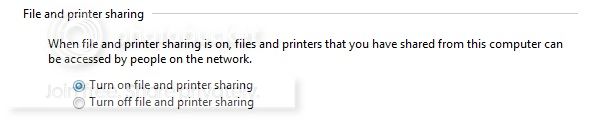
I think I have turned on "file and printer sharing".
Untitledsharing_zpsc235e2b0.jpg
 

My Computer My Computer

OS
Windows 7 starter
Is there annything else I can do?
 

My Computer My Computer

OS
Windows 7 starter
Can you post a snap shot of your printer and devices window?
 

My Computer My Computer

Computer Manufacturer/Model Number
Custom built
OS
Windows 7 Ultimate 64 bit
CPU
AMD Phenom II X4 965 Black Edition
Motherboard
Gigabyte GA-MA790X-DS4
Memory
GSkill 4 X 2 GB PC 8500
Graphics Card(s)
XFX Radeon HD 6790 D
Sound Card
On board RealTek HD
Monitor(s) Displays
Dual monitors:Samsung SyncMaster S20B300
Screen Resolution
1600 X 900
Hard Drives
Seagate Barracuda 1TB (primary)
Seagate Barracuda 2 X 320 GB
PSU
Ultra X4 750 watt fully modular
Case
Thermaltake Overseer RX 1 full tower
Cooling
Core-Contact 92 mm CPU Cooler
Keyboard
Logitech G510
Mouse
Razor DeathAdder
Internet Speed
50/5 Mbps UL/DL
Other Info
Optical: Super Muliti DVD burner w/lightscribe, Hauppauge WinTV HVR-1800
Your Brother is not the default printer. That needs to be fixed. == Also click on your Windows icon in the left bottom of the screen. In the space above type "Device Manager" (without the quotes) and hit enter. See if there are any yellow trianges showing.
 

My Computer My Computer

Computer type
PC/Desktop
Computer Manufacturer/Model Number
Custom Build
OS
Windows 7 Home Premium 32-Bit - Build 7600 SP1
CPU
Intel Core i3-2120 3.30Ghz
Motherboard
Asus P8Z68-V LX Intel Z68 Socket H2 ATX
Memory
Kingston 4 GB DDR3 1333 mhz
Graphics Card(s)
AMD Radeon HD6670
Sound Card
Sound Blaster Audigy SE 24-Bit
Monitor(s) Displays
Asus VE228
Screen Resolution
1440 X 900
Hard Drives
OCZ Vertex 3 120 GB Sata 3 SSD ==
Kingston SH103/S3 120 G Hyper X 120 GB SSD ==
Western Digital 500 GB Caviar Green 7200 RPM ==
PSU
Corsair CX600M == 600 Watt
Case
NZXT Apollo - Silver with Clear Side Panel
Cooling
Three 120 mm Fans
Keyboard
Microsoft Natural 4000
Mouse
Microsoft Custom Optical 3000
Internet Speed
AT&T Fiber Optic Wireless Network
Antivirus
Microsoft Security Essentials
Browser
Chrome
Other Info
120 mm Blue LED Fan -- Three Blue LED Lazer Light Sticks
Your pc is connected to tour router by using a wireless connection. Your printer is connected wireless to same router?

You did connect pc to router by entering a password (only once)? You have to enter that password for every pc/laptop that wants to connect wireless to your router.

Did you enter that password on printer as well?
 

My Computer My Computer

Computer type
Laptop
Computer Manufacturer/Model Number
ACER ASPIRE 5742G
OS
Microsoft Windows 7 Home Premium 64-bits 7601 Multiprocessor Free Service Pack 1
CPU
Intel(R) Core(TM) i3 CPU M 370 @ 2.40GHz
Motherboard
Acer Aspire 5742G
Memory
4,00 GB
Graphics Card(s)
ATI Mobility Radeon HD 5400 Series
Sound Card
(1) AMD High Definition Audio Device (2) Realtek High Defi
Screen Resolution
1366 x 768 x 32 bits (4294967296 colors) @ 60 Hz
Hard Drives
WDC WD5000BEVT-22ZAT0
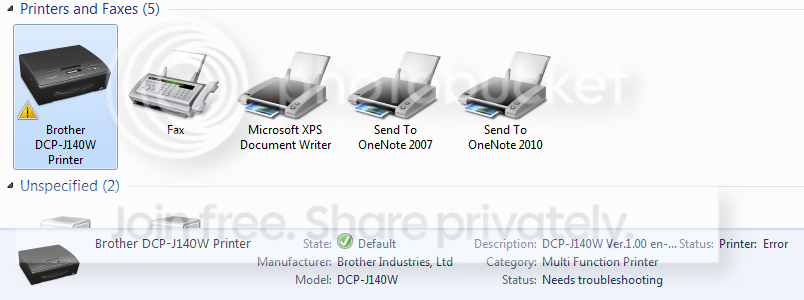
Now I have:
Untitledpandddefault_zps82d05b62.png

After troubleshooting this comes up:
Troubleshooting_zpsa2cec302.jpg

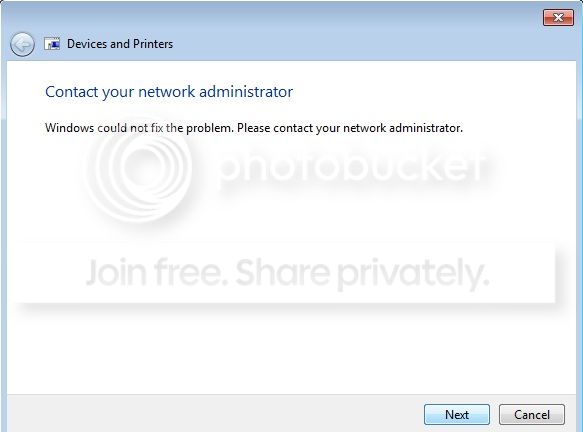
Followed by:
TroubleshootingCompleted_zps67af50fd.jpg
 

My Computer My Computer

OS
Windows 7 starter
Kactussoft:
Yes I did the printer is working fine and says has medium signal to the internet.
 

My Computer My Computer

OS
Windows 7 starter
Kactussoft:
Yes I did the printer is working fine and says has medium signal to the internet.
So printer is connected wireless to YOUR router and you did put in the password?

Do you know the tcp/ip address? Check router information pages to see if it's really connected
 

My Computer My Computer

Computer type
Laptop
Computer Manufacturer/Model Number
ACER ASPIRE 5742G
OS
Microsoft Windows 7 Home Premium 64-bits 7601 Multiprocessor Free Service Pack 1
CPU
Intel(R) Core(TM) i3 CPU M 370 @ 2.40GHz
Motherboard
Acer Aspire 5742G
Memory
4,00 GB
Graphics Card(s)
ATI Mobility Radeon HD 5400 Series
Sound Card
(1) AMD High Definition Audio Device (2) Realtek High Defi
Screen Resolution
1366 x 768 x 32 bits (4294967296 colors) @ 60 Hz
Hard Drives
WDC WD5000BEVT-22ZAT0
Yes I did and a sheet came out of the print that said: "***WLAN Connection: OK***"
 

My Computer My Computer

OS
Windows 7 starter
Can two laptops both connected wireless see eacht other? Or is Access Point isolation active?

In the computer networking world, AP stands for Access Point, or in this case, a wireless access point. AP Isolation effectively creates a “virtual” network among wireless clients, in which each device is an individual entity that cannot communicate with other wireless devices on the same Wi-Fi access point. This configuration can be useful for public Wi-Fi hotspots to separate potentially malicious network traffic from other.

Don't enable AP isolation on router! If enabled all wireless devices can't see each other
 

My Computer My Computer

Computer type
Laptop
Computer Manufacturer/Model Number
ACER ASPIRE 5742G
OS
Microsoft Windows 7 Home Premium 64-bits 7601 Multiprocessor Free Service Pack 1
CPU
Intel(R) Core(TM) i3 CPU M 370 @ 2.40GHz
Motherboard
Acer Aspire 5742G
Memory
4,00 GB
Graphics Card(s)
ATI Mobility Radeon HD 5400 Series
Sound Card
(1) AMD High Definition Audio Device (2) Realtek High Defi
Screen Resolution
1366 x 768 x 32 bits (4294967296 colors) @ 60 Hz
Hard Drives
WDC WD5000BEVT-22ZAT0

My Computer My Computer

Computer type
Laptop
Computer Manufacturer/Model Number
ACER ASPIRE 5742G
OS
Microsoft Windows 7 Home Premium 64-bits 7601 Multiprocessor Free Service Pack 1
CPU
Intel(R) Core(TM) i3 CPU M 370 @ 2.40GHz
Motherboard
Acer Aspire 5742G
Memory
4,00 GB
Graphics Card(s)
ATI Mobility Radeon HD 5400 Series
Sound Card
(1) AMD High Definition Audio Device (2) Realtek High Defi
Screen Resolution
1366 x 768 x 32 bits (4294967296 colors) @ 60 Hz
Hard Drives
WDC WD5000BEVT-22ZAT0
We have a computer and two laptops, how do you see if the AP Isolation is enabled?
 

My Computer My Computer

OS
Windows 7 starter
We have a computer and two laptops, how do you see if the AP Isolation is enabled?
give me brand/type of router.

Laptop is wireless(?) Can it ping or connect to computer?
 

My Computer My Computer

Computer type
Laptop
Computer Manufacturer/Model Number
ACER ASPIRE 5742G
OS
Microsoft Windows 7 Home Premium 64-bits 7601 Multiprocessor Free Service Pack 1
CPU
Intel(R) Core(TM) i3 CPU M 370 @ 2.40GHz
Motherboard
Acer Aspire 5742G
Memory
4,00 GB
Graphics Card(s)
ATI Mobility Radeon HD 5400 Series
Sound Card
(1) AMD High Definition Audio Device (2) Realtek High Defi
Screen Resolution
1366 x 768 x 32 bits (4294967296 colors) @ 60 Hz
Hard Drives
WDC WD5000BEVT-22ZAT0
Back
Top