Solved I have not been able to Backup or Restore my C: Drive, nothing happens

Mike Lynch

New member
Pro User
VIP
Local time
1:30 PM
Messages
958
Location
Clearwater Florida
I have not been able to Backup or Restore my C: Drive, nothing happens.


I have sought help but am fearful to initiate the suggestions just yet.


I thought perhaps a 3rd Party may have a way to safeguard my data before initiating the suggestions.


I installed the Free Version of Macrium 7.


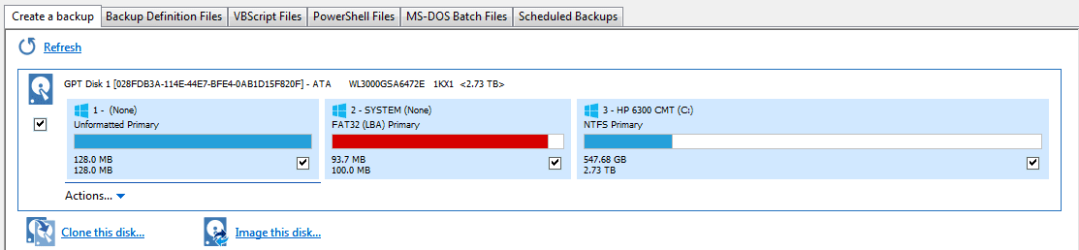
I compared what it would Backup vs. Disk Management and found what appears to be a difference.


Perhaps the difference is why I cannot Backup or Restore.


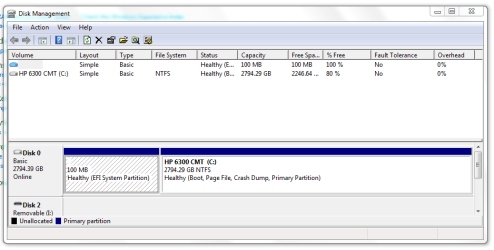
I am attaching Images of both the Disk Management and Macrium map of my C: Drive.


What could the Fat32 Partition be and could it be the root of my difficulty?
 

Attachments
  • Capture Macrium Reflect.PNG
    Capture Macrium Reflect.PNG
    8.4 KB · Views: 5
  • Capture W7 Pro Disk Management.PNG
    Capture W7 Pro Disk Management.PNG
    18.3 KB · Views: 0

My Computer My Computer

At a glance

Microsoft Windows 7 Professional 64-bit 7601 ...Intel(R) Core(TM) i7-3770 CPU @ 3.40GHz8.00 GBIntel(R) HD Graphics 4000
Computer type
PC/Desktop
Computer Manufacturer/Model Number
Two HP Desktops. One in the Laundry Room / Bed Room.
OS
Microsoft Windows 7 Professional 64-bit 7601 Multiprocessor Free Service Pack 1
CPU
Intel(R) Core(TM) i7-3770 CPU @ 3.40GHz
Motherboard
Hewlett-Packard 3396
Memory
8.00 GB
Graphics Card(s)
Intel(R) HD Graphics 4000
Sound Card
(1) Realtek High Definition Audio (2) Intel(R) Display Aud
Monitor(s) Displays
Hanns-G
Screen Resolution
1440 x 900 x 32 bits (4294967296 colors) @ 59 Hz
Hard Drives
(1) ATA WDC WD40EZRX-00S SCSI Disk Device (2) HP Officejet Pro 86 USB Device (3) WD My Book 1230 USB Device
PSU
Whatever came with the CMT.
Case
HP CMT Black.
Cooling
Whatever came with the CMT.
Keyboard
Logitech K740.
Mouse
Microsoft Optical Mouse 1000.
Internet Speed
Spectrum 25Mbs.
Antivirus
WebRoot, Microsoft Security Essentials.
Browser
EDGE
Other Info
HP Officejet Pro 8600 Plus.
WD MyBook 4TB.
You haven't told us if there are any error messages.

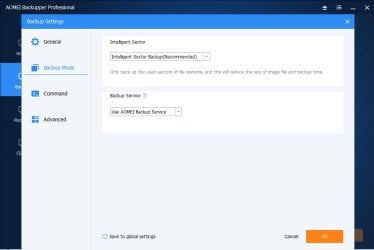
Try using the proprietary snaphot driver

aomeibackupservice.jpg
 

My Computers My Computers

  • At a glance

    7 X64i5 84002x8gb 3200mhz
    Computer type
    PC/Desktop
    OS
    7 X64
    CPU
    i5 8400
    Motherboard
    gigabyte b365m ds3h
    Memory
    2x8gb 3200mhz
    Hard Drives
    various
    PSU
    pure power 11 400w cm
    Case
    Coolermaster
    Cooling
    cryorig m9i
  • At a glance

    7x64g54008gb ddr4 2400
    Computer type
    PC/Desktop
    OS
    7x64
    CPU
    g5400
    Motherboard
    ga b365m ds3h
    Memory
    8gb ddr4 2400
    PSU
    xfx pro 450w
Not enough space on the 100mb partition for vss diff area. You can use the proprietary snap driver as pictured in my previous post, or make some space on the 100mb, or use a 3rd party partition manager to increase the size of the 100mb partition.

Aomei Backupper


Aomei partition assistant

I don't think macrium has a proprietary driver and therefore has to rely on vss.
 
Last edited:

My Computers My Computers

  • At a glance

    7 X64i5 84002x8gb 3200mhz
    Computer type
    PC/Desktop
    OS
    7 X64
    CPU
    i5 8400
    Motherboard
    gigabyte b365m ds3h
    Memory
    2x8gb 3200mhz
    Hard Drives
    various
    PSU
    pure power 11 400w cm
    Case
    Coolermaster
    Cooling
    cryorig m9i
  • At a glance

    7x64g54008gb ddr4 2400
    Computer type
    PC/Desktop
    OS
    7x64
    CPU
    g5400
    Motherboard
    ga b365m ds3h
    Memory
    8gb ddr4 2400
    PSU
    xfx pro 450w
SIW2, OP could make a full image of the C partition, which I assume contains both the OS and data stuff, and for now, simply ignore System Reserved partition? Whether AOMEI or Macrium Reflect is used, doesn't matter.
 

My Computer My Computer

At a glance

Windows 7 Professional 64-bitDesktop i5; Acers i5 & i7desktop 16GB; 1 Acer 8GB & 1 Acer 16GB
Computer type
PC/Desktop
Computer Manufacturer/Model Number
Antec desktop; Acer Aspire laptops
OS
Windows 7 Professional 64-bit
CPU
Desktop i5; Acers i5 & i7
Memory
desktop 16GB; 1 Acer 8GB & 1 Acer 16GB
Hard Drives
1TB split into 2 equal partitions [OS and data] usable by RJS
Internet Speed
AT&T DSL
Browser
FF, GChrome, msIE
Other Info
Windows 7 Firewall, Emsisoft AM/AV, MSE [scan-only], SpywareBlaster, Ruiware/BillP combine

My Computer My Computer

At a glance

Win 10 x64, Linux Lite, Win 7 x64, BlackArch,...
Computer type
PC/Desktop
Computer Manufacturer/Model Number
HP Desktop & Compaq Laptop
OS
Win 10 x64, Linux Lite, Win 7 x64, BlackArch, & Kali
Hard Drives
Samsung 850 Pro 256Gb,
Hitachi HDD 1Tb,
Crucial MX SSD 250Gb
Segate 3Tb USB 3.0 Ext. Backup HDD
Internet Speed
150Mbps dn, 20Mbps up
Antivirus
Avast Free, Malwarebytes Anti-Exploit & Anti-Ransomware
Browser
Firefox, Chrome, Opera, & VPN
What seems odd is the 100MB system recovery partition is too full...


The 100MB partition shown in the Disk Management screenshot of post #1 is the EFI System Partition, not the recovery partition. Mess with the EFI partition and you won't be able to boot this UEFI system.


The 128MB unformatted partition shown in the Macrium screenshot but not in Disk Management is the Microsoft Reserved Partition (MSR). The default MSR size in W7 is 128MB, for W10 this has been reduced to just 16MB. This partition is always present on GPT formatted disks, but never shown in Disk Management. I'd leave that alone too.


GPT formatted disks and the UEFI partition specification do not allow hidden sectors.[3] Microsoft reserves a chunk of disk space using this MSR partition type, to provide an alternative data storage space for such software components which previously may have used hidden sectors on MBR formatted disks.
Microsoft Reserved Partition - Wikipedia


Macrium will include both of these partitions in the partition(s) required to backup and restore Windows. I have used Macrium to image and restore my UEFI systems and these two partitions do not prevent that from working.
 
Last edited:

My Computers My Computers

  • At a glance

    Windows 7 Home Premium x64AMD V1204GB
    Computer type
    Laptop
    Computer Manufacturer/Model Number
    Toshiba satellite C650D
    OS
    Windows 7 Home Premium x64
    CPU
    AMD V120
    Memory
    4GB
    Internet Speed
    150 Mbps
    Antivirus
    MSE
    Browser
    IE11, Edge, Firefox
    Other Info
    I also have W7 Pro on my System Two, and several W7 Hyper-V VMs. My other machines run Windows 10/11. Their specs are in my Ten Forums & Eleven Forum profiles.
  • At a glance

    Windows 7 Pro x64Intel i5-3320M8 GB
    Computer type
    Laptop
    System Manufacturer/Model Number
    Lenovo Thinkpad T430
    OS
    Windows 7 Pro x64
    CPU
    Intel i5-3320M
    Memory
    8 GB
    Hard Drives
    250GB Samsung SSD 860 EVO
    Antivirus
    MSE
What could the Fat32 Partition be...
The EFI System Partition, essential for booting your UEFI machine. See my post above...

...and could it be the root of my difficulty?
No. See my last paragraph in the post above.


There is some other reason Macrium cannot make a backup. Please share any Macrium error messages. A full log of your (failed or otherwise) backups can be found in the Log tab in Macrium. What error does Macrium report here?
 

My Computers My Computers

  • At a glance

    Windows 7 Home Premium x64AMD V1204GB
    Computer type
    Laptop
    Computer Manufacturer/Model Number
    Toshiba satellite C650D
    OS
    Windows 7 Home Premium x64
    CPU
    AMD V120
    Memory
    4GB
    Internet Speed
    150 Mbps
    Antivirus
    MSE
    Browser
    IE11, Edge, Firefox
    Other Info
    I also have W7 Pro on my System Two, and several W7 Hyper-V VMs. My other machines run Windows 10/11. Their specs are in my Ten Forums & Eleven Forum profiles.
  • At a glance

    Windows 7 Pro x64Intel i5-3320M8 GB
    Computer type
    Laptop
    System Manufacturer/Model Number
    Lenovo Thinkpad T430
    OS
    Windows 7 Pro x64
    CPU
    Intel i5-3320M
    Memory
    8 GB
    Hard Drives
    250GB Samsung SSD 860 EVO
    Antivirus
    MSE
Not enough space on the 100mb partition for vss diff area. You can use the proprietary snap driver as pictured in my previous post, or make some space on the 100mb, or use a 3rd party partition manager to increase the size of the 100mb partition.

Aomei Backupper


Aomei partition assistant

I don't think macrium has a proprietary driver and therefore has to rely on vss.


Mike Lynch
Have you tried AOMEI?
Same problem?
Second opinion?
 

My Computer My Computer

At a glance

Win 10 x64, Linux Lite, Win 7 x64, BlackArch,...
Computer type
PC/Desktop
Computer Manufacturer/Model Number
HP Desktop & Compaq Laptop
OS
Win 10 x64, Linux Lite, Win 7 x64, BlackArch, & Kali
Hard Drives
Samsung 850 Pro 256Gb,
Hitachi HDD 1Tb,
Crucial MX SSD 250Gb
Segate 3Tb USB 3.0 Ext. Backup HDD
Internet Speed
150Mbps dn, 20Mbps up
Antivirus
Avast Free, Malwarebytes Anti-Exploit & Anti-Ransomware
Browser
Firefox, Chrome, Opera, & VPN
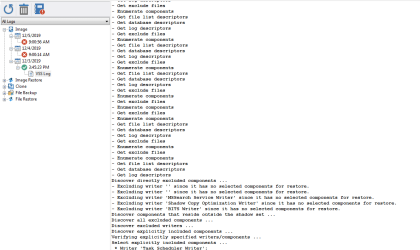
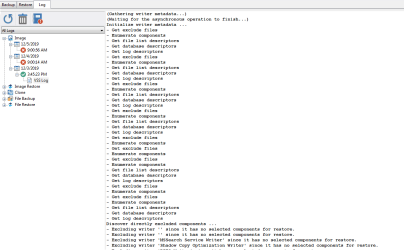
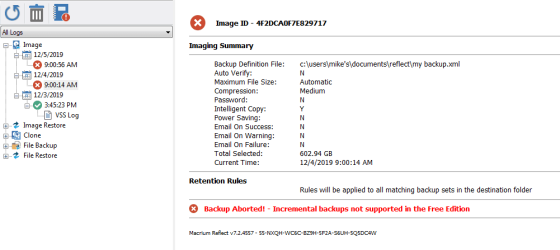
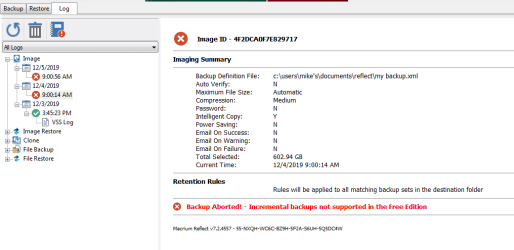
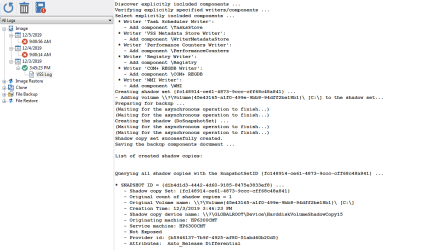
Here is what the VSS Log has:
 

Attachments

  • Capture - Macrium 12-03-19 bottom of VSS Log.PNG
    Capture - Macrium 12-03-19 bottom of VSS Log.PNG
    28.2 KB · Views: 0
  • Capture - Macrium 12-03-19 middle of VSS Log.PNG
    Capture - Macrium 12-03-19 middle of VSS Log.PNG
    21.3 KB · Views: 0
  • Capture - Macrium 12-03-19 top of VSS Log.PNG
    Capture - Macrium 12-03-19 top of VSS Log.PNG
    22 KB · Views: 0
  • Capture - Macrium 12-03-19.PNG
    Capture - Macrium 12-03-19.PNG
    15.8 KB · Views: 0
  • Capture - Macrium 12-04-19.PNG
    Capture - Macrium 12-04-19.PNG
    17.2 KB · Views: 0
  • Capture - Macrium 12-05-19.PNG
    Capture - Macrium 12-05-19.PNG
    14.4 KB · Views: 0

My Computer My Computer

At a glance

Microsoft Windows 7 Professional 64-bit 7601 ...Intel(R) Core(TM) i7-3770 CPU @ 3.40GHz8.00 GBIntel(R) HD Graphics 4000
Computer type
PC/Desktop
Computer Manufacturer/Model Number
Two HP Desktops. One in the Laundry Room / Bed Room.
OS
Microsoft Windows 7 Professional 64-bit 7601 Multiprocessor Free Service Pack 1
CPU
Intel(R) Core(TM) i7-3770 CPU @ 3.40GHz
Motherboard
Hewlett-Packard 3396
Memory
8.00 GB
Graphics Card(s)
Intel(R) HD Graphics 4000
Sound Card
(1) Realtek High Definition Audio (2) Intel(R) Display Aud
Monitor(s) Displays
Hanns-G
Screen Resolution
1440 x 900 x 32 bits (4294967296 colors) @ 59 Hz
Hard Drives
(1) ATA WDC WD40EZRX-00S SCSI Disk Device (2) HP Officejet Pro 86 USB Device (3) WD My Book 1230 USB Device
PSU
Whatever came with the CMT.
Case
HP CMT Black.
Cooling
Whatever came with the CMT.
Keyboard
Logitech K740.
Mouse
Microsoft Optical Mouse 1000.
Internet Speed
Spectrum 25Mbs.
Antivirus
WebRoot, Microsoft Security Essentials.
Browser
EDGE
Other Info
HP Officejet Pro 8600 Plus.
WD MyBook 4TB.
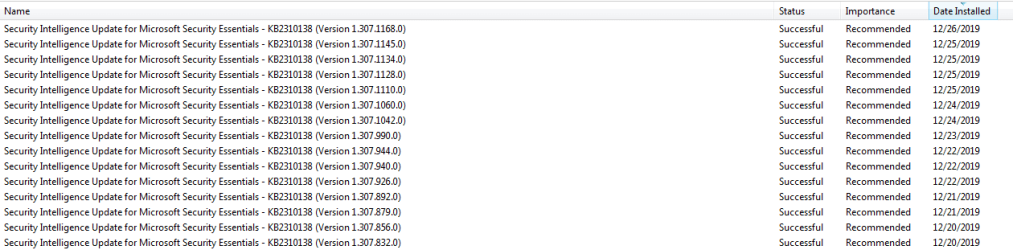
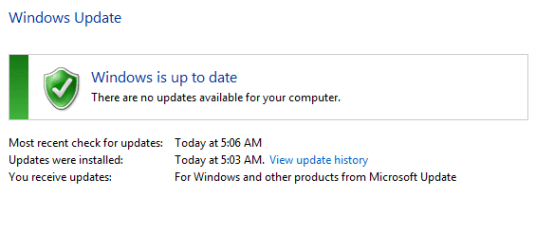
Just a side note / observation.
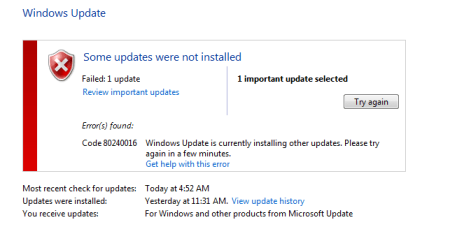
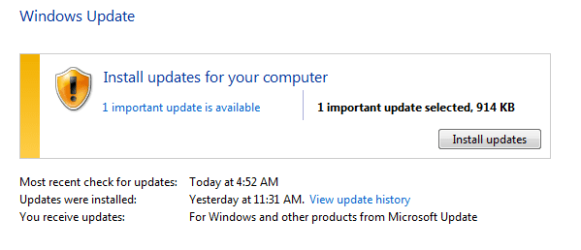
I manually attempted to update my System this morning.
I went to Windows Update.
Searched for and found an Update.
Tried to apply it.
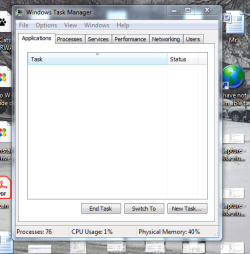
Windows said I couldn't as another Update was in progress which Task Manager did not show as happening.
I decided to reboot my System and noticed that there were no Updates waiting to be applied requiring a reboot.
I rebooted and Windows started to install an Update and took about four minutes to apply it.
The message about not powering down was on the screen.
After it finished, the system restarted and booted.
I went back to Windows Update and 'surprise', the update I was originally presented with was installed?
Who knows what or why this happened but I Snipped all I could just in case it might shed light on my Backup problem.
 

Attachments

  • Capture - WU-5.PNG
    Capture - WU-5.PNG
    6.4 KB · Views: 1
  • Capture - WU-4.PNG
    Capture - WU-4.PNG
    5.6 KB · Views: 13
  • Capture - WU-3.PNG
    Capture - WU-3.PNG
    46.7 KB · Views: 13
  • Capture - WU-2.PNG
    Capture - WU-2.PNG
    9.1 KB · Views: 13
  • Capture - WU-1.PNG
    Capture - WU-1.PNG
    7.1 KB · Views: 13

My Computer My Computer

At a glance

Microsoft Windows 7 Professional 64-bit 7601 ...Intel(R) Core(TM) i7-3770 CPU @ 3.40GHz8.00 GBIntel(R) HD Graphics 4000
Computer type
PC/Desktop
Computer Manufacturer/Model Number
Two HP Desktops. One in the Laundry Room / Bed Room.
OS
Microsoft Windows 7 Professional 64-bit 7601 Multiprocessor Free Service Pack 1
CPU
Intel(R) Core(TM) i7-3770 CPU @ 3.40GHz
Motherboard
Hewlett-Packard 3396
Memory
8.00 GB
Graphics Card(s)
Intel(R) HD Graphics 4000
Sound Card
(1) Realtek High Definition Audio (2) Intel(R) Display Aud
Monitor(s) Displays
Hanns-G
Screen Resolution
1440 x 900 x 32 bits (4294967296 colors) @ 59 Hz
Hard Drives
(1) ATA WDC WD40EZRX-00S SCSI Disk Device (2) HP Officejet Pro 86 USB Device (3) WD My Book 1230 USB Device
PSU
Whatever came with the CMT.
Case
HP CMT Black.
Cooling
Whatever came with the CMT.
Keyboard
Logitech K740.
Mouse
Microsoft Optical Mouse 1000.
Internet Speed
Spectrum 25Mbs.
Antivirus
WebRoot, Microsoft Security Essentials.
Browser
EDGE
Other Info
HP Officejet Pro 8600 Plus.
WD MyBook 4TB.
Just a 'second' side note / observation.

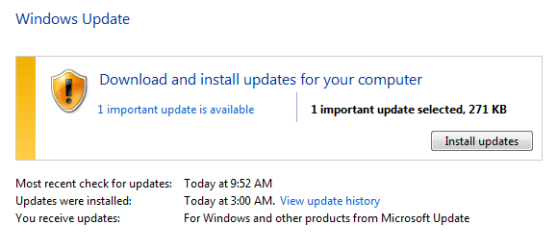
The situation with Windows Update occurred again today, same symptoms and messages.
I search for a solution and cane across the following which I used and it appeared to fix the situation.
Note that I have not Rebooted so I do not know if the fix will hold.

cmd, run as admin, net stop wuauserv
cmd, run as admin, net start wuauserv

I will now reboot but will have to wait until another Windows Update is available.
 

Attachments

  • Capture - 1 on 12-27.PNG
    Capture - 1 on 12-27.PNG
    7.3 KB · Views: 9
  • Capture - 2 on 12-27.PNG
    Capture - 2 on 12-27.PNG
    9 KB · Views: 9
  • Capture - 3 on 12-27.PNG
    Capture - 3 on 12-27.PNG
    6.5 KB · Views: 0
  • Capture - 4 on 12-27.PNG
    Capture - 4 on 12-27.PNG
    6.6 KB · Views: 0
Last edited:

My Computer My Computer

At a glance

Microsoft Windows 7 Professional 64-bit 7601 ...Intel(R) Core(TM) i7-3770 CPU @ 3.40GHz8.00 GBIntel(R) HD Graphics 4000
Computer type
PC/Desktop
Computer Manufacturer/Model Number
Two HP Desktops. One in the Laundry Room / Bed Room.
OS
Microsoft Windows 7 Professional 64-bit 7601 Multiprocessor Free Service Pack 1
CPU
Intel(R) Core(TM) i7-3770 CPU @ 3.40GHz
Motherboard
Hewlett-Packard 3396
Memory
8.00 GB
Graphics Card(s)
Intel(R) HD Graphics 4000
Sound Card
(1) Realtek High Definition Audio (2) Intel(R) Display Aud
Monitor(s) Displays
Hanns-G
Screen Resolution
1440 x 900 x 32 bits (4294967296 colors) @ 59 Hz
Hard Drives
(1) ATA WDC WD40EZRX-00S SCSI Disk Device (2) HP Officejet Pro 86 USB Device (3) WD My Book 1230 USB Device
PSU
Whatever came with the CMT.
Case
HP CMT Black.
Cooling
Whatever came with the CMT.
Keyboard
Logitech K740.
Mouse
Microsoft Optical Mouse 1000.
Internet Speed
Spectrum 25Mbs.
Antivirus
WebRoot, Microsoft Security Essentials.
Browser
EDGE
Other Info
HP Officejet Pro 8600 Plus.
WD MyBook 4TB.
Here is what the VSS Log has:


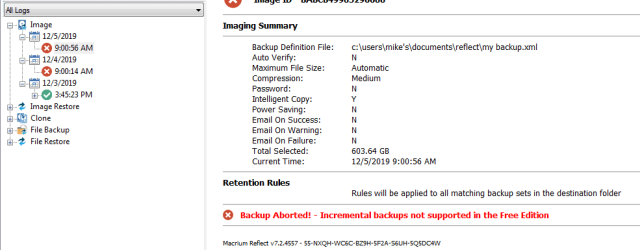
The VSS log says: Backup Aborted! Incremental Backups not supported in the Free Edition.

Incremental backups are a Premium feature. An Incremental will be small because it only contains changes since the last backup. You make a Full, then each time you have changes you want to record you can make an incremental. Each incremental has only the changes since the last incremental, so you need the Full and all subsequent Incrementals to restore the latest image.

You attempted an incremental backup with your Free edition and that's why it failed. You can make Full backups and Differential backups with Free. Each differential has all the changes since the last Full backup, so they tend to be larger than Incrementals, but still smaller than a Full image. To restore the latest image you just need the Full and the latest Differential.

Try again, this time make a Differential image and it should work.
 

My Computers My Computers

  • At a glance

    Windows 7 Home Premium x64AMD V1204GB
    Computer type
    Laptop
    Computer Manufacturer/Model Number
    Toshiba satellite C650D
    OS
    Windows 7 Home Premium x64
    CPU
    AMD V120
    Memory
    4GB
    Internet Speed
    150 Mbps
    Antivirus
    MSE
    Browser
    IE11, Edge, Firefox
    Other Info
    I also have W7 Pro on my System Two, and several W7 Hyper-V VMs. My other machines run Windows 10/11. Their specs are in my Ten Forums & Eleven Forum profiles.
  • At a glance

    Windows 7 Pro x64Intel i5-3320M8 GB
    Computer type
    Laptop
    System Manufacturer/Model Number
    Lenovo Thinkpad T430
    OS
    Windows 7 Pro x64
    CPU
    Intel i5-3320M
    Memory
    8 GB
    Hard Drives
    250GB Samsung SSD 860 EVO
    Antivirus
    MSE
Will do!
 

My Computer My Computer

At a glance

Microsoft Windows 7 Professional 64-bit 7601 ...Intel(R) Core(TM) i7-3770 CPU @ 3.40GHz8.00 GBIntel(R) HD Graphics 4000
Computer type
PC/Desktop
Computer Manufacturer/Model Number
Two HP Desktops. One in the Laundry Room / Bed Room.
OS
Microsoft Windows 7 Professional 64-bit 7601 Multiprocessor Free Service Pack 1
CPU
Intel(R) Core(TM) i7-3770 CPU @ 3.40GHz
Motherboard
Hewlett-Packard 3396
Memory
8.00 GB
Graphics Card(s)
Intel(R) HD Graphics 4000
Sound Card
(1) Realtek High Definition Audio (2) Intel(R) Display Aud
Monitor(s) Displays
Hanns-G
Screen Resolution
1440 x 900 x 32 bits (4294967296 colors) @ 59 Hz
Hard Drives
(1) ATA WDC WD40EZRX-00S SCSI Disk Device (2) HP Officejet Pro 86 USB Device (3) WD My Book 1230 USB Device
PSU
Whatever came with the CMT.
Case
HP CMT Black.
Cooling
Whatever came with the CMT.
Keyboard
Logitech K740.
Mouse
Microsoft Optical Mouse 1000.
Internet Speed
Spectrum 25Mbs.
Antivirus
WebRoot, Microsoft Security Essentials.
Browser
EDGE
Other Info
HP Officejet Pro 8600 Plus.
WD MyBook 4TB.
It appears that in my eagerness to supply information, I have confused a successful resolution to my dilemma.

MY APOLOGIES TO EVERYONE WHO HAS CONTRIBUTED!

I will start a new thread and fight the urge to second guess by trying 'other stuff' while a resolution is being developed.

Again, I am sorry for the confusion I have caused.

I decided to try and upgrade in place to Windows 8.1.
It took me several Posts and Searches but I found the Retail Version and ordered it.
Prior to that, I purchased an External Drive and ran:

Easy File Transfer to it,
WD Backup to it.
Macrium Reflect to it.

Having nothing more to do, I ran a manual Windows Update and updated with what was offered.
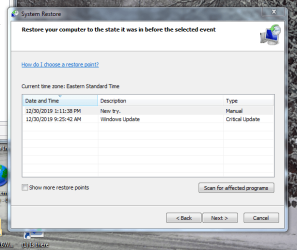
Unlike prior Updates since first reporting this problem thread, Windows Update did not try and run a Creating Restore Point, first, which always fail.
SUPRISE!
Since it did not try and create a Restore Point, I checked to see if the Update was installed, it was.
I then decided to try and create a Restore Point, it worked.
The Restore Point worked and I did not do anything that I am aware of to cause it to work.
Thank you Jesus!
 

Attachments

  • Capture - Did MS 'fix' this problem in secret..PNG
    Capture - Did MS 'fix' this problem in secret..PNG
    46 KB · Views: 6
  • Capture - External Drive.PNG
    Capture - External Drive.PNG
    6.8 KB · Views: 0
Last edited:

My Computer My Computer

At a glance

Microsoft Windows 7 Professional 64-bit 7601 ...Intel(R) Core(TM) i7-3770 CPU @ 3.40GHz8.00 GBIntel(R) HD Graphics 4000
Computer type
PC/Desktop
Computer Manufacturer/Model Number
Two HP Desktops. One in the Laundry Room / Bed Room.
OS
Microsoft Windows 7 Professional 64-bit 7601 Multiprocessor Free Service Pack 1
CPU
Intel(R) Core(TM) i7-3770 CPU @ 3.40GHz
Motherboard
Hewlett-Packard 3396
Memory
8.00 GB
Graphics Card(s)
Intel(R) HD Graphics 4000
Sound Card
(1) Realtek High Definition Audio (2) Intel(R) Display Aud
Monitor(s) Displays
Hanns-G
Screen Resolution
1440 x 900 x 32 bits (4294967296 colors) @ 59 Hz
Hard Drives
(1) ATA WDC WD40EZRX-00S SCSI Disk Device (2) HP Officejet Pro 86 USB Device (3) WD My Book 1230 USB Device
PSU
Whatever came with the CMT.
Case
HP CMT Black.
Cooling
Whatever came with the CMT.
Keyboard
Logitech K740.
Mouse
Microsoft Optical Mouse 1000.
Internet Speed
Spectrum 25Mbs.
Antivirus
WebRoot, Microsoft Security Essentials.
Browser
EDGE
Other Info
HP Officejet Pro 8600 Plus.
WD MyBook 4TB.
Back
Top