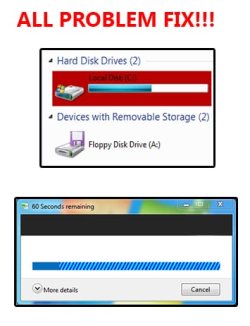
Solved I have problem with TransparentBar, ProgressBar & HighLight

Local time
10:43 PM
Messages
30
Hello, could somebody help me with this 2 problem : -

1. 'TransparentBar' & 'ProgressBar'.

I tried to change PrograssBar [Buttons, Boxes, Controls> Progressbars> normal> fill] & TransparentBar [Buttons, Boxes, Controls> Progressbars> normal> transparentbar] to stripe pattern, but there was a problem. See the picture below.
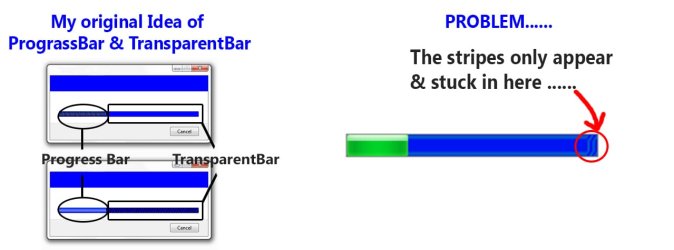
1st.jpg
** PLEASE CLICK THE IMAGE TO SEE **


2. highlights

I want to know where the place to change the 'highlight' [as pictured below].

2nd.jpg
** PLEASE CLICK THE IMAGE TO SEE **

I have changed the "Explorer & Shell> Explorer> Tree View / List View", but the thing [picture above], still no change.....

Hope somebody could help me with this, Thank You.
 

My Computer

OS
Windows 7 Ultimate x32
Let me do some checking and I will get back to you in a little bit.

Jerry
 

My Computer

Computer type
Laptop
Computer Manufacturer/Model Number
Sager NP9170
OS
Win 7 Pro x64 / Win 10 Pro
CPU
Intel(R) Core(TM) i7-3630QM CPU @ 2.40GHz
Motherboard
CLEVO P170EM
Memory
12 GB
Graphics Card(s)
(1) Intel(R) HD Graphics 4000 (2) NVIDIA GeForce GTX 675M
Sound Card
(1) Realtek High Definition Audio (2) Intel(R) Display Aud
Monitor(s) Displays
17.3
Screen Resolution
1920x1080
Hard Drives
(1) Samsung 860 EVO 500GB(OS) (1) Samsung 860 EVO 500GB(Data)
Keyboard
Backlite
Antivirus
MSE, Malwarebytes Pro
Browser
Firefox
Other Info
DESKTOP: Custom-built.
OS: Win 10 Pro x64.
CASE: Rosewill R5.
CPU: Intel I5 4670K CPU @ 3.40GHz.
CPU COOLER: Cool Master Hyper 212 EVO.
MOTHERBOARD: Asus Z87-A.
MEMORY: Kingston HyperX 2x4 GB.
GPU: Nvidia Geforce 650 TI.
PSU: Corsair TX750.
DRIVES: (1) Samsung 840 120 GB SSD (2) Western Digital blue 500 GB 7200 RPM.
#2
Explorer & Shell > Explorer > Items View > ListView > ListItem > Hot

#1
The ProgressBar is very tough to get right I would suggest going here Concept Design Windows 7 Theme and download Mr Grimm's Concept theme and study what he did, look in both areas
Buttons, Boxes & Controls > Progress Bars > Indeterminate
and
Buttons, Boxes & Controls > Progress Bars > Normal

Jerry
 

My Computer

Computer type
Laptop
Computer Manufacturer/Model Number
Sager NP9170
OS
Win 7 Pro x64 / Win 10 Pro
CPU
Intel(R) Core(TM) i7-3630QM CPU @ 2.40GHz
Motherboard
CLEVO P170EM
Memory
12 GB
Graphics Card(s)
(1) Intel(R) HD Graphics 4000 (2) NVIDIA GeForce GTX 675M
Sound Card
(1) Realtek High Definition Audio (2) Intel(R) Display Aud
Monitor(s) Displays
17.3
Screen Resolution
1920x1080
Hard Drives
(1) Samsung 860 EVO 500GB(OS) (1) Samsung 860 EVO 500GB(Data)
Keyboard
Backlite
Antivirus
MSE, Malwarebytes Pro
Browser
Firefox
Other Info
DESKTOP: Custom-built.
OS: Win 10 Pro x64.
CASE: Rosewill R5.
CPU: Intel I5 4670K CPU @ 3.40GHz.
CPU COOLER: Cool Master Hyper 212 EVO.
MOTHERBOARD: Asus Z87-A.
MEMORY: Kingston HyperX 2x4 GB.
GPU: Nvidia Geforce 650 TI.
PSU: Corsair TX750.
DRIVES: (1) Samsung 840 120 GB SSD (2) Western Digital blue 500 GB 7200 RPM.
#2
Explorer & Shell > Explorer > Items View > ListView > ListItem > Hot

#1
The ProgressBar is very tough to get right I would suggest going here Concept Design Windows 7 Theme and download Mr Grimm's Concept theme and study what he did, look in both areas
Buttons, Boxes & Controls > Progress Bars > Indeterminate
and
Buttons, Boxes & Controls > Progress Bars > Normal

Jerry

Thank you, I appreciate your help :D Now everything is running smoothly.

For my 1st problem, I follow like what you said [study theme from mr Grim], and I was able to solve my problem.

What I to do is, change the size of the original 'Progress Bar' and 'TransparentBar'
to [2560 W x 18 H in pixel], and then change 'STRECH' to 'TRUESIZE' in the 'SIZINGTYPE:ENUM' column.


and For my 2nd problem, I found the place to change the 'highlight' is on: -
Explorer & Shell> Explorer> ItemView> ItemView> ListItemNotFocus

Here the result : -

APF.jpg

Once again, 'Thank You very much':D
 

My Computer

OS
Windows 7 Ultimate x32
You're welcome, that turned out very nice.
 

My Computer

Computer type
Laptop
Computer Manufacturer/Model Number
Sager NP9170
OS
Win 7 Pro x64 / Win 10 Pro
CPU
Intel(R) Core(TM) i7-3630QM CPU @ 2.40GHz
Motherboard
CLEVO P170EM
Memory
12 GB
Graphics Card(s)
(1) Intel(R) HD Graphics 4000 (2) NVIDIA GeForce GTX 675M
Sound Card
(1) Realtek High Definition Audio (2) Intel(R) Display Aud
Monitor(s) Displays
17.3
Screen Resolution
1920x1080
Hard Drives
(1) Samsung 860 EVO 500GB(OS) (1) Samsung 860 EVO 500GB(Data)
Keyboard
Backlite
Antivirus
MSE, Malwarebytes Pro
Browser
Firefox
Other Info
DESKTOP: Custom-built.
OS: Win 10 Pro x64.
CASE: Rosewill R5.
CPU: Intel I5 4670K CPU @ 3.40GHz.
CPU COOLER: Cool Master Hyper 212 EVO.
MOTHERBOARD: Asus Z87-A.
MEMORY: Kingston HyperX 2x4 GB.
GPU: Nvidia Geforce 650 TI.
PSU: Corsair TX750.
DRIVES: (1) Samsung 840 120 GB SSD (2) Western Digital blue 500 GB 7200 RPM.
Back
Top