
I have to unplug wifi adapter every time I restart - help!

JohnnyScience

New member
Power User
Local time
11:25 PM
Messages
889
Why doesn't my wifi adapter work when my computer restarts, is shut down, etc?

It's a Netgear WNDA3100 Wireless N Dual band adapter.

I have to manually unplug it & plug it back in so it resets and works.

Needless to say this is BEYOND FRUSTRATING

WHY doesn't technology ever work right in 2014?! geesh.

Suggestions?

Thanks.
 

My Computer My Computer

At a glance

Windows 7 64 & Ubuntu 64Intel Quad Core Q6600 2.40GHz8gNvidia 9600 GT & 9800 GT
Computer Manufacturer/Model Number
Built it myself
OS
Windows 7 64 & Ubuntu 64
CPU
Intel Quad Core Q6600 2.40GHz
Motherboard
Asus
Memory
8g
Graphics Card(s)
Nvidia 9600 GT & 9800 GT
Sound Card
Turtle Beach 5.1
Monitor(s) Displays
Three 19" Dell's & one 46" Samsung 750
Hello,

Do you have the latest driver installed?
WNDA3100v2

I'd also investigate if there's any interference (electronics and small appliances) in your network or wireless channels nearby.
Please install and run Xirrus Wi-Fi Inspector and post a capture of the current activity.
 

My Computer My Computer

At a glance

Win7 & Win8 64bitIntel i5
Computer Manufacturer/Model Number
Lenovo Desktop/Samsung Laptop
OS
Win7 & Win8 64bit
CPU
Intel i5
Internet Speed
Charter-20 Mbps
Antivirus
Avast
Browser
FF, IE9 and Chrome
Ok I downloaded the adapter & was trying to follow these install steps, but I can't seem to find anything coming up for Netgear, which is odd since the wireless adapter does work, even though it's spotty.

For Windows XP/Vista/7

  1. To properly install adapter software, please remove drivers that were previously installed.
    To uninstall, go to Start > Programs > NETGEAR WNDA3100 adapter > Uninstall NETGEAR WNDA3100 adapter .
  2. Unplug the WNDA3100 adapter from your computer.
  3. Run the file you just downloaded and follow the on-screen install instructions.
Am I missing something?


I downloaded the other program & will run it now & post results.
 

My Computer My Computer

At a glance

Windows 7 64 & Ubuntu 64Intel Quad Core Q6600 2.40GHz8gNvidia 9600 GT & 9800 GT
Computer Manufacturer/Model Number
Built it myself
OS
Windows 7 64 & Ubuntu 64
CPU
Intel Quad Core Q6600 2.40GHz
Motherboard
Asus
Memory
8g
Graphics Card(s)
Nvidia 9600 GT & 9800 GT
Sound Card
Turtle Beach 5.1
Monitor(s) Displays
Three 19" Dell's & one 46" Samsung 750
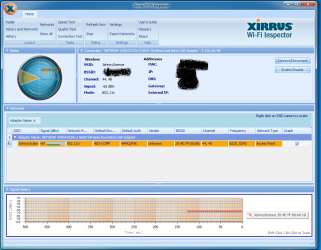
Here's a screen shot. Also I have a dual band router, not sure why only 1 band usually shows up?
 

Attachments

  • Untitled.png
    Untitled.png
    58.4 KB · Views: 1

My Computer My Computer

At a glance

Windows 7 64 & Ubuntu 64Intel Quad Core Q6600 2.40GHz8gNvidia 9600 GT & 9800 GT
Computer Manufacturer/Model Number
Built it myself
OS
Windows 7 64 & Ubuntu 64
CPU
Intel Quad Core Q6600 2.40GHz
Motherboard
Asus
Memory
8g
Graphics Card(s)
Nvidia 9600 GT & 9800 GT
Sound Card
Turtle Beach 5.1
Monitor(s) Displays
Three 19" Dell's & one 46" Samsung 750
Anyone?
 

My Computer My Computer

At a glance

Windows 7 64 & Ubuntu 64Intel Quad Core Q6600 2.40GHz8gNvidia 9600 GT & 9800 GT
Computer Manufacturer/Model Number
Built it myself
OS
Windows 7 64 & Ubuntu 64
CPU
Intel Quad Core Q6600 2.40GHz
Motherboard
Asus
Memory
8g
Graphics Card(s)
Nvidia 9600 GT & 9800 GT
Sound Card
Turtle Beach 5.1
Monitor(s) Displays
Three 19" Dell's & one 46" Samsung 750
You may have better luck connecting to the 2.4Ghz radio.

It looks like you are connecting to the 5Ghz radio right now because the channels are 44,48
 

My Computer My Computer

At a glance

Windows 7 Ult, Windows 8.1 Pro,Q9650-4.275GHz, E8600 4.5GHz, E6750-3.8GHzG.Skill PC2 9600 1200Mhz 5 5 5 15 2TGTX480
Computer type
PC/Desktop
Computer Manufacturer/Model Number
Home built
OS
Windows 7 Ult, Windows 8.1 Pro,
CPU
Q9650-4.275GHz, E8600 4.5GHz, E6750-3.8GHz
Motherboard
Evga 780i FTW
Memory
G.Skill PC2 9600 1200Mhz 5 5 5 15 2T
Graphics Card(s)
GTX480
Sound Card
Asus Xonar D2
Monitor(s) Displays
HannsG
Screen Resolution
1680X1050
Hard Drives
GSkill Phoenix Pro 120GB SSD
PSU
ThermalTake Toughpower 1000Watt modular
Case
ThermalTake XaserV
Cooling
Xigmatek S1283
Keyboard
Logitech G15
Mouse
Logitech G9
Internet Speed
T1
How do I tell which one I am connected to? I have them labeled as JohnnyScience & JohnnyScience2 & when I hover over them both they don't seem to mention their ghz?

I do have issues with it staying on the wifi from time to time, but the computer actually stays on the wifi better than my iphone/ipad does.

But, this doesn't fix my original issue of having to unplug the wifi adapter upon start up? Any idea on what would correct this issue of having to unplug the adapter upon restart?

It doesn't happen every time when restarting the computer, only most of the time. Sometimes it does work though, more often it doesn't which is the frustrating part.

Thanks.
 

My Computer My Computer

At a glance

Windows 7 64 & Ubuntu 64Intel Quad Core Q6600 2.40GHz8gNvidia 9600 GT & 9800 GT
Computer Manufacturer/Model Number
Built it myself
OS
Windows 7 64 & Ubuntu 64
CPU
Intel Quad Core Q6600 2.40GHz
Motherboard
Asus
Memory
8g
Graphics Card(s)
Nvidia 9600 GT & 9800 GT
Sound Card
Turtle Beach 5.1
Monitor(s) Displays
Three 19" Dell's & one 46" Samsung 750
Sorry for the delay.....busy....busy.... :D

Do you and can you access the router settings? See if the wireless mode/band is set to a Mixed mode or not, I'd fiddle with the setting and see if it helps.
 

My Computer My Computer

At a glance

Win7 & Win8 64bitIntel i5
Computer Manufacturer/Model Number
Lenovo Desktop/Samsung Laptop
OS
Win7 & Win8 64bit
CPU
Intel i5
Internet Speed
Charter-20 Mbps
Antivirus
Avast
Browser
FF, IE9 and Chrome
Sorry for the delay.....busy....busy.... :D

Do you and can you access the router settings? See if the wireless mode/band is set to a Mixed mode or not, I'd fiddle with the setting and see if it helps.


I probably do, haven't tried since initial setup to be honest. Should I take this over to the Netgear forums you think?

Any suggestions on what to change in the settings?

It still happens all the time upon reboot the adapter needing to be manually pulled from the computer to reset it so that it starts up.

What about trying to update the driver? I did so & these were my results:

I downloaded the adapter & was trying to follow these install steps, but I can't seem to find anything coming up for Netgear, which is odd since the wireless adapter does work, even though it's spotty.

For Windows XP/Vista/7

  1. To properly install adapter software, please remove drivers that were previously installed.
    To uninstall, go to Start > Programs > NETGEAR WNDA3100 adapter > Uninstall NETGEAR WNDA3100 adapter .
  2. Unplug the WNDA3100 adapter from your computer.
  3. Run the file you just downloaded and follow the on-screen install instructions.
Am I missing something?
 

My Computer My Computer

At a glance

Windows 7 64 & Ubuntu 64Intel Quad Core Q6600 2.40GHz8gNvidia 9600 GT & 9800 GT
Computer Manufacturer/Model Number
Built it myself
OS
Windows 7 64 & Ubuntu 64
CPU
Intel Quad Core Q6600 2.40GHz
Motherboard
Asus
Memory
8g
Graphics Card(s)
Nvidia 9600 GT & 9800 GT
Sound Card
Turtle Beach 5.1
Monitor(s) Displays
Three 19" Dell's & one 46" Samsung 750
Someone also mentioned this which I've previously suggested, might be worth trying it out. If you need guidance please let us know.
You may have better luck connecting to the 2.4Ghz radio.

It looks like you are connecting to the 5Ghz radio right now because the channels are 44,48
It's up to you to post at the Netgear Forums, we're also here to help out. :D

USB Ethernet adapters can be very buggy sometimes as they do conflict with other USB devices. You may also trying a different make and model.

Make sure that your O/S has the latest Windows Updates, click on the optional updates, might have the latest driver for your Netgear adapter.
 

My Computer My Computer

At a glance

Win7 & Win8 64bitIntel i5
Computer Manufacturer/Model Number
Lenovo Desktop/Samsung Laptop
OS
Win7 & Win8 64bit
CPU
Intel i5
Internet Speed
Charter-20 Mbps
Antivirus
Avast
Browser
FF, IE9 and Chrome
Back
Top