
Solved I installed Win7 on an HDD from PC1 but I get a blue screen on PC2

MichC

New member
Local time
4:15 AM
Messages
16
Hello everyone.
A friend asked me to install Win7 on his very old laptop (32bit intel centrino)
The laptop doesn't support boot from usb and I had problems with DVDs too, so I decided to attach its sata HDD to my roommate's desktop and install windows from there.
The installation went ok and I assured to install it in old bios-legacy mode instead of uefi.
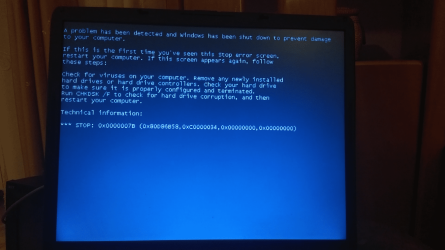
I reinserted the hdd in the laptop, win7 boots but I get a blue screen. The error is:
Code:
 *** STOP: 0x0000007B (0x80D86B58, 0xC0000034, 0x00000000, 0x00000000
attachment.php


I googled and I tryed solving this giving these commands from the "emergency" terminal, but I think they're useless in this case:
Code:
bcdboot C:\windows
bootrec /fixboot
bootrec /fixmbr
bootrec /rebuildbcd

bcdedit /export C:\BCD_BU
C:
cd boot
attrib bcd -s -h -r
ren C:\boot\bcd bcd.old
bootrec /rebuildbcd

I think that the desktop was set to AHCI mode when I installed Windows, and the old laptop just suuports IDE mode.
I've seen on internet that it's possible to switch between these 2 modes without reinstalling, I should just change a registry key!
But how can I do that if I can't boot even in safe mode?
Can I use any live solution?


Thanks in advance
 

Attachments
  • 67324240_678930462580582_1975809995542888448_n.png
    67324240_678930462580582_1975809995542888448_n.png
    459.8 KB · Views: 43

My Computer My Computer

At a glance

Win 7 ultimate x64Amd a108gbAmd
Computer type
Laptop
Computer Manufacturer/Model Number
HP
OS
Win 7 ultimate x64
CPU
Amd a10
Memory
8gb
Graphics Card(s)
Amd
It will be a driver problem as it will have all the drivers for the desktop and none for the laptop so its not going to work if the systems are different
 

My Computer My Computer

At a glance

win 8 32 bit
Computer type
PC/Desktop
OS
win 8 32 bit
One should never expect to move Windows from one computer to another without trouble, specially if the computers are very different hardare-wise. The BSOD is likely the result of driver incompatibilities with the hardware, as Samuria said, as Windows is trying to load drivers for a different computer.

The only sane choice is to just throw away the installation and reformat again, this time in the final computer it'll live on.
 

My Computer My Computer

At a glance

Windows 7 Ultimate x64Intel Core i7-740QM8 GB DDR3NVIDIA GeForce 330GT
Computer type
Laptop
Computer Manufacturer/Model Number
Toshiba Sattelite A665-S6092
OS
Windows 7 Ultimate x64
CPU
Intel Core i7-740QM
Memory
8 GB DDR3
Graphics Card(s)
NVIDIA GeForce 330GT
Screen Resolution
1366x768
Hard Drives
Samsung 840 SSD 500GB
1TB USB3 external HD
Cooling
Coolermaster Notepal U3 notebook cooling pad
Internet Speed
3mbps ASDL
Antivirus
ClamWin 0.98.7
Browser
Opera 12.17 x86 (main), Firefox 38 (sec), IE11 (last resort)
attach the laptop sata HDD to your roommate's desktop.

boot up the cd/dvd/usb you created from this Make Windows 7 bootable after motherboard swap ( it is 32 bit so boot it in legacy mode)

Point the adjust to new hardware module at the sick windows installation.

After that, do not attempt to boot into the hd on the desktop.

Plug the hd back into the laptop.

Strart the laptop, and you should see it do the"setting up devices" routine
 
Last edited:

My Computers My Computers

  • At a glance

    7 X64i5 84002x8gb 3200mhz
    Computer type
    PC/Desktop
    OS
    7 X64
    CPU
    i5 8400
    Motherboard
    gigabyte b365m ds3h
    Memory
    2x8gb 3200mhz
    Hard Drives
    various
    PSU
    pure power 11 400w cm
    Case
    Coolermaster
    Cooling
    cryorig m9i
  • At a glance

    7x64g54008gb ddr4 2400
    Computer type
    PC/Desktop
    OS
    7x64
    CPU
    g5400
    Motherboard
    ga b365m ds3h
    Memory
    8gb ddr4 2400
    PSU
    xfx pro 450w
attach the laptop sata HDD to your roommate's desktop.

boot up the cd/dvd/usb you created from this Make Windows 7 bootable after motherboard swap ( it is 32 bit so boot it in legacy mode)

Point the adjust to new hardware module at the sick windows installation.

After that, do not attempt to boot into the hd on the desktop.

Plug the hd back into the laptop.

Strart the laptop, and you should see it do the"setting up devices" routine

Many thanks!
I don't have any empty disc at the moment, Can I flash the Paragon Adaptive Restore ISO on a usb with rufus?

I flashed it on the micro-sd card reader I use as second pendrive but it doesn't want to boot.
I don't know if the problem is caused by the sd card reader or by the fact that Paragon can be flashed just on CDs/DVDs
 

My Computer My Computer

At a glance

Win 7 ultimate x64Amd a108gbAmd
Computer type
Laptop
Computer Manufacturer/Model Number
HP
OS
Win 7 ultimate x64
CPU
Amd a10
Memory
8gb
Graphics Card(s)
Amd
Can I flash the Paragon Adaptive Restore ISO on a usb with rufus?
Yes

It might be possible to boot from sd card, depending on the system. Format the sd card using diskpart, and mark the partition active.
at command prompt type:

diskpart
lis dis
sel dis ( whatever number your sd card is)
clean
cre par pri
sel par 1
act
format fs=fat32
assign letter=z
exi

Then extract the contents of the iso onto the sd card

Alternatively, use a 3rd party partition program such as aomei Free Partition Manager Software - AOMEI Partition Assistant Standard
 

My Computers My Computers

  • At a glance

    7 X64i5 84002x8gb 3200mhz
    Computer type
    PC/Desktop
    OS
    7 X64
    CPU
    i5 8400
    Motherboard
    gigabyte b365m ds3h
    Memory
    2x8gb 3200mhz
    Hard Drives
    various
    PSU
    pure power 11 400w cm
    Case
    Coolermaster
    Cooling
    cryorig m9i
  • At a glance

    7x64g54008gb ddr4 2400
    Computer type
    PC/Desktop
    OS
    7x64
    CPU
    g5400
    Motherboard
    ga b365m ds3h
    Memory
    8gb ddr4 2400
    PSU
    xfx pro 450w

My Computer My Computer

At a glance

Win7 pro x64stock i7 7700kCorsair Vengeance LPX 16GB (2x8GB) DDR4 @ 320...integrated Intel HD 630
Computer type
PC/Desktop
Computer Manufacturer/Model Number
diy
OS
Win7 pro x64
CPU
stock i7 7700k
Motherboard
Gigabyte Z270N-WIFI mini-ITX
Memory
Corsair Vengeance LPX 16GB (2x8GB) DDR4 @ 3200MHz
Graphics Card(s)
integrated Intel HD 630
Sound Card
onboard Realtek ALC1220
Monitor(s) Displays
two vertically mounted samsung 55" 4k un55mu8000
Screen Resolution
1920x1280
Hard Drives
256GB Samsung EVO 960 M.2 pci-e NVMe SSD
PSU
SilverStone Nightjar ST45NF 450Watt Fanless
Case
No case. Motherboard is mounted directly onto power supply
Cooling
Evercool low profile 815EP with Panaflow 12L fan at 7v
Keyboard
Ortek MCK-86 mini
Mouse
Belkin 5-button USB
Internet Speed
spectrum 400mbps
Yes

It might be possible to boot from sd card, depending on the system. Format the sd card using diskpart, and mark the partition active.
at command prompt type:

diskpart
lis dis
sel dis ( whatever number your sd card is)
clean
cre par pri
sel par 1
act
format fs=fat32
assign letter=z
exi

Then extract the contents of the iso onto the sd card

Alternatively, use a 3rd party partition program such as aomei Free Partition Manager Software - AOMEI Partition Assistant Standard
Thank you. Before reading your reply I formatted in fat32 from the context menu so I haven't check if the partition was set to active, anyway this time it booted. I used the Paragon Software from a "working" PC. After the fix I reinserted the hdd to the laptop but nothing has changed :cry:
 

My Computer My Computer

At a glance

Win 7 ultimate x64Amd a108gbAmd
Computer type
Laptop
Computer Manufacturer/Model Number
HP
OS
Win 7 ultimate x64
CPU
Amd a10
Memory
8gb
Graphics Card(s)
Amd
Another thing you can try:

attach the hd to the desktop.

format the target windows partition

apply the image ( not install)
you can use gimagex to apply View attachment gimagex.zip

mark the apply partition partition active

create the required boot files: ( if the apply partition is z:)

at admin command prompt

bcdboot z:\windows /s z:

Do not try and boot the hd while it is attached to the desktop

re-attach the hd to the laptop. It ought to boot and go through the setup phase, installing devices, etc.

You will probabaly need to go and get some specific drivers from the laptop mfr site - network card drivers, for example.


When it is all working fine, I suggest you add plop boot manager - it adds the ability to boot from usb.
 

My Computers My Computers

  • At a glance

    7 X64i5 84002x8gb 3200mhz
    Computer type
    PC/Desktop
    OS
    7 X64
    CPU
    i5 8400
    Motherboard
    gigabyte b365m ds3h
    Memory
    2x8gb 3200mhz
    Hard Drives
    various
    PSU
    pure power 11 400w cm
    Case
    Coolermaster
    Cooling
    cryorig m9i
  • At a glance

    7x64g54008gb ddr4 2400
    Computer type
    PC/Desktop
    OS
    7x64
    CPU
    g5400
    Motherboard
    ga b365m ds3h
    Memory
    8gb ddr4 2400
    PSU
    xfx pro 450w
Thank you again for your help Sid2, you're very competent.
Unfortunately nothing worked for me.
But I solved doing a PXE intallation through "Serva". :) If anyone needs help to do it let me know
 

My Computer My Computer

At a glance

Win 7 ultimate x64Amd a108gbAmd
Computer type
Laptop
Computer Manufacturer/Model Number
HP
OS
Win 7 ultimate x64
CPU
Amd a10
Memory
8gb
Graphics Card(s)
Amd
Back
Top