Solved I keep getting an error while installing FIFA11

CityLady

New member
Member
Local time
10:44 AM
Messages
85
Location
Cape Town, South Africa
I recently bought my son Fifa11 for his birthday and when we try to install it he gets an error here is the error

Error 1934 an error occured during the assembley'Microsoft.VC90.ATL,version="9.0.30729.1", Public keytoken=1fc8b3b9a1e18e3b" Processor Architecture=x86,type win32 please refer to help and support for help.

Hope you can help him as we got it for his birthday and he's itching to play it...

My Pc covers the specs required to play the game, it starts to install re-distributable and then the error pops up just before the end of installation. Here are my specs:-
System Manufacturer/Model Number
ACPI x 86-based pc
OS
windows 7 64bit Enterprise
CPU
AMD Athlon(tm) 64 Processor 3200+
Motherboard
Gigabybte Technology Co; Ltd GA-K8N51GMF-9 (Socket 939)
Memory
3gb
Graphics Card(s)
NVidia Geforce9600GT
Sound Card
High definition audio device
Monitor(s) Displays
SyncMaster 923NW
Screen Resolution
1440 x900
Hard Drives
Maxtor 2F040L0 ATA 360gb
SATA ST3120026a ATA 120gb
SATA ST332061 3AS 120gb
PSU
500watts
Case
not sure
Cooling
not sure
Keyboard
Standard PS/2 Keyboard
Mouse
Logitech wireless HID-compliant mouse
Internet Speed
384kb/s
Other Info
N/A
 
Last edited:

My Computer

Computer type
PC/Desktop
Computer Manufacturer/Model Number
ACPI x 86-based pc
OS
windows 7 64bit Enterprise
CPU
Intel core i5- 3330 CPU @ 3.00GHz
Motherboard
MSI MS-7756
Memory
8gb
Graphics Card(s)
Nvidia GeForce GT630 2Gb ram
Sound Card
High definition audio device
Monitor(s) Displays
Dell 1908 FP (Analog)
Screen Resolution
1440 x900
Hard Drives
Maxtor 2F040L0 ATA 360gb
SATA ST3120026a ATA 120gb
SATA ST332061 3AS 120gb
WD 2tb hard drive
PSU
500watts
Case
not sure
Cooling
not sure
Keyboard
Standard PS/2 Keyboard
Mouse
Logitech wireless HID-compliant mouse
Internet Speed
4MB/s
hi ya that was quick !! searching with the error code for you something should pop up:)
 

My Computer

Computer Manufacturer/Model Number
packard bell IXTREME M5722
OS
Operating System : Windows 7 Home Premium Edition 6.01.7600 SP1 (x64)
CPU
Processor : Intel Core 2 Quad Q8300 @ 2500 MHz
Motherboard
Mainboard : Packard Bell (Acer EG43M )
Memory
Physical Memory :8GB Corsair4x 2GB 800MHz C5 DDR2
Graphics Card(s)
Video Card : XFX 6700 AMD
Monitor(s) Displays
Maestro 234DL - BenQ V2220 - BenQ VW2420H
Screen Resolution
Current Display :1920x1080p pixels at 60 Hz in HD LED
Hard Drives
Hard Disks : WDC (1000 GB)
Drive C: (Hard Disk) : 428 GB available on 491 GB
Drive D: (Hard Disk) : 426 GB available on 492 GB
SAMSUNG spinpoint HD103SJ 1000.2 GB
(X 2) KINGSTON SSD NOW V 30GB
PSU
XFX ProSeries 550W PSU
Case
PACKARD BELL IXTREME
Cooling
System Blower Current: 150mA Air Flow16CFM ;Akasa 90mm rear
Keyboard
Gigabyte Aivia K8100
Mouse
TRUST-Wireless Laser Mouse - Carbon edition MI-7770C
Internet Speed
TP-LINK > TL-WN951N / AV500 Gigabit Powerline Adapters
Browser
chrome dev
Other Info
EXTRA COOLING>(FAN CONTROLLER) PC Bay Cooler 3 x 40mm fans; Akasa AK-HD-BL Blue hard drive cooler 2 x 40 mm fan 4500 rpm 29.7 dBA
Bios> American Megatrends Inc.
Version : P01-A1
Date : 08/31/2009

My Computer

Computer Manufacturer/Model Number
packard bell IXTREME M5722
OS
Operating System : Windows 7 Home Premium Edition 6.01.7600 SP1 (x64)
CPU
Processor : Intel Core 2 Quad Q8300 @ 2500 MHz
Motherboard
Mainboard : Packard Bell (Acer EG43M )
Memory
Physical Memory :8GB Corsair4x 2GB 800MHz C5 DDR2
Graphics Card(s)
Video Card : XFX 6700 AMD
Monitor(s) Displays
Maestro 234DL - BenQ V2220 - BenQ VW2420H
Screen Resolution
Current Display :1920x1080p pixels at 60 Hz in HD LED
Hard Drives
Hard Disks : WDC (1000 GB)
Drive C: (Hard Disk) : 428 GB available on 491 GB
Drive D: (Hard Disk) : 426 GB available on 492 GB
SAMSUNG spinpoint HD103SJ 1000.2 GB
(X 2) KINGSTON SSD NOW V 30GB
PSU
XFX ProSeries 550W PSU
Case
PACKARD BELL IXTREME
Cooling
System Blower Current: 150mA Air Flow16CFM ;Akasa 90mm rear
Keyboard
Gigabyte Aivia K8100
Mouse
TRUST-Wireless Laser Mouse - Carbon edition MI-7770C
Internet Speed
TP-LINK > TL-WN951N / AV500 Gigabit Powerline Adapters
Browser
chrome dev
Other Info
EXTRA COOLING>(FAN CONTROLLER) PC Bay Cooler 3 x 40mm fans; Akasa AK-HD-BL Blue hard drive cooler 2 x 40 mm fan 4500 rpm 29.7 dBA
Bios> American Megatrends Inc.
Version : P01-A1
Date : 08/31/2009
ok try this

Perform a SFC Scan

1. Click Start, click All Programs, click Accessories, right-click Command Prompt, and then click Run as administrator. If you are prompted for an administrator password or for a confirmation, type the password, or click Allow

2. Type the following command, and then press ENTER:

sfc /scannow

A message will appear stating that 'The system scan will begin'. Be patient because the scan may take some time

3. If any files require a replace SFC will replace them. You may be asked to insert your Windows 7 DVD for this process to continue

4. If everything is okay you should, after the scan, see the following message "Windows resource protection did not find any integrity violations"

5. After the scan has completed, close the command prompt window, restart the computer and check.

more information here :ar: How to use the System File Checker tool to troubleshoot missing or corrupted system files on Windows Vista or on Windows 7


If a Windows Resource Protection (WRP) file is missing or is corrupted, Windows may not behave as expected. For example, some Windows functions may not work, or Windows may crash. The System File Checker tool (SFC.exe) scans for missing or corrupted system files and repairs them.
 

My Computer

Computer Manufacturer/Model Number
packard bell IXTREME M5722
OS
Operating System : Windows 7 Home Premium Edition 6.01.7600 SP1 (x64)
CPU
Processor : Intel Core 2 Quad Q8300 @ 2500 MHz
Motherboard
Mainboard : Packard Bell (Acer EG43M )
Memory
Physical Memory :8GB Corsair4x 2GB 800MHz C5 DDR2
Graphics Card(s)
Video Card : XFX 6700 AMD
Monitor(s) Displays
Maestro 234DL - BenQ V2220 - BenQ VW2420H
Screen Resolution
Current Display :1920x1080p pixels at 60 Hz in HD LED
Hard Drives
Hard Disks : WDC (1000 GB)
Drive C: (Hard Disk) : 428 GB available on 491 GB
Drive D: (Hard Disk) : 426 GB available on 492 GB
SAMSUNG spinpoint HD103SJ 1000.2 GB
(X 2) KINGSTON SSD NOW V 30GB
PSU
XFX ProSeries 550W PSU
Case
PACKARD BELL IXTREME
Cooling
System Blower Current: 150mA Air Flow16CFM ;Akasa 90mm rear
Keyboard
Gigabyte Aivia K8100
Mouse
TRUST-Wireless Laser Mouse - Carbon edition MI-7770C
Internet Speed
TP-LINK > TL-WN951N / AV500 Gigabit Powerline Adapters
Browser
chrome dev
Other Info
EXTRA COOLING>(FAN CONTROLLER) PC Bay Cooler 3 x 40mm fans; Akasa AK-HD-BL Blue hard drive cooler 2 x 40 mm fan 4500 rpm 29.7 dBA
Bios> American Megatrends Inc.
Version : P01-A1
Date : 08/31/2009

My Computer

Computer type
PC/Desktop
Computer Manufacturer/Model Number
ACPI x 86-based pc
OS
windows 7 64bit Enterprise
CPU
Intel core i5- 3330 CPU @ 3.00GHz
Motherboard
MSI MS-7756
Memory
8gb
Graphics Card(s)
Nvidia GeForce GT630 2Gb ram
Sound Card
High definition audio device
Monitor(s) Displays
Dell 1908 FP (Analog)
Screen Resolution
1440 x900
Hard Drives
Maxtor 2F040L0 ATA 360gb
SATA ST3120026a ATA 120gb
SATA ST332061 3AS 120gb
WD 2tb hard drive
PSU
500watts
Case
not sure
Cooling
not sure
Keyboard
Standard PS/2 Keyboard
Mouse
Logitech wireless HID-compliant mouse
Internet Speed
4MB/s
ok try this

Perform a SFC Scan

1. Click Start, click All Programs, click Accessories, right-click Command Prompt, and then click Run as administrator. If you are prompted for an administrator password or for a confirmation, type the password, or click Allow

2. Type the following command, and then press ENTER:

sfc /scannow

A message will appear stating that 'The system scan will begin'. Be patient because the scan may take some time

3. If any files require a replace SFC will replace them. You may be asked to insert your Windows 7 DVD for this process to continue

4. If everything is okay you should, after the scan, see the following message "Windows resource protection did not find any integrity violations"

5. After the scan has completed, close the command prompt window, restart the computer and check.

more information here :ar: How to use the System File Checker tool to troubleshoot missing or corrupted system files on Windows Vista or on Windows 7


If a Windows Resource Protection (WRP) file is missing or is corrupted, Windows may not behave as expected. For example, some Windows functions may not work, or Windows may crash. The System File Checker tool (SFC.exe) scans for missing or corrupted system files and repairs them.


Ok i will do this when I get up in the morning... will keep you posted on how it went..

Hazel
 

My Computer

Computer type
PC/Desktop
Computer Manufacturer/Model Number
ACPI x 86-based pc
OS
windows 7 64bit Enterprise
CPU
Intel core i5- 3330 CPU @ 3.00GHz
Motherboard
MSI MS-7756
Memory
8gb
Graphics Card(s)
Nvidia GeForce GT630 2Gb ram
Sound Card
High definition audio device
Monitor(s) Displays
Dell 1908 FP (Analog)
Screen Resolution
1440 x900
Hard Drives
Maxtor 2F040L0 ATA 360gb
SATA ST3120026a ATA 120gb
SATA ST332061 3AS 120gb
WD 2tb hard drive
PSU
500watts
Case
not sure
Cooling
not sure
Keyboard
Standard PS/2 Keyboard
Mouse
Logitech wireless HID-compliant mouse
Internet Speed
4MB/s
i hope there will be more replys for you have a good evening :)
 

My Computer

Computer Manufacturer/Model Number
packard bell IXTREME M5722
OS
Operating System : Windows 7 Home Premium Edition 6.01.7600 SP1 (x64)
CPU
Processor : Intel Core 2 Quad Q8300 @ 2500 MHz
Motherboard
Mainboard : Packard Bell (Acer EG43M )
Memory
Physical Memory :8GB Corsair4x 2GB 800MHz C5 DDR2
Graphics Card(s)
Video Card : XFX 6700 AMD
Monitor(s) Displays
Maestro 234DL - BenQ V2220 - BenQ VW2420H
Screen Resolution
Current Display :1920x1080p pixels at 60 Hz in HD LED
Hard Drives
Hard Disks : WDC (1000 GB)
Drive C: (Hard Disk) : 428 GB available on 491 GB
Drive D: (Hard Disk) : 426 GB available on 492 GB
SAMSUNG spinpoint HD103SJ 1000.2 GB
(X 2) KINGSTON SSD NOW V 30GB
PSU
XFX ProSeries 550W PSU
Case
PACKARD BELL IXTREME
Cooling
System Blower Current: 150mA Air Flow16CFM ;Akasa 90mm rear
Keyboard
Gigabyte Aivia K8100
Mouse
TRUST-Wireless Laser Mouse - Carbon edition MI-7770C
Internet Speed
TP-LINK > TL-WN951N / AV500 Gigabit Powerline Adapters
Browser
chrome dev
Other Info
EXTRA COOLING>(FAN CONTROLLER) PC Bay Cooler 3 x 40mm fans; Akasa AK-HD-BL Blue hard drive cooler 2 x 40 mm fan 4500 rpm 29.7 dBA
Bios> American Megatrends Inc.
Version : P01-A1
Date : 08/31/2009
When I try to run sfc/scannow with admin rights in cmd prompt i got an error saying Windows Resource Protection could not start the repair service, so i typed in the problem in google and it came up with what i think is maybe the solution. my services were disabled for some reason and it took me through some simple steps to enable the service. Now it will sfc/scannow in cmd Prompt. I am wondering if when my husband used a program to changed registry settings that this problem occurred from that? I am awaiting the results of the scan as we speak will post the out come.
 

My Computer

Computer type
PC/Desktop
Computer Manufacturer/Model Number
ACPI x 86-based pc
OS
windows 7 64bit Enterprise
CPU
Intel core i5- 3330 CPU @ 3.00GHz
Motherboard
MSI MS-7756
Memory
8gb
Graphics Card(s)
Nvidia GeForce GT630 2Gb ram
Sound Card
High definition audio device
Monitor(s) Displays
Dell 1908 FP (Analog)
Screen Resolution
1440 x900
Hard Drives
Maxtor 2F040L0 ATA 360gb
SATA ST3120026a ATA 120gb
SATA ST332061 3AS 120gb
WD 2tb hard drive
PSU
500watts
Case
not sure
Cooling
not sure
Keyboard
Standard PS/2 Keyboard
Mouse
Logitech wireless HID-compliant mouse
Internet Speed
4MB/s
Ok Brian this is what's happening now, I turned on some services that the step took me through and then was prompted to restart my pc. After it rebooted updates where installed and yes the game installs too I have just tried on the off chance it would work and it did.

Thank you for your time in helping me again especially since it's not your field of expertise, you still helped me by putting me on the right path. My son is still sleeping and will e over the moon when he wakes to find his Mum's a genius well that's what he'll think! But i know differently Thanks again Brian your so very helpful and I must say also CONGRATULATIONS on gold if anyone deserves it it's you!

Regards

Hazel
 

My Computer

Computer type
PC/Desktop
Computer Manufacturer/Model Number
ACPI x 86-based pc
OS
windows 7 64bit Enterprise
CPU
Intel core i5- 3330 CPU @ 3.00GHz
Motherboard
MSI MS-7756
Memory
8gb
Graphics Card(s)
Nvidia GeForce GT630 2Gb ram
Sound Card
High definition audio device
Monitor(s) Displays
Dell 1908 FP (Analog)
Screen Resolution
1440 x900
Hard Drives
Maxtor 2F040L0 ATA 360gb
SATA ST3120026a ATA 120gb
SATA ST332061 3AS 120gb
WD 2tb hard drive
PSU
500watts
Case
not sure
Cooling
not sure
Keyboard
Standard PS/2 Keyboard
Mouse
Logitech wireless HID-compliant mouse
Internet Speed
4MB/s
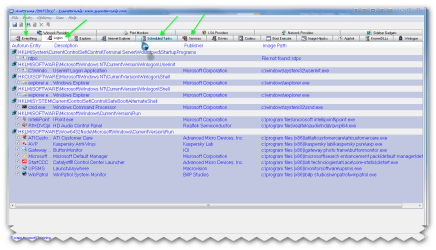
well done! yes the services can cause problems for programs if they are not started or disabled another way is to check with autoruns here is a program that will show you in depth what is set to run auto etc you can use it to disable/enable but use with caution and if you change anything make a note of it

Autoruns for Windows v10.06 By Mark Russinovich and Bryce Cogswell

LINK :ar: Autoruns for Windows

Simply run Autoruns and it shows you the currently configured auto-start applications as well as the full list of Registry and file system locations available for auto-start configuration. Autostart locations displayed by Autoruns include logon entries, Explorer add-ons, Internet Explorer add-ons including Browser Helper Objects (BHOs), Appinit DLLs, image hijacks, boot execute images, Winlogon notification DLLs, Windows Services and Winsock Layered Service Providers. Switch tabs to view autostarts from different categories

there is a suite of useful programs too Sysinternals Suite By Mark Russinovich :ar: Sysinternals Suite

The Sysinternals Troubleshooting Utilities have been rolled up into a single Suite of tools. This file contains the individual troubleshooting tools and help files.

The Suite is a bundling of the following selected Sysinternals Utilities:

  1. AccessChk
  2. AccessEnum
  3. AdExplorer
  4. AdRestore
  5. Autologon
  6. Autoruns
  7. BgInfo
  8. CacheSet
  9. ClockRes
  10. Contig
  11. Coreinfo
  12. Ctrl2Cap
  13. DebugView
  14. Desktops
  15. Disk2vhd
  16. DiskExt
  17. DiskMon
  18. DiskView
  19. Disk Usage (DU)
  20. EFSDump
  21. Handle
  22. Hex2dec
  23. Junction
  24. LDMDump
  25. ListDLLs
  26. LiveKd
  27. LoadOrder
  28. LogonSessions
  29. MoveFile
  30. NTFSInfo
  31. PageDefrag
  32. PendMoves
  33. PipeList
  34. PortMon
  35. ProcDump
  36. Process Explorer
  37. Process Monitor
  38. ProcFeatures
  39. PsExec
  40. PsFile
  41. PsGetSid
  42. PsInfo
  43. PsKill
  44. PsList
  45. PsLoggedOn
  46. PsLogList
  47. PsPasswd
  48. PsService
  49. PsShutdown
  50. PsSuspend
  51. RAMMap
  52. RegDelNull
  53. RegJump
  54. RootkitRevealer
  55. SDelete
  56. ShareEnum
  57. ShellRunas
  58. SigCheck
  59. Streams
  60. Strings
  61. Sync
  62. TCPView
  63. VMMap
  64. VolumeID
  65. WhoIs
  66. WinObj
  67. ZoomIt
 

Attachments

  • brys snap 19 December 2010 08h06m12s.png
    brys snap 19 December 2010 08h06m12s.png
    54.6 KB · Views: 11

My Computer

Computer Manufacturer/Model Number
packard bell IXTREME M5722
OS
Operating System : Windows 7 Home Premium Edition 6.01.7600 SP1 (x64)
CPU
Processor : Intel Core 2 Quad Q8300 @ 2500 MHz
Motherboard
Mainboard : Packard Bell (Acer EG43M )
Memory
Physical Memory :8GB Corsair4x 2GB 800MHz C5 DDR2
Graphics Card(s)
Video Card : XFX 6700 AMD
Monitor(s) Displays
Maestro 234DL - BenQ V2220 - BenQ VW2420H
Screen Resolution
Current Display :1920x1080p pixels at 60 Hz in HD LED
Hard Drives
Hard Disks : WDC (1000 GB)
Drive C: (Hard Disk) : 428 GB available on 491 GB
Drive D: (Hard Disk) : 426 GB available on 492 GB
SAMSUNG spinpoint HD103SJ 1000.2 GB
(X 2) KINGSTON SSD NOW V 30GB
PSU
XFX ProSeries 550W PSU
Case
PACKARD BELL IXTREME
Cooling
System Blower Current: 150mA Air Flow16CFM ;Akasa 90mm rear
Keyboard
Gigabyte Aivia K8100
Mouse
TRUST-Wireless Laser Mouse - Carbon edition MI-7770C
Internet Speed
TP-LINK > TL-WN951N / AV500 Gigabit Powerline Adapters
Browser
chrome dev
Other Info
EXTRA COOLING>(FAN CONTROLLER) PC Bay Cooler 3 x 40mm fans; Akasa AK-HD-BL Blue hard drive cooler 2 x 40 mm fan 4500 rpm 29.7 dBA
Bios> American Megatrends Inc.
Version : P01-A1
Date : 08/31/2009
Back
Top