Solved I keep losing hard drive space

Dalek22

New member
Local time
10:33 PM
Messages
11
Hello, I keep losing hard drive space over time, now yes. I've ran CCleaner, I've uninstalled Games that I dont usually play, I had around 40-30GB, it went down so I uninstalled more things and it always goes down no matter what I do. I've defragged my hard drive and only received around 2GB.

I ran AVG TuneUp, I got from 5GB to 32GB, and now over the month I somehow have 2GB left? Even though I have installed nothing huge at all.

I've tried scanning for viruses with Malware Bytes, nothing found.

Now, I am guessing it's something to do with the virtual memory or whatever but I honestly don't know what to do there. If someone could give me a step by step guide on what I should set it to or whatever then that would be great. Because I dont want to mess up my performance.

As for shadow copies, I've tried stopping it. Only got a few GB back. I tried getting rid of my restore points. Got some room back, but it always goes back down, it doesn't have a huge impact on room anyway

My Specs:

Windows Vista Home Premium 32-bit
3.5GB Of Ram, (32-bit) (If I had 64-bit I would have 8GB)
Intel Core 2 Quad Q9550 2.83GHz 4 CPUs
ATI Radeon 6950

Now, I know I should had posted on a Vista forum but Windows 7 is basically Vista 2.0 so... Yeah.
 

My Computer My Computer

At a glance

Windows 7 64-bit16GBATI Radeon 6950
Computer type
PC/Desktop
Computer Manufacturer/Model Number
Custom Built
OS
Windows 7 64-bit
Memory
16GB
Graphics Card(s)
ATI Radeon 6950
Monitor(s) Displays
1
Screen Resolution
1920x1080
Hard Drives
2
Case
Antec
Cooling
Fans
Browser
Firefox
Install TreeSize Free.

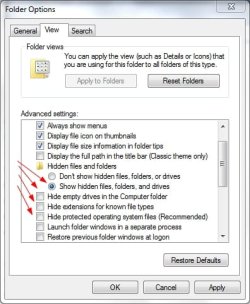
Open Control Panel, Folder Options.
Click on the View tab.
Select or unselect the following as shown:

ShowAllFilesAndFolders.jpg

Run TreeSize Free and it will show you where all the space is being used.
 

My Computer My Computer

At a glance

Windows 10 Pro X64Intel Quad Core i7-4770 @ 3.4Ghz16.0GB PC3-12800 DDR3 SDRAM 1600 MHzIntel Integrated HD Graphics
Computer type
PC/Desktop
Computer Manufacturer/Model Number
Lenovo IdeaCenter 450
OS
Windows 10 Pro X64
CPU
Intel Quad Core i7-4770 @ 3.4Ghz
Memory
16.0GB PC3-12800 DDR3 SDRAM 1600 MHz
Graphics Card(s)
Intel Integrated HD Graphics
Sound Card
Realtek HD Audio
Monitor(s) Displays
HP 22" LCD
Screen Resolution
1680 x 1050
Hard Drives
250GB Samsung EVO SATA-3 SSD
2TB Seagate ST2000DM001 SATA-2
1.5TB Seagate ST3150041AS SATA
Keyboard
Dell USB
Mouse
Lenovo USB
Internet Speed
Cable via Road Runner 3MB Upload, 30MB Download
Antivirus
Windows Defender, MBAM Pro, MBAE
Browser
Seamonkey
Other Info
UEFI/GPT
PLDS DVD-RW DH16AERSH

My Computer My Computer

At a glance

Windows 8 Prointel i3 2.40 Ghz6 GB RAMIntegrated Intel HD
Computer Manufacturer/Model Number
DELL
OS
Windows 8 Pro
CPU
intel i3 2.40 Ghz
Motherboard
DELL inc
Memory
6 GB RAM
Graphics Card(s)
Integrated Intel HD
Sound Card
Realtek high definition SRS surround sound
Screen Resolution
1366*768
Hard Drives
320 GB
Internet Speed
1Mbps

My Computer My Computer

At a glance

Windows 7 Ultimate X64 SP1Intel i5-2550K, Differing ~4.4-4.8GHz No buil...16GB G.Skill Sniper 1866MHz @ 2133MHz 2x8GBASUS GTX650TIB-DC2OC-2GD5, (650TI Boost)
Computer type
PC/Desktop
Computer Manufacturer/Model Number
Home Built Desktop By DataTech
OS
Windows 7 Ultimate X64 SP1
CPU
Intel i5-2550K, Differing ~4.4-4.8GHz No built in GPU
Motherboard
ASUS P8Z68-V PRO/GEN3
Memory
16GB G.Skill Sniper 1866MHz @ 2133MHz 2x8GB
Graphics Card(s)
ASUS GTX650TIB-DC2OC-2GD5, (650TI Boost)
Sound Card
Onboard Realtek 5-1
Monitor(s) Displays
Samsung P2570HD
Screen Resolution
1920x1080
Hard Drives
Samsung 840 Pro 256GB SSD for OS, 500GB Seagate Constellation (Enterprise drive) for Data
PSU
Corsair HX650W
Case
Inwin Dragon Rider
Cooling
Hyper 212 EVO w/two Noctua fans, push-pull, @1300 RPM
Keyboard
E-Z Eyes, bright yellow keys with large characters
Mouse
steelseries SENSEI Laser Pro Gaming
Internet Speed
48-51Mbs Mbs down, 11 Mbs up Xfinity Cable
Antivirus
Norton Internet Security 2013
Browser
IE 10, Opera, Pale Moon if needed
Other Info
4 case fans, LG BluRay-RE, ASUS DVD-RW, Mr. Fusion power supply, 1.21 gigawatts.
I've used it time and time again and I still lose room even if I keep removing things, here's a screenshot:
myharddrive01.png
 

My Computer My Computer

At a glance

Windows 7 64-bit16GBATI Radeon 6950
Computer type
PC/Desktop
Computer Manufacturer/Model Number
Custom Built
OS
Windows 7 64-bit
Memory
16GB
Graphics Card(s)
ATI Radeon 6950
Monitor(s) Displays
1
Screen Resolution
1920x1080
Hard Drives
2
Case
Antec
Cooling
Fans
Browser
Firefox

My Computer My Computer

At a glance

Windows 7 64-bit16GBATI Radeon 6950
Computer type
PC/Desktop
Computer Manufacturer/Model Number
Custom Built
OS
Windows 7 64-bit
Memory
16GB
Graphics Card(s)
ATI Radeon 6950
Monitor(s) Displays
1
Screen Resolution
1920x1080
Hard Drives
2
Case
Antec
Cooling
Fans
Browser
Firefox
It looks like you have almost 300GB used for the C:\Program Files folder.
On a Win 7 PC i have ~3GB used for this folder.
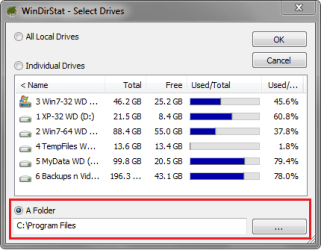
Run WinDirStat for the C:\Program Files folder and see what is using so much space.

WinDSP01.PNG
 

My Computer My Computer

At a glance

Multi-Boot W7_Pro_x64 W8.1_Pro_x64 W10_Pro_x6...AMD Athlon II x4 6206GB GSkill DDR2 800AMD 4670 GPU + AMD 4200 IGP
Computer type
PC/Desktop
Computer Manufacturer/Model Number
home built
OS
Multi-Boot W7_Pro_x64 W8.1_Pro_x64 W10_Pro_x64 +Linux_VMs +Chromium_VM
CPU
AMD Athlon II x4 620
Motherboard
Gigabyte GA-MA785G-UD3H
Memory
6GB GSkill DDR2 800
Graphics Card(s)
AMD 4670 GPU + AMD 4200 IGP
Sound Card
on board Realtek ALC889A
Monitor(s) Displays
RCA 40" LCD TV, Insignia 32" LCD TV, HP 15" LCD monitor
Screen Resolution
1680 x 1050
Hard Drives
OCZ Vertex 3 120GB,
Samsung F3 1TB (3),
Several others - WD, Seagate, Hitachi, ...
PSU
Corsair 500 W
Case
Rosewill mid tower
Cooling
CM 90mm rifle
Keyboard
Gyration wireless, Logitech wireless, Dell USB wired
Mouse
Gyration wireless, Logitech wireless, V7 USB wired
Internet Speed
Spectrum - 100Mbps D / 10Mbps U
Antivirus
Avast, MBAM3, EMET, WinPatrol
Browser
Pale Moon, Firefox, IE
Other Info
2 multi-boot PC's
Mainly HTPC/Office/Gen purpose (no gaming).
Trendnet USB KVM.
LG DVD burner/Blue Ray Player.
Tray system for removable SATA backup drives.

Not currently OCd, under-volted.
I use Hybrid sleep, rarely re-boot or shutdown.

Hauppauge HD-PVR, Avermedia PCIe TV Tuner, Hauppauge PCI TV Tuner.
Yes, like I've said. I've done that and have uninstalled what I dont want. But over time my space will just go back down even though I dont install anything big. My Hard drive is 465GB and it should have at least around 50GB because it doesn't all add up looking at WinDirStat.
 

My Computer My Computer

At a glance

Windows 7 64-bit16GBATI Radeon 6950
Computer type
PC/Desktop
Computer Manufacturer/Model Number
Custom Built
OS
Windows 7 64-bit
Memory
16GB
Graphics Card(s)
ATI Radeon 6950
Monitor(s) Displays
1
Screen Resolution
1920x1080
Hard Drives
2
Case
Antec
Cooling
Fans
Browser
Firefox
Yes, like I've said. I've done that and have uninstalled what I dont want. But over time my space will just go back down even though I dont install anything big. My Hard drive is 465GB and it should have at least around 50GB because it doesn't all add up looking at WinDirStat.

I am sure you know this, but what is inside the Program Files folder when you expand it? Do you have an additional backup program that runs at a scheduled time?

HTH
 

My Computer My Computer

At a glance

Windows 7 Professional x64Intel i5 quad processor16 GBRadeon HD 5770
Computer type
PC/Desktop
Computer Manufacturer/Model Number
Custom Built
OS
Windows 7 Professional x64
CPU
Intel i5 quad processor
Motherboard
DP67BG
Memory
16 GB
Graphics Card(s)
Radeon HD 5770
Sound Card
Realtek High Definition Audio
Monitor(s) Displays
Samsung SyncMaster
Screen Resolution
1920X1080
Hard Drives
WD 2TB (SATA Internal)
WD 1TB (USB External)
PSU
Corsair GS800
Case
Tower (Generic)
Cooling
3 Internal Fans
Keyboard
MS Wireless
Mouse
MS Optical Wired
Internet Speed
54 mbps
Antivirus
Emsisoft
Browser
IE-Version 9, Palemoon-Version 24.2.0
^^

+1

Expand and run Windrstat on your program files folder within C drive & post the screenshot here.
 

My Computer My Computer

At a glance

Windows 8 Prointel i3 2.40 Ghz6 GB RAMIntegrated Intel HD
Computer Manufacturer/Model Number
DELL
OS
Windows 8 Pro
CPU
intel i3 2.40 Ghz
Motherboard
DELL inc
Memory
6 GB RAM
Graphics Card(s)
Integrated Intel HD
Sound Card
Realtek high definition SRS surround sound
Screen Resolution
1366*768
Hard Drives
320 GB
Internet Speed
1Mbps
hardrive12389q123893289.png


Now I know what you people are going to say on how I should uninstall stuff on Steam, but I have done that time and time again, I've restored over 30GB and again, I lose it even though I dont install anything big.
 

My Computer My Computer

At a glance

Windows 7 64-bit16GBATI Radeon 6950
Computer type
PC/Desktop
Computer Manufacturer/Model Number
Custom Built
OS
Windows 7 64-bit
Memory
16GB
Graphics Card(s)
ATI Radeon 6950
Monitor(s) Displays
1
Screen Resolution
1920x1080
Hard Drives
2
Case
Antec
Cooling
Fans
Browser
Firefox
276GB for Steam, sounds like that is where the space is going? Must be one or more of the Steam games that is eating up the space.
 

My Computer My Computer

At a glance

Windows 10 Pro X64Intel Quad Core i7-4770 @ 3.4Ghz16.0GB PC3-12800 DDR3 SDRAM 1600 MHzIntel Integrated HD Graphics
Computer type
PC/Desktop
Computer Manufacturer/Model Number
Lenovo IdeaCenter 450
OS
Windows 10 Pro X64
CPU
Intel Quad Core i7-4770 @ 3.4Ghz
Memory
16.0GB PC3-12800 DDR3 SDRAM 1600 MHz
Graphics Card(s)
Intel Integrated HD Graphics
Sound Card
Realtek HD Audio
Monitor(s) Displays
HP 22" LCD
Screen Resolution
1680 x 1050
Hard Drives
250GB Samsung EVO SATA-3 SSD
2TB Seagate ST2000DM001 SATA-2
1.5TB Seagate ST3150041AS SATA
Keyboard
Dell USB
Mouse
Lenovo USB
Internet Speed
Cable via Road Runner 3MB Upload, 30MB Download
Antivirus
Windows Defender, MBAM Pro, MBAE
Browser
Seamonkey
Other Info
UEFI/GPT
PLDS DVD-RW DH16AERSH
276GB for Steam, sounds like that is where the space is going? Must be one or more of the Steam games that is eating up the space.

The thing is though, I don't install anything at all that would eat up 30GB+ now there may be some big 200mb updates or something like that but huge updates dont happen THAT often...
 

My Computer My Computer

At a glance

Windows 7 64-bit16GBATI Radeon 6950
Computer type
PC/Desktop
Computer Manufacturer/Model Number
Custom Built
OS
Windows 7 64-bit
Memory
16GB
Graphics Card(s)
ATI Radeon 6950
Monitor(s) Displays
1
Screen Resolution
1920x1080
Hard Drives
2
Case
Antec
Cooling
Fans
Browser
Firefox
276GB for Steam, sounds like that is where the space is going? Must be one or more of the Steam games that is eating up the space.

Sounds like a very reasonable explanation, as well as logical.
 

My Computer My Computer

At a glance

Windows 7 Professional x64Intel i5 quad processor16 GBRadeon HD 5770
Computer type
PC/Desktop
Computer Manufacturer/Model Number
Custom Built
OS
Windows 7 Professional x64
CPU
Intel i5 quad processor
Motherboard
DP67BG
Memory
16 GB
Graphics Card(s)
Radeon HD 5770
Sound Card
Realtek High Definition Audio
Monitor(s) Displays
Samsung SyncMaster
Screen Resolution
1920X1080
Hard Drives
WD 2TB (SATA Internal)
WD 1TB (USB External)
PSU
Corsair GS800
Case
Tower (Generic)
Cooling
3 Internal Fans
Keyboard
MS Wireless
Mouse
MS Optical Wired
Internet Speed
54 mbps
Antivirus
Emsisoft
Browser
IE-Version 9, Palemoon-Version 24.2.0
How many games in Steam are updating?
You may have some other things updating a lot too, but you've not followed the request to post a screen shot of windirstat. :huh:
 

My Computer My Computer

At a glance

Windows 7 Ultimate X64 SP1Intel i5-2550K, Differing ~4.4-4.8GHz No buil...16GB G.Skill Sniper 1866MHz @ 2133MHz 2x8GBASUS GTX650TIB-DC2OC-2GD5, (650TI Boost)
Computer type
PC/Desktop
Computer Manufacturer/Model Number
Home Built Desktop By DataTech
OS
Windows 7 Ultimate X64 SP1
CPU
Intel i5-2550K, Differing ~4.4-4.8GHz No built in GPU
Motherboard
ASUS P8Z68-V PRO/GEN3
Memory
16GB G.Skill Sniper 1866MHz @ 2133MHz 2x8GB
Graphics Card(s)
ASUS GTX650TIB-DC2OC-2GD5, (650TI Boost)
Sound Card
Onboard Realtek 5-1
Monitor(s) Displays
Samsung P2570HD
Screen Resolution
1920x1080
Hard Drives
Samsung 840 Pro 256GB SSD for OS, 500GB Seagate Constellation (Enterprise drive) for Data
PSU
Corsair HX650W
Case
Inwin Dragon Rider
Cooling
Hyper 212 EVO w/two Noctua fans, push-pull, @1300 RPM
Keyboard
E-Z Eyes, bright yellow keys with large characters
Mouse
steelseries SENSEI Laser Pro Gaming
Internet Speed
48-51Mbs Mbs down, 11 Mbs up Xfinity Cable
Antivirus
Norton Internet Security 2013
Browser
IE 10, Opera, Pale Moon if needed
Other Info
4 case fans, LG BluRay-RE, ASUS DVD-RW, Mr. Fusion power supply, 1.21 gigawatts.
How many games in Steam are updating?
You may have some other things updating a lot too, but you've not followed the request to post a screen shot of windirstat. :huh:

I believe post #11 has a Windirstat image. I don't use that particular program and prefer Folder Size so I am not sure which program he used. However, he didn't post an expanded File Folder Directory.
 

My Computer My Computer

At a glance

Windows 7 Professional x64Intel i5 quad processor16 GBRadeon HD 5770
Computer type
PC/Desktop
Computer Manufacturer/Model Number
Custom Built
OS
Windows 7 Professional x64
CPU
Intel i5 quad processor
Motherboard
DP67BG
Memory
16 GB
Graphics Card(s)
Radeon HD 5770
Sound Card
Realtek High Definition Audio
Monitor(s) Displays
Samsung SyncMaster
Screen Resolution
1920X1080
Hard Drives
WD 2TB (SATA Internal)
WD 1TB (USB External)
PSU
Corsair GS800
Case
Tower (Generic)
Cooling
3 Internal Fans
Keyboard
MS Wireless
Mouse
MS Optical Wired
Internet Speed
54 mbps
Antivirus
Emsisoft
Browser
IE-Version 9, Palemoon-Version 24.2.0
The folders aren't exactly huge below it but ok, here you go.

myharddriveprogramfiles.png


So look, it cant be Steam taking it up completely because its not like it has 30GB updates on games, it has to be windows doing something.
 

My Computer My Computer

At a glance

Windows 7 64-bit16GBATI Radeon 6950
Computer type
PC/Desktop
Computer Manufacturer/Model Number
Custom Built
OS
Windows 7 64-bit
Memory
16GB
Graphics Card(s)
ATI Radeon 6950
Monitor(s) Displays
1
Screen Resolution
1920x1080
Hard Drives
2
Case
Antec
Cooling
Fans
Browser
Firefox
Now that we know the Steam folder is what is using the space we need to see what is using so much space in the Steam folder.

Click the little "+" sign to the left of the Steam folder to expand the folder.
Post back a screen print with that expanded.

Right now we're trying to drill-down to find what is using so much space in the Steam folder...

if you see one folder in there using most of the space, click that "+" to expand...and post the image.
 

My Computer My Computer

At a glance

Multi-Boot W7_Pro_x64 W8.1_Pro_x64 W10_Pro_x6...AMD Athlon II x4 6206GB GSkill DDR2 800AMD 4670 GPU + AMD 4200 IGP
Computer type
PC/Desktop
Computer Manufacturer/Model Number
home built
OS
Multi-Boot W7_Pro_x64 W8.1_Pro_x64 W10_Pro_x64 +Linux_VMs +Chromium_VM
CPU
AMD Athlon II x4 620
Motherboard
Gigabyte GA-MA785G-UD3H
Memory
6GB GSkill DDR2 800
Graphics Card(s)
AMD 4670 GPU + AMD 4200 IGP
Sound Card
on board Realtek ALC889A
Monitor(s) Displays
RCA 40" LCD TV, Insignia 32" LCD TV, HP 15" LCD monitor
Screen Resolution
1680 x 1050
Hard Drives
OCZ Vertex 3 120GB,
Samsung F3 1TB (3),
Several others - WD, Seagate, Hitachi, ...
PSU
Corsair 500 W
Case
Rosewill mid tower
Cooling
CM 90mm rifle
Keyboard
Gyration wireless, Logitech wireless, Dell USB wired
Mouse
Gyration wireless, Logitech wireless, V7 USB wired
Internet Speed
Spectrum - 100Mbps D / 10Mbps U
Antivirus
Avast, MBAM3, EMET, WinPatrol
Browser
Pale Moon, Firefox, IE
Other Info
2 multi-boot PC's
Mainly HTPC/Office/Gen purpose (no gaming).
Trendnet USB KVM.
LG DVD burner/Blue Ray Player.
Tray system for removable SATA backup drives.

Not currently OCd, under-volted.
I use Hybrid sleep, rarely re-boot or shutdown.

Hauppauge HD-PVR, Avermedia PCIe TV Tuner, Hauppauge PCI TV Tuner.
harddrivesteam.png
 

My Computer My Computer

At a glance

Windows 7 64-bit16GBATI Radeon 6950
Computer type
PC/Desktop
Computer Manufacturer/Model Number
Custom Built
OS
Windows 7 64-bit
Memory
16GB
Graphics Card(s)
ATI Radeon 6950
Monitor(s) Displays
1
Screen Resolution
1920x1080
Hard Drives
2
Case
Antec
Cooling
Fans
Browser
Firefox
I think you're just trying to store more data than your HD is capable of.
That means you need to get a bigger HD or another HD for Steam Games.
You could remove 3 games and recover over 50GB of space for a quick fix.

Looking back to post #5 it shows two 465 GB HD's.
D is labeled "Games and Tools".
C is labeled "Hard Drive C".

Where are you installing Steam Games to, "C:" or "D:" ?

How many HD's and what size do you have in this PC?
Can you post a maximized screen print of Disk Management?
 

My Computer My Computer

At a glance

Multi-Boot W7_Pro_x64 W8.1_Pro_x64 W10_Pro_x6...AMD Athlon II x4 6206GB GSkill DDR2 800AMD 4670 GPU + AMD 4200 IGP
Computer type
PC/Desktop
Computer Manufacturer/Model Number
home built
OS
Multi-Boot W7_Pro_x64 W8.1_Pro_x64 W10_Pro_x64 +Linux_VMs +Chromium_VM
CPU
AMD Athlon II x4 620
Motherboard
Gigabyte GA-MA785G-UD3H
Memory
6GB GSkill DDR2 800
Graphics Card(s)
AMD 4670 GPU + AMD 4200 IGP
Sound Card
on board Realtek ALC889A
Monitor(s) Displays
RCA 40" LCD TV, Insignia 32" LCD TV, HP 15" LCD monitor
Screen Resolution
1680 x 1050
Hard Drives
OCZ Vertex 3 120GB,
Samsung F3 1TB (3),
Several others - WD, Seagate, Hitachi, ...
PSU
Corsair 500 W
Case
Rosewill mid tower
Cooling
CM 90mm rifle
Keyboard
Gyration wireless, Logitech wireless, Dell USB wired
Mouse
Gyration wireless, Logitech wireless, V7 USB wired
Internet Speed
Spectrum - 100Mbps D / 10Mbps U
Antivirus
Avast, MBAM3, EMET, WinPatrol
Browser
Pale Moon, Firefox, IE
Other Info
2 multi-boot PC's
Mainly HTPC/Office/Gen purpose (no gaming).
Trendnet USB KVM.
LG DVD burner/Blue Ray Player.
Tray system for removable SATA backup drives.

Not currently OCd, under-volted.
I use Hybrid sleep, rarely re-boot or shutdown.

Hauppauge HD-PVR, Avermedia PCIe TV Tuner, Hauppauge PCI TV Tuner.
Back
Top