I killed windows search

zapwow

New member
Local time
2:47 PM
Messages
2
Somehow I have managed to remove all search functionality from windows 7 professional 64bit.
Does anyone know how to get it back?

  • Search box no longer appears in start menu
  • search box no longer appears by the address bar in explorer windows
  • F3 or Ctrl-F in explorer no longer begins a search
  • Windows Search no longer appears in the services list.
Please help!
 

My Computer

OS
Windows 7 Professional 64-bit
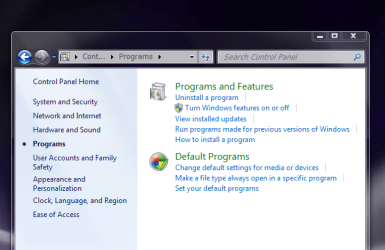
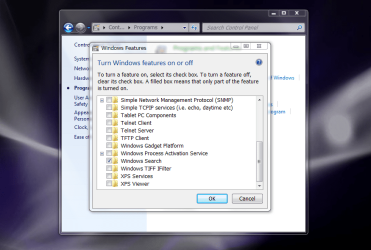
Go to Programs & Features in Control Panel and put a check in Windows Search
 

My Computer

Computer Manufacturer/Model Number
HP M9077c
OS
Windows 7 Home Premium 64bit
CPU
Intel(R)Core(TM)2 quad [email protected] 2.39GHz
Motherboard
ASUSeK
Memory
6GB DDR2 6400
Graphics Card(s)
GeForce 8500/512MB
Sound Card
Realtek High Def Audio
Monitor(s) Displays
HP w2408 LCD 24" widescreen
Screen Resolution
1920x1200
Cooling
6 pack of Bud
Keyboard
MS wireless Inteli
Mouse
MS wireless Inteli

My Computer

Computer type
PC/Desktop
Computer Manufacturer/Model Number
Dell XPS 420
OS
Windows 10, Home Clean Install
CPU
Intel Core2 processsor Q8200(2.33Ghz 1333FSB) Quad Core Tech
Motherboard
Dell
Memory
6 gb
Graphics Card(s)
ATI Radeon 256MB HD3650
Sound Card
Intergrated 7.1 Channel Audio
Monitor(s) Displays
Dell SP2009W 20"
Hard Drives
640 GB Serial ATA Hard drive
Cooling
Fan
Keyboard
Dell USB Keyboard
Mouse
Dell Premium Optical USB
Internet Speed
DSL 2.85
Windows Search

Somehow I have managed to remove all search functionality from windows 7 professional 64bit.
Does anyone know how to get it back?

  • Search box no longer appears in start menu
  • search box no longer appears by the address bar in explorer windows
  • F3 or Ctrl-F in explorer no longer begins a search
  • Windows Search no longer appears in the services list.
Please help!
Open Control panel/programs and features then "Turn windows features on and off"
scroll to bottom of window and tick Windows search,that should do it
 

Attachments

  • Capture.PNG
    Capture.PNG
    32.9 KB · Views: 1
  • Capture2.PNG
    Capture2.PNG
    81.5 KB · Views: 6

My Computer

Computer type
PC/Desktop
OS
Windows 7 X64 Bit
CPU
Intel(R) Core(TM)i7-4771 CPU @ 3.50GH
Motherboard
Asus Sabertooth Z87
Memory
Corsair 4x8 Vengeance (32GB)
Graphics Card(s)
NVIDIA GeForce GTX780
Monitor(s) Displays
LG
Screen Resolution
1920x1080
PSU
Corsair CX750
Case
Corsair 200 series
Cooling
H80i Liquid Cooler
Keyboard
Microsoft
Mouse
Microsoft
Internet Speed
good times-500-850 kbs bad times-50-100 kbs
Hello,

Uncheck the Windows search option and reboot the System. Then go back in there and check it again. If that didn't works check the link which Rich provided.

- Captain
 

My Computer

Computer Manufacturer/Model Number
Samsung NP550P5C-S02IN
OS
Windows 7 Ultimate - 64-bit | Windows 8 Pro - 64-bit
CPU
Intel® Core™ i7 Processor 3,610QM (2.30Hz, 6MB L3 Cach
Memory
8 GB
Graphics Card(s)
NVIDIA® GeForce® GT 650M 2GB Graphics, Optimus™ techno
Sound Card
SoundAlive™ JBL 3 Speakers (With sub-Woofer)
Monitor(s) Displays
39.62cm (15.6) SuperBright 300nit HD+ LED Display
Screen Resolution
1,600 x 900, Anti-Reflective
Hard Drives
1TB S-ATA II Hard Drive (5,400RPM)
Wow, I could have sworn I tried that already and saw that it was checked. Ohwell, thanks for the solution, it worked.
 

My Computer

OS
Windows 7 Professional 64-bit
Wow, I could have sworn I tried that already and saw that it was checked. Ohwell, thanks for the solution, it worked.

Your Welcome !
 

My Computer

Computer Manufacturer/Model Number
Samsung NP550P5C-S02IN
OS
Windows 7 Ultimate - 64-bit | Windows 8 Pro - 64-bit
CPU
Intel® Core™ i7 Processor 3,610QM (2.30Hz, 6MB L3 Cach
Memory
8 GB
Graphics Card(s)
NVIDIA® GeForce® GT 650M 2GB Graphics, Optimus™ techno
Sound Card
SoundAlive™ JBL 3 Speakers (With sub-Woofer)
Monitor(s) Displays
39.62cm (15.6) SuperBright 300nit HD+ LED Display
Screen Resolution
1,600 x 900, Anti-Reflective
Hard Drives
1TB S-ATA II Hard Drive (5,400RPM)
Back
Top