I lost my Screen Resolution AND taskbar customize

r2dizzle

New member
Local time
9:42 PM
Messages
13
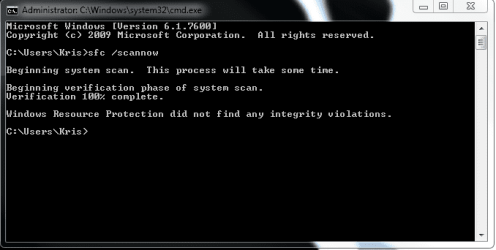
I am at a loss for words. Nothing has changed (video card drivers). 1 day it was there. the next it stopped working. No windows updates happened between the time of working and not. If anyone has an idea of what internally altered itself please feel free to add useful comments. It's not the end of the world, but this shouldn't be messing up. And i can't use the customize taskbar thing anymore. I can't do system restore because they deleted the restore point that would have fixed this. and http://www.sevenforums.com/tutorials/1538-sfc-scannow-command-system-file-checker.html doesn't work.

HELP PLEASE!
 

Attachments

  • 1.2.png
    1.2.png
    622.5 KB · Views: 25
  • 2.1.png
    2.1.png
    615.9 KB · Views: 20
  • 1.png
    1.png
    190.3 KB · Views: 19
  • 2.png
    2.png
    193.8 KB · Views: 14
  • wtf.png
    wtf.png
    9 KB · Views: 14

My Computer My Computer

Computer Manufacturer/Model Number
me
OS
Windows 7 Pro
CPU
P4 3.0 Ghz 512kb
Motherboard
Abit Ic7-G
Memory
3 gbs
Graphics Card(s)
ati radon hd 3850 512 mb ddr3 agp
Sound Card
on-board
Monitor(s) Displays
viewsonic 20"
Hard Drives
2 80gbs fuji
1 120 raptor
2 300gb wd
PSU
600watts of antec power
Case
mid tower with a window
Cooling
Air
Hi r2dizzle,

Have you access to the Internet? If so, I'd strongly recommend running a scan with Malwarebytes' Anti-Malware. I believe you've fallen victim to a malicious attack. If you can access the Internet normally, follow the below instructions.

I'd like to ask you to download and install an application known as Malwarebytes' Anti-Malware, as it will be a necessary tool for cleaning your system.
Please execute the following instructions:

  • Double-click the 'mbam-setup.exe' file to install this application.
  • Ensure a check mark is placed in the radio box next to 'Update Malwarebytes' Anti-Malware' and please also make sure that there is a check mark in the radio box next to 'Launch Malwarebytes' Anti-Malware'
  • Click 'Finish'
    • Note: If an update is found, it will download and install the latest version. Please do not interrupt this process.
  • Once the program has loaded, please ensure a check mark is placed in the radio box next to 'Perform Full Scan' (not Perform Quick Scan) and proceed by clicking on 'Scan'.
    • Note: The scan may take some time, so please be patient and wait for it to finish. Please stop all current downloads while your scan is in progress, as this may corrupt the results.
  • When the scan is complete, click 'OK' and then click 'Show Results' to view the results.
  • Make sure that everything is checked, and proceed by clicking 'Remove Selected'
  • Once disinfection is completed, a log will open in Notepad and you may be prompted to restart your machine. If you are asked to restart, please do so.
    • Note: The log is automatically saved by Malwarebytes' Anti-Malware and can be viewed by clicking on the 'Logs' tab in the main interface.
If you cannot access the Internet normally, reboot your computer into Safe Mode With Networking and do the above instructions. To do this, restart your computer and when it's booting up, tap F8. Select Safe Mode With Networking from the Boot Menu.

After the scan has completed, post the log here.

Thanks,
Harvey Meale
 

My Computer My Computer

Computer Manufacturer/Model Number
Dell Inspiron 1545
OS
Windows 7 Home Premium 32-bit, BackTrack 4, Ubuntu
Failed to fix my problem.
Malwarebytes' Anti-Malware 1.46
Malwarebytes

Database version: 4460

Windows 6.1.7600
Internet Explorer 8.0.7600.16385

8/21/2010 8:02:46 PM
mbam-log-2010-08-21 (20-02-46).txt

Scan type: Full scan (C:\|D:\|E:\|F:\|)
Objects scanned: 291672
Time elapsed: 42 minute(s), 1 second(s)

Memory Processes Infected: 0
Memory Modules Infected: 0
Registry Keys Infected: 0
Registry Values Infected: 1
Registry Data Items Infected: 0
Folders Infected: 0
Files Infected: 2

Memory Processes Infected:
(No malicious items detected)

Memory Modules Infected:
(No malicious items detected)

Registry Keys Infected:
(No malicious items detected)

Registry Values Infected:
HKEY_CURRENT_USER\SOFTWARE\Microsoft\Windows\CurrentVersion\Policies\Explorer\DisallowCpl\1 (Malware.Trace) -> No action taken.

Registry Data Items Infected:
(No malicious items detected)

Folders Infected:
(No malicious items detected)

Files Infected:
F:\System Volume Information\_restore{7FF5EE0E-DBBA-499C-8C69-11199328228A}\RP11\A0001182.exe (Trojan.Agent) -> No action taken.
F:\System Volume Information\_restore{7FF5EE0E-DBBA-499C-8C69-11199328228A}\RP11\A0001183.exe (Hacktool.Gen) -> No action taken.
 

My Computer My Computer

Computer Manufacturer/Model Number
me
OS
Windows 7 Pro
CPU
P4 3.0 Ghz 512kb
Motherboard
Abit Ic7-G
Memory
3 gbs
Graphics Card(s)
ati radon hd 3850 512 mb ddr3 agp
Sound Card
on-board
Monitor(s) Displays
viewsonic 20"
Hard Drives
2 80gbs fuji
1 120 raptor
2 300gb wd
PSU
600watts of antec power
Case
mid tower with a window
Cooling
Air
Hi r2dizzle,

Can you please explain all symptoms of this infection in as much detail as possible?

Thanks,
Harvey Meale
 

My Computer My Computer

Computer Manufacturer/Model Number
Dell Inspiron 1545
OS
Windows 7 Home Premium 32-bit, BackTrack 4, Ubuntu
what infection? i had access to it before. routine didn't change. i just lost the ability....
 

My Computer My Computer

Computer Manufacturer/Model Number
me
OS
Windows 7 Pro
CPU
P4 3.0 Ghz 512kb
Motherboard
Abit Ic7-G
Memory
3 gbs
Graphics Card(s)
ati radon hd 3850 512 mb ddr3 agp
Sound Card
on-board
Monitor(s) Displays
viewsonic 20"
Hard Drives
2 80gbs fuji
1 120 raptor
2 300gb wd
PSU
600watts of antec power
Case
mid tower with a window
Cooling
Air
Tell me about the loss of ability. Your original post didn't really say what was wrong.
 

My Computer My Computer

Computer Manufacturer/Model Number
Dell Inspiron 1545
OS
Windows 7 Home Premium 32-bit, BackTrack 4, Ubuntu
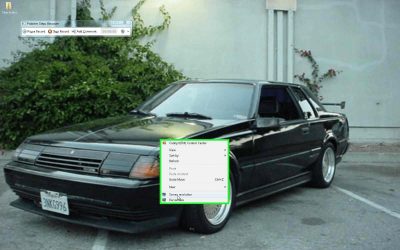
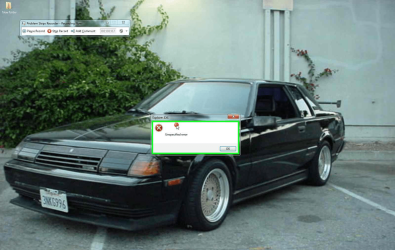
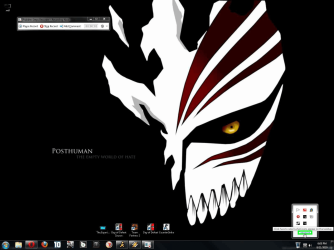
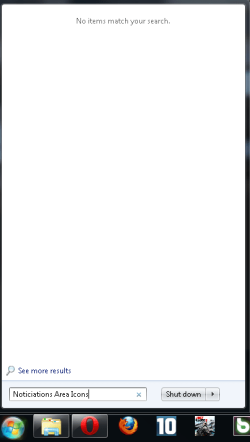
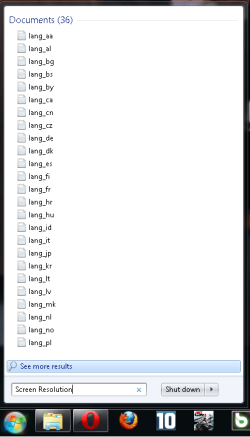
no screen resolution option, nor lower right taskbar customize access. There is pictures that speaks 1000 words more than i could.
 

My Computer My Computer

Computer Manufacturer/Model Number
me
OS
Windows 7 Pro
CPU
P4 3.0 Ghz 512kb
Motherboard
Abit Ic7-G
Memory
3 gbs
Graphics Card(s)
ati radon hd 3850 512 mb ddr3 agp
Sound Card
on-board
Monitor(s) Displays
viewsonic 20"
Hard Drives
2 80gbs fuji
1 120 raptor
2 300gb wd
PSU
600watts of antec power
Case
mid tower with a window
Cooling
Air
When i right click > screen resolution> error. The lower right hand corner the customize option doesn't work.
 

My Computer My Computer

Computer Manufacturer/Model Number
me
OS
Windows 7 Pro
CPU
P4 3.0 Ghz 512kb
Motherboard
Abit Ic7-G
Memory
3 gbs
Graphics Card(s)
ati radon hd 3850 512 mb ddr3 agp
Sound Card
on-board
Monitor(s) Displays
viewsonic 20"
Hard Drives
2 80gbs fuji
1 120 raptor
2 300gb wd
PSU
600watts of antec power
Case
mid tower with a window
Cooling
Air
Hi r2dizzle,

Are these the only obvious differences?

We'll give restarting Explorer a go. Open the Task Manager (Ctrl + Shift + Esc) and then navigate to the 'Processes' tab. Right click on 'Explorer.exe' and select 'End Process'. Then, in Task Manager, click on 'File' then 'New Task (Run...)' and then type in 'explorer.exe'. See if anything's changed.

Thanks,
Harvey Meale
 

My Computer My Computer

Computer Manufacturer/Model Number
Dell Inspiron 1545
OS
Windows 7 Home Premium 32-bit, BackTrack 4, Ubuntu
failed. next option?
 

My Computer My Computer

Computer Manufacturer/Model Number
me
OS
Windows 7 Pro
CPU
P4 3.0 Ghz 512kb
Motherboard
Abit Ic7-G
Memory
3 gbs
Graphics Card(s)
ati radon hd 3850 512 mb ddr3 agp
Sound Card
on-board
Monitor(s) Displays
viewsonic 20"
Hard Drives
2 80gbs fuji
1 120 raptor
2 300gb wd
PSU
600watts of antec power
Case
mid tower with a window
Cooling
Air
Hi r2dizzle,

Can you think of anything that may have occurred between the time that it was working and now?

Thanks,
Harvey Meale
 

My Computer My Computer

Computer Manufacturer/Model Number
Dell Inspiron 1545
OS
Windows 7 Home Premium 32-bit, BackTrack 4, Ubuntu
None... Besides sometimes having the monitor unplugged when i shut my pc off. I am not a newbie with pc's FYI.
 

My Computer My Computer

Computer Manufacturer/Model Number
me
OS
Windows 7 Pro
CPU
P4 3.0 Ghz 512kb
Motherboard
Abit Ic7-G
Memory
3 gbs
Graphics Card(s)
ati radon hd 3850 512 mb ddr3 agp
Sound Card
on-board
Monitor(s) Displays
viewsonic 20"
Hard Drives
2 80gbs fuji
1 120 raptor
2 300gb wd
PSU
600watts of antec power
Case
mid tower with a window
Cooling
Air
It has to deal with the way i shut down my computer, and if my second monitor is plugged in or not. that's the only thing i could think of. Sometimes i wouldn't have the second monitor plugged with power. Or have the vga cord plugged into the monitor when i turn on or turn off the pc. Get me?
 

My Computer My Computer

Computer Manufacturer/Model Number
me
OS
Windows 7 Pro
CPU
P4 3.0 Ghz 512kb
Motherboard
Abit Ic7-G
Memory
3 gbs
Graphics Card(s)
ati radon hd 3850 512 mb ddr3 agp
Sound Card
on-board
Monitor(s) Displays
viewsonic 20"
Hard Drives
2 80gbs fuji
1 120 raptor
2 300gb wd
PSU
600watts of antec power
Case
mid tower with a window
Cooling
Air
Hi r2dizzle,

I see. Well, even though there's no shortcut icon to Screen Resolution, you should still be able to access it. In the 'Start Menu', type in 'Screen Resolution' and hit 'Enter'. And you should be able to customize what appears in your taskbar by doing the same except typing in 'Noticiations Area Icons'. Let me know if you can access these areas by doing this. Perhaps you can find a fix that way.

Thanks,
Harvey Meale
 

My Computer My Computer

Computer Manufacturer/Model Number
Dell Inspiron 1545
OS
Windows 7 Home Premium 32-bit, BackTrack 4, Ubuntu
Do you have any programs that can change the background and theme of windows? If so you can get the resolution from there and change it it sucks to go around the issue but beats trying to find a way to fix it
 

My Computer My Computer

Computer type
PC/Desktop
Computer Manufacturer/Model Number
CoreI7-6700K MrFingerIII Special Builds
OS
Windows 10 Home Premium 64bit sp1
CPU
Intel I7-6700K @ 4.6 Ghz 1.344 volts everyday OC
Motherboard
Asrock Fatality K6 Z170 Socket 1151
Memory
32GB G-Skill TridentZ 3200mhz 16-18-18-38 DDR4
Graphics Card(s)
Sli Gigabyte Windforce GTX 980 G1
Sound Card
AC97 Creative Rage Tactic 3D Headphones Bluetooth
Monitor(s) Displays
27" Asus ROG Swift PG278Q G-Sync 48" Vizio Smart HD TV
Screen Resolution
2560x1440p 27"- 48" Currently Gaming at 2560x1440p Res 2K
Hard Drives
250GB Samsung Evo840SSD Seagate baracuda 500 GB WD Mybook 500Gb 1TB Seagate Barracuda
PSU
HX1050w Corsair Silver 80plus certified crosfire/sli
Case
Enthod Pro Full Tower
Cooling
Corsair H110i GT 280 mm High Performance WaterBlock
Keyboard
Logitech wireless keyboard
Mouse
Logitech wireless mouse
Internet Speed
Cox Cable 100+ mb
Antivirus
WebRoot Spysweeper with Antivirus
Browser
IE-10, Chrome, Opera
Other Info
My Other Rig is a AMD FX8320E @4.6Ghz 16GB Ballistic Sport Ram
Mobo Asrock Fatality 990FX 120GB OCZ SSD 1TB Seagate Barracuda Corsair H75 Cooling PSU Corsair CX750
GPU GTX Gigabyte 970G1
mmmmmmmm so what you think?
 

Attachments

  • NAI.png
    NAI.png
    11 KB · Views: 9
  • SR.png
    SR.png
    14 KB · Views: 14

My Computer My Computer

Computer Manufacturer/Model Number
me
OS
Windows 7 Pro
CPU
P4 3.0 Ghz 512kb
Motherboard
Abit Ic7-G
Memory
3 gbs
Graphics Card(s)
ati radon hd 3850 512 mb ddr3 agp
Sound Card
on-board
Monitor(s) Displays
viewsonic 20"
Hard Drives
2 80gbs fuji
1 120 raptor
2 300gb wd
PSU
600watts of antec power
Case
mid tower with a window
Cooling
Air
Hi r2dizzle,

It seems that something's corrupted these files. Go into Control Panel and then into Personalization and see if you can get into the 'Customize Icons On The Taskbar' section.

Thanks,
Harvey Meale
 

My Computer My Computer

Computer Manufacturer/Model Number
Dell Inspiron 1545
OS
Windows 7 Home Premium 32-bit, BackTrack 4, Ubuntu
i figured it out. all good .
 

My Computer My Computer

Computer Manufacturer/Model Number
me
OS
Windows 7 Pro
CPU
P4 3.0 Ghz 512kb
Motherboard
Abit Ic7-G
Memory
3 gbs
Graphics Card(s)
ati radon hd 3850 512 mb ddr3 agp
Sound Card
on-board
Monitor(s) Displays
viewsonic 20"
Hard Drives
2 80gbs fuji
1 120 raptor
2 300gb wd
PSU
600watts of antec power
Case
mid tower with a window
Cooling
Air
Okay. Let us know if problems persist.
 

My Computer My Computer

Computer Manufacturer/Model Number
Dell Inspiron 1545
OS
Windows 7 Home Premium 32-bit, BackTrack 4, Ubuntu

My Computer My Computer

Computer type
PC/Desktop
Computer Manufacturer/Model Number
Self Built
OS
Win 10 Pro x64
CPU
Intel I5-2500K @3.3GHz
Motherboard
Asrock P67 Extreme4
Memory
16GB G.Skill Ripjaws X (4x4GB)
Graphics Card(s)
EVGA GeForce 750 Ti SC 2GB
Sound Card
ASUS Xonar DG 5.1 Channels 24-bit 96KHz PCI Interface Sound
Monitor(s) Displays
auria eq2367
Screen Resolution
1920 x 1080
Hard Drives
250GB Samsung 850 EVO SSD
1TB WD Blue
1TB Hitachi
PSU
SeaSonic X 650W 80 Plus Gold
Case
Corsair Obsidian 750D
Cooling
Corsair H60, Three 140mm case fans
Keyboard
Logitech Wireless Keyboard K520
Mouse
Logitech Wireless Mouse M310
Internet Speed
Wave Broadband ~ 100 dn 5 up
Antivirus
Windows Defender, Malwarebytes Premium
Browser
Edge, IE11, Chrome
Other Info
Laptop specs: HP g7-1365dx /
CPU: AMD A6-3420M APU with Radeon(tm) HD Graphics /
RAM: Crucial 8Gb (2x4Gb) /
SSD: Crucial M4-CT128M4SSD2 ATA Device/ FW 000F /
GFX: AMD Radeon HD 6520G /
OS: Windows 10 Pro x64
Back
Top