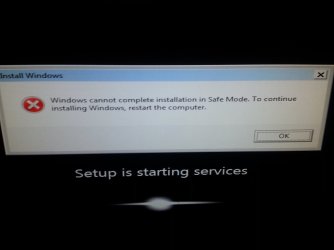
I lost power during a windows restore and cannot even boot windows now

Fengo

New member
Local time
7:10 PM
Messages
3
I was having g trouble with peraiatant viruses causing major slow down so I opted to totally restore the system. I chose the option to have a backup of my personal files be saved to disk C and that went smoothly. It took an hour or two to do the restore itself and another couple hours to get to 99% on the "updating system" step at which point it got stuck. I left it alone for almost 10 hours at that point when a storm caused the power to flicker out. Now when I turn the system on it goes to the black loading screens but has an error when it says "System is starting services" I don't know what to do or how to fix it so could someone please help!? I'm using an e-machines 7 home premium 64bit desktop. The el1306g-uw11p HDMI. Is there a way for me to restart the restore or something as I do lack a setup disk unfortunately..
 

My Computer My Computer

At a glance

Windows 7 home premium 64-bitand radeon HD 6310
Computer type
PC/Desktop
Computer Manufacturer/Model Number
e-machine
OS
Windows 7 home premium 64-bit
Graphics Card(s)
and radeon HD 6310
Hard Drives
500gb
Antivirus
avast and malwarebytea
Browser
chrome/Firefox/explorer

My Computer My Computer

At a glance

Windows 7 Ultimate 64-bit, Windows 8.1 64-bit...
Computer type
PC/Desktop
Computer Manufacturer/Model Number
Customs, Dell, Gateway, HP, Toshiba, Acer, ASUS
OS
Windows 7 Ultimate 64-bit, Windows 8.1 64-bit, Mac OS X 10.10, Linux Mint 17, Windows 10 Pro TP
Keyboard
Microsoft
Mouse
Microsoft
This didn't work. It starts normally, giving me an option to go to the boot menus or bios setup...None of the boot options work, I'm getting no prompt for f11 it always takes me back to the same screen followed by the same error before I can even use the computer
 

Attachments

  • 1411398383457.jpg
    1411398383457.jpg
    384.6 KB · Views: 2

My Computer My Computer

At a glance

Windows 7 home premium 64-bitand radeon HD 6310
Computer type
PC/Desktop
Computer Manufacturer/Model Number
e-machine
OS
Windows 7 home premium 64-bit
Graphics Card(s)
and radeon HD 6310
Hard Drives
500gb
Antivirus
avast and malwarebytea
Browser
chrome/Firefox/explorer
Sometimes you kinda have to take it on faith that pressing F11 will work even if not shown. The key is to do it at the proper time, I have done it while the F2 is showing.
 

My Computer My Computer

At a glance

Windows 7 Ultimate 64-bit, Windows 8.1 64-bit...
Computer type
PC/Desktop
Computer Manufacturer/Model Number
Customs, Dell, Gateway, HP, Toshiba, Acer, ASUS
OS
Windows 7 Ultimate 64-bit, Windows 8.1 64-bit, Mac OS X 10.10, Linux Mint 17, Windows 10 Pro TP
Keyboard
Microsoft
Mouse
Microsoft
This didn't work. It starts normally, giving me an option to go to the boot menus or bios setup...None of the boot options work, I'm getting no prompt for f11 it always takes me back to the same screen followed by the same error before I can even use the computer

I had this issue but it was because i was installing windows on a computer and I apparently had a non-working charger plugged into it and it died mid way.
I pressed the F11 key after about 5 seconds when i saw the screen you posted.(Before the Error window came up, obviously)

I dont know if it will help you but thats how i got passed it.
 

My Computer My Computer

At a glance

Windows 7 Home Premium
Computer type
Laptop
Computer Manufacturer/Model Number
HP G60-441US
OS
Windows 7 Home Premium
Browser
Chrome
I press f11 constantly and nothing is happening...however it seems this time I'm not getting an error message but it just stays on this screen constantly
 

My Computer My Computer

At a glance

Windows 7 home premium 64-bitand radeon HD 6310
Computer type
PC/Desktop
Computer Manufacturer/Model Number
e-machine
OS
Windows 7 home premium 64-bit
Graphics Card(s)
and radeon HD 6310
Hard Drives
500gb
Antivirus
avast and malwarebytea
Browser
chrome/Firefox/explorer
When you're PC boots up at first where you can change the BIOS, go to that menu, usually it is something like pressing the esc key almost immediately after booting up... Disable the automatic restart on system failure, save the changes and exit..
restart the computer and if you have an installation disc you can insert that and start in recover windows mode after selecting a language, etc...
this will not delete any of your info...
however what is the make and model of your PC BC there is usually a way around this on many brands...
 

My Computer My Computer

At a glance

Windows 7 Home Premium
Computer type
Laptop
Computer Manufacturer/Model Number
HP G60-441US
OS
Windows 7 Home Premium
Browser
Chrome
Back
Top