I Messed up

treadhead194

New member
Member
Local time
11:32 PM
Messages
31
I was doing some work on my hard drives when I noticed I lost my internet connection. I unplugged everything and shutdown my pc. When I restarted I found I couldn't boot to C. I received an error message something like "Master Boot Record Missing" or something like that. I tried to repair C with the Win7 DVD but it could not find any installation of Windows.
I installed what I thought to be Win7 64bit but it turned out I grabbed the wrong disk and installed the 32bit version. Windows was installed to disc 0 which was actually D drive and prior to installation Windows formatted D into two partitions, one called "System Reserved" and the other a primary partition. After installing I copied the "autoexec.bat" and the configsys.ini to C, this being the 32bit not the 64bit(any difference?)
After restarting the computer I get the Windows Boot Manager Screen giving me two choices of OS, Windows 7 or Windows 7 (home premium) recovered. The Win 7 (home premium) recovered is the one I want. If I boot to the Windows DVD and try a repair, The Win 7 Home Premium version, Windows goes through the motions and after it's finished and you read all it has done to repair the OS, the bottom line is that it says that Windows has booted successfully. How do I get rid of the 32bit version that was installed on D and realizing that the autoexec.bat and the configsys.ini are incorrect, is there any way I can fix my OS?. Yea, I screwed up but not having access to the internet for that time period really posed a problem.
 

My Computer

Computer Manufacturer/Model Number
Intel I7 860
OS
Windows 7 home premium 64bit
CPU
Intel I7 860
Motherboard
EVGA P55 200 Classified 3x SLI
Memory
16 gig Corsair Vengence
Graphics Card(s)
EVGA GTX 560 TI
Sound Card
Soundblaster X-FI
Monitor(s) Displays
Asus, Sony Bravia
Hard Drives
C; WD Velociraptor 300gig
D; Seagate, 500gig
E; WD 500gig
PSU
Kingwin ABT-1000MA1S
Case
Thermaltake Armor+
Cooling
Noctua NH-D14
Keyboard
MS 4000
Mouse
Logitech Trackman Wheel
Internet Speed
Insight BroadBand 20.0
Please post back a screenshot of your full Disk Management drive map with listings showing all columns, using the Snipping Tool in Start Menu.
 
OK, i'm a dummy, how do you map a hard drive in Win7. I can only find answers on how to map a Network drive. Also, in the drop down box for drive letters C isn't even there
 

My Computer

Computer Manufacturer/Model Number
Intel I7 860
OS
Windows 7 home premium 64bit
CPU
Intel I7 860
Motherboard
EVGA P55 200 Classified 3x SLI
Memory
16 gig Corsair Vengence
Graphics Card(s)
EVGA GTX 560 TI
Sound Card
Soundblaster X-FI
Monitor(s) Displays
Asus, Sony Bravia
Hard Drives
C; WD Velociraptor 300gig
D; Seagate, 500gig
E; WD 500gig
PSU
Kingwin ABT-1000MA1S
Case
Thermaltake Armor+
Cooling
Noctua NH-D14
Keyboard
MS 4000
Mouse
Logitech Trackman Wheel
Internet Speed
Insight BroadBand 20.0
Hello treadhead194, welcome to Seven Forums!


   Note

Before we make any specific recommendations will you please post a snip/screen-shot of the entire Windows disk management drive map with a full description as to which drive/partition is which, so we can see what you have going on as there may be a fairly simple way to resolve the situation.

In the Windows start menu right click computer and click manage, in the left pane of the "Computer Management" window that opens click disk management and post a maximized snip of that.

How to Upload and Post a Screenshot and File in Seven Forums
 

My Computer

Computer Manufacturer/Model Number
* BFK Customs *
OS
W 7 64-bit Ultimate
CPU
Intel Q9550 Yorkfield
Motherboard
ASUS P5Q Pro
Memory
8GB Dominator 8500C5D
Graphics Card(s)
ATI : XFX 5870
Sound Card
Realtek HD Audio 7-1
Monitor(s) Displays
1x 47" LCD HDMI & 3x 26" LCD HDMI
Screen Resolution
1920x1080P & 1920x1200
Hard Drives
1x 80GB Intel X25-M G2 SSD : 1x 500GB & 1x 640GB WD Caviar Black(s)
PSU
Corsair 620HX
Case
Cooler Master RC-690
Cooling
Tuniq Tower 120, 2x 140mm and 3x 120mm case fans
Keyboard
Microsoft 500
Mouse
Razer Diamondback 3G
Internet Speed
14 Mb/s
Other Info
1x Koutech 3Gb/s SATA HDD Hot Swap Rack
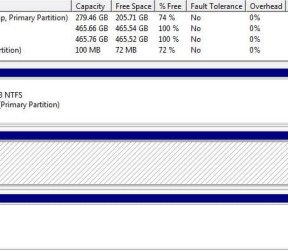
OK, here's the shots (I hope I got them right). C, needless to say is the primary drive, D is/ will be my work drive> D drive is where Win7 32bit was installed(dummy me) and that is where the 100mb SYSTEM RESERVE is located in partition 1,
E drive is my internal backup drive, I didn't include my cdrom which is F.

SHOT 1.jpg


SHOT 2.jpg
 

My Computer

Computer Manufacturer/Model Number
Intel I7 860
OS
Windows 7 home premium 64bit
CPU
Intel I7 860
Motherboard
EVGA P55 200 Classified 3x SLI
Memory
16 gig Corsair Vengence
Graphics Card(s)
EVGA GTX 560 TI
Sound Card
Soundblaster X-FI
Monitor(s) Displays
Asus, Sony Bravia
Hard Drives
C; WD Velociraptor 300gig
D; Seagate, 500gig
E; WD 500gig
PSU
Kingwin ABT-1000MA1S
Case
Thermaltake Armor+
Cooling
Noctua NH-D14
Keyboard
MS 4000
Mouse
Logitech Trackman Wheel
Internet Speed
Insight BroadBand 20.0
In Disk Management mark C Active, power down to unplug data cable from D, plug its data cable into C so that the OS HD is in preferred Disk0 slot. Partition - Mark as Active

Now boot the Win7 DVD Repair console or Repair CD to run Startup Repair up to 3 separate times with reboots until it writes the System boot files to C and Win7 starts. Startup Repair - Run 3 Separate Times

You can then plug D back in to Disk1 cable, boot if needed using one-time BIOS Boot Menu key, or use DiskPart Command-Line Options from Win7 Elevated Command Prompt to delete partitions using Delete Partition Override or wipe the HD using Clean.

In the future be aware that you never run an OS installer from an OS - always boot to install following these steps to get a perfect reinstall: Reinstalling Windows 7
 
Here you go mate, this will help you understand the need for and how to wipe (secure erase) the Hard disk Drive using diskpart, have a look at the information in this tutorial linked below.

Simply using the clean command will not wipe a HDD, you must use the clean all command.
 

My Computer

Computer Manufacturer/Model Number
* BFK Customs *
OS
W 7 64-bit Ultimate
CPU
Intel Q9550 Yorkfield
Motherboard
ASUS P5Q Pro
Memory
8GB Dominator 8500C5D
Graphics Card(s)
ATI : XFX 5870
Sound Card
Realtek HD Audio 7-1
Monitor(s) Displays
1x 47" LCD HDMI & 3x 26" LCD HDMI
Screen Resolution
1920x1080P & 1920x1200
Hard Drives
1x 80GB Intel X25-M G2 SSD : 1x 500GB & 1x 640GB WD Caviar Black(s)
PSU
Corsair 620HX
Case
Cooler Master RC-690
Cooling
Tuniq Tower 120, 2x 140mm and 3x 120mm case fans
Keyboard
Microsoft 500
Mouse
Razer Diamondback 3G
Internet Speed
14 Mb/s
Other Info
1x Koutech 3Gb/s SATA HDD Hot Swap Rack
I messed up

I want to thank you guys for this info, but I'm just a little skeptical when it comes to windows, for some unknown reason Murphy's law comes into play more than not so lets just say that I follow your instructions and it just doesn't work. So now I'm going to have to re-install Win7, would I just re-install as usual or what? I'm not saying the instructions won't work, it's just that sometimes Windows just doesn't want to play fair.
 

My Computer

Computer Manufacturer/Model Number
Intel I7 860
OS
Windows 7 home premium 64bit
CPU
Intel I7 860
Motherboard
EVGA P55 200 Classified 3x SLI
Memory
16 gig Corsair Vengence
Graphics Card(s)
EVGA GTX 560 TI
Sound Card
Soundblaster X-FI
Monitor(s) Displays
Asus, Sony Bravia
Hard Drives
C; WD Velociraptor 300gig
D; Seagate, 500gig
E; WD 500gig
PSU
Kingwin ABT-1000MA1S
Case
Thermaltake Armor+
Cooling
Noctua NH-D14
Keyboard
MS 4000
Mouse
Logitech Trackman Wheel
Internet Speed
Insight BroadBand 20.0

My Computer

Computer Manufacturer/Model Number
* BFK Customs *
OS
W 7 64-bit Ultimate
CPU
Intel Q9550 Yorkfield
Motherboard
ASUS P5Q Pro
Memory
8GB Dominator 8500C5D
Graphics Card(s)
ATI : XFX 5870
Sound Card
Realtek HD Audio 7-1
Monitor(s) Displays
1x 47" LCD HDMI & 3x 26" LCD HDMI
Screen Resolution
1920x1080P & 1920x1200
Hard Drives
1x 80GB Intel X25-M G2 SSD : 1x 500GB & 1x 640GB WD Caviar Black(s)
PSU
Corsair 620HX
Case
Cooler Master RC-690
Cooling
Tuniq Tower 120, 2x 140mm and 3x 120mm case fans
Keyboard
Microsoft 500
Mouse
Razer Diamondback 3G
Internet Speed
14 Mb/s
Other Info
1x Koutech 3Gb/s SATA HDD Hot Swap Rack
I messed up

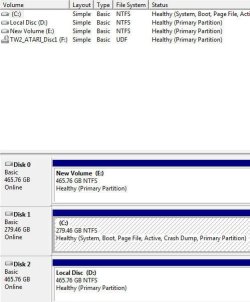
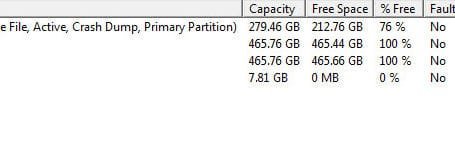
Well, I have to admit everything worked out just fine and again thanks for the help. There is only one problem, instead of C being disk 0 it's disk 1. WHY? Is there any way I can change this or am I stuck with it. I give up. Take a look;
Image1.jpg Image2.jpg
 

My Computer

Computer Manufacturer/Model Number
Intel I7 860
OS
Windows 7 home premium 64bit
CPU
Intel I7 860
Motherboard
EVGA P55 200 Classified 3x SLI
Memory
16 gig Corsair Vengence
Graphics Card(s)
EVGA GTX 560 TI
Sound Card
Soundblaster X-FI
Monitor(s) Displays
Asus, Sony Bravia
Hard Drives
C; WD Velociraptor 300gig
D; Seagate, 500gig
E; WD 500gig
PSU
Kingwin ABT-1000MA1S
Case
Thermaltake Armor+
Cooling
Noctua NH-D14
Keyboard
MS 4000
Mouse
Logitech Trackman Wheel
Internet Speed
Insight BroadBand 20.0
If you'd prefer having Win7 in DISK0 slot, just swap the data cable with DISK1, making sure that Win7 HD remains set first HD to boot in BIOS setup.

It looks fine the way it is. The only potential prob with an OS on DISK1 is if you have to run Startup Repair and any partition on Disk0 is incorrectly marked Active, the System Boot files will be rewritten to the first-in-line Active partition. So we recommend the OS is in DISK0 normally but you can leave it if you want now that you know.
 
Changing the SATA port may not make a difference at all; this is my PC I use.

This is connected to the #1 SATA port of the mobo and set as the first boot device and it was the only HDD connected for the clean install.

Originally the "Movies" HDD was Disk 2 after the others were reconnected but that changed also at a later time.
click to enlarge


My Computer

Computer Manufacturer/Model Number
* BFK Customs *
OS
W 7 64-bit Ultimate
CPU
Intel Q9550 Yorkfield
Motherboard
ASUS P5Q Pro
Memory
8GB Dominator 8500C5D
Graphics Card(s)
ATI : XFX 5870
Sound Card
Realtek HD Audio 7-1
Monitor(s) Displays
1x 47" LCD HDMI & 3x 26" LCD HDMI
Screen Resolution
1920x1080P & 1920x1200
Hard Drives
1x 80GB Intel X25-M G2 SSD : 1x 500GB & 1x 640GB WD Caviar Black(s)
PSU
Corsair 620HX
Case
Cooler Master RC-690
Cooling
Tuniq Tower 120, 2x 140mm and 3x 120mm case fans
Keyboard
Microsoft 500
Mouse
Razer Diamondback 3G
Internet Speed
14 Mb/s
Other Info
1x Koutech 3Gb/s SATA HDD Hot Swap Rack
Back
Top