I NEED 100MB partition

emel

New member
Local time
7:28 AM
Messages
10
Location
Slovakia
Hello,

Here is my situation:
I have an older hard drive, which was used for my previous operating system. Disk has two partitions: System (C: ) and Data (D: ) I want to delete all data on System partition but nothing on Data partition. I also want to have only one system for booting at this time. So after turning on the computer I want to boot to my windows accout automatically, without choosing an operating system to boot. I know how to automate logging into windows, that is not problem for me.)

Problem:
I need to install Windows 7 x64 Ultimate but WITH 100MB partition (I know, almost every user is asking for the information how to remove that partition, but I really NEED it!)
Problem is, that during installation I do not how to force windows to create that 100MB partition and also re-write MBR, so only one record will be in MBR.

What should I do? Should I remove only system partition without formatting it during the installation process, or should I also format it? I can not format whole hard drive, because I do not have another hard drive to backup all data on Data partition.

Please help. Thanks to everybody who helps.
 

My Computer

OS
windows 7 x64 bit
Hello emel,

Welcome to Seven Forums.

You've got it. Delete the system partition C: and leave it as unallocated space. You can do this under Custom Install when booted from the DVD (maybe advanced options at the pick a partition screen if I remember). Then install there and Seven will do the rest. You will not get a Windows.old folder doing this, so make sure that you have everything you need off of the C drive (email etc. if stored there.)

Hope this helps.

Gary
 

My Computer

Computer Manufacturer/Model Number
Dell XPS420
OS
Vista Ult 64 bit Seven Ult RTM x64
CPU
Intel Core2 Quad Q6600 2.40 gigahertz
Memory
Crucial Ballistix 4x2GB PC2 6400
Graphics Card(s)
NVIDIA GeForce 8600 GTS 256 MB
Sound Card
Creative SB X-Fi audio
Monitor(s) Displays
HP w2207 + HPvs15
Screen Resolution
1680x1050 + 1024x768
Hard Drives
2-WD5000AAKS-500 GB
WD5000AAV-500 GB external
Keyboard
Microsoft Comfort Curve
Mouse
MX Revolution
Other Info
Wacom Intuos 2 Graphics Tablet
Experience Index=5.5
Thank you very much, Garysgold. I will try it in approx. 7 hours and write an update if it works.
 

My Computer

OS
windows 7 x64 bit
still not working

Hello,

I tried your suggestion just to remove that partition and leave it as unallocated space. But my problem persists: I tried a fresh clean installation of Windows 7 x64 but 100 MB partition was not created and also old record (earlier version of windows) is still in MBR.
MBR is not so big problem, but MAIN PROBLEM is, that 100 MB partition was not created.
I am not able to view that partition in any application: computer management in windows and also it is not showed in Norton ghost or acronis true image.

Please help
 

My Computer

OS
windows 7 x64 bit
Hello,

I tried your suggestion just to remove that partition and leave it as unallocated space. But my problem persists: I tried a fresh clean installation of Windows 7 x64 but 100 MB partition was not created and also old record (earlier version of windows) is still in MBR.
MBR is not so big problem, but MAIN PROBLEM is, that 100 MB partition was not created.
I am not able to view that partition in any application: computer management in windows and also it is not showed in Norton ghost or acronis true image.

Please help
emel;

Garysgold's advice should have worked for you. I did some experimenting with the "System Repair" CD recently and the 100MB partition was automatically created:

http://www.sevenforums.com/tutorials/52291-partition-hard-drive-windows-7-install.html

Some questions: Is this the only hard drive connected when you installed to the unallocated space? If not, unplug all other hard drives and try again. Does the D: partition show up as "Active"? If it has been marked as active as some time in the past, it might be interfering with your install. If so and if you need help making it "Not Active" let us know.

One last suggestion: As a last resort, you can use Windows 7 "Image" utility (or a third party utility) to create an image of the 100MB partition and a windows 7 partition on a hard drive. Then "Restore" the image to the unallocated space you created (make sure the "Image" is small enough to fit in the unallocated space.)

It might be easier to copy the data in the D: partition and save it, then install 7 on an empty drive and put the D: partition back and restore the data?

Please let us know how we can help!
Robert
 
Last edited:

My Computer

OS
...
Hello Robert,

yes, it is my only hard drive. I do not have another.

My D: partition is marked as System... I do not know if it is correct, but I think that not, because on that partition is no system installed.

Unfortunatelly, I am not able to back up data from D: (I do not have another drive for backup, and it is impossible to burn 200 GB to DVDs...), so it can not be removed.
 

My Computer

OS
windows 7 x64 bit
Hello Robert,

yes, it is my only hard drive. I do not have another.

My D: partition is marked as System... I do not know if it is correct, but I think that not, because on that partition is no system installed.

Unfortunatelly, I am not able to back up data from D: (I do not have another drive for backup, and it is impossible to burn 200 GB to DVDs...), so it can not be removed.
Hello back to you, emel!

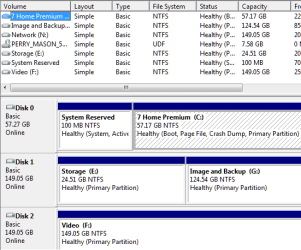
I just looked at my hard drives and the only partition marked as "system" is the 100MB partition:

emel_01.png

So I would say your D: partition was at some time used as a "System" partition and that is preventing (by MS design) the 100MB partition from being used.

I would suggest to you that you have a couple of options here, some more dangerous that others, so it would be up to you.

1) If you can borrow another hard drive?

2) You can try to change the D: drive to remove the "System" status. I don't think Windows Disk Manager Utility will do it, so you would need a third party utility, like "Partition Wizard" (free), or GParted you can get as explained in the tutorial in my sig.

3) You can create another 200GB partition on your hard drive (if there is room?), making only "primary", and copy your data there. Then delete the current D: partition, move partitions around to get the unallocated space at the front fo your drive and try Garysgold's advice again.

You see it is harder with out another drive. But we can get there with what you have. It might take more time and effort, but we won't quit until you get your system the way you need it.

Cheers!
Robert
 

My Computer

OS
...
Please post back a screenshot of your full Disk Management drive map, using Snipping Tool in Start Menu, attaching file with paper clip in reply box.

The 100mb is not being created because of the presence of a created partition. You must delete all partitions before it will create 100mb.

Further, you somehow placed System on D; data partition which needs to be taken off first. The solution to your problem is to move your data off the HD to an external so that the entire HD can be deleted and formatted, install Win7 with 100mb to C:, leaving room to format a logical data partition D: afterward to move your data back into.

If you are unable to obtain an external HDD, can you move the data into a new partition you create by shrinking the other partitions? Then boot into the Win7 DVD, use Custom drive tools to delete all partiitions except new data partition, install Win7 to new C; partition. This will allow you to delete the D: system partition. Just make sure the new data partition is not marked active this time so it doesn't take System.

Edit: I see Robert was replying at same time. Follow his advice; he will get you thru this.:)
 
Hello,


It might be easier to copy the data in the D: partition and save it, then install 7 on an empty drive and put the D: partition back and restore the data?

Please let us know how we can help!
Robert

iseeuu has given you good sound advice.

When you have Win 7 installed with 100mb partition, where are you going to backup to?
 

My Computer

OS
ME/XP/Vista/Win7
hello again,

due to the fact, that I am in time stress, I lend another hard drive from my PC seller for a little fee and right now I am moving all files from D: drive to that drive and after installation back.
If anybody of you are in touch with Microsoft, please, tell them, that it would be very nice to have the option to create that partition during installation of windows 8 regardless the state of hard drive´s partitions...

This thread can be closed. Thanks to everyone who gave me any suggestion. I wish you a nice day.
 

My Computer

OS
windows 7 x64 bit
Edit: I see Robert was replying at same time.

iseeuu has given you good sound advice.

When you have Win 7 installed with 100mb partition, where are you going to backup to?
Greg and theog, it is of great reassurance to me (as it should be to the OPs) that you have my back. A warm thank you!

Cheers!
Robert
 

My Computer

OS
...
hello again,

due to the fact, that I am in time stress, I lend another hard drive from my PC seller for a little fee and right now I am moving all files from D: drive to that drive and after installation back.
If anybody of you are in touch with Microsoft, please, tell them, that it would be very nice to have the option to create that partition during installation of windows 8 regardless the state of hard drive´s partitions...

This thread can be closed. Thanks to everyone who gave me any suggestion. I wish you a nice day.
emel;

You are most welcome! Please let us know how your project turns out and if we can be of any help? We are a team effort here and are glad to be of help anytime.

Cheers!
Robert
 

My Computer

OS
...
Thanks again, you can see my answer above. I lend another hard drive and I am copying files to that drive and after that install fresh copy of windows 7 x64.
 

My Computer

OS
windows 7 x64 bit
The 100mb is not being created because of the presence of a created partition. You must delete all partitions before it will create 100mb.

I have done this with other partitions on the drive. I deleted the first partition to create unallocated space and the System partition was created. Just a fluke maybe.
 

My Computer

Computer Manufacturer/Model Number
Dell XPS420
OS
Vista Ult 64 bit Seven Ult RTM x64
CPU
Intel Core2 Quad Q6600 2.40 gigahertz
Memory
Crucial Ballistix 4x2GB PC2 6400
Graphics Card(s)
NVIDIA GeForce 8600 GTS 256 MB
Sound Card
Creative SB X-Fi audio
Monitor(s) Displays
HP w2207 + HPvs15
Screen Resolution
1680x1050 + 1024x768
Hard Drives
2-WD5000AAKS-500 GB
WD5000AAV-500 GB external
Keyboard
Microsoft Comfort Curve
Mouse
MX Revolution
Other Info
Wacom Intuos 2 Graphics Tablet
Experience Index=5.5
My D: partition is marked as System... I do not know if it is correct, but I think that not, because on that partition is no system installed.

The 100mb is not being created because of the presence of a created partition. You must delete all partitions before it will create 100mb.

I have done this with other partitions on the drive. I deleted the first partition to create unallocated space and the System partition was created. Just a fluke maybe.
Gary;

emel said that the D: partition was showing as "System" in the quote above. Can't really tell now how or why that happened? I have seen Windows automatically assign another partition as "Active" (System) when marking an active partition in-active. Seems there MUST be one active partition ... or else. Anyway, that made his project really difficult for him. Could have used "diskpart" to mark D: in-active, but not everyone is willing to try command line utilities. Could have used a third party utility like Partition Wizard to mark it in-active. In the end, it was just easier for emel to borrow a hard drive to save everything and install on a blank hard drive.
 

My Computer

OS
...
Back
Top