JavaScript is disabled. For a better experience, please enable JavaScript in your browser before proceeding.
You are using an out of date browser. It may not display this or other websites correctly.
You should upgrade or use an
alternative browser .
Solved I need change something in theme....
Hello everyone!
I need help with this (screenshot below) in " Server OS X " theme. It looks like there is a problem with margin or maybe small icons... I don't know, I can't find it in W7 Style Builder to fix that
Here is a screenshot
Link for theme (Sever OS X - deviantart):
Browsing deviantART
Thanks for your help & sorry for English
I hope you understand what I mean (from screenshot)
OS Windows 7 Ultimate 32bit
Jerry ☮ 1956-2019 R.I.P.
VIP
SF Team
Welcome to the Seven Forums
Computer type Laptop Computer Manufacturer/Model Number Sager NP9170 OS Win 7 Pro x64 / Win 10 Pro CPU Intel(R) Core(TM) i7-3630QM CPU @ 2.40GHz Motherboard CLEVO P170EM Memory 12 GB Graphics Card(s) (1) Intel(R) HD Graphics 4000 (2) NVIDIA GeForce GTX 675M Sound Card (1) Realtek High Definition Audio (2) Intel(R) Display Aud Monitor(s) Displays 17.3 Screen Resolution 1920x1080 Hard Drives (1) Samsung 860 EVO 500GB(OS) (1) Samsung 860 EVO 500GB(Data) Keyboard Backlite Antivirus MSE, Malwarebytes Pro Browser Firefox Other Info DESKTOP: Custom-built.
New member
Thread Starter
Adobe Photoshop CS6
//And when I try to switch to other themes it looks good, but when I using Seven OS X it always do that .
OS Windows 7 Ultimate 32bit
Jerry ☮ 1956-2019 R.I.P.
VIP
SF Team
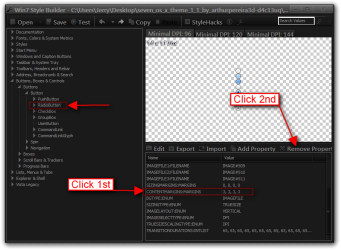
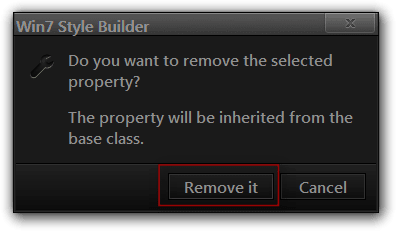
Go to Buttons, Boxes & Controls > Buttons > Button > RadioButton and remove CONTENTMARGINS:MARGINS properties.
Jerry
Computer type Laptop Computer Manufacturer/Model Number Sager NP9170 OS Win 7 Pro x64 / Win 10 Pro CPU Intel(R) Core(TM) i7-3630QM CPU @ 2.40GHz Motherboard CLEVO P170EM Memory 12 GB Graphics Card(s) (1) Intel(R) HD Graphics 4000 (2) NVIDIA GeForce GTX 675M Sound Card (1) Realtek High Definition Audio (2) Intel(R) Display Aud Monitor(s) Displays 17.3 Screen Resolution 1920x1080 Hard Drives (1) Samsung 860 EVO 500GB(OS) (1) Samsung 860 EVO 500GB(Data) Keyboard Backlite Antivirus MSE, Malwarebytes Pro Browser Firefox Other Info DESKTOP: Custom-built.
New member
Thread Starter
Thank you very much! I thought it was margin, but I didnt know where is it
I appreciate your help, thank you again
OS Windows 7 Ultimate 32bit
Jerry ☮ 1956-2019 R.I.P.
VIP
SF Team
You're welcome
Computer type Laptop Computer Manufacturer/Model Number Sager NP9170 OS Win 7 Pro x64 / Win 10 Pro CPU Intel(R) Core(TM) i7-3630QM CPU @ 2.40GHz Motherboard CLEVO P170EM Memory 12 GB Graphics Card(s) (1) Intel(R) HD Graphics 4000 (2) NVIDIA GeForce GTX 675M Sound Card (1) Realtek High Definition Audio (2) Intel(R) Display Aud Monitor(s) Displays 17.3 Screen Resolution 1920x1080 Hard Drives (1) Samsung 860 EVO 500GB(OS) (1) Samsung 860 EVO 500GB(Data) Keyboard Backlite Antivirus MSE, Malwarebytes Pro Browser Firefox Other Info DESKTOP: Custom-built.