
Solved I need help clearing my temporary Internet files.

  • Thread starter Thread starter Advice Pro
  • Start date Start date
A

Advice Pro

Guest
I can't navigate to:
Code:
C:\Users\(user-name)\AppData\Local\Microsoft\Windows\Temporary Internet Files
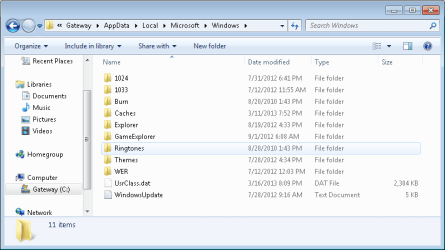
At C:\Users, the folder Gateway, which I think is my user name since this is different from my admin name, has a lock. If I double click on the folder and follow it all the way to Windows as in the path, I get this:
 

Attachments

  • Path.PNG
    Path.PNG
    15.9 KB · Views: 6
I can't navigate to:
Code:
C:\Users\(user-name)\AppData\Local\Microsoft\Windows\Temporary Internet Files
At C:\Users, the folder Gateway, which I think is my user name since this is different from my admin name, has a lock. If I double click on the folder and follow it all the way to Windows as in the path, I get this:
You can use Disk Cleanup to clean out temporary files, as well as the delete browsing history section of Internet Explorer.
Instructions on how to use Disk Cleanup: http://www.sevenforums.com/tutorials/818-disk-cleanup-open-use.html
Also, go to start and next to your user account picture, it will have your account name.
 

My Computer My Computer

At a glance

Windows 7 Professional x64 Service Pack 1AMD Athlon X4 6456GB DDR3 1066Sapphire Radeon HD 5670 512MB GDDR5
Computer type
PC/Desktop
Computer Manufacturer/Model Number
HP Pavilion P7-1010
OS
Windows 7 Professional x64 Service Pack 1
CPU
AMD Athlon X4 645
Motherboard
Foxxcon N-Alvorix RS880
Memory
6GB DDR3 1066
Graphics Card(s)
Sapphire Radeon HD 5670 512MB GDDR5
Sound Card
Realtek Integrated Audio
Monitor(s) Displays
HP 2011x
Screen Resolution
1600x900
Hard Drives
1. Crucial M4 128GB SSD
2. 1TB Seagate Barracuda 7200.12 RPM
3. 1TB Western Digital Caviar Green 5400RPM
PSU
Seasonic S12 II Bronze 380 Watt
Case
HP OEM
Cooling
Coolermaster Heatsink, AVC Case Fan
Keyboard
HP OEM- Made by Chicony
Mouse
HP OEM- Made by Logitech
Internet Speed
20MBit Down/4 Up
Antivirus
Microsoft Security Essentials
Browser
Internet Explorer 10
Back
Top