I need help, please.

marco1

New member
Local time
3:17 PM
Messages
10
So today I installed some antivirus and my friends told me to go into safe mode. I couldn't go with F8 thinghy so I made it so in msconfig.

I choosed the boot section with Minimal> With internet. ( Practically it's safe mode with internet)

I had a shock when I restarted my pc and it said that the resolution is not supported. I tried 2 different monitors.

I also somehow managed from to get back the list with Start windows normally etc. I choosed start windows normally but the windows still loads in safe mode with internet.

What I can do? \


I use Intel HG graphic.

I also have something wich I don't know what it. Asus express gate.

I really need some help. Explain it like you talk with a kid, even though I'm 43.
 
Last edited:

My Computer

Computer type
PC/Desktop
OS
windows 7 x64
To get you out of safe mode this might help.
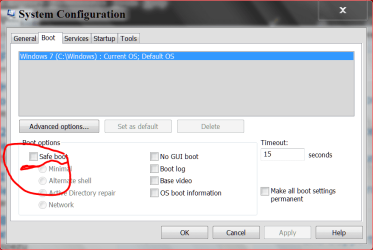
Go back into msconfig and make sure Safe Mode is NOT checked.

msconfig Safe Mode.PNG
 

My Computer

Computer type
PC/Desktop
Computer Manufacturer/Model Number
Home made Desktop
OS
Windows 10 Pro. 64/ version 1709 Windows 7 Pro/64
CPU
Intel i7-6800K @ 4.3
Motherboard
ASUS X-99 Deluxe II
Memory
Corsair Platinum 16 gig @2400
Graphics Card(s)
EVGA GTX 1070 OC
Monitor(s) Displays
Asus 27" LED LCD/VE278Q
Screen Resolution
1920-1080 or 1280-720 HDMI
Hard Drives
INTEL SSD 730-240 Gb Sata 3.0/
PSU
EVGA Platium 1200W
Case
Phanteks Luxe Tempered Glass 8 fans/ one radiator
Cooling
XSPC/ Water Cooled CPU
Keyboard
Das 4 Professional
Mouse
Logitech M705/MX Anywhere 2-S
Internet Speed
100 mbits
Antivirus
Microsoft Security Essentials/ Malwarebytes Premium 3.0/ SAS
Browser
I.E. 11 default/Firefox/ ISP Time Warner Cable/Spectrum
Other Info
LG BluRay Burner/
Sound system-KLipsch-THX/
Icy Dock ssd Hot Swap bays.
To get you out of safe mode this might help.
Go back into msconfig and make sure Safe Mode is NOT checked.

View attachment 271100


And how I do that? Everytime I start the pc it goes into the safe mode with internet and after that it says that the resolution is not supported,
 

My Computer

Computer type
PC/Desktop
OS
windows 7 x64
Are you saying that you can't go into msconfig while you are in safe mode?
 

My Computer

Computer type
PC/Desktop
Computer Manufacturer/Model Number
Home made Desktop
OS
Windows 10 Pro. 64/ version 1709 Windows 7 Pro/64
CPU
Intel i7-6800K @ 4.3
Motherboard
ASUS X-99 Deluxe II
Memory
Corsair Platinum 16 gig @2400
Graphics Card(s)
EVGA GTX 1070 OC
Monitor(s) Displays
Asus 27" LED LCD/VE278Q
Screen Resolution
1920-1080 or 1280-720 HDMI
Hard Drives
INTEL SSD 730-240 Gb Sata 3.0/
PSU
EVGA Platium 1200W
Case
Phanteks Luxe Tempered Glass 8 fans/ one radiator
Cooling
XSPC/ Water Cooled CPU
Keyboard
Das 4 Professional
Mouse
Logitech M705/MX Anywhere 2-S
Internet Speed
100 mbits
Antivirus
Microsoft Security Essentials/ Malwarebytes Premium 3.0/ SAS
Browser
I.E. 11 default/Firefox/ ISP Time Warner Cable/Spectrum
Other Info
LG BluRay Burner/
Sound system-KLipsch-THX/
Icy Dock ssd Hot Swap bays.
I think he's saying that he can't see the screen to type it in. He's going to need a complete key sequence to that point. EEK!

(P.S. I would try it, but I'm in Win8 right now, and it would make NO sense! LOL. What am I saying? Neither does 8.)
 

My Computer

Computer type
PC/Desktop
Computer Manufacturer/Model Number
iBuyPower NZXT
OS
Microsoft Windows 10 Home Build 15036
CPU
Intel(R) Core(TM) i7-860 @ 2.80GHz
Motherboard
Gigabyte Technology Co., Ltd. P55-UD3L
Memory
4.00 GB
Graphics Card(s)
NVIDIA GeForce GTX 750
Sound Card
(1) Line 6 UX2 (2) Realtek High Definition Audio
Monitor(s) Displays
23" acer
Screen Resolution
1920 x 1080 x 32 bits (4294967296 colors) @ 60 Hz
Hard Drives
(1) WDC WD5000AAKS-00D2B0 ATA Device (2) Seagate FreeAgent Go 250G USB Device
Cooling
Corsair H75 liquid cooler (Very easy to install, actually)
Internet Speed
60M cable modem-->Linksys E1200-->1Gbps net card
Browser
Chrome
Other Info
This is probably the longest I've ever had a Windows machine run without having to restore it to scratch. I'm used to restoring to "factory" about every 2 yrs. I've run with Win7 since new in 2009 and only recently (Nov, '14) restored to clean up the machine from all my 'xperimenting. LOL!! I may never need another machine.

Upgraded to 10 when it was still free, then installed 2017 update.
Thanks PeaB4YouGo good idea.
While your are in safe mode try right ticking on you desktop and select Screen Resolution and make changes to the resolution so things can be seen better.
Are you using more that one screen?
 

My Computer

Computer type
PC/Desktop
Computer Manufacturer/Model Number
Home made Desktop
OS
Windows 10 Pro. 64/ version 1709 Windows 7 Pro/64
CPU
Intel i7-6800K @ 4.3
Motherboard
ASUS X-99 Deluxe II
Memory
Corsair Platinum 16 gig @2400
Graphics Card(s)
EVGA GTX 1070 OC
Monitor(s) Displays
Asus 27" LED LCD/VE278Q
Screen Resolution
1920-1080 or 1280-720 HDMI
Hard Drives
INTEL SSD 730-240 Gb Sata 3.0/
PSU
EVGA Platium 1200W
Case
Phanteks Luxe Tempered Glass 8 fans/ one radiator
Cooling
XSPC/ Water Cooled CPU
Keyboard
Das 4 Professional
Mouse
Logitech M705/MX Anywhere 2-S
Internet Speed
100 mbits
Antivirus
Microsoft Security Essentials/ Malwarebytes Premium 3.0/ SAS
Browser
I.E. 11 default/Firefox/ ISP Time Warner Cable/Spectrum
Other Info
LG BluRay Burner/
Sound system-KLipsch-THX/
Icy Dock ssd Hot Swap bays.
Also if F8 didn't work try F2, or the Delete key, Also a few newer motherboards may have small buttons to. Mine has for Bio's start, and to check the RAM. Really New MB's can start (with small button on MB) in less than 3 seconds! It FAST!
 

My Computer

Computer type
PC/Desktop
Computer Manufacturer/Model Number
My own custom build
OS
Windows 7pro. and Windows 8
CPU
CPU - AMD FX-8150 CPU 8core overclocked 10%
Motherboard
ASUS Crosshair V Formula-Z Upgraded 990FX
Memory
AMD Radeon RP1866 Performance Series 32GB
Graphics Card(s)
3 ea. AMD Radeon HD 7950 - 3GB 3-wayCrossfireXing
Sound Card
ASUS Xonar Essence STX S/PDIFed to Harmon/kardon AVR55
Monitor(s) Displays
3ea. 30in NEC MultiSync PA301W
Screen Resolution
2560 x 1600
Hard Drives
2 SSD - Intel 520's 480GBytes
1 3TB WesternDigital Red WD30EFRX
PSU
ToughPower 1500m 1500watt
Case
CoolerMaster HAF-X FullTower LiquidCooled Case Push/Pull Ed.
Cooling
XSPC Raystorm RS360 Custom Liquidcooling Push/Pull Ed.
Keyboard
Mad Catz S.T.R.I.K.E. 7 Gaming Keyboard
Mouse
Cyborg M.M.O. 7 Gaming Mouse
Internet Speed
somewhere between 4 and 6 gigs
Antivirus
Avast internet security
Browser
Firefox, Google Chrome
Other Info
12X Pioneer BLU-RAY Re-Writer, DVD±R/±RW Burner Combo
AeroCool V12XT Touch Screen Fan, Temp Control
TRITON AX Pro Dolby Digital Precision Gaming Headset
12-In-1 External USB Flash Media Card R/W SDHC
hmm... going into safe mode to install an antivirus... sounds like you were cracking it. :p Bad boy.
Please don't, there are pretty good free ones like Avira (my current one) that don't require you to risk killing your Windows 7 installation with the malware you usually find in pirated stuff.

Anyway, back to the issue at hand.
In Safe mode the warning "resolution not supported" is perfectly normal, as the proprietary video drivers aren't loaded (and it uses generic ones that do have limits on resolution but work on any hardware). It is useful in case your current video drivers suck and you need to change them (but you cannot do so, maybe because they prevent you from seeing anything after boot), but this isn't your case. Just ignore the warning and set a better resolution to work into as Ladyback said.
After you get out of Safe Mode everything will be fine as the drivers will be loaded as normal.

So, boot into Safe Mode (since you say you can do it) and then open the Start menu, you should have a "run..." entry on the right panel (not on the program list, on the colored part of the panel), type "msconfig" (without the " ) and click Ok or press enter.
If not, write "msconfig" in the search box of the start menu (the first line, closest to the start button when you open the menu) and click on the file it finds.

Then do what Ladyback said in post 2

If you were doing what I'm suspecting you were doing, after you solved the issue please follow this tutorial and restore Windows 7 from a restore point before you did this thing to erase any such tampering. And install a free antivirus instead (Avira for example).
 

My Computer

Computer type
PC/Desktop
Computer Manufacturer/Model Number
custom built
OS
Win 7 Pro 64-bit 7601
CPU
AMD Phenom 9650 QuadCore, revision DR-B3
Motherboard
ASUS M4A78
Memory
5 GB yes I run 2x 2GB and 1x 1GB, different brand, spank me.
Graphics Card(s)
NVIDIA GeForce 9800 GT 512 Mb, unknown manufacturer.
Sound Card
Crappy Realtek Integrated Audio
Monitor(s) Displays
Fujitsu Siemens P19-3P
Screen Resolution
1280 x 1024 x 32 bits @ 60 Hz Oh yeah, 4:3 rocks!
Hard Drives
(1) MAXTOR S TM3320613AS SATA Disk Device (2) STM35004 18AS SATA Disk Device (3) TOSHIBA USB 2.5"-HDD
PSU
whatever, around 450w
Case
Scavenged from old company PC, 10+ years old
Cooling
CPU fan, GPU fan, case fan, nothing fancy
Keyboard
Microsoft, PS/2, white.
Mouse
Optical, logitec.
Internet Speed
effective max speeds: 70-ish kB/s down 30-ish kB/s up
Antivirus
Avira, free edition.
Browser
Firefox with FXChrome to make it look like Google Chrome :P
Other Info
Was discarded by previous owner due to "horrible performance".
Was running Win Xp from a IDE drive. Yeah. Was a pain.
SATA II drive and Win7 and it zips away! Yay!
hmm... going into safe mode to install an antivirus... sounds like you were cracking it. :p Bad boy.
Please don't, there are pretty good free ones like Avira (my current one) that don't require you to risk killing your Windows 7 installation with the malware you usually find in pirated stuff.

Anyway, back to the issue at hand.
In Safe mode the warning "resolution not supported" is perfectly normal, as the proprietary video drivers aren't loaded (and it uses generic ones that do have limits on resolution but work on any hardware). It is useful in case your current video drivers suck and you need to change them (but you cannot do so, maybe because they prevent you from seeing anything after boot), but this isn't your case. Just ignore the warning and set a better resolution to work into as Ladyback said.
After you get out of Safe Mode everything will be fine as the drivers will be loaded as normal.

So, boot into Safe Mode (since you say you can do it) and then open the Start menu, you should have a "run..." entry on the right panel (not on the program list, on the colored part of the panel), type "msconfig" (without the " ) and click Ok or press enter.
If not, write "msconfig" in the search box of the start menu (the first line, closest to the start button when you open the menu) and click on the file it finds.

Then do what Ladyback said in post 2

If you were doing what I'm suspecting you were doing, after you solved the issue please follow this tutorial and restore Windows 7 from a restore point before you did this thing to erase any such tampering. And install a free antivirus instead (Avira for example).

Hellow again. Well basically everytime I open the pc it goes in safemode with networking. It loads the drivers and after that my screen is black. It's not like an error appears and it goes. My screen is black.

Also I tried to boot from CD to re install the Windows. After I waited for the first screen the load the Windows goes in System Recovery failue and I have the next option again:

- Start in safe mode
Start in safe mode with networking
Start in safe mode with cmd

Start windows normally.

It doesen't matter what I choose because the Windows still loads safe mode with internet and after that my screen is total black.
 

My Computer

Computer type
PC/Desktop
OS
windows 7 x64
You didn't say that your screen was black after boot. Do you see a cursor? Can you write anything?

Try booting from the CD and from the recovery options ask it to do a startup repair.

If it is just a black screen and you cannot do anything (and the above fails), if you don't have anything important in tha PC I suggest a full reinstall. This is the tutorial to do it right.
If you want to save your data and installed programs (but lose most Windows settings), try a repair install. Follow this tutorial.

Make sure that you are booting from the installation CD by going into Bios options (also called Setup in the first lines of text you see when powering on the PC, should tell you the key/button to press to get into BIOS/Setup), then go into boot options panel and make sure that the CD/DVD reader is 1st, and the hard drive is 2nd.
 

My Computer

Computer type
PC/Desktop
Computer Manufacturer/Model Number
custom built
OS
Win 7 Pro 64-bit 7601
CPU
AMD Phenom 9650 QuadCore, revision DR-B3
Motherboard
ASUS M4A78
Memory
5 GB yes I run 2x 2GB and 1x 1GB, different brand, spank me.
Graphics Card(s)
NVIDIA GeForce 9800 GT 512 Mb, unknown manufacturer.
Sound Card
Crappy Realtek Integrated Audio
Monitor(s) Displays
Fujitsu Siemens P19-3P
Screen Resolution
1280 x 1024 x 32 bits @ 60 Hz Oh yeah, 4:3 rocks!
Hard Drives
(1) MAXTOR S TM3320613AS SATA Disk Device (2) STM35004 18AS SATA Disk Device (3) TOSHIBA USB 2.5"-HDD
PSU
whatever, around 450w
Case
Scavenged from old company PC, 10+ years old
Cooling
CPU fan, GPU fan, case fan, nothing fancy
Keyboard
Microsoft, PS/2, white.
Mouse
Optical, logitec.
Internet Speed
effective max speeds: 70-ish kB/s down 30-ish kB/s up
Antivirus
Avira, free edition.
Browser
Firefox with FXChrome to make it look like Google Chrome :P
Other Info
Was discarded by previous owner due to "horrible performance".
Was running Win Xp from a IDE drive. Yeah. Was a pain.
SATA II drive and Win7 and it zips away! Yay!
You didn't say that your screen was black after boot. Do you see a cursor? Can you write anything?

Try booting from the CD and from the recovery options ask it to do a startup repair.

If it is just a black screen and you cannot do anything (and the above fails), if you don't have anything important in tha PC I suggest a full reinstall. This is the tutorial to do it right.
If you want to save your data and installed programs (but lose most Windows settings), try a repair install. Follow this tutorial.

Make sure that you are booting from the installation CD by going into Bios options (also called Setup in the first lines of text you see when powering on the PC, should tell you the key/button to press to get into BIOS/Setup), then go into boot options panel and make sure that the CD/DVD reader is 1st, and the hard drive is 2nd.


I went in BIOS, made the options and after that I restarted my pc. Doesen't matter what I do after the first screen the PC goes in some sort :" Failed to recover" where I have the options stated above. Doesen't matter what I choose the PC still boots from safe mode with networking and after that my screen is total black.

I can't click anything and see anything. After the drivers load I'm in a total black. I also restarted the BIOS by getting the batery out and get it back on after 2 mins, so the problem is not the BIOS. I don't know why but the pc is not booting from CD even though I made the first option in BIOS. That "Failed to recover" screen is appearing and after that it goes in safe mode with networking w/e I choose.
 

My Computer

Computer type
PC/Desktop
OS
windows 7 x64
remove HDD power (the bigger connector with 4 colorful cables or if that is a laptop fully remove the hard drive), boot the PC with the CD, mount that connector (or the hard drive) again when it asks you if you want to install or repair your PC.

The darn thing cannot boot from a drive that does not have power.
 

My Computer

Computer type
PC/Desktop
Computer Manufacturer/Model Number
custom built
OS
Win 7 Pro 64-bit 7601
CPU
AMD Phenom 9650 QuadCore, revision DR-B3
Motherboard
ASUS M4A78
Memory
5 GB yes I run 2x 2GB and 1x 1GB, different brand, spank me.
Graphics Card(s)
NVIDIA GeForce 9800 GT 512 Mb, unknown manufacturer.
Sound Card
Crappy Realtek Integrated Audio
Monitor(s) Displays
Fujitsu Siemens P19-3P
Screen Resolution
1280 x 1024 x 32 bits @ 60 Hz Oh yeah, 4:3 rocks!
Hard Drives
(1) MAXTOR S TM3320613AS SATA Disk Device (2) STM35004 18AS SATA Disk Device (3) TOSHIBA USB 2.5"-HDD
PSU
whatever, around 450w
Case
Scavenged from old company PC, 10+ years old
Cooling
CPU fan, GPU fan, case fan, nothing fancy
Keyboard
Microsoft, PS/2, white.
Mouse
Optical, logitec.
Internet Speed
effective max speeds: 70-ish kB/s down 30-ish kB/s up
Antivirus
Avira, free edition.
Browser
Firefox with FXChrome to make it look like Google Chrome :P
Other Info
Was discarded by previous owner due to "horrible performance".
Was running Win Xp from a IDE drive. Yeah. Was a pain.
SATA II drive and Win7 and it zips away! Yay!
You didn't say that your screen was black after boot. Do you see a cursor? Can you write anything?

Try booting from the CD and from the recovery options ask it to do a startup repair.

If it is just a black screen and you cannot do anything (and the above fails), if you don't have anything important in tha PC I suggest a full reinstall. This is the tutorial to do it right.
If you want to save your data and installed programs (but lose most Windows settings), try a repair install. Follow this tutorial.

Make sure that you are booting from the installation CD by going into Bios options (also called Setup in the first lines of text you see when powering on the PC, should tell you the key/button to press to get into BIOS/Setup), then go into boot options panel and make sure that the CD/DVD reader is 1st, and the hard drive is 2nd.

remove HDD power (the bigger connector with 4 colorful cables or if that is a laptop fully remove the hard drive), boot the PC with the CD, mount that connector (or the hard drive) again when it asks you if you want to install or repair your PC.

The darn thing cannot boot from a drive that does not have power.


I did that and now after the first screen a screen wich says : Select a proper boot device

Insert boot media in selected boot device and pres any key.


Ok so I injected the DVD , pressed any keys and nothing happens. I still get the same message over and over again.

I did that and now after the first screen a screen wich says : Select a proper boot device

Insert boot medis in selected boot device and pres any key.


Can be the DVD wich I use? It's new though.
 

My Computer

Computer type
PC/Desktop
OS
windows 7 x64
In the tutorial about the full reinstall you find links to official Windows 7 iso files you can download and burn to DVD or place on a USB thumbdrive (chiavetta USB)
 

My Computer

Computer type
PC/Desktop
Computer Manufacturer/Model Number
custom built
OS
Win 7 Pro 64-bit 7601
CPU
AMD Phenom 9650 QuadCore, revision DR-B3
Motherboard
ASUS M4A78
Memory
5 GB yes I run 2x 2GB and 1x 1GB, different brand, spank me.
Graphics Card(s)
NVIDIA GeForce 9800 GT 512 Mb, unknown manufacturer.
Sound Card
Crappy Realtek Integrated Audio
Monitor(s) Displays
Fujitsu Siemens P19-3P
Screen Resolution
1280 x 1024 x 32 bits @ 60 Hz Oh yeah, 4:3 rocks!
Hard Drives
(1) MAXTOR S TM3320613AS SATA Disk Device (2) STM35004 18AS SATA Disk Device (3) TOSHIBA USB 2.5"-HDD
PSU
whatever, around 450w
Case
Scavenged from old company PC, 10+ years old
Cooling
CPU fan, GPU fan, case fan, nothing fancy
Keyboard
Microsoft, PS/2, white.
Mouse
Optical, logitec.
Internet Speed
effective max speeds: 70-ish kB/s down 30-ish kB/s up
Antivirus
Avira, free edition.
Browser
Firefox with FXChrome to make it look like Google Chrome :P
Other Info
Was discarded by previous owner due to "horrible performance".
Was running Win Xp from a IDE drive. Yeah. Was a pain.
SATA II drive and Win7 and it zips away! Yay!
In the tutorial about the full reinstall you find links to official Windows 7 iso files you can download and burn to DVD or place on a USB thumbdrive (chiavetta USB)


So it's the DVD? Dude I bought the DVD and it's not a copy. It's new and I used it on some other pc and it worked.
 

My Computer

Computer type
PC/Desktop
OS
windows 7 x64
Excuse me for the double post. The pc just doesen't want to boot from the DVD and goes into the Windows Recovery system where I reiceive those option and w/e I choose the pc still starts in Safe mode with networking.
 

My Computer

Computer type
PC/Desktop
OS
windows 7 x64
Here is a prime example where I should of asked for marco1 specs right off the bat. Now we have no idea what we are working with.
If I'm understanding things correctly marco1 system can't read the CD/DVD player or the hard drive.
I'm reading this correctly?
 

My Computer

Computer type
PC/Desktop
Computer Manufacturer/Model Number
Home made Desktop
OS
Windows 10 Pro. 64/ version 1709 Windows 7 Pro/64
CPU
Intel i7-6800K @ 4.3
Motherboard
ASUS X-99 Deluxe II
Memory
Corsair Platinum 16 gig @2400
Graphics Card(s)
EVGA GTX 1070 OC
Monitor(s) Displays
Asus 27" LED LCD/VE278Q
Screen Resolution
1920-1080 or 1280-720 HDMI
Hard Drives
INTEL SSD 730-240 Gb Sata 3.0/
PSU
EVGA Platium 1200W
Case
Phanteks Luxe Tempered Glass 8 fans/ one radiator
Cooling
XSPC/ Water Cooled CPU
Keyboard
Das 4 Professional
Mouse
Logitech M705/MX Anywhere 2-S
Internet Speed
100 mbits
Antivirus
Microsoft Security Essentials/ Malwarebytes Premium 3.0/ SAS
Browser
I.E. 11 default/Firefox/ ISP Time Warner Cable/Spectrum
Other Info
LG BluRay Burner/
Sound system-KLipsch-THX/
Icy Dock ssd Hot Swap bays.
Here is a prime example where I should of asked for marco1 specs right off the bat. Now we have no idea what we are working with.
If I'm understanding things correctly marco1 system can't read the CD/DVD player or the hard drive.
I'm reading this correctly?

It reads both. I just can't boot from the DVD or anything else.


I'm using an OS Windows 7 x74 with Asus motherboard afaik.

Here is the problem from the start.

Main problem: I wanted to run the pc in safe mode so I did the change in msconfig. Now everytime I start my pc it goes in safe mode with networking and after that the screen becomes black. ( resolution not supported)

What I tried to do: - I got off the batery and added it back in after 3 min ( BIOS restart) - Not worked.

- I pulled out the HDD jumper and I turned it off. After the first screen another screen appeared :"Select a proper boot device

Insert boot media in selected boot device and pres any key. "

I injected the DVD and pressed any key. The same screen appeared and nothing happened. It's not from the DVD. I tested it on nother pc. What else I can do ?
 

My Computer

Computer type
PC/Desktop
OS
windows 7 x64
To boot from a DVD you need to place the DVD in the reader, and then power off the PC, then power on again.
The DVD must be already inside the reader when the PC powers up or it won't boot from it.
 

My Computer

Computer type
PC/Desktop
Computer Manufacturer/Model Number
custom built
OS
Win 7 Pro 64-bit 7601
CPU
AMD Phenom 9650 QuadCore, revision DR-B3
Motherboard
ASUS M4A78
Memory
5 GB yes I run 2x 2GB and 1x 1GB, different brand, spank me.
Graphics Card(s)
NVIDIA GeForce 9800 GT 512 Mb, unknown manufacturer.
Sound Card
Crappy Realtek Integrated Audio
Monitor(s) Displays
Fujitsu Siemens P19-3P
Screen Resolution
1280 x 1024 x 32 bits @ 60 Hz Oh yeah, 4:3 rocks!
Hard Drives
(1) MAXTOR S TM3320613AS SATA Disk Device (2) STM35004 18AS SATA Disk Device (3) TOSHIBA USB 2.5"-HDD
PSU
whatever, around 450w
Case
Scavenged from old company PC, 10+ years old
Cooling
CPU fan, GPU fan, case fan, nothing fancy
Keyboard
Microsoft, PS/2, white.
Mouse
Optical, logitec.
Internet Speed
effective max speeds: 70-ish kB/s down 30-ish kB/s up
Antivirus
Avira, free edition.
Browser
Firefox with FXChrome to make it look like Google Chrome :P
Other Info
Was discarded by previous owner due to "horrible performance".
Was running Win Xp from a IDE drive. Yeah. Was a pain.
SATA II drive and Win7 and it zips away! Yay!
To boot from a DVD you need to place the DVD in the reader, and then power off the PC, then power on again.
The DVD must be already inside the reader when the PC powers up or it won't boot from it.
\


I did that. Still notthing mate... What else I can do ? Maybe the DVD ROM is broked?
 
Last edited:

My Computer

Computer type
PC/Desktop
OS
windows 7 x64
Back
Top