Solved I need help removing Adobe as administator

MetalMan228

New member
Member
VIP
Local time
6:56 AM
Messages
265
Location
Lancaster PA
Good Morning all, I am having trouble with my Adobe Flash again just after the newest versions were installed. In the following link I had posted a thread about flash issues i was having at the time:

http://www.sevenforums.com/music-pictures-video/277501-need-help-adobe-flash-player.html

In this thread I was instructred to use the official Flash uninstaller.
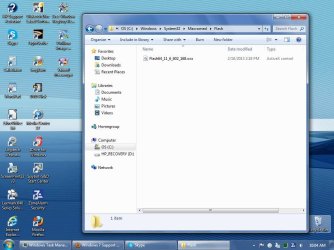
This time I did this, in the order it is listed. However, I cannot remove one file from the first listed folder.

In this folder- C:\Windows\SysWOW64\Macromed\Flash

Is the following file- Flash 64_11_6_602_168.ocx
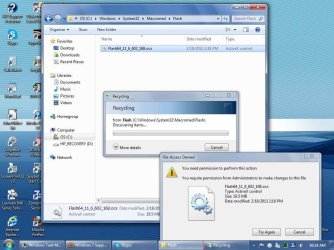
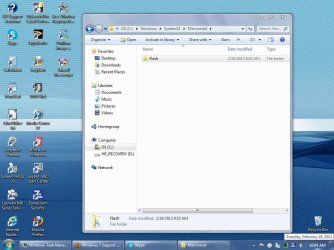
(see screenshots)

This file, or the folder, when I try to delete it the dialog box states that It must be done as administrator. I am currently logged on AS the administrator, but i cannot delete the folder or file.

I need someone to explain or help me to do this operation. I currently have no flash installed and this one file is holding up the works!!

Also, sorry for the differing font, I cannot seem to fix that either!

I 'tupid loser!!
 

Attachments
  • SP32-20130219-100423.jpg
    SP32-20130219-100423.jpg
    85.6 KB · Views: 5
  • SP32-20130219-100430.jpg
    SP32-20130219-100430.jpg
    84 KB · Views: 5
  • SP32-20130219-101428.jpg
    SP32-20130219-101428.jpg
    99.4 KB · Views: 4

My Computer

Computer type
PC/Desktop
Computer Manufacturer/Model Number
HP 505B B2C02UT Business Desktop
OS
Windows 7 professional 64 bit
CPU
AMD Athlon(tm) II X2 220 Processor
Motherboard
PEGATRON (2A99)
Memory
3GB
Graphics Card(s)
NVIDIA GeForce 6150SE nForce 430
Sound Card
Realtek ALC662 High Definition Audio (OEM)
Monitor(s) Displays
OEM Dell CRT
Screen Resolution
N/A
Hard Drives
(1) NCQ Smart IV 500GB Hard Drive - 7,200RPM - SATA 3.0Gb/s

HP LightScribe CD/DVD burner
PSU
OEM HP 300 watt
Case
OEM
Cooling
OEM
Keyboard
wired Logitech K120
Mouse
wired M100 mouse
Internet Speed
G5 High Speed Internet
Antivirus
ZoneAlarm Extreme Security
Browser
FF36.04 IE11
Other Info
JRivers Media Center v17

AudioQuest dragonfly DAC V1.2

Mackie MR5 Studio Monitors
Don't know if this will help but you might see if Revo Uninstaller (forced uninstall option) can get rid of that file. Revo Pro has a free 30 day trial period with full functionality.

Revo Uninstaller Pro - Uninstall Software, Remove Programs easily, Forced Uninstall

If you're familiar with editing the registry, you might be able to search for Adobe Flash and then Macromed. Delete all references from the registry. I would definitely make a new restore point or backup and save a copy of the registry "just in case".

http://www.sevenforums.com/tutorials/697-system-restore-point-create.html

http://www.sevenforums.com/tutorials/700-system-restore.html

http://www.sevenforums.com/tutorials/4230-registry-backup-restore.html

When you say "I currently have no flash installed and this one file is holding up the works!!", are you saying you've tried to reinstall Adobe Flash but it's not installing? Perhaps this Adobe KB article will help with additional troubleshooting steps.

Installation problems | Flash Player | Windows
 

My Computer

Computer type
Laptop
Computer Manufacturer/Model Number
Sony Vaio VPCEB47GM Laptop
OS
Win 7 Pro 64-bit
CPU
Intel i5 2.4 Ghz
Memory
8GB DDR3
Graphics Card(s)
Intel HD 3000
Sound Card
IDT High Definition
Monitor(s) Displays
15.6 WGXA Anti-Glare LED
Screen Resolution
1280x800
Hard Drives
640Gb 7200rpm
Antivirus
MSE
Browser
Opera (primary) with IE9 backup
if you want to delete stubborn file or folder, you can use a free software ''unlocker''. It can delete that!
 

My Computer

OS
Windows 7 SP1 Ultimate x86
As mentioned - unlocker is good - but be sure that you get the 64bit version.

And uncheck all of the junk that comes with it.
See this post - below the video.
 

My Computer

Computer type
Laptop
Computer Manufacturer/Model Number
Employer provided Dell Latitude
OS
W7 Pro SP1 64bit
CPU
i7
Memory
8GB
Graphics Card(s)
Intel HD Graphics
Hard Drives
crappy SSD
Antivirus
Employer mandated Symantec Endpoint Protection
Browser
Pale Moon 64bit, IE11 64bit & Chrome 64bit
Ok, so if i understand everyones answers, then there really is no way to go into my PC and get it to delete this file as the administrator, I must use an outside source???

I meant that since I removed the flash, I currently have none installed on my PC, as I am waiting to remove the last file before reinstalling the flash player, otherwise I may still have flash player issues.

I guess I will try the unlocker, and report back
 

My Computer

Computer type
PC/Desktop
Computer Manufacturer/Model Number
HP 505B B2C02UT Business Desktop
OS
Windows 7 professional 64 bit
CPU
AMD Athlon(tm) II X2 220 Processor
Motherboard
PEGATRON (2A99)
Memory
3GB
Graphics Card(s)
NVIDIA GeForce 6150SE nForce 430
Sound Card
Realtek ALC662 High Definition Audio (OEM)
Monitor(s) Displays
OEM Dell CRT
Screen Resolution
N/A
Hard Drives
(1) NCQ Smart IV 500GB Hard Drive - 7,200RPM - SATA 3.0Gb/s

HP LightScribe CD/DVD burner
PSU
OEM HP 300 watt
Case
OEM
Cooling
OEM
Keyboard
wired Logitech K120
Mouse
wired M100 mouse
Internet Speed
G5 High Speed Internet
Antivirus
ZoneAlarm Extreme Security
Browser
FF36.04 IE11
Other Info
JRivers Media Center v17

AudioQuest dragonfly DAC V1.2

Mackie MR5 Studio Monitors
Yes - there is a way to do it using the native tools in W7...

See the middle paragraph of post #2.

...but that way could be more dangerous than using unlocker.

It sounds like we need to find the reason why flash will not properly uninstall or update. You have identified at least one file that remains registered and loaded. The update process should be able to unload that file and replace it with a new one. (At least I think that is how this stuff is supposed to work.)
 

My Computer

Computer type
Laptop
Computer Manufacturer/Model Number
Employer provided Dell Latitude
OS
W7 Pro SP1 64bit
CPU
i7
Memory
8GB
Graphics Card(s)
Intel HD Graphics
Hard Drives
crappy SSD
Antivirus
Employer mandated Symantec Endpoint Protection
Browser
Pale Moon 64bit, IE11 64bit & Chrome 64bit

My Computer

Computer Manufacturer/Model Number
Custom Built
OS
Windows 7 Ultimate 32-Bit & Windows 7 Ultimate 64-Bit
CPU
Intel Core i7 CPU 950 @ 3.07GHz
Motherboard
ASUS P6T DELUXE V2
Memory
OCZ 6GB (3 x 2GB) 240-Pin DDR3 SDRAM DDR3 1600 OCZ3X1600R2
Graphics Card(s)
ATI Radeon HD 5700 Series
Sound Card
OnBoard
Hard Drives
WD6400AACS-00M3B0 (640GB SATA )
PSU
CORSAIR 850w
Case
NZXT LEXA
Cooling
Intel Stock Heatsink Fan
Keyboard
Microsoft Wireless Laser Keyboard 7000
Mouse
Microsoft Wireless Laser Mouse 7000
OK, using the registry, I see. While I was waiting for an answer here, I went to the adobe site, and found their own uninstall tool, which never seemed to work for me, and it did remove the offending file, and left in it's place an installer file, which i figured was Adobe's way of preparing for the re-installation of the flash. A quick check of the other folders revealed some new files I did not see before. So then I went and used the unlocker, and it did remove every last file.

You see, on this new PC, right after I initially fired it up it said it needed to install a flash "plugin" which crashed the flash. And every now and then I have some issue with it. And right after the newest versions were installed (yesterday) I had problems again. (I let it tell me there is a new version to install, then I do it myself, and check the flash operation immediately on both browsers, and found issues) I use a registry repair (I know, I know) and I got a huge amount of corrupt files listed from the adobe flash.

Hopefully, now, that I used the unlocker It will not cause me any issues. I have reinstalled flash on both browsers, (IE8 and FF). It works great now. And no bad files shown with the reg rep. So, I will mark this as SOLVED.

Thanks everyone for your help!! This is THE best forum I have ever been on :)
 

My Computer

Computer type
PC/Desktop
Computer Manufacturer/Model Number
HP 505B B2C02UT Business Desktop
OS
Windows 7 professional 64 bit
CPU
AMD Athlon(tm) II X2 220 Processor
Motherboard
PEGATRON (2A99)
Memory
3GB
Graphics Card(s)
NVIDIA GeForce 6150SE nForce 430
Sound Card
Realtek ALC662 High Definition Audio (OEM)
Monitor(s) Displays
OEM Dell CRT
Screen Resolution
N/A
Hard Drives
(1) NCQ Smart IV 500GB Hard Drive - 7,200RPM - SATA 3.0Gb/s

HP LightScribe CD/DVD burner
PSU
OEM HP 300 watt
Case
OEM
Cooling
OEM
Keyboard
wired Logitech K120
Mouse
wired M100 mouse
Internet Speed
G5 High Speed Internet
Antivirus
ZoneAlarm Extreme Security
Browser
FF36.04 IE11
Other Info
JRivers Media Center v17

AudioQuest dragonfly DAC V1.2

Mackie MR5 Studio Monitors
Hi VistaKing. I took your advise and read and used the Built-in Administrator Account - Enable or Disable. I enabled it, and low and behold there is another administrator acct, the ELEVATED one!! Very nice! I thought that since I was logged on AS the administrator, and/or had the slider in the UAC to allow me to change any program that I should be able to do what i wanted on my PC.

But now that I have enabled the B.I.A.A. I can't wait for the next time my PC wont allow me to do something!!
I will show it who's da Boss! :)
 

My Computer

Computer type
PC/Desktop
Computer Manufacturer/Model Number
HP 505B B2C02UT Business Desktop
OS
Windows 7 professional 64 bit
CPU
AMD Athlon(tm) II X2 220 Processor
Motherboard
PEGATRON (2A99)
Memory
3GB
Graphics Card(s)
NVIDIA GeForce 6150SE nForce 430
Sound Card
Realtek ALC662 High Definition Audio (OEM)
Monitor(s) Displays
OEM Dell CRT
Screen Resolution
N/A
Hard Drives
(1) NCQ Smart IV 500GB Hard Drive - 7,200RPM - SATA 3.0Gb/s

HP LightScribe CD/DVD burner
PSU
OEM HP 300 watt
Case
OEM
Cooling
OEM
Keyboard
wired Logitech K120
Mouse
wired M100 mouse
Internet Speed
G5 High Speed Internet
Antivirus
ZoneAlarm Extreme Security
Browser
FF36.04 IE11
Other Info
JRivers Media Center v17

AudioQuest dragonfly DAC V1.2

Mackie MR5 Studio Monitors
Back
Top