
Solved I need help removing viruses

TrueBlue502

New member
Local time
3:50 AM
Messages
12
I first thought I had a virus when I was on the internet and clicked a link and it redirected me to some random site. So I ran "Malwarebytes Anti-Malware" and "SUPERAntiSpyware Free Edition", they both said I had viruses. I removed all of them and restarted my PC. I was then notified by Microsoft Security Essentials that I had a "potential threat" on my computer. I selected remove, but it said I needed "Standalone System Sweeper" I clicked 'download now' and I was taken to a microsoft.com link telling me how to get "Windows Defender Offline Beta." (Notice that it's not the same program it said it was before). However, I still decided to download WDOB. I had to put it on a flash drive and boot the computer from the USB.

Upon restarting the computer from the flash drive, WDOB performed a scan for potential threats and found two items. I selected to remove them both, then continued with the restart of my computer and when I got to the desktop, MSE notified me again that I still had a virus. That's when I decided to post this.

Thanks for any help!!

EDIT: I remember some of the virus names: blacole and cleaman.g
 
Last edited:

My Computer

Computer Manufacturer/Model Number
Dell Inc.
OS
Windows 7 Home Premium 64bit
First, Copy and paste these lines in Note pad.

@Echo on
pushd\windows\system32\drivers\etc
attrib -h -s -r hosts
echo 127.0.0.1 localhost>HOSTS
attrib +r +h +s hosts
popd
ipconfig /release
ipconfig /renew
ipconfig /flushdns
netsh winsock reset all
netsh int ip reset all
shutdown -r -t 1
del %0


Save as flush.bat to your desktop.
Double click on the flush.bat file to run it.Vista and Windows 7... right click the .bat file and choose to run as Administrator. Your computer will reboot itself.

Next, let's get rid of the Java script ... (temp cache)
download TFC by Old Timer TFC - Temp File Cleaner by OldTimer - Geeks to Go Forums and save it to your desktop.
Save any unsaved work. TFC will close ALL open programs including your browser!
Double-click on TFC.exe to run it. If you are using Vista/Windows 7 right-click on the file and choose Run As Administrator.
Click the Start button to begin the cleaning process and let it run uninterrupted to completion.
Important! If TFC prompts you to reboot, please do so immediately. If not prompted, manually reboot the machine anyway to ensure a complete clean.

TFC (Temp File Cleaner) will clear out all temp folders for all user accounts (temp, IE temp, java, FF, Opera, Chrome, Safari), including Administrator, All Users, LocalService, NetworkService, and any other accounts in the user folder. It also cleans out the %systemroot%\temp folder and checks for .tmp files in the %systemdrive% root folder, %systemroot%, and the system32 folder (both 32bit and 64bit on 64bit OSs). It shows the amount removed for each location found (in bytes) and the total removed (in MB). Before running, it will stop Explorer and all other running apps. When finished, if a reboot is required the user must reboot to finish clearing any in-use temp files.

Now, I'd like you to scan your machine with ESET OnlineScan
  1. Hold down Control and click on the following link to open ESET OnlineScan in a new window.
    ESET OnlineScan
  2. Click the
    esetOnline.png
    button.
  3. For alternate browsers only: (Microsoft Internet Explorer users can skip these steps)
    1. Click on
      esetSmartInstall.png
      to download the ESET Smart Installer. Save it to your desktop.
    2. Double click on the
      esetSmartInstallDesktopIcon.png
      icon on your desktop.
  4. Check
    esetAcceptTerms.png
  5. Click the
    esetStart.png
    button.
  6. Accept any security warnings from your browser.
  7. Check
    esetScanArchives.png
  8. Push the Start button.
  9. ESET will then download updates for itself, install itself, and begin scanning your computer. Please be patient as this can take some time.
  10. When the scan completes, push
    esetListThreats.png
  11. Push
    esetExport.png
    , and save the file to your desktop using a unique name, such as ESETScan. Include the contents of this report in your next reply.
  12. Push the
    esetBack.png
    button.
  13. Push
    esetFinish.png
 

My Computer

Computer type
PC/Desktop
Computer Manufacturer/Model Number
Bruce ... somewhere in his 40's
OS
Windows 7 Ultimate 32bit SP1
CPU
Intel(R) Core(TM)2 Quad CPU @ 2.40GHz, 2400 MHz
Motherboard
INTEL/D975XBX2
Memory
4 GB
Graphics Card(s)
ATI Radeon HD 2600 Pro
Monitor(s) Displays
Samsung SyncMaster 914v
Screen Resolution
1280 x 1024
Hard Drives
2/500GB each ... ST3500630AS ATA Device.
One is not connected
PSU
Rocketfish 700 W
Case
G.Skill Gigabyte Chassis
Keyboard
Standard PS/2 Keyboard
Mouse
Microsoft PS/2 Mouse
Internet Speed
DSL
Antivirus
Avira Internet Security
Browser
IE 11
Other Info
ATI HDMI Audio
First, Copy and paste these lines in Note pad.

@Echo on
pushd\windows\system32\drivers\etc
attrib -h -s -r hosts
echo 127.0.0.1 localhost>HOSTS
attrib +r +h +s hosts
popd
ipconfig /release
ipconfig /renew
ipconfig /flushdns
netsh winsock reset all
netsh int ip reset all
shutdown -r -t 1
del %0


Save as flush.bat to your desktop.
Double click on the flush.bat file to run it.Vista and Windows 7... right click the .bat file and choose to run as Administrator. Your computer will reboot itself.

Next, let's get rid of the Java script ... (temp cache)
download TFC by Old Timer TFC - Temp File Cleaner by OldTimer - Geeks to Go Forums and save it to your desktop.
Save any unsaved work. TFC will close ALL open programs including your browser!
Double-click on TFC.exe to run it. If you are using Vista/Windows 7 right-click on the file and choose Run As Administrator.
Click the Start button to begin the cleaning process and let it run uninterrupted to completion.
Important! If TFC prompts you to reboot, please do so immediately. If not prompted, manually reboot the machine anyway to ensure a complete clean.

TFC (Temp File Cleaner) will clear out all temp folders for all user accounts (temp, IE temp, java, FF, Opera, Chrome, Safari), including Administrator, All Users, LocalService, NetworkService, and any other accounts in the user folder. It also cleans out the %systemroot%\temp folder and checks for .tmp files in the %systemdrive% root folder, %systemroot%, and the system32 folder (both 32bit and 64bit on 64bit OSs). It shows the amount removed for each location found (in bytes) and the total removed (in MB). Before running, it will stop Explorer and all other running apps. When finished, if a reboot is required the user must reboot to finish clearing any in-use temp files.

Now, I'd like you to scan your machine with ESET OnlineScan
  1. Hold down Control and click on the following link to open ESET OnlineScan in a new window.
    ESET OnlineScan
  2. Click the
    esetOnline.png
    button.
  3. For alternate browsers only: (Microsoft Internet Explorer users can skip these steps)
    1. Click on
      esetSmartInstall.png
      to download the ESET Smart Installer. Save it to your desktop.
    2. Double click on the
      esetSmartInstallDesktopIcon.png
      icon on your desktop.
  4. Check
    esetAcceptTerms.png
  5. Click the
    esetStart.png
    button.
  6. Accept any security warnings from your browser.
  7. Check
    esetScanArchives.png
  8. Push the Start button.
  9. ESET will then download updates for itself, install itself, and begin scanning your computer. Please be patient as this can take some time.
  10. When the scan completes, push
    esetListThreats.png
  11. Push
    esetExport.png
    , and save the file to your desktop using a unique name, such as ESETScan. Include the contents of this report in your next reply.
  12. Push the
    esetBack.png
    button.
  13. Push
    esetFinish.png
When I try to run ESET OnlineScan I get this:
rr2pug.jpg

Should I start it anyways?

Also, my AV is giving me notifications of malware every minute. If you need me to I can post the details of what it's blocking.
 

My Computer

Computer Manufacturer/Model Number
Dell Inc.
OS
Windows 7 Home Premium 64bit
It would be best to turn WD off it you can.

  1. Open Windows Defender by clicking the Start button
    4f6cbd09-148c-4dd8-b1f2-48f232a2fd33_47.png
    , clicking All Programs, and then clicking Windows Defender.
  2. Click Tools, and then click Options.
  3. Under Administrator options, select or clear the Use Windows Defender check box, and then click Save.
    18abb370-ac1e-4b6b-b663-e028a75bf05b_41.png
    If you are prompted for an administrator password or confirmation, type the password or provide confirmation.
 

My Computer

Computer type
PC/Desktop
Computer Manufacturer/Model Number
Dell Inspiron 530
OS
Windows 7 Professional SP1 64-bit
CPU
Intel Core 2 Duo Processor E8300 @ 2.83GHz
Motherboard
Dell Inc. 0RY007 (Socket 775)
Memory
4.00 GB Dual-Channel DDR2 @ 332MHz (5-5-5-15)
Graphics Card(s)
Intel(R) G33/G31 Express Chipset Family
Sound Card
Integrated 7.1 Channel Audio
Monitor(s) Displays
Acer G245HQL 23.6" LED(1920x1080@60Hz)
Screen Resolution
1920 x 1080
Hard Drives
Disk 0 HITACHI 1TB OS Installed - Disk 1 HITACHI 1TB For Backups
Keyboard
Dell USB Keyboard
Mouse
Dell Optical USB Mouse
Internet Speed
DSL 10 meg
Antivirus
Symantec(SEP)
Browser
Pale Moon
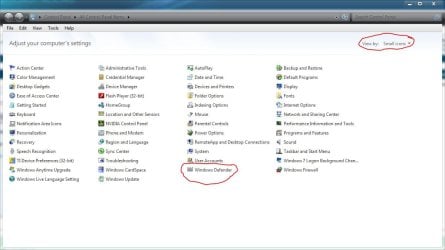
Couldn't find WD under all programs
 

My Computer

Computer Manufacturer/Model Number
Dell Inc.
OS
Windows 7 Home Premium 64bit
Couldn't find WD under all programs
Look in the Control Panel or try this:
Click the “Start Orb” and type in defender into the text box. Select Windows Defender.
Select Tools from the main Windows Defender screen.
Select Options from the Settings section.
From the left navigation pane, select Administrator.
Now remove the check mark from the box labeled Use this program. Click the Save button in the bottom right corner.
Click Yes when prompted to make the change
If you can't find it go ahead with ESET.
 

My Computer

Computer type
PC/Desktop
Computer Manufacturer/Model Number
Dell Inspiron 530
OS
Windows 7 Professional SP1 64-bit
CPU
Intel Core 2 Duo Processor E8300 @ 2.83GHz
Motherboard
Dell Inc. 0RY007 (Socket 775)
Memory
4.00 GB Dual-Channel DDR2 @ 332MHz (5-5-5-15)
Graphics Card(s)
Intel(R) G33/G31 Express Chipset Family
Sound Card
Integrated 7.1 Channel Audio
Monitor(s) Displays
Acer G245HQL 23.6" LED(1920x1080@60Hz)
Screen Resolution
1920 x 1080
Hard Drives
Disk 0 HITACHI 1TB OS Installed - Disk 1 HITACHI 1TB For Backups
Keyboard
Dell USB Keyboard
Mouse
Dell Optical USB Mouse
Internet Speed
DSL 10 meg
Antivirus
Symantec(SEP)
Browser
Pale Moon

My Computer

Computer type
PC/Desktop
Computer Manufacturer/Model Number
Self Built
OS
Win 10 Pro x64
CPU
Intel I5-2500K @3.3GHz
Motherboard
Asrock P67 Extreme4
Memory
16GB G.Skill Ripjaws X (4x4GB)
Graphics Card(s)
EVGA GeForce 750 Ti SC 2GB
Sound Card
ASUS Xonar DG 5.1 Channels 24-bit 96KHz PCI Interface Sound
Monitor(s) Displays
auria eq2367
Screen Resolution
1920 x 1080
Hard Drives
250GB Samsung 850 EVO SSD
1TB WD Blue
1TB Hitachi
PSU
SeaSonic X 650W 80 Plus Gold
Case
Corsair Obsidian 750D
Cooling
Corsair H60, Three 140mm case fans
Keyboard
Logitech Wireless Keyboard K520
Mouse
Logitech Wireless Mouse M310
Internet Speed
Wave Broadband ~ 100 dn 5 up
Antivirus
Windows Defender, Malwarebytes Premium
Browser
Edge, IE11, Chrome
Other Info
Laptop specs: HP g7-1365dx /
CPU: AMD A6-3420M APU with Radeon(tm) HD Graphics /
RAM: Crucial 8Gb (2x4Gb) /
SSD: Crucial M4-CT128M4SSD2 ATA Device/ FW 000F /
GFX: AMD Radeon HD 6520G /
OS: Windows 10 Pro x64
You can also disable it in Services. Type services.msc in the start search box, click on the icon, scroll down to Windows Defender, right click > choose properties, then set it to disabled.

Now run ESET
 

My Computer

Computer type
PC/Desktop
Computer Manufacturer/Model Number
Bruce ... somewhere in his 40's
OS
Windows 7 Ultimate 32bit SP1
CPU
Intel(R) Core(TM)2 Quad CPU @ 2.40GHz, 2400 MHz
Motherboard
INTEL/D975XBX2
Memory
4 GB
Graphics Card(s)
ATI Radeon HD 2600 Pro
Monitor(s) Displays
Samsung SyncMaster 914v
Screen Resolution
1280 x 1024
Hard Drives
2/500GB each ... ST3500630AS ATA Device.
One is not connected
PSU
Rocketfish 700 W
Case
G.Skill Gigabyte Chassis
Keyboard
Standard PS/2 Keyboard
Mouse
Microsoft PS/2 Mouse
Internet Speed
DSL
Antivirus
Avira Internet Security
Browser
IE 11
Other Info
ATI HDMI Audio
You can also disable it in Services. Type services.msc in the start search box, click on the icon, scroll down to Windows Defender, right click > choose properties, then set it to disabled.

Now run ESET
Here are the results:
C:\Program Files (x86)\Uniblue\RegistryBooster\rbmonitor.exe Win32/RegistryBooster application cleaned by deleting - quarantined
C:\Program Files (x86)\Uniblue\RegistryBooster\rbnotifier.exe Win32/RegistryBooster application cleaned by deleting - quarantined
C:\Program Files (x86)\Uniblue\RegistryBooster\rb_move_serial.exe Win32/RegistryBooster application cleaned by deleting - quarantined
C:\Program Files (x86)\Uniblue\RegistryBooster\registrybooster.exe Win32/RegistryBooster application cleaned by deleting - quarantined
C:\Users\Henry\AppData\Local\TempDIR\BetterInstaller.exe a variant of Win32/Adware.Somoto.A application cleaned by deleting - quarantined
C:\Users\Henry\Downloads\registrybooster.exe Win32/RegistryBooster application deleted - quarantined
C:\Windows.old\Documents and Settings\Henry\RegistryReviverSetup.exe a variant of Win32/SlowPCfighter application cleaned by deleting - quarantined


My anti-virus is still giving me "Trojan Horse blocked" and "Malicious URL blocked" every minute when I'm not even opening a new page. I've had a total of 432 network connections blocked in the last ten and a half hours. Here's the initial alert of one of them:
mc88x2.png

and the details:
2i1cbxv.png

Those are just examples, they're different every time.
 
Last edited:

My Computer

Computer Manufacturer/Model Number
Dell Inc.
OS
Windows 7 Home Premium 64bit
Let's flush the DNS cache and restore MS's Hosts file:

Copy and paste these lines in Note pad.

@Echo on
pushd\windows\system32\drivers\etc
attrib -h -s -r hosts
echo 127.0.0.1 localhost>HOSTS
attrib +r +h +s hosts
popd
ipconfig /release
ipconfig /renew
ipconfig /flushdns
netsh winsock reset all
netsh int ip reset all
shutdown -r -t 1
del %0


Save as flush.bat to your desktop.
Double click on the flush.bat file to run it.Vista and Windows 7... right click the .bat file and choose to run as Administrator. Your computer will reboot itself.

Next, download TFC by Old Timer TFC - Temp File Cleaner by OldTimer - Geeks to Go Forums and save it to your desktop.
Save any unsaved work. TFC will close ALL open programs including your browser!
Double-click on TFC.exe to run it. If you are using Vista/Windows 7 right-click on the file and choose Run As Administrator.
Click the Start button to begin the cleaning process and let it run uninterrupted to completion.
Important! If TFC prompts you to reboot, please do so immediately. If not prompted, manually reboot the machine anyway to ensure a complete clean.

Tell me if the problem is still there.
 

My Computer

Computer type
PC/Desktop
Computer Manufacturer/Model Number
Bruce ... somewhere in his 40's
OS
Windows 7 Ultimate 32bit SP1
CPU
Intel(R) Core(TM)2 Quad CPU @ 2.40GHz, 2400 MHz
Motherboard
INTEL/D975XBX2
Memory
4 GB
Graphics Card(s)
ATI Radeon HD 2600 Pro
Monitor(s) Displays
Samsung SyncMaster 914v
Screen Resolution
1280 x 1024
Hard Drives
2/500GB each ... ST3500630AS ATA Device.
One is not connected
PSU
Rocketfish 700 W
Case
G.Skill Gigabyte Chassis
Keyboard
Standard PS/2 Keyboard
Mouse
Microsoft PS/2 Mouse
Internet Speed
DSL
Antivirus
Avira Internet Security
Browser
IE 11
Other Info
ATI HDMI Audio
Let's flush the DNS cache and restore MS's Hosts file:

Copy and paste these lines in Note pad.

@Echo on
pushd\windows\system32\drivers\etc
attrib -h -s -r hosts
echo 127.0.0.1 localhost>HOSTS
attrib +r +h +s hosts
popd
ipconfig /release
ipconfig /renew
ipconfig /flushdns
netsh winsock reset all
netsh int ip reset all
shutdown -r -t 1
del %0


Save as flush.bat to your desktop.
Double click on the flush.bat file to run it.Vista and Windows 7... right click the .bat file and choose to run as Administrator. Your computer will reboot itself.

Next, download TFC by Old Timer TFC - Temp File Cleaner by OldTimer - Geeks to Go Forums and save it to your desktop.
Save any unsaved work. TFC will close ALL open programs including your browser!
Double-click on TFC.exe to run it. If you are using Vista/Windows 7 right-click on the file and choose Run As Administrator.
Click the Start button to begin the cleaning process and let it run uninterrupted to completion.
Important! If TFC prompts you to reboot, please do so immediately. If not prompted, manually reboot the machine anyway to ensure a complete clean.

Tell me if the problem is still there.
The problem seems to have ceased. Thank you so much!!

Is there anything else I should do? (i.e. change passwords)
 

My Computer

Computer Manufacturer/Model Number
Dell Inc.
OS
Windows 7 Home Premium 64bit
Yes, change passwords ... that's always a good idea!

Please download (free version) Malwarebytes' Anti-Malware to your desktop
http://shop.malwarebytes.org/lpa/342/3/7268/index_b.html?gclid=CI2d8YrN2K4CFQ1vhwodUH-UfQ
* Double-click mbam-setup.exe and follow the prompts to install the program.
* At the end, be sure a checkmark is placed next to Update Malwarebytes' Anti-Malware and Launch Malwarebytes' Anti-Malware, then click Finish.
* If an update is found, it will download and install the latest version.
* Once the program has loaded, select Perform full scan, then click Scan.
* When the scan is complete, click OK, then Show Results to view the results.
* Be sure that everything is checked, and click Remove Selected.
* When completed, a log will open in Notepad. Please save it to a convenient location. Copy and Paste that log into your next reply.
 

My Computer

Computer type
PC/Desktop
Computer Manufacturer/Model Number
Bruce ... somewhere in his 40's
OS
Windows 7 Ultimate 32bit SP1
CPU
Intel(R) Core(TM)2 Quad CPU @ 2.40GHz, 2400 MHz
Motherboard
INTEL/D975XBX2
Memory
4 GB
Graphics Card(s)
ATI Radeon HD 2600 Pro
Monitor(s) Displays
Samsung SyncMaster 914v
Screen Resolution
1280 x 1024
Hard Drives
2/500GB each ... ST3500630AS ATA Device.
One is not connected
PSU
Rocketfish 700 W
Case
G.Skill Gigabyte Chassis
Keyboard
Standard PS/2 Keyboard
Mouse
Microsoft PS/2 Mouse
Internet Speed
DSL
Antivirus
Avira Internet Security
Browser
IE 11
Other Info
ATI HDMI Audio
Yes, change passwords ... that's always a good idea!

Please download (free version) Malwarebytes' Anti-Malware to your desktop
Malwarebytes Special Offer!
* Double-click mbam-setup.exe and follow the prompts to install the program.
* At the end, be sure a checkmark is placed next to Update Malwarebytes' Anti-Malware and Launch Malwarebytes' Anti-Malware, then click Finish.
* If an update is found, it will download and install the latest version.
* Once the program has loaded, select Perform full scan, then click Scan.
* When the scan is complete, click OK, then Show Results to view the results.
* Be sure that everything is checked, and click Remove Selected.
* When completed, a log will open in Notepad. Please save it to a convenient location. Copy and Paste that log into your next reply.
Malwarebytes Anti-Malware 1.60.1.1000
Malwarebytes : Free anti-malware, anti-virus and spyware removal download

Database version: v2012.03.17.06

Windows 7 Service Pack 1 x64 NTFS
Internet Explorer 9.0.8112.16421
Henry :: HENRY-PC [administrator]

3/17/2012 2:59:05 PM
mbam-log-2012-03-17 (14-59-05).txt

Scan type: Full scan
Scan options enabled: Memory | Startup | Registry | File System | Heuristics/Extra | Heuristics/Shuriken | PUP | PUM
Scan options disabled: P2P
Objects scanned: 389774
Time elapsed: 2 hour(s), 21 minute(s), 58 second(s)

Memory Processes Detected: 0
(No malicious items detected)

Memory Modules Detected: 0
(No malicious items detected)

Registry Keys Detected: 0
(No malicious items detected)

Registry Values Detected: 0
(No malicious items detected)

Registry Data Items Detected: 0
(No malicious items detected)

Folders Detected: 0
(No malicious items detected)

Files Detected: 0
(No malicious items detected)

(end)
 

My Computer

Computer Manufacturer/Model Number
Dell Inc.
OS
Windows 7 Home Premium 64bit
Okay, that looks good. Report back if there are any more problems!! :)
 

My Computer

Computer type
PC/Desktop
Computer Manufacturer/Model Number
Bruce ... somewhere in his 40's
OS
Windows 7 Ultimate 32bit SP1
CPU
Intel(R) Core(TM)2 Quad CPU @ 2.40GHz, 2400 MHz
Motherboard
INTEL/D975XBX2
Memory
4 GB
Graphics Card(s)
ATI Radeon HD 2600 Pro
Monitor(s) Displays
Samsung SyncMaster 914v
Screen Resolution
1280 x 1024
Hard Drives
2/500GB each ... ST3500630AS ATA Device.
One is not connected
PSU
Rocketfish 700 W
Case
G.Skill Gigabyte Chassis
Keyboard
Standard PS/2 Keyboard
Mouse
Microsoft PS/2 Mouse
Internet Speed
DSL
Antivirus
Avira Internet Security
Browser
IE 11
Other Info
ATI HDMI Audio

My Computer

Computer Manufacturer/Model Number
Dell Inc.
OS
Windows 7 Home Premium 64bit
You're welcome, but don't hesitate to ask for more help if we didn't succeed!!
 

My Computer

Computer type
PC/Desktop
Computer Manufacturer/Model Number
Bruce ... somewhere in his 40's
OS
Windows 7 Ultimate 32bit SP1
CPU
Intel(R) Core(TM)2 Quad CPU @ 2.40GHz, 2400 MHz
Motherboard
INTEL/D975XBX2
Memory
4 GB
Graphics Card(s)
ATI Radeon HD 2600 Pro
Monitor(s) Displays
Samsung SyncMaster 914v
Screen Resolution
1280 x 1024
Hard Drives
2/500GB each ... ST3500630AS ATA Device.
One is not connected
PSU
Rocketfish 700 W
Case
G.Skill Gigabyte Chassis
Keyboard
Standard PS/2 Keyboard
Mouse
Microsoft PS/2 Mouse
Internet Speed
DSL
Antivirus
Avira Internet Security
Browser
IE 11
Other Info
ATI HDMI Audio
Back
Top