I need Help To Overclock My AMD CPU

Kliton x64

New member
Member
Local time
3:58 PM
Messages
27
Location
Albania
How to Overclock My AMD CPU

Hello All!

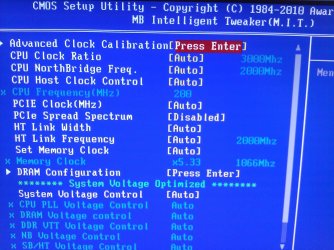
I need help to overclock my CPU AMD Athlon II X2 250 3.00GHz,Motherboard: Giabyte Ltd. Ga-790XT -USB3.

Ram: 6GB DDR 3
OS: Windows 7 Ultimate SP1 x64
10qxf95.jpg

Please Can Help Me.

Thanks Kliton!
 
Last edited:

My Computer

OS
Windows 7 Ultimate x64
CPU
AMD Athlon II X2 250 3.00GHz
Motherboard
Gigabyte Ltd. Ga-790XT -USB3
Memory
6GB Ram DDR3
Graphics Card(s)
ATI HD 4600 1GB
Sound Card
Realtek HD Audio
Monitor(s) Displays
LG L192WS
Screen Resolution
1440 x 900
Keyboard
Genius
Mouse
Genius
Internet Speed
8MB Download 1MB Upload
Please Can Help me Please :(
 

My Computer

OS
Windows 7 Ultimate x64
CPU
AMD Athlon II X2 250 3.00GHz
Motherboard
Gigabyte Ltd. Ga-790XT -USB3
Memory
6GB Ram DDR3
Graphics Card(s)
ATI HD 4600 1GB
Sound Card
Realtek HD Audio
Monitor(s) Displays
LG L192WS
Screen Resolution
1440 x 900
Keyboard
Genius
Mouse
Genius
Internet Speed
8MB Download 1MB Upload
Hai Kliton x64, i actually am not familiar wit AMD ( i used to OC Intel ). But since I see the bios menu from your picts, it looks almost identic to intel mobo i ever had. So here i try to give you some clues - not the best ones - on how you can start from.

1st. Make sure how good your cpu cooler. ( at least never use stock cooler when ocing ).

2nd. Make sure what is actual default voltage of your default clock 3 ghz by stressing it with PRIME95 or IBT.
To see your voltage during stressing, open CPUZ or HWmonitor ( last version better ).

3rd. Once you get default vcore / voltage core from cpuz, then go to bios and set System Voltage Control to manual. Start lowering vcore one increment / a notch, save the bios.

4th. Let's see if the cpu can boot to windows.

5th. If it does, then lowering vcore until you find it unstable ( crash / can't boot ). From here you'll know the stable vcore for your default clock.

It's more "trial error", so carry on some experiments.

Remember keeping your eyes on cpu temp while stressing ( use Coretemp or Realtemp or HW Monitor ).

Hoping this helps you a bit.
 

My Computer

OS
Win7 Ult x64 SP1
CPU
i7 920 / i5 2500K
Motherboard
eVGA Classified / As Rock Z68 X3 G3
Memory
Corsair 6 gb Triple Channel / Corsair 8 GB Dual Channel
Graphics Card(s)
Nvidia DA GTX 295 / MSI HD 5850 TF II
Sound Card
X-Fi Xtreme Fatality Gamer
Monitor(s) Displays
2 x 22 inch Samsung / LG
Screen Resolution
1680 * 1050
PSU
Silverstone 1500 Watt / Antec NeoPower 650 Watt
Case
Lian Li / CM Scout
Cooling
WC / Corsair Hydro H60
Keyboard
Razer Lycosa Mirror
Mouse
Razer DA Blue
Other Info
Mousepad:

Razer Destructor White Edition
Mionix Propuse 380
peaceful@ Thanks for reply!

I need to change the functions for example CPU Clock Ratio [Auto] -System Voltage and others for overclock,but I do not know how to do.:(
 

My Computer

OS
Windows 7 Ultimate x64
CPU
AMD Athlon II X2 250 3.00GHz
Motherboard
Gigabyte Ltd. Ga-790XT -USB3
Memory
6GB Ram DDR3
Graphics Card(s)
ATI HD 4600 1GB
Sound Card
Realtek HD Audio
Monitor(s) Displays
LG L192WS
Screen Resolution
1440 x 900
Keyboard
Genius
Mouse
Genius
Internet Speed
8MB Download 1MB Upload

My Computer

Computer type
PC/Desktop
Computer Manufacturer/Model Number
Me
OS
Win 7 Ultimate x64
CPU
FX-8350 @ 4.6 GHz so far
Motherboard
Asus M5A97 EVO
Memory
ADATA XPG V1 Series Black 8GB DDR3 1600
Graphics Card(s)
Sapphire R9 270x Dual-X
Sound Card
Xonar DGX w/ Corsair Vengence 1300
Monitor(s) Displays
Acer S232HL Abid
Screen Resolution
1920x1080
Hard Drives
120 GB OCZ Vertex 3
500 GB Seagate 7200.12
PSU
Antec Earthwatts 650W Green
Case
Antec Three Hundred
Cooling
Cooler Master 212 EVO
Keyboard
Logitech G510
Mouse
Logitech G500s
Internet Speed
35000/3000
Thank you I read this but it does not show how to act for Overclocking :(
 

My Computer

OS
Windows 7 Ultimate x64
CPU
AMD Athlon II X2 250 3.00GHz
Motherboard
Gigabyte Ltd. Ga-790XT -USB3
Memory
6GB Ram DDR3
Graphics Card(s)
ATI HD 4600 1GB
Sound Card
Realtek HD Audio
Monitor(s) Displays
LG L192WS
Screen Resolution
1440 x 900
Keyboard
Genius
Mouse
Genius
Internet Speed
8MB Download 1MB Upload
^ ok, let's begin with this:

1. Run IBT or Prime95 for 2 minutes, open HWMonitor to see vcore during stressing and core temp to see temp. Once it's completed, you can see what's your max. vcore and temp.

2. I need more BIOS picts to see how the menu looks like.
- Press enter CPU Clock Ratio ( then see what i looks like - as i see from your bios your basic clock is 200 Mhz and your default clock 3000Mhz, it might be that the CPU Clock Ratio is 30X - just my guess ).

- Press enter System Voltage Control ( there' should be at least 2 options - Auto or Manual ).

Ok, just to steps of BIOS menu I'd like to know how they tell us before we go any further.
 

My Computer

OS
Win7 Ult x64 SP1
CPU
i7 920 / i5 2500K
Motherboard
eVGA Classified / As Rock Z68 X3 G3
Memory
Corsair 6 gb Triple Channel / Corsair 8 GB Dual Channel
Graphics Card(s)
Nvidia DA GTX 295 / MSI HD 5850 TF II
Sound Card
X-Fi Xtreme Fatality Gamer
Monitor(s) Displays
2 x 22 inch Samsung / LG
Screen Resolution
1680 * 1050
PSU
Silverstone 1500 Watt / Antec NeoPower 650 Watt
Case
Lian Li / CM Scout
Cooling
WC / Corsair Hydro H60
Keyboard
Razer Lycosa Mirror
Mouse
Razer DA Blue
Other Info
Mousepad:

Razer Destructor White Edition
Mionix Propuse 380
The temp is normal 1.42 V,this picture is to overclock,this is complete picture.
 

My Computer

OS
Windows 7 Ultimate x64
CPU
AMD Athlon II X2 250 3.00GHz
Motherboard
Gigabyte Ltd. Ga-790XT -USB3
Memory
6GB Ram DDR3
Graphics Card(s)
ATI HD 4600 1GB
Sound Card
Realtek HD Audio
Monitor(s) Displays
LG L192WS
Screen Resolution
1440 x 900
Keyboard
Genius
Mouse
Genius
Internet Speed
8MB Download 1MB Upload
All your BIOS setting is in AUTO mode, so too see more menu of your bios, you have to change AUTO sertting to MANUAL.
 

My Computer

OS
Win7 Ult x64 SP1
CPU
i7 920 / i5 2500K
Motherboard
eVGA Classified / As Rock Z68 X3 G3
Memory
Corsair 6 gb Triple Channel / Corsair 8 GB Dual Channel
Graphics Card(s)
Nvidia DA GTX 295 / MSI HD 5850 TF II
Sound Card
X-Fi Xtreme Fatality Gamer
Monitor(s) Displays
2 x 22 inch Samsung / LG
Screen Resolution
1680 * 1050
PSU
Silverstone 1500 Watt / Antec NeoPower 650 Watt
Case
Lian Li / CM Scout
Cooling
WC / Corsair Hydro H60
Keyboard
Razer Lycosa Mirror
Mouse
Razer DA Blue
Other Info
Mousepad:

Razer Destructor White Edition
Mionix Propuse 380
This is the menu for overclokck:
 

Attachments

  • WP_000073.jpg
    WP_000073.jpg
    567.8 KB · Views: 24

My Computer

OS
Windows 7 Ultimate x64
CPU
AMD Athlon II X2 250 3.00GHz
Motherboard
Gigabyte Ltd. Ga-790XT -USB3
Memory
6GB Ram DDR3
Graphics Card(s)
ATI HD 4600 1GB
Sound Card
Realtek HD Audio
Monitor(s) Displays
LG L192WS
Screen Resolution
1440 x 900
Keyboard
Genius
Mouse
Genius
Internet Speed
8MB Download 1MB Upload
All your BIOS setting is in AUTO mode, so too see more menu of your bios, you have to change AUTO sertting to MANUAL.

That is what is required to be able to change those settings. And no we can not tell you what to set them to as what works for one does not work for another.

Might be a good idea if you can't understand that guide I linked too, that you give up on the idea as you can and will damage something if you don't do it properly.
 

My Computer

Computer type
PC/Desktop
Computer Manufacturer/Model Number
Me
OS
Win 7 Ultimate x64
CPU
FX-8350 @ 4.6 GHz so far
Motherboard
Asus M5A97 EVO
Memory
ADATA XPG V1 Series Black 8GB DDR3 1600
Graphics Card(s)
Sapphire R9 270x Dual-X
Sound Card
Xonar DGX w/ Corsair Vengence 1300
Monitor(s) Displays
Acer S232HL Abid
Screen Resolution
1920x1080
Hard Drives
120 GB OCZ Vertex 3
500 GB Seagate 7200.12
PSU
Antec Earthwatts 650W Green
Case
Antec Three Hundred
Cooling
Cooler Master 212 EVO
Keyboard
Logitech G510
Mouse
Logitech G500s
Internet Speed
35000/3000
If something bad happens,I do not blame anyone,I just want an idea how to do,Please :)
 

My Computer

OS
Windows 7 Ultimate x64
CPU
AMD Athlon II X2 250 3.00GHz
Motherboard
Gigabyte Ltd. Ga-790XT -USB3
Memory
6GB Ram DDR3
Graphics Card(s)
ATI HD 4600 1GB
Sound Card
Realtek HD Audio
Monitor(s) Displays
LG L192WS
Screen Resolution
1440 x 900
Keyboard
Genius
Mouse
Genius
Internet Speed
8MB Download 1MB Upload

My Computer

Computer type
PC/Desktop
Computer Manufacturer/Model Number
Me
OS
Win 7 Ultimate x64
CPU
FX-8350 @ 4.6 GHz so far
Motherboard
Asus M5A97 EVO
Memory
ADATA XPG V1 Series Black 8GB DDR3 1600
Graphics Card(s)
Sapphire R9 270x Dual-X
Sound Card
Xonar DGX w/ Corsair Vengence 1300
Monitor(s) Displays
Acer S232HL Abid
Screen Resolution
1920x1080
Hard Drives
120 GB OCZ Vertex 3
500 GB Seagate 7200.12
PSU
Antec Earthwatts 650W Green
Case
Antec Three Hundred
Cooling
Cooler Master 212 EVO
Keyboard
Logitech G510
Mouse
Logitech G500s
Internet Speed
35000/3000

My Computer

OS
Windows 7 Ultimate x64
CPU
AMD Athlon II X2 250 3.00GHz
Motherboard
Gigabyte Ltd. Ga-790XT -USB3
Memory
6GB Ram DDR3
Graphics Card(s)
ATI HD 4600 1GB
Sound Card
Realtek HD Audio
Monitor(s) Displays
LG L192WS
Screen Resolution
1440 x 900
Keyboard
Genius
Mouse
Genius
Internet Speed
8MB Download 1MB Upload
Klinton x 64 may i also add if you are able to upgrade to a better performance chip that will eliminate the need to Overclock which looking at this thread isn't recommended at this time

If you have a crap system you can use for that i say use that first test dummies are a good thing if not ,I would leave well enough alone

If you do have spare cash i would look into getting a higher ranking chip cause even overclocking really doesn't render to many perks some benchmarks some games but ussually can't tell unles you got a super set up
 

My Computer

Computer type
PC/Desktop
Computer Manufacturer/Model Number
CoreI7-6700K MrFingerIII Special Builds
OS
Windows 10 Home Premium 64bit sp1
CPU
Intel I7-6700K @ 4.6 Ghz 1.344 volts everyday OC
Motherboard
Asrock Fatality K6 Z170 Socket 1151
Memory
32GB G-Skill TridentZ 3200mhz 16-18-18-38 DDR4
Graphics Card(s)
Sli Gigabyte Windforce GTX 980 G1
Sound Card
AC97 Creative Rage Tactic 3D Headphones Bluetooth
Monitor(s) Displays
27" Asus ROG Swift PG278Q G-Sync 48" Vizio Smart HD TV
Screen Resolution
2560x1440p 27"- 48" Currently Gaming at 2560x1440p Res 2K
Hard Drives
250GB Samsung Evo840SSD Seagate baracuda 500 GB WD Mybook 500Gb 1TB Seagate Barracuda
PSU
HX1050w Corsair Silver 80plus certified crosfire/sli
Case
Enthod Pro Full Tower
Cooling
Corsair H110i GT 280 mm High Performance WaterBlock
Keyboard
Logitech wireless keyboard
Mouse
Logitech wireless mouse
Internet Speed
Cox Cable 100+ mb
Antivirus
WebRoot Spysweeper with Antivirus
Browser
IE-10, Chrome, Opera
Other Info
My Other Rig is a AMD FX8320E @4.6Ghz 16GB Ballistic Sport Ram
Mobo Asrock Fatality 990FX 120GB OCZ SSD 1TB Seagate Barracuda Corsair H75 Cooling PSU Corsair CX750
GPU GTX Gigabyte 970G1
Back
Top