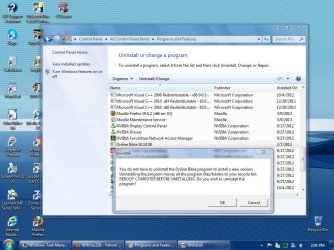
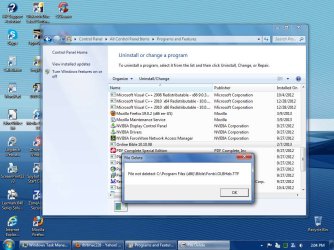
I am trying to remove an online Bible program i had tried to install on my PC. I was just looking in the programs list and found it still listed. I tried to uninstall the program but it stubbornly refuses to remove itself.
A little background: I got the program from someone at my church, on disk. The disk was badly scratched and the software would never properly, or fully install itself. I got ALOT of errors during the install.
I never could install it, so i gave the disks back and thought I had uninstalled it before.
I tried to follow the instructions to reboot before uninstalling, but it did not work either.I am including 2 screenshots to help out.
Thanks in advance
Attachments
SP32-20130313-140436.jpg
117.6 KB
· Views: 13
SP32-20130313-140446.jpg
113.9 KB
· Views: 11
My Computer
Computer type
PC/Desktop
Computer Manufacturer/Model Number
HP 505B B2C02UT Business Desktop
OS
Windows 7 professional 64 bit
CPU
AMD Athlon(tm) II X2 220 Processor
Motherboard
PEGATRON (2A99)
Memory
3GB
Graphics Card(s)
NVIDIA GeForce 6150SE nForce 430
Sound Card
Realtek ALC662 High Definition Audio (OEM)
Monitor(s) Displays
OEM Dell CRT
Screen Resolution
N/A
Hard Drives
(1) NCQ Smart IV 500GB Hard Drive - 7,200RPM - SATA 3.0Gb/s
I use Revo uninstaller to get everything off my machine. Having said that..... can't you just go into your programs folder and delete them/it? Or go to your registry and delete all references to it?
Sounds good MetalMan. the link I posted was a downloadable program so you don't have to be online, but I wasn't sure if it was the same one or not. The site you linked to looks good too So whatever works for you best. Glad REVO was able to uninstall the other program
My Computer
Computer type
Laptop
Computer Manufacturer/Model Number
ASUS G60-RBBX05
OS
Win7 Home Premium 64x
CPU
Intel Core 2 Duo P7450 / 2.13 GHz (2.29 with Extreme Turbo)
Memory
4 GB PC-6400 Hyundai (2X2) at 800Mhz
Graphics Card(s)
NVIDIA GeForce GTX 260M 1GB DDR3 VRAM
Monitor(s) Displays
16" LED Backlit
Screen Resolution
1366 x 768 on laptop 1600x1050 max res on 22" external mon
"Uninstall applications. Sometimes you cannot uninstall applications completely, because some files or folders can be locked by other processes. Using EMCO MoveOnBoot you can schedule remained resources for deletion at the next restart."





 So whatever works for you best. Glad REVO was able to uninstall the other program