I need help with File Sharing on NOT networked PC's (XP - W7)

MetalMan228

New member
Member
VIP
Local time
4:42 AM
Messages
265
Location
Lancaster PA
Morning all,

I have searched the win7 forums for help with transferring files from XP-W7, but only seem to find threads with networked PC's

I still have my old XP machine as a backup if my current W7 machine were to die suddenly. I keep it in the closet and wanted to take it out, hook it up to the internet and update everything I can, then I wish to delete all the documents/pictures etc, which are outdated and copy to the XP machine all my current documents/pictures etc so that both machines would be mirror image's of each other with current resumes and pics etc if it became necessary to use the XP computer for any reason.

If there is a thread about transferring files, like via a thumb drive please let me know so we don't rehash this again. Currently I have a 16GB thumb with copy's of my documents/pics/music/videos that I keep updated in case of a major problem as well as online backups, but i thought if could if I change the root maybe i'd be able to transfer all this to my XP computer.
 

My Computer My Computer

At a glance

Windows 7 professional 64 bitAMD Athlon(tm) II X2 220 Processor3GBNVIDIA GeForce 6150SE nForce 430
Computer type
PC/Desktop
Computer Manufacturer/Model Number
HP 505B B2C02UT Business Desktop
OS
Windows 7 professional 64 bit
CPU
AMD Athlon(tm) II X2 220 Processor
Motherboard
PEGATRON (2A99)
Memory
3GB
Graphics Card(s)
NVIDIA GeForce 6150SE nForce 430
Sound Card
Realtek ALC662 High Definition Audio (OEM)
Monitor(s) Displays
OEM Dell CRT
Screen Resolution
N/A
Hard Drives
(1) NCQ Smart IV 500GB Hard Drive - 7,200RPM - SATA 3.0Gb/s

HP LightScribe CD/DVD burner
PSU
OEM HP 300 watt
Case
OEM
Cooling
OEM
Keyboard
wired Logitech K120
Mouse
wired M100 mouse
Internet Speed
G5 High Speed Internet
Antivirus
ZoneAlarm Extreme Security
Browser
FF36.04 IE11
Other Info
JRivers Media Center v17

AudioQuest dragonfly DAC V1.2

Mackie MR5 Studio Monitors
Something I don't understand: You tell you want to connect the XP machine to Internet for updates. If so, why don't you simply hook it up to the same router than your Seven machine, set both to same workgroup and share / copy files normally?

You can of course use any external device to copy files between computers.

Kari
 

My Computer My Computer

At a glance

Windows 10 Pro x64 EN-GB1.6 GHz Intel Core i7-720QM Processor6 GBATI Mobility Radeon HD 5850 Graphics
Computer type
Laptop
Computer Manufacturer/Model Number
HP ENVY 17-1150eg
OS
Windows 10 Pro x64 EN-GB
CPU
1.6 GHz Intel Core i7-720QM Processor
Memory
6 GB
Graphics Card(s)
ATI Mobility Radeon HD 5850 Graphics
Sound Card
Beats sound system with integrated subwoofer
Monitor(s) Displays
17" laptop display, 22" LED and 32" Full HD TV through HDMI
Screen Resolution
1600*900 (1), 1920*1080 (2&3)
Hard Drives
Internal: 2 x 500 GB SATA Hard Disk Drive 7200 rpm
External: 2TB for backups, 3TB USB3 network drive for media
Cooling
As Envy runs a bit warm, I have it on a Cooler Master pad
Keyboard
Logitech diNovo Media Desktop Laser (bluetooth)
Mouse
Logitech Performance Mouse MX
Internet Speed
50/10 Mbps VDSL
Antivirus
Windows Defender 4.3.9431.0
Browser
Maxthon 3.5.2., IE11
Sorry, I guess i should have explained the setup better. My current Win7 machine is connected to the internet via a cable to phone/Ethernet modem. This modem only has one Ethernet connection so when I hook up the XP machine I need to disconnect the Win7 computer and plug in the XP one. I cannot hook both machines to the internet at the same time. (with my current setup)

Actually I was hoping to transfer the files via the 16GB thumb I mentioned earlier in the post without having to spend any money on arranging a temporary setup i will not be using again, (unless my living situation changes in the future).

I thought I could change the root name to transfer the files from the thumb, then change it back.
 

My Computer My Computer

At a glance

Windows 7 professional 64 bitAMD Athlon(tm) II X2 220 Processor3GBNVIDIA GeForce 6150SE nForce 430
Computer type
PC/Desktop
Computer Manufacturer/Model Number
HP 505B B2C02UT Business Desktop
OS
Windows 7 professional 64 bit
CPU
AMD Athlon(tm) II X2 220 Processor
Motherboard
PEGATRON (2A99)
Memory
3GB
Graphics Card(s)
NVIDIA GeForce 6150SE nForce 430
Sound Card
Realtek ALC662 High Definition Audio (OEM)
Monitor(s) Displays
OEM Dell CRT
Screen Resolution
N/A
Hard Drives
(1) NCQ Smart IV 500GB Hard Drive - 7,200RPM - SATA 3.0Gb/s

HP LightScribe CD/DVD burner
PSU
OEM HP 300 watt
Case
OEM
Cooling
OEM
Keyboard
wired Logitech K120
Mouse
wired M100 mouse
Internet Speed
G5 High Speed Internet
Antivirus
ZoneAlarm Extreme Security
Browser
FF36.04 IE11
Other Info
JRivers Media Center v17

AudioQuest dragonfly DAC V1.2

Mackie MR5 Studio Monitors
OK. Thinking of how cheap USB WiFi adapters are, I would by two adapters and then share the Windows 7 computers Internet connection with XP. Here two adapters with less than £20: Edimax EW-7811UN 150Mbps Wireless Nano USB Adapter: Amazon.co.uk: Computers & Accessories

Your modem or router do not have to be WiFi, you connect the Seven PC with Ethernet cable to modem as usual. Then a WiFi adapter on a free USB port on Seven PC, share its Internet connection as told in this tutorial, the other WiFi adapter to XP machine and suddenly you are online with both.

If you prefer the manual method, you need no specific instructions: an external USB storage device to Seven PC, copy files to it, remove it from Seven PC, connect to XP PC and copy files from USB device to XP PC.
 

My Computer My Computer

At a glance

Windows 10 Pro x64 EN-GB1.6 GHz Intel Core i7-720QM Processor6 GBATI Mobility Radeon HD 5850 Graphics
Computer type
Laptop
Computer Manufacturer/Model Number
HP ENVY 17-1150eg
OS
Windows 10 Pro x64 EN-GB
CPU
1.6 GHz Intel Core i7-720QM Processor
Memory
6 GB
Graphics Card(s)
ATI Mobility Radeon HD 5850 Graphics
Sound Card
Beats sound system with integrated subwoofer
Monitor(s) Displays
17" laptop display, 22" LED and 32" Full HD TV through HDMI
Screen Resolution
1600*900 (1), 1920*1080 (2&3)
Hard Drives
Internal: 2 x 500 GB SATA Hard Disk Drive 7200 rpm
External: 2TB for backups, 3TB USB3 network drive for media
Cooling
As Envy runs a bit warm, I have it on a Cooler Master pad
Keyboard
Logitech diNovo Media Desktop Laser (bluetooth)
Mouse
Logitech Performance Mouse MX
Internet Speed
50/10 Mbps VDSL
Antivirus
Windows Defender 4.3.9431.0
Browser
Maxthon 3.5.2., IE11
Since you have the files backed on the thumb drive, plug it in to the XP computer and copy them over. I'm not sure what you are asking about in regards to changing the root name?

One way to do it with only 1 computer connected to the internet at a time would be to setup a free DropBox account. Upload the files to DropBox from the Win 7 computer, disconnect, then connect XP computer and download but honestly, the thumbdrive would be easier and faster.
 

My Computer My Computer

At a glance

W10 Pro desktop, W11 laptop, W11 Pro tablet (...3.7Ghz 8700K i7, i7-11800H, i7-1065G716G desktop, 16G laptop, 4G tabletAMD Radeon RX580, RTX 3060, Intel Iris Plus
Computer type
PC/Desktop
Computer Manufacturer/Model Number
Home Built desktop, Dell G15 5511 Gaming laptop,MS Surface Pro 7 tablet
OS
W10 Pro desktop, W11 laptop, W11 Pro tablet (all 64-bit)
CPU
3.7Ghz 8700K i7, i7-11800H, i7-1065G7
Motherboard
ASUS TUF Z370-Pro Gaming in desktop
Memory
16G desktop, 16G laptop, 4G tablet
Graphics Card(s)
AMD Radeon RX580, RTX 3060, Intel Iris Plus
Sound Card
High Definition Audio (Built-in to mobo)
Monitor(s) Displays
Samsung U32J59 32" (2x), 15.6", 12"
Screen Resolution
3840x2160, 3840x2160, 1920x1080, 2160x1440
Hard Drives
500G SSD for OS; 2T, 10T & 15T HDDs for Data on Desktop, 1TB SSD laptop, 128G SSD tablet.
PSU
Corsair CX 750M
Case
Antec 100
Cooling
CM 212+
Keyboard
IBM Model M - used continuously since 1986
Mouse
Microsoft Pro IntelliMouse
Internet Speed
400M down 8M up
Antivirus
Windows Defender
Browser
FireFox
Other Info
Built my first computer (8Mhz 8088cpu, 640K RAM, 20MB HDD, 2 360K floppy drives) in 1985 and have been building them for myself, relatives and friends ever since.
The reason i thought that the root was different was when my XP died and i bought the Win 7 machine and i went to my online backup to download my pics/documents and the files would not transfer.

The reason they gave was differing addresses: for example win7-

C:\Users\robert macmichael\Downloads

This is supposed to be different than XP and the XP machine would not recognize it. I cannot find a XP address for comparison but i thought they cannot directly interchange. I think that the user name is not part of a file location on XP. Maybe command path is what I am thinking...

Oh, the Edimax is a #1 bestseller on Amazon USA :) cheap too...
 

My Computer My Computer

At a glance

Windows 7 professional 64 bitAMD Athlon(tm) II X2 220 Processor3GBNVIDIA GeForce 6150SE nForce 430
Computer type
PC/Desktop
Computer Manufacturer/Model Number
HP 505B B2C02UT Business Desktop
OS
Windows 7 professional 64 bit
CPU
AMD Athlon(tm) II X2 220 Processor
Motherboard
PEGATRON (2A99)
Memory
3GB
Graphics Card(s)
NVIDIA GeForce 6150SE nForce 430
Sound Card
Realtek ALC662 High Definition Audio (OEM)
Monitor(s) Displays
OEM Dell CRT
Screen Resolution
N/A
Hard Drives
(1) NCQ Smart IV 500GB Hard Drive - 7,200RPM - SATA 3.0Gb/s

HP LightScribe CD/DVD burner
PSU
OEM HP 300 watt
Case
OEM
Cooling
OEM
Keyboard
wired Logitech K120
Mouse
wired M100 mouse
Internet Speed
G5 High Speed Internet
Antivirus
ZoneAlarm Extreme Security
Browser
FF36.04 IE11
Other Info
JRivers Media Center v17

AudioQuest dragonfly DAC V1.2

Mackie MR5 Studio Monitors
The directory structure in Win 7 is different so in that case, copy the contents of the Win 7 downloads folder to the downloads folder of the XP machine.
 

My Computer My Computer

At a glance

W10 Pro desktop, W11 laptop, W11 Pro tablet (...3.7Ghz 8700K i7, i7-11800H, i7-1065G716G desktop, 16G laptop, 4G tabletAMD Radeon RX580, RTX 3060, Intel Iris Plus
Computer type
PC/Desktop
Computer Manufacturer/Model Number
Home Built desktop, Dell G15 5511 Gaming laptop,MS Surface Pro 7 tablet
OS
W10 Pro desktop, W11 laptop, W11 Pro tablet (all 64-bit)
CPU
3.7Ghz 8700K i7, i7-11800H, i7-1065G7
Motherboard
ASUS TUF Z370-Pro Gaming in desktop
Memory
16G desktop, 16G laptop, 4G tablet
Graphics Card(s)
AMD Radeon RX580, RTX 3060, Intel Iris Plus
Sound Card
High Definition Audio (Built-in to mobo)
Monitor(s) Displays
Samsung U32J59 32" (2x), 15.6", 12"
Screen Resolution
3840x2160, 3840x2160, 1920x1080, 2160x1440
Hard Drives
500G SSD for OS; 2T, 10T & 15T HDDs for Data on Desktop, 1TB SSD laptop, 128G SSD tablet.
PSU
Corsair CX 750M
Case
Antec 100
Cooling
CM 212+
Keyboard
IBM Model M - used continuously since 1986
Mouse
Microsoft Pro IntelliMouse
Internet Speed
400M down 8M up
Antivirus
Windows Defender
Browser
FireFox
Other Info
Built my first computer (8Mhz 8088cpu, 640K RAM, 20MB HDD, 2 360K floppy drives) in 1985 and have been building them for myself, relatives and friends ever since.
That seems like an easy way to accomplish what I am trying to do :)

The files on my thumb are not in the "downloads", but I guess I can still try to copy them to the download folder on the XP machine.

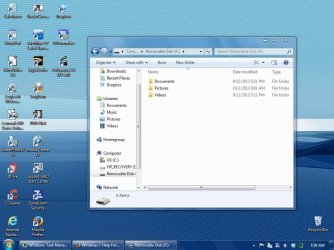
I am including a screenshot of the thumb drive contents.

I was hoping to open each folder and select the contents and copy them to the appropriate folder on my XP machine.
 

Attachments

  • SP32-20140131-075916.jpg
    SP32-20140131-075916.jpg
    90.1 KB · Views: 2

My Computer My Computer

At a glance

Windows 7 professional 64 bitAMD Athlon(tm) II X2 220 Processor3GBNVIDIA GeForce 6150SE nForce 430
Computer type
PC/Desktop
Computer Manufacturer/Model Number
HP 505B B2C02UT Business Desktop
OS
Windows 7 professional 64 bit
CPU
AMD Athlon(tm) II X2 220 Processor
Motherboard
PEGATRON (2A99)
Memory
3GB
Graphics Card(s)
NVIDIA GeForce 6150SE nForce 430
Sound Card
Realtek ALC662 High Definition Audio (OEM)
Monitor(s) Displays
OEM Dell CRT
Screen Resolution
N/A
Hard Drives
(1) NCQ Smart IV 500GB Hard Drive - 7,200RPM - SATA 3.0Gb/s

HP LightScribe CD/DVD burner
PSU
OEM HP 300 watt
Case
OEM
Cooling
OEM
Keyboard
wired Logitech K120
Mouse
wired M100 mouse
Internet Speed
G5 High Speed Internet
Antivirus
ZoneAlarm Extreme Security
Browser
FF36.04 IE11
Other Info
JRivers Media Center v17

AudioQuest dragonfly DAC V1.2

Mackie MR5 Studio Monitors
I only used downloads as an example since you used it. :)

Regardless, you just need to do exactly what you said, "I was hoping to open each folder and select the contents and copy them to the appropriate folder on my XP machine." The folders may be in a different location and may have slightly different names but the content is the same. For instance, Win 7 - Music, XP - My Music. Win 7 - Pictures, Win XP - My Pictures.

There's also nothing stopping you from creating folders on either machine that are named the same to make it easier on yourself.
 

My Computer My Computer

At a glance

W10 Pro desktop, W11 laptop, W11 Pro tablet (...3.7Ghz 8700K i7, i7-11800H, i7-1065G716G desktop, 16G laptop, 4G tabletAMD Radeon RX580, RTX 3060, Intel Iris Plus
Computer type
PC/Desktop
Computer Manufacturer/Model Number
Home Built desktop, Dell G15 5511 Gaming laptop,MS Surface Pro 7 tablet
OS
W10 Pro desktop, W11 laptop, W11 Pro tablet (all 64-bit)
CPU
3.7Ghz 8700K i7, i7-11800H, i7-1065G7
Motherboard
ASUS TUF Z370-Pro Gaming in desktop
Memory
16G desktop, 16G laptop, 4G tablet
Graphics Card(s)
AMD Radeon RX580, RTX 3060, Intel Iris Plus
Sound Card
High Definition Audio (Built-in to mobo)
Monitor(s) Displays
Samsung U32J59 32" (2x), 15.6", 12"
Screen Resolution
3840x2160, 3840x2160, 1920x1080, 2160x1440
Hard Drives
500G SSD for OS; 2T, 10T & 15T HDDs for Data on Desktop, 1TB SSD laptop, 128G SSD tablet.
PSU
Corsair CX 750M
Case
Antec 100
Cooling
CM 212+
Keyboard
IBM Model M - used continuously since 1986
Mouse
Microsoft Pro IntelliMouse
Internet Speed
400M down 8M up
Antivirus
Windows Defender
Browser
FireFox
Other Info
Built my first computer (8Mhz 8088cpu, 640K RAM, 20MB HDD, 2 360K floppy drives) in 1985 and have been building them for myself, relatives and friends ever since.
Alright, thats what i will do. I am just trying to get my ducks in a row before i pull out the old PC to do this and find out I cant, lol! It will be a week or so till i do, but afterwords i will report back and let everyone know how it went,

thanks!!
 

My Computer My Computer

At a glance

Windows 7 professional 64 bitAMD Athlon(tm) II X2 220 Processor3GBNVIDIA GeForce 6150SE nForce 430
Computer type
PC/Desktop
Computer Manufacturer/Model Number
HP 505B B2C02UT Business Desktop
OS
Windows 7 professional 64 bit
CPU
AMD Athlon(tm) II X2 220 Processor
Motherboard
PEGATRON (2A99)
Memory
3GB
Graphics Card(s)
NVIDIA GeForce 6150SE nForce 430
Sound Card
Realtek ALC662 High Definition Audio (OEM)
Monitor(s) Displays
OEM Dell CRT
Screen Resolution
N/A
Hard Drives
(1) NCQ Smart IV 500GB Hard Drive - 7,200RPM - SATA 3.0Gb/s

HP LightScribe CD/DVD burner
PSU
OEM HP 300 watt
Case
OEM
Cooling
OEM
Keyboard
wired Logitech K120
Mouse
wired M100 mouse
Internet Speed
G5 High Speed Internet
Antivirus
ZoneAlarm Extreme Security
Browser
FF36.04 IE11
Other Info
JRivers Media Center v17

AudioQuest dragonfly DAC V1.2

Mackie MR5 Studio Monitors
The reason they gave was differing addresses: for example win7-

C:\Users\robert macmichael\Downloads

This is supposed to be different than XP and the XP machine would not recognize it. I cannot find a XP address for comparison but i thought they cannot directly interchange. I

Your user profile folder on Seven:
C:\Users\Your_Username

Your user profile folder on XP:
C:\Documents and Settings\Your_Username
 

My Computer My Computer

At a glance

Windows 10 Pro x64 EN-GB1.6 GHz Intel Core i7-720QM Processor6 GBATI Mobility Radeon HD 5850 Graphics
Computer type
Laptop
Computer Manufacturer/Model Number
HP ENVY 17-1150eg
OS
Windows 10 Pro x64 EN-GB
CPU
1.6 GHz Intel Core i7-720QM Processor
Memory
6 GB
Graphics Card(s)
ATI Mobility Radeon HD 5850 Graphics
Sound Card
Beats sound system with integrated subwoofer
Monitor(s) Displays
17" laptop display, 22" LED and 32" Full HD TV through HDMI
Screen Resolution
1600*900 (1), 1920*1080 (2&3)
Hard Drives
Internal: 2 x 500 GB SATA Hard Disk Drive 7200 rpm
External: 2TB for backups, 3TB USB3 network drive for media
Cooling
As Envy runs a bit warm, I have it on a Cooler Master pad
Keyboard
Logitech diNovo Media Desktop Laser (bluetooth)
Mouse
Logitech Performance Mouse MX
Internet Speed
50/10 Mbps VDSL
Antivirus
Windows Defender 4.3.9431.0
Browser
Maxthon 3.5.2., IE11
Great Kari, thats what i was thinking.

Now, do i need to change that on my thumb before copying it to the XP computer, or can I just copy directly as strollin was saying?
 

My Computer My Computer

At a glance

Windows 7 professional 64 bitAMD Athlon(tm) II X2 220 Processor3GBNVIDIA GeForce 6150SE nForce 430
Computer type
PC/Desktop
Computer Manufacturer/Model Number
HP 505B B2C02UT Business Desktop
OS
Windows 7 professional 64 bit
CPU
AMD Athlon(tm) II X2 220 Processor
Motherboard
PEGATRON (2A99)
Memory
3GB
Graphics Card(s)
NVIDIA GeForce 6150SE nForce 430
Sound Card
Realtek ALC662 High Definition Audio (OEM)
Monitor(s) Displays
OEM Dell CRT
Screen Resolution
N/A
Hard Drives
(1) NCQ Smart IV 500GB Hard Drive - 7,200RPM - SATA 3.0Gb/s

HP LightScribe CD/DVD burner
PSU
OEM HP 300 watt
Case
OEM
Cooling
OEM
Keyboard
wired Logitech K120
Mouse
wired M100 mouse
Internet Speed
G5 High Speed Internet
Antivirus
ZoneAlarm Extreme Security
Browser
FF36.04 IE11
Other Info
JRivers Media Center v17

AudioQuest dragonfly DAC V1.2

Mackie MR5 Studio Monitors
Back
Top