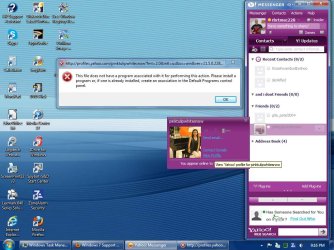
Hi everyone. I have had Yahoo messenger for awhile now, but just developed a problem. When I recently added another contact I tried to view the profile but got a weird error message i never got before. I do not know why i got this error, nor how to correct it. Any help would be appreciated!!
Please see screen shot
Thanks!!
Attachments
SP32-20130224-211657.jpg
111.2 KB
· Views: 11
My Computer
Computer type
PC/Desktop
Computer Manufacturer/Model Number
HP 505B B2C02UT Business Desktop
OS
Windows 7 professional 64 bit
CPU
AMD Athlon(tm) II X2 220 Processor
Motherboard
PEGATRON (2A99)
Memory
3GB
Graphics Card(s)
NVIDIA GeForce 6150SE nForce 430
Sound Card
Realtek ALC662 High Definition Audio (OEM)
Monitor(s) Displays
OEM Dell CRT
Screen Resolution
N/A
Hard Drives
(1) NCQ Smart IV 500GB Hard Drive - 7,200RPM - SATA 3.0Gb/s
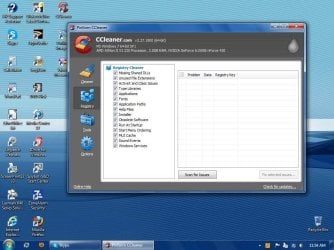
You have a some software that involves registry repair or registry cleaning. Please don't do that to W7. If you have already run that tool, then that could be the source of your problem.
Looking at the title bar of the error message, it seems that Yahoo messenger is attempting to open a web page. Try uninstalling and re-installing the Yahoo Messenger app. Assuming that Firefox is your default browser, you might also want to backup your Firefox profile (http://www.sevenforums.com/tutorials/164526-mozbackup-create-backup-your-mozilla-profile.html) - then uninstall and re-install Firefox too.
I also see that ZoneAlarm is installed; that too can cause problems.
Glad that it worked for you... just stay away from registry tools. W7 does not need them. If you are OCD about cleaning the registry - then please use CCleaner (it is free). It takes a very conservative approach to cleaning stuff out.
You can run a benchmark tool that tests how well your computer does stuff.
Then run only a registry cleaner (don't clean temp files or the like)
Then run that same benchmark program - you will not see any improvement.
I would love to be proven wrong on that - 'cuz I like a clean the registry.
Alright, you will be glad to know I installed the CCleaner and removed the other registry repair tool. I do admit that the old program seemed to improve performance a tad, and it confirmed some issued i was having with Adobe Flash, but I will take your word on the harmful aspect of it.
Thanks again UsernameIssues
Attachments
SP32-20130225-115413.jpg
100.6 KB
· Views: 1
My Computer
Computer type
PC/Desktop
Computer Manufacturer/Model Number
HP 505B B2C02UT Business Desktop
OS
Windows 7 professional 64 bit
CPU
AMD Athlon(tm) II X2 220 Processor
Motherboard
PEGATRON (2A99)
Memory
3GB
Graphics Card(s)
NVIDIA GeForce 6150SE nForce 430
Sound Card
Realtek ALC662 High Definition Audio (OEM)
Monitor(s) Displays
OEM Dell CRT
Screen Resolution
N/A
Hard Drives
(1) NCQ Smart IV 500GB Hard Drive - 7,200RPM - SATA 3.0Gb/s


 Any help would be appreciated!!