I need the best OS and i'm really not sure about Win 7

Wus? All 3 point are not true... perhaps I misunderstand ...
Thumbnails of the contents of some (but not all ) Images are NOT Icons.
And Thumbnails of Images do not belong on the Desk Top ... IMHO
The way I'm used to working .. I can't see what I have on my Desktop.
I'm also not allowed to Customize my Image file Icons

I have found out how to crack the registry to customize the R Click Context menu ..
So I don't always have to take the "Open With" > "Multiple Choice Test" Route ...
One click and I'm there.

In W7 .. You can NOT create a new task bar and park it on any edge of your screen(s)
You can only park a new Task Bar in the Windows Task bar .. What good does it do there ??
This WAS a nice feature if you're running twin screens.

The OP did say he was working with Images ..
I thought I'd contribute the W7 annoyances I've found so far...
And the reasons why I'm staying with XP

An OS is just a collection of tools (More or Less) .. Don't take it Personal ...
I wasn't trying to insult anyone's Spouse or Kids
 

Attachments
  • Clip.gif
    Clip.gif
    52.4 KB · Views: 22

My Computer My Computer

At a glance

XP MCE .... XP Pro 64 .... W7 U x64E6750, 2.67GHz C2D4GB, PC2 6400GeForce 9400GT
Computer Manufacturer/Model Number
HP d4996t (upgraded)
OS
XP MCE .... XP Pro 64 .... W7 U x64
CPU
E6750, 2.67GHz C2D
Memory
4GB, PC2 6400
Graphics Card(s)
GeForce 9400GT
Monitor(s) Displays
Twin Samsung 2443BWT
Screen Resolution
1920x1200
Hard Drives
Many .. 3 Installed
PSU
460W
Internet Speed
Cable
I have found out how to crack the registry to customize the R Click Context menu ..
So I don't always have to take the "Open With" > "Multiple Choice Test" Route ...
One click and I'm there.

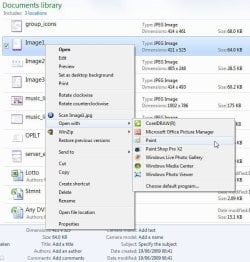
Actually, you only have to go through the "Open With Multiple Choice" once, and the Right-Click context menu will automatically be customized for you to include whichever program you selected, as show in this screenshot:

open_with.jpg

So, whichever way you do, you still need to Right-Click and click "Open With" to access the open with list...
 

My Computer My Computer

At a glance

Windows 7 Professional 32-bit SP1AMD A4/A63.00GB EDOVMware SVGA 3D
Computer type
PC/Desktop
Computer Manufacturer/Model Number
Virtual Machine
OS
Windows 7 Professional 32-bit SP1
CPU
AMD A4/A6
Motherboard
Intel Corporation 440BX Desktop Reference Platform
Memory
3.00GB EDO
Graphics Card(s)
VMware SVGA 3D
Sound Card
High Definition Audio Device
Monitor(s) Displays
Generic Non-PnP Monitor on VMware SVGA 3D
Screen Resolution
1440x900
Hard Drives
1 x 60GB VMware Virtual SATA Hard Drive ATA Device
Antivirus
Kaspersky Total Security
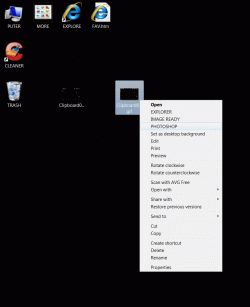
See the top 3 Capitalized choices in my sample R Click Context menu for a gif file.
This saves the "Hunt and Choose" procedure required with the "Open With" Route.
If you perform a lot of this ... It is a very handy Shortcut.
My file type Context menus are customized differently depending on the File Type.

It's just a shame that those who are not comfortable with editing the registry will loose this tool.
 

My Computer My Computer

At a glance

XP MCE .... XP Pro 64 .... W7 U x64E6750, 2.67GHz C2D4GB, PC2 6400GeForce 9400GT
Computer Manufacturer/Model Number
HP d4996t (upgraded)
OS
XP MCE .... XP Pro 64 .... W7 U x64
CPU
E6750, 2.67GHz C2D
Memory
4GB, PC2 6400
Graphics Card(s)
GeForce 9400GT
Monitor(s) Displays
Twin Samsung 2443BWT
Screen Resolution
1920x1200
Hard Drives
Many .. 3 Installed
PSU
460W
Internet Speed
Cable
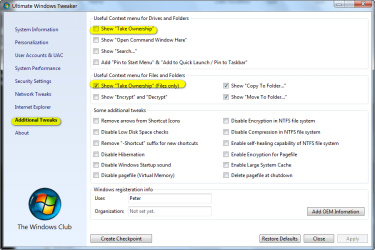
There are free tools available that allow you to customize the right click context menu without having to edit the registry yourself. The tool does it for you. One example of such tools is the Ultimate Windows Tweaker for 7

The screen shot shows a few of the items the tool will allow to be added to the context menu simply by checking a box (or unchecking to remove them).

Also there are .reg files people have created that allow the user to add various items to the right click context menu, again without the user having to personally go into regedit and edit the registry, although in effect such files and the tool I mentioned are editing the registry for the user.

Various apps (such as winzip or winrar to name just a few) also have options that allow the user to add or not add various items to the explorer context menu.

In sum, for my purposes, the right click menu is certainly customizable enough and I seem to be able to put whatever icons I want on my desktop. So I'm just totally happy with 7 and have a hard time understanding these kinds of criticisms, which seem pretty minor to me. Certainly not enough to keep me from wanting to use an OS that is so much more advanced in so many respects then what came before.

In some cases one must be willing to find a way to adapt to new ways of doing things though, or not, I guess. :)
 

Attachments

  • 2009-08-10_015341.png
    2009-08-10_015341.png
    35.8 KB · Views: 12

My Computer My Computer

At a glance

Windows 7 Ultimate x64 (Retail)i7-Q 7206 GBnVidia GeForce GT 230M (1GB)
Computer Manufacturer/Model Number
HP DV8t quad
OS
Windows 7 Ultimate x64 (Retail)
CPU
i7-Q 720
Motherboard
Motherboard Chipset Intel Ibex Peak-M PM55, Intel Lynnfield
Memory
6 GB
Graphics Card(s)
nVidia GeForce GT 230M (1GB)
Sound Card
IDT High Definition Audio CODEC
Monitor(s) Displays
18.4 inch HP Infinity FHD (Samsung 184HT03-001)
Screen Resolution
1920 x 1080
Hard Drives
Hitachi 500GB 7200 rpm (x2)
Seagate FreeAgent 1.5 TB External USB (x2)
Thermaltake BlacX eSATA/USB 2.0 3.5/2.5 HD dock
Cooling
Zalman NC-2000 notebook cooling pad
Keyboard
laptop
Mouse
Logitech VX Revolution
Other Info
Backup Unit: Lenovo T61p
An OS is just a collection of tools (More or Less) .. Don't take it Personal ...
I wasn't trying to insult anyone's Spouse or Kids
The Win 7 police may just arrive at your door, anyway... :D
 

My Computer My Computer

At a glance

XP_Pro, W7_7201, W7RC.vhd, SciLinux5.3, Fedor...AMD 64x21 gigDunno
Computer Manufacturer/Model Number
Gateway GT5056
OS
XP_Pro, W7_7201, W7RC.vhd, SciLinux5.3, Fedora12, Fedora9_2x, OpenSolaris_09-06
CPU
AMD 64x2
Motherboard
Yes
Memory
1 gig
Graphics Card(s)
Dunno
Sound Card
Realtek something
Monitor(s) Displays
Samsung SyncMaster 940MW w/TV
Screen Resolution
1280x1024
Hard Drives
250 GB WD, USB Seagate Freedesk 1.5 T
Internet Speed
Cable modem
Other Info
1 + 1 = 10b,
7 + 7 = 16o,
a + b = 15h.
So, whichever way you do, you still need to Right-Click and click "Open With" to access the open with list...
His pic indicates that the executables are ready to be commanded

without his clicking "Open With"... (Top of the box)

Far more convenient!
 

My Computer My Computer

At a glance

XP_Pro, W7_7201, W7RC.vhd, SciLinux5.3, Fedor...AMD 64x21 gigDunno
Computer Manufacturer/Model Number
Gateway GT5056
OS
XP_Pro, W7_7201, W7RC.vhd, SciLinux5.3, Fedora12, Fedora9_2x, OpenSolaris_09-06
CPU
AMD 64x2
Motherboard
Yes
Memory
1 gig
Graphics Card(s)
Dunno
Sound Card
Realtek something
Monitor(s) Displays
Samsung SyncMaster 940MW w/TV
Screen Resolution
1280x1024
Hard Drives
250 GB WD, USB Seagate Freedesk 1.5 T
Internet Speed
Cable modem
Other Info
1 + 1 = 10b,
7 + 7 = 16o,
a + b = 15h.
If I have any serious work to do .. I’m staying with XP as long as I can.
The inability to have Icons on my desktop, Customize my R Click context menus or make new taskbars …
Makes W7 a major pain to work in .. When working with Images.

If you haven’t been spoiled with these missing XP tools .. Then go for W7

You can have as many icons as you wish with Win7, your screen resolution is the limiting factor. Customizing rightclick context menu is fairly simple in Win7 just download the correct 3rd party tools like Windows 7 Manager and your set, If your serious about your work you should have dumped XP a long time ago.
 

My Computer My Computer

At a glance

Windows 7 Ultimate X64 RTMQ6600 @ 3.4Ghz8GB DDR2-800GTX285 1GB
OS
Windows 7 Ultimate X64 RTM
CPU
Q6600 @ 3.4Ghz
Motherboard
Abit IP35-E
Memory
8GB DDR2-800
Graphics Card(s)
GTX285 1GB
Sound Card
Creative X-Fi Extreme Music
Monitor(s) Displays
Samsung T220
Hard Drives
Samsung F1 Spinpoint 1TB
PSU
Silverstone Zues 750ZF
Case
Lian Li PC-P80
Cooling
Thermalright Ultra 120-Extreme
last time I used it, windows xp x64 had serious compatibility issues (with both hardware and software), and that was somewhere end of 2007/beginning of 2008, the sp2 was out and there has been no new one since then as far as I know.

I'd recommend Vista sp2 x64 over windowx xp x64, for sure. I know a lot of people hated vista from the start, but it has really turned into a very stable and flexible os, and shares same kernel as windows 2008.

Or may be you didn't mention vista because windows 7 is seen as a vista upgrade, so you want to choose between 2 really different things, hence xp and windows 7.
 

My Computer My Computer

At a glance

Windows 7 Ultimate x64 build 7600
OS
Windows 7 Ultimate x64 build 7600
my new workstation

intel core i7 975 3.33Ghz
asus p6t workstation motherboard
12g ram x6 DIMMs
video card quadro fx 1800


my major use of this workstation is
3d
animation
visual effect
motion graphics


so it's not for gaming nor normal use

i was going to buy windows xp pro x64 but and when i saw windows 7
i got lost between the 2 of them i don't want to waste my time trying the best OS for me so can someone help me pick one

thanks all
Try Ubuntu, not as good as windows 7 when it comes to gaming but no viruses and IS very fast.
 

My Computer My Computer

At a glance

Windows 7 Enterprise x64AMD Athlon II X4 @ 2.6ghz8GBGalaxy 250 GTS 512MB Super-Clocked
Computer Manufacturer/Model Number
HP
OS
Windows 7 Enterprise x64
CPU
AMD Athlon II X4 @ 2.6ghz
Memory
8GB
Graphics Card(s)
Galaxy 250 GTS 512MB Super-Clocked
Screen Resolution
1600x900
Hard Drives
640GB hard Drive
1.5TB External Hard Drive
PSU
700W OCZ StealthxStreme
Cooling
2 Heatsink and 3 Fans
Internet Speed
3MB/sec download, 322kb/sec upload

My Computer My Computer

At a glance

Windows 7 Ultimate x64Core i7 9206 GBATI Radeon HD 4870
Computer Manufacturer/Model Number
Playtech
OS
Windows 7 Ultimate x64
CPU
Core i7 920
Motherboard
ASUS P6T
Memory
6 GB
Graphics Card(s)
ATI Radeon HD 4870
Sound Card
SoundMAX
Monitor(s) Displays
LG 26" and 22"
Screen Resolution
1900x1200 & 1650x1050
Hard Drives
Western Digital VelociRaptor
Thumbnails of the contents of some (but not all ) Images are NOT Icons.
And Thumbnails of Images do not belong on the Desk Top ... IMHO
The way I'm used to working .. I can't see what I have on my Desktop.
I'm also not allowed to Customize my Image file Icons

I have found out how to crack the registry to customize the R Click Context menu ..
So I don't always have to take the "Open With" > "Multiple Choice Test" Route ...
One click and I'm there.

In W7 .. You can NOT create a new task bar and park it on any edge of your screen(s)
You can only park a new Task Bar in the Windows Task bar .. What good does it do there ??
This WAS a nice feature if you're running twin screens.

The OP did say he was working with Images ..
I thought I'd contribute the W7 annoyances I've found so far...
And the reasons why I'm staying with XP

An OS is just a collection of tools (More or Less) .. Don't take it Personal ...
I wasn't trying to insult anyone's Spouse or Kids

Ok now i understand how you use these examples :)
 

My Computer My Computer

At a glance

W7 64b - Leopard 10.6.2 - Ubuntu 10.10 (MBP S...Intel E66004GBnVidia 8800GTX
Computer Manufacturer/Model Number
Self assembled
OS
W7 64b - Leopard 10.6.2 - Ubuntu 10.10 (MBP Snow Leopard 10.6.3)
CPU
Intel E6600
Motherboard
Asus P5W DeluxeHome
Memory
4GB
Graphics Card(s)
nVidia 8800GTX
Sound Card
Onboard
Monitor(s) Displays
Samsung 24"
Screen Resolution
1920*1200
Hard Drives
3*250GB
PSU
Antec
Case
Antec
Cooling
3*Fan
Keyboard
Logitec
Mouse
Logitec
Internet Speed
25Mb
I personally mainly use Windows 7, because I have a powerful computer and if something happens to go wrong I have backups of my data, I would just reinstall it.
 

My Computer My Computer

At a glance

Vista
OS
Vista
Back
Top