i need to install win7 and xp sp3 with out lossing any system after format

tonteee

New member
Local time
3:31 AM
Messages
2
i need to install win7 and xp sp3 with out lossing any system after format

i use xp sp3 in active partion c drive

i need to install and use windows7 in another drive d

and do not loss windows 7 booting if i format c drive

so i need this

xp in c

windows 7 in d

format c win xp damage

and use windows 7
 

My Computer My Computer

At a glance

windows xp sp3
OS
windows xp sp3
Just to clarify:

You already have XP installed on C:\ and then wish to install W7 on a sepereate partition d:\?

Once W7 is installed you plan to format and remove the XP partition completely, without loosing the ability to boot into W7?

If you lose the ability to boot W7 after formatting your XP partition, use your 7 installation dvd to perform a start up repair which will repair your boot loader.
 

My Computer My Computer

At a glance

8 Pro x64i7 3770K 4.6GHz16GB G.Skill Trident X 2666mhzx2 EVGA 780 Ti Superclocked SLI
Computer type
PC/Desktop
Computer Manufacturer/Model Number
Systems by SmartEyeball
OS
8 Pro x64
CPU
i7 3770K 4.6GHz
Motherboard
ASUS P8Z77 WS
Memory
16GB G.Skill Trident X 2666mhz
Graphics Card(s)
x2 EVGA 780 Ti Superclocked SLI
Sound Card
SB X-FI Surround 5.1 PRO USB / ATH-AD900 Headphones
Monitor(s) Displays
x3 Dell U2410 / 58" Samsung
Screen Resolution
5760*1200/ 1920*1200
Hard Drives
2x Intel 520 240GB (RAID 0) * 2x WD Caviar Blacks 2TB (RAID 0) * 2TB WD Caviar Black * Sony Optirac DVD
PSU
Silverstone Strider Evolution 1200W
Case
Thermaltake Level 10 GT Snow Edition
Cooling
Noctua NH-D14
Keyboard
Topre Realforce // Ducky Shine MX Black // Filco Ninja TKL
Mouse
Thermaltake Theron (Highly Recommended) + Razer Imperator
Antivirus
MSE
Browser
IE, FF, WaterFox
Other Info
GT Extreme V2 Sim Racing Cockpit + 40" LCD and K/B Mouse stand ▼
Fanatec CSR Elite Wheel + Clubsport V1 Pedals + CSR shifter/7G-H ▼Saitek X52 Pro ▼ TrackIR 5 Pro
Buttkicker v2 Seat Rumbler with Dedicated 5.1 and Sub Woofer attached to frame ▼
=
Bloody Big Grin
thankxxx
 

My Computer My Computer

At a glance

windows xp sp3
OS
windows xp sp3
help plz

how about other way around,
i had w7 but had to come back to win xp (modem driver issues)
w7 is on c win xp on d, need to format c :)
ty
 

My Computer My Computer

At a glance

w7 ultimate 64-bit sp1i5 2500K @4.52x4GB G.Skill Ripjaws-X 2,133 CL9GTX 560Ti
Computer type
PC/Desktop
Computer Manufacturer/Model Number
custom build
OS
w7 ultimate 64-bit sp1
CPU
i5 2500K @4.5
Motherboard
MSI P67A-GD65 rev2
Memory
2x4GB G.Skill Ripjaws-X 2,133 CL9
Graphics Card(s)
GTX 560Ti
Sound Card
on board
Monitor(s) Displays
BenQ G2410HD
Screen Resolution
1920x1080
Hard Drives
Samsung 2.5-Inch 250 GB 850 EVO
PSU
BeQuiet 600W
Keyboard
K65
Mouse
Razer Deathadder Ergonomic Gaming Mouse
Internet Speed
35Mbps
I assume C is the first partition and is Active?

Go to folder options, show Hidden files, copy and paste NTLDR, NTDETECT.COM and BOOT.INI from C to D.

Mark D Active. Restart.
 

My Computers My Computers

  • At a glance

    7 X64i5 84002x8gb 3200mhz
    Computer type
    PC/Desktop
    OS
    7 X64
    CPU
    i5 8400
    Motherboard
    gigabyte b365m ds3h
    Memory
    2x8gb 3200mhz
    Hard Drives
    various
    PSU
    pure power 11 400w cm
    Case
    Coolermaster
    Cooling
    cryorig m9i
  • At a glance

    7x64g54008gb ddr4 2400
    Computer type
    PC/Desktop
    OS
    7x64
    CPU
    g5400
    Motherboard
    ga b365m ds3h
    Memory
    8gb ddr4 2400
    PSU
    xfx pro 450w
c&d are 2hd's, i copy & paste files mentioned above.
can i format c using winxp/w7 cd now or is there some other way?

ty
 

My Computer My Computer

At a glance

w7 ultimate 64-bit sp1i5 2500K @4.52x4GB G.Skill Ripjaws-X 2,133 CL9GTX 560Ti
Computer type
PC/Desktop
Computer Manufacturer/Model Number
custom build
OS
w7 ultimate 64-bit sp1
CPU
i5 2500K @4.5
Motherboard
MSI P67A-GD65 rev2
Memory
2x4GB G.Skill Ripjaws-X 2,133 CL9
Graphics Card(s)
GTX 560Ti
Sound Card
on board
Monitor(s) Displays
BenQ G2410HD
Screen Resolution
1920x1080
Hard Drives
Samsung 2.5-Inch 250 GB 850 EVO
PSU
BeQuiet 600W
Keyboard
K65
Mouse
Razer Deathadder Ergonomic Gaming Mouse
Internet Speed
35Mbps
c&d are 2hd's, i copy & paste files mentioned above.
can i format c using winxp/w7 cd now or is there some other way?

ty

Try unplugging the Windows 7 drive now to see if XP starts up with the boot files you copied.

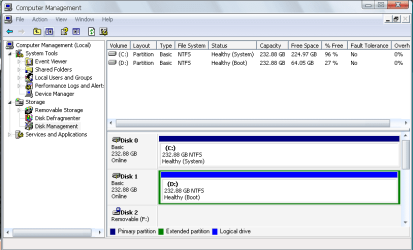
If not, please plug back in Win7 drive and post a screenshot of your full Disk Management map, using Snipping tool in Start Menu, attached using paper clip in reply box.
 
removing C, i was unable to boot "no boot device found"

do i need to edit boot.ini file? the one i copied from C?

default=multi(0)disk(0)rdisk(1)partition(1)\WINDOWS
[operating systems]
multi(0)disk(0)rdisk(1)partition(1)\WINDOWS="Microsoft Windows XP Professional" /noexecute=optin /fastdetect /usepmtimer

w7 don't load after installing winxp on D

in attachment is ss of disk management

ty
 

Attachments

  • untitled.PNG
    untitled.PNG
    16.3 KB · Views: 201

My Computer My Computer

At a glance

w7 ultimate 64-bit sp1i5 2500K @4.52x4GB G.Skill Ripjaws-X 2,133 CL9GTX 560Ti
Computer type
PC/Desktop
Computer Manufacturer/Model Number
custom build
OS
w7 ultimate 64-bit sp1
CPU
i5 2500K @4.5
Motherboard
MSI P67A-GD65 rev2
Memory
2x4GB G.Skill Ripjaws-X 2,133 CL9
Graphics Card(s)
GTX 560Ti
Sound Card
on board
Monitor(s) Displays
BenQ G2410HD
Screen Resolution
1920x1080
Hard Drives
Samsung 2.5-Inch 250 GB 850 EVO
PSU
BeQuiet 600W
Keyboard
K65
Mouse
Razer Deathadder Ergonomic Gaming Mouse
Internet Speed
35Mbps

My Computers My Computers

  • At a glance

    7 X64i5 84002x8gb 3200mhz
    Computer type
    PC/Desktop
    OS
    7 X64
    CPU
    i5 8400
    Motherboard
    gigabyte b365m ds3h
    Memory
    2x8gb 3200mhz
    Hard Drives
    various
    PSU
    pure power 11 400w cm
    Case
    Coolermaster
    Cooling
    cryorig m9i
  • At a glance

    7x64g54008gb ddr4 2400
    Computer type
    PC/Desktop
    OS
    7x64
    CPU
    g5400
    Motherboard
    ga b365m ds3h
    Memory
    8gb ddr4 2400
    PSU
    xfx pro 450w
To get Win7 back up and running in a dual boot, First mark the D: drive active in Disk Management, or using free Partition Wizard bootable CD.

Now unplug the C: drive. Enter BIOS setup to Set D: drive first HD to boot (after DVD drive), or change C: cable to D:

Boot into the Win7 DVD Repair console, select Recovery Tools and run Startup Repair 3 separate times to recover the MBR to Windows 7 drive. Repeat until Win7 starts.

Do you want to remove the dual boot now? Perhaps you can research the modem drive issues in Win7 before going back to the retro OS.
 
Last edited:
using dual-boot 4 now, ty 4 your help
 

My Computer My Computer

At a glance

w7 ultimate 64-bit sp1i5 2500K @4.52x4GB G.Skill Ripjaws-X 2,133 CL9GTX 560Ti
Computer type
PC/Desktop
Computer Manufacturer/Model Number
custom build
OS
w7 ultimate 64-bit sp1
CPU
i5 2500K @4.5
Motherboard
MSI P67A-GD65 rev2
Memory
2x4GB G.Skill Ripjaws-X 2,133 CL9
Graphics Card(s)
GTX 560Ti
Sound Card
on board
Monitor(s) Displays
BenQ G2410HD
Screen Resolution
1920x1080
Hard Drives
Samsung 2.5-Inch 250 GB 850 EVO
PSU
BeQuiet 600W
Keyboard
K65
Mouse
Razer Deathadder Ergonomic Gaming Mouse
Internet Speed
35Mbps
I would troubleshoot my Win7 modem driver issues in the related forums here, and research it fully via Google.

If you still want to remove Win7 to format it's drive, then use EasyBCD 2.0 in XP to uninstall the Win7 bootloader in Manage Bootloader tab to revert to XP boot only. View attachment 44012

Now unplug your Win7 drive and see if XP is independent.

If not, the next step would be to run a Repair install in XP to recover its boot critical files to exclude Win7 dual boot. It is really like reinstalling XP except keeps programs, files and settings in place. You only need to reactivate.

For an XP repair install, boot from the CD, ignore the first "R" for repair option, proceed to install until it finds the XP installation and then choose "R" for repair.

After XP repair install, see if Win7 can be unplugged and XP restarts. If so, you may need to mark Win7 inactive to delete and format the drive. Boot into the Win 7 DVD Repair console, open a Command Line and type:

DISKPART
LIST DISK (confirm number of Win7 HD)
SELECT DISK 0
INACTIVE
EXIT
 
Last edited:
Back
Top