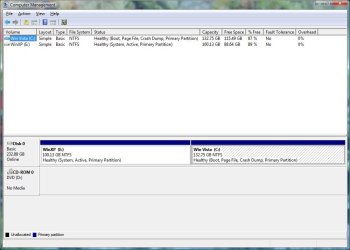
I have an old Dell laptop I replaced the HDD is a few months ago and have been dual booting XP and Vista Business. Now I want to just delete the XP partition and have Vista have the whole drive.
Will Partition Wizard bootable CD free do this with no issues? I have read that a CD will work better than a DVD, but can I boot it from a USB stick?
The boot flag is on the Vista partition.
My Computer
At a glance
Windows 7 Ultimate X64 SP1Intel i5-2550K, Differing ~4.4-4.8GHz No buil...16GB G.Skill Sniper 1866MHz @ 2133MHz 2x8GBASUS GTX650TIB-DC2OC-2GD5, (650TI Boost)
Computer type
PC/Desktop
Computer Manufacturer/Model Number
Home Built Desktop By DataTech
OS
Windows 7 Ultimate X64 SP1
CPU
Intel i5-2550K, Differing ~4.4-4.8GHz No built in GPU
Motherboard
ASUS P8Z68-V PRO/GEN3
Memory
16GB G.Skill Sniper 1866MHz @ 2133MHz 2x8GB
Graphics Card(s)
ASUS GTX650TIB-DC2OC-2GD5, (650TI Boost)
Sound Card
Onboard Realtek 5-1
Monitor(s) Displays
Samsung P2570HD
Screen Resolution
1920x1080
Hard Drives
Samsung 840 Pro 256GB SSD for OS, 500GB Seagate Constellation (Enterprise drive) for Data
PSU
Corsair HX650W
Case
Inwin Dragon Rider
Cooling
Hyper 212 EVO w/two Noctua fans, push-pull, @1300 RPM
Keyboard
E-Z Eyes, bright yellow keys with large characters
Mouse
steelseries SENSEI Laser Pro Gaming
Internet Speed
48-51Mbs Mbs down, 11 Mbs up Xfinity Cable
Antivirus
Norton Internet Security 2013
Browser
IE 10, Opera, Pale Moon if needed
Other Info
4 case fans, LG BluRay-RE, ASUS DVD-RW, Mr. Fusion power supply, 1.21 gigawatts.
I'd use Partition Wizard boot CD which has never failed during resizing while the Windows version can.
First mark Vista Partition Active in Disk Mgmt.
Boot into Vista installation media or Repair CD, run Startup Repair - Run 3 Separate Times until Vista starts and holds the System Active Boot flags.
Now boot into PW CD to Delete XP partition and Resize Vista to the left: Partition Wizard Resize Partition - Video Help. Have your Vista boot CD standing by as resizing on the boot sector can sometimes require repair again.
Gav, I could if the XP partition was to the right of Vista.
Greg, damn, I hadn't noticed the Vista partition isn't marked active.
Yup, I have YUMI already and that's what I was going to try, if it won't work I can still make a bootable CD.
Brian, I have a boatload of DVD/+R laying around, so not a big deal, I think I might have a stray CD/R someplace.
My Computer
At a glance
Windows 7 Ultimate X64 SP1Intel i5-2550K, Differing ~4.4-4.8GHz No buil...16GB G.Skill Sniper 1866MHz @ 2133MHz 2x8GBASUS GTX650TIB-DC2OC-2GD5, (650TI Boost)
Computer type
PC/Desktop
Computer Manufacturer/Model Number
Home Built Desktop By DataTech
OS
Windows 7 Ultimate X64 SP1
CPU
Intel i5-2550K, Differing ~4.4-4.8GHz No built in GPU
Motherboard
ASUS P8Z68-V PRO/GEN3
Memory
16GB G.Skill Sniper 1866MHz @ 2133MHz 2x8GB
Graphics Card(s)
ASUS GTX650TIB-DC2OC-2GD5, (650TI Boost)
Sound Card
Onboard Realtek 5-1
Monitor(s) Displays
Samsung P2570HD
Screen Resolution
1920x1080
Hard Drives
Samsung 840 Pro 256GB SSD for OS, 500GB Seagate Constellation (Enterprise drive) for Data
PSU
Corsair HX650W
Case
Inwin Dragon Rider
Cooling
Hyper 212 EVO w/two Noctua fans, push-pull, @1300 RPM
Keyboard
E-Z Eyes, bright yellow keys with large characters
Mouse
steelseries SENSEI Laser Pro Gaming
Internet Speed
48-51Mbs Mbs down, 11 Mbs up Xfinity Cable
Antivirus
Norton Internet Security 2013
Browser
IE 10, Opera, Pale Moon if needed
Other Info
4 case fans, LG BluRay-RE, ASUS DVD-RW, Mr. Fusion power supply, 1.21 gigawatts.
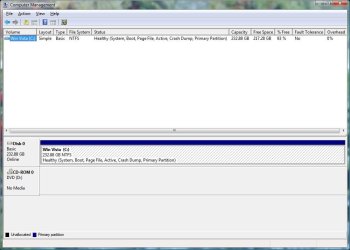
Okay people, I finally got it to work. I followed Greg's instructions, Vista held the Active and booted. Run the PW bootable (from a USB flash using YUMI) and deleted the XP partition, moved the Vista one to the left them extended it to the right all the way and Applied changes and rebooted.
Vista started with the shiny globe, the tinkle sound, then Preparing Desktop for 5-6 minutes, then to an empty light blue screen.
Ran Startup repair 6 time with no luck. I rebooted into PW set the Vista to inactiveand hit Apply, to my surprize it went to resizing again. Finished successfully as the first time.
As expected I got no Vista boot with no active partition. Ran Startup Repair and all was fixed, whew!
Here's what I have and wanted.
Posted from the Vista laptop with the old rusty trusty IE8.
Thanks for the help.
My Computer
At a glance
Windows 7 Ultimate X64 SP1Intel i5-2550K, Differing ~4.4-4.8GHz No buil...16GB G.Skill Sniper 1866MHz @ 2133MHz 2x8GBASUS GTX650TIB-DC2OC-2GD5, (650TI Boost)
Computer type
PC/Desktop
Computer Manufacturer/Model Number
Home Built Desktop By DataTech
OS
Windows 7 Ultimate X64 SP1
CPU
Intel i5-2550K, Differing ~4.4-4.8GHz No built in GPU
Motherboard
ASUS P8Z68-V PRO/GEN3
Memory
16GB G.Skill Sniper 1866MHz @ 2133MHz 2x8GB
Graphics Card(s)
ASUS GTX650TIB-DC2OC-2GD5, (650TI Boost)
Sound Card
Onboard Realtek 5-1
Monitor(s) Displays
Samsung P2570HD
Screen Resolution
1920x1080
Hard Drives
Samsung 840 Pro 256GB SSD for OS, 500GB Seagate Constellation (Enterprise drive) for Data
PSU
Corsair HX650W
Case
Inwin Dragon Rider
Cooling
Hyper 212 EVO w/two Noctua fans, push-pull, @1300 RPM
Keyboard
E-Z Eyes, bright yellow keys with large characters
Mouse
steelseries SENSEI Laser Pro Gaming
Internet Speed
48-51Mbs Mbs down, 11 Mbs up Xfinity Cable
Antivirus
Norton Internet Security 2013
Browser
IE 10, Opera, Pale Moon if needed
Other Info
4 case fans, LG BluRay-RE, ASUS DVD-RW, Mr. Fusion power supply, 1.21 gigawatts.
It's s best to run the Startup Repairs before you do the Resizing, so you'll know if the new System partition is going to boot before getting rid of the old one.
As we've known here since beta, running only the bootrec commands does not finish the job. There is no longer a link to F8 System Recovery Options for one thing.
Startup Repairs go over every parameter to make sure nothing is awry, if necessary rewriting the boot files to the target partition, applying bootsect to make the drive bootable again.