I need you help urgently!

rsaravanan

New member
Local time
2:39 AM
Messages
8
Dear Sir ,
I have Samsung Laptop and I have formatted it recently (just 5 days ago ) .I use Microsoft security essentials as my antivirus . But now , i have a problem . The free space in disk C is rapidly decreasing as the used space is continuously increasing . I even checked for any virus , spyware or malware with spyhunter , PC Tools Internet Security 2011 and Microsoft security essentials . But no virus is being detected .I am so concerned about this . Within 15 minutes I have nearly lost more than 20 gb of storage !
Please suggest me a proper way .
Awaiting for your reply .

Thanks
 

My Computer

OS
Windows 7
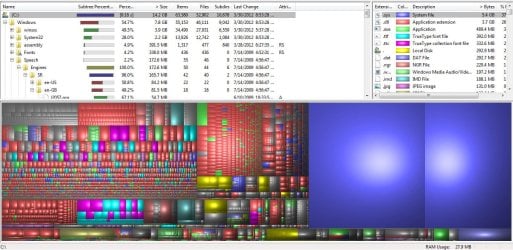
Download and run WinDirStat. It should tell you where the space is used.

How much space do you have devoted to System Restore?

How large is your page file?

Please fill out your system specs from the User Control Panel.

Post a screen shot of the output of WinDirStat if possible.

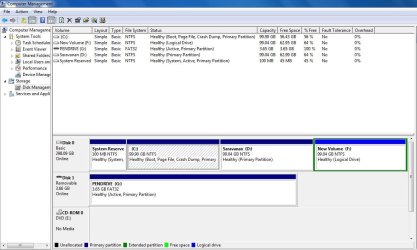
A screen shot of Windows Disk Management might also be useful.
 

My Computer

Computer type
PC/Desktop
Computer Manufacturer/Model Number
Ignatz Special; 4 speed manual gearbox; factory air conditioning; one of one
OS
Windows 7 Home Premium SP1, 64-bit
CPU
Intel Skylake i5-6600K, not overclocked
Motherboard
AsRock Z170M Extreme 4, micro ATX
Memory
8 GB HyperX DDR4-2666 (2 x 4 GB)
Graphics Card(s)
none; graphics are integrated on CPU
Sound Card
onboard: Realtek ALC1150; external: USB Behringer UF0-202
Monitor(s) Displays
Dell S2340M 23 inch IPS
Screen Resolution
1600 x 900
Hard Drives
System: Crucial MX100 series SSD, 128 GB;
Data: Samsung Spinpoint 103SJ, 1 TB;
Backup: WD Caviar Green WD30EZRX-00D8PB0, 3 TB
PSU
Rosewill SilentNight 500 watt fanless, semi-modular
Case
Antec Solo II
Cooling
Noctua NH-U12S; Noctua F12 intake, Noctua S12A exhaust
Keyboard
Microsoft 200 6JH-00001 USB
Mouse
Dell or Microsoft optical wired; USB
Antivirus
Microsoft Security Essentials and Malwarebytes Premium
Browser
Pale Moon
Other Info
All fans PWM; speeds at idle: CPU circa 500 rpm; intake circa 600 rpm; exhaust circa 600 rpm; CPU temps 27 idle and 47 C load in a warm room (27 C/81 F) when running Intel Extreme Tuning Utility stress test.
My pagefile.sys is 2.9gb .
My system file is 5.4 gb
 

Attachments

  • Capture.JPG
    Capture.JPG
    97.4 KB · Views: 23
  • windir start.JPG
    windir start.JPG
    169.9 KB · Views: 26

My Computer

OS
Windows 7
It's strange that Windows Disk Management shows about 43 GB occupied on C, but WinDirStat shows under 15 GB occupied on C.

Have you recently done a Disc Cleanup to remove any temp files?

How many anti-virus applications do you have running?

Look at Windows Explorer. How much occupied space does it show on the C drive?
 

My Computer

Computer type
PC/Desktop
Computer Manufacturer/Model Number
Ignatz Special; 4 speed manual gearbox; factory air conditioning; one of one
OS
Windows 7 Home Premium SP1, 64-bit
CPU
Intel Skylake i5-6600K, not overclocked
Motherboard
AsRock Z170M Extreme 4, micro ATX
Memory
8 GB HyperX DDR4-2666 (2 x 4 GB)
Graphics Card(s)
none; graphics are integrated on CPU
Sound Card
onboard: Realtek ALC1150; external: USB Behringer UF0-202
Monitor(s) Displays
Dell S2340M 23 inch IPS
Screen Resolution
1600 x 900
Hard Drives
System: Crucial MX100 series SSD, 128 GB;
Data: Samsung Spinpoint 103SJ, 1 TB;
Backup: WD Caviar Green WD30EZRX-00D8PB0, 3 TB
PSU
Rosewill SilentNight 500 watt fanless, semi-modular
Case
Antec Solo II
Cooling
Noctua NH-U12S; Noctua F12 intake, Noctua S12A exhaust
Keyboard
Microsoft 200 6JH-00001 USB
Mouse
Dell or Microsoft optical wired; USB
Antivirus
Microsoft Security Essentials and Malwarebytes Premium
Browser
Pale Moon
Other Info
All fans PWM; speeds at idle: CPU circa 500 rpm; intake circa 600 rpm; exhaust circa 600 rpm; CPU temps 27 idle and 47 C load in a warm room (27 C/81 F) when running Intel Extreme Tuning Utility stress test.
windows explorer shows same as Windows Disk Management
For your information , the problem continues with all the disk also now.
At present I have only 1 antivirus .
 

My Computer

OS
Windows 7
Also have to remember that WinDirStat, I believe by default, does not show space used that it does not have access to. Under Options, select show unknown. Then it should match what Explorer reports. For example, it doesn't have access to the System Volume Information folder, it is only aware that the space is used.

So you might want to check on your System Restore settings. Also you can try to find what's being written to disk by using Explorer to find all files modified on today's date.
 

My Computer

OS
Windows 7 Ultimate x64
Sir,
I am very thankful that you are helping me continuousy .But my problem is not yet solved and it is increasing to large extent . Sorry for the inconvenience , but please help me

Thanks
thanks
thanks
 

My Computer

OS
Windows 7
Try running WinDirStat by right clicking and click "Run as administrator".
See if that shows something different.

If you are logged in with a STANDARD account you could also try logging in with an ADMIN account and then run WirDirStat with "Run as administrator".
 

My Computer

Computer type
PC/Desktop
Computer Manufacturer/Model Number
home built
OS
Multi-Boot W7_Pro_x64 W8.1_Pro_x64 W10_Pro_x64 +Linux_VMs +Chromium_VM
CPU
AMD Athlon II x4 620
Motherboard
Gigabyte GA-MA785G-UD3H
Memory
6GB GSkill DDR2 800
Graphics Card(s)
AMD 4670 GPU + AMD 4200 IGP
Sound Card
on board Realtek ALC889A
Monitor(s) Displays
RCA 40" LCD TV, Insignia 32" LCD TV, HP 15" LCD monitor
Screen Resolution
1680 x 1050
Hard Drives
OCZ Vertex 3 120GB,
Samsung F3 1TB (3),
Several others - WD, Seagate, Hitachi, ...
PSU
Corsair 500 W
Case
Rosewill mid tower
Cooling
CM 90mm rifle
Keyboard
Gyration wireless, Logitech wireless, Dell USB wired
Mouse
Gyration wireless, Logitech wireless, V7 USB wired
Internet Speed
Spectrum - 100Mbps D / 10Mbps U
Antivirus
Avast, MBAM3, EMET, WinPatrol
Browser
Pale Moon, Firefox, IE
Other Info
2 multi-boot PC's
Mainly HTPC/Office/Gen purpose (no gaming).
Trendnet USB KVM.
LG DVD burner/Blue Ray Player.
Tray system for removable SATA backup drives.

Not currently OCd, under-volted.
I use Hybrid sleep, rarely re-boot or shutdown.

Hauppauge HD-PVR, Avermedia PCIe TV Tuner, Hauppauge PCI TV Tuner.
Back
Top