Solved I now have two boot mgrs

riffwraith

New member
Member
VIP
Local time
10:22 PM
Messages
240
Hi all

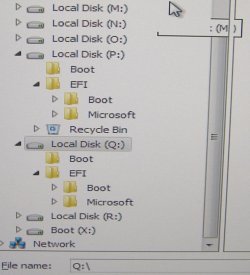
Just did an Acronis backup, and wound up with two boot managers in the list in my BIOS. Prolly b/c of this: (below)

I wouldn't mind so much, but...

1) The first one in the list in my BIOS is the "bad one", as I cant boot into windows straight up; I have to hit F2 and select the second one, and then I am fine. I dont see an option to move, or remove.

2) If I need to restore another image, this creates a problem.

Any ideas on what to do here? I might be able to do something while booted into Acronis, but I dont know what, and they no longer support this version..

Thanks in advance.
 

Attachments
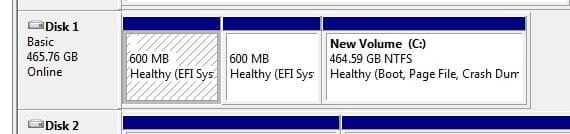
  • disc.jpg
    disc.jpg
    22.5 KB · Views: 12

My Computer

Computer type
PC/Desktop
Computer Manufacturer/Model Number
Custom
OS
W7 64 Ult
CPU
Intel Core i9-7940x
Motherboard
ASUS x299 TUF
Memory
GSkill 128GB
Graphics Card(s)
AMD Radeon RX 560
Sound Card
RME
Screen Resolution
1920x1080
Hard Drives
5
PSU
BeQuiet!
Case
BeQuiet!
Keyboard
HyperX
Mouse
Logitech
Browser
IE - what else is there?
Find out which one is live

at cmd prompt type: ( or copy and paste the line below)

REG QUERY HKLM\SYSTEM\CurrentControlSet\Control /v FirmwareBootDevice

then you could format or delete the other one
 

My Computers

System One System Two

  • Computer type
    PC/Desktop
    OS
    7 X64
    CPU
    i5 8400
    Motherboard
    gigabyte b365m ds3h
    Memory
    2x8gb 3200mhz
    Hard Drives
    various
    PSU
    pure power 11 400w cm
    Case
    Coolermaster
    Cooling
    cryorig m9i
  • Computer type
    PC/Desktop
    OS
    7x64
    CPU
    g5400
    Motherboard
    ga b365m ds3h
    Memory
    8gb ddr4 2400
    PSU
    xfx pro 450w
Thx!

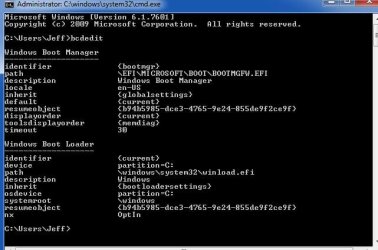
It says:

multi(0)disk(0)rdisk(2)partition(2)

I did a googley to try and figure out what's what there, but couldn't come up with anything, other than info on the boot.ini file, but I am pretty sure that was pre-Vista.

Also, I cant delete nor format either one; no r-click options are avail from disk mgmt.

- - - Updated - - -

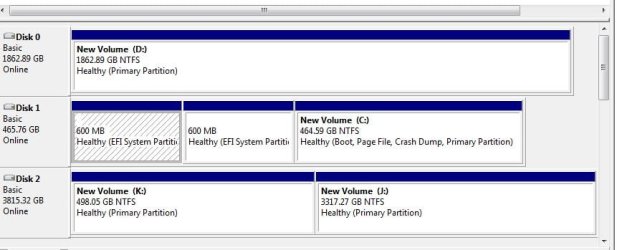
And here they are in Acronis (below)

I can format one of those, but have no idea which is which
 

Attachments

  • Dscf3558.jpg
    Dscf3558.jpg
    127.4 KB · Views: 0

My Computer

Computer type
PC/Desktop
Computer Manufacturer/Model Number
Custom
OS
W7 64 Ult
CPU
Intel Core i9-7940x
Motherboard
ASUS x299 TUF
Memory
GSkill 128GB
Graphics Card(s)
AMD Radeon RX 560
Sound Card
RME
Screen Resolution
1920x1080
Hard Drives
5
PSU
BeQuiet!
Case
BeQuiet!
Keyboard
HyperX
Mouse
Logitech
Browser
IE - what else is there?
It tells you it is using rdisk 2 partition 2

ms default is

\EFI\MICROSOFT\BOOT\BOOTMGFW.EFI

- - - Updated - - -

at admin cmd prompt

diskpart

lis dis
 
Last edited:

My Computers

System One System Two

  • Computer type
    PC/Desktop
    OS
    7 X64
    CPU
    i5 8400
    Motherboard
    gigabyte b365m ds3h
    Memory
    2x8gb 3200mhz
    Hard Drives
    various
    PSU
    pure power 11 400w cm
    Case
    Coolermaster
    Cooling
    cryorig m9i
  • Computer type
    PC/Desktop
    OS
    7x64
    CPU
    g5400
    Motherboard
    ga b365m ds3h
    Memory
    8gb ddr4 2400
    PSU
    xfx pro 450w
Here's lis dis (below)

That says disk 1 is my OS drive, which matches what disk mgmt says. Disk 2 is another drive that just has data on it.

So, I am confused.
 

Attachments

  • lisdsk.jpg
    lisdsk.jpg
    44.2 KB · Views: 10

My Computer

Computer type
PC/Desktop
Computer Manufacturer/Model Number
Custom
OS
W7 64 Ult
CPU
Intel Core i9-7940x
Motherboard
ASUS x299 TUF
Memory
GSkill 128GB
Graphics Card(s)
AMD Radeon RX 560
Sound Card
RME
Screen Resolution
1920x1080
Hard Drives
5
PSU
BeQuiet!
Case
BeQuiet!
Keyboard
HyperX
Mouse
Logitech
Browser
IE - what else is there?

My Computers

System One System Two

  • Computer type
    PC/Desktop
    OS
    7 X64
    CPU
    i5 8400
    Motherboard
    gigabyte b365m ds3h
    Memory
    2x8gb 3200mhz
    Hard Drives
    various
    PSU
    pure power 11 400w cm
    Case
    Coolermaster
    Cooling
    cryorig m9i
  • Computer type
    PC/Desktop
    OS
    7x64
    CPU
    g5400
    Motherboard
    ga b365m ds3h
    Memory
    8gb ddr4 2400
    PSU
    xfx pro 450w
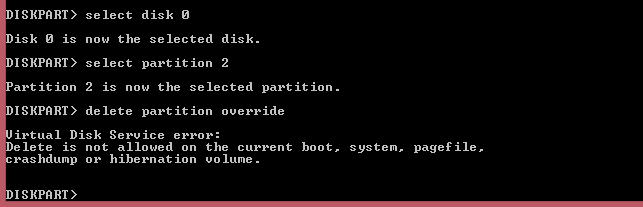
You can't break an active System partition in diskpart. Run

delete partition override

on both. Or run bcdedit. Or msinfo32.
 

My Computer

Computer type
PC/Desktop
OS
Windows 7 Home Premium

Attachments

  • boot.jpg
    boot.jpg
    32 KB · Views: 1
  • boot2.jpg
    boot2.jpg
    55.8 KB · Views: 7

My Computer

Computer type
PC/Desktop
Computer Manufacturer/Model Number
Custom
OS
W7 64 Ult
CPU
Intel Core i9-7940x
Motherboard
ASUS x299 TUF
Memory
GSkill 128GB
Graphics Card(s)
AMD Radeon RX 560
Sound Card
RME
Screen Resolution
1920x1080
Hard Drives
5
PSU
BeQuiet!
Case
BeQuiet!
Keyboard
HyperX
Mouse
Logitech
Browser
IE - what else is there?
Run delete partition override on both - than how do I boot into Windows upon restart?

You do not actually delete both. You find out which one diskpart refuses to break.
 

Attachments

  • Diskpart.PNG
    Diskpart.PNG
    5.8 KB · Views: 8

My Computer

Computer type
PC/Desktop
OS
Windows 7 Home Premium
AH - ok, that makes sense.

One final thing before I try... does diskpart see the disk numbering the same as computer mgmt? I am actually selecting disk 1 here, correct?

Furthermore - sysinfo has the three partitions labeled as 0, 1, 2 - I assume I try 0 and 1? --edit-- no, diskpart doesn't see 0 as being a parition
 

Attachments

  • disk.jpg
    disk.jpg
    63.9 KB · Views: 0

My Computer

Computer type
PC/Desktop
Computer Manufacturer/Model Number
Custom
OS
W7 64 Ult
CPU
Intel Core i9-7940x
Motherboard
ASUS x299 TUF
Memory
GSkill 128GB
Graphics Card(s)
AMD Radeon RX 560
Sound Card
RME
Screen Resolution
1920x1080
Hard Drives
5
PSU
BeQuiet!
Case
BeQuiet!
Keyboard
HyperX
Mouse
Logitech
Browser
IE - what else is there?
does diskpart see the disk numbering the same as computer mgmt? I am actually selecting disk 1 here, correct?

Yup. What is the output of

diskpart
select disk 1
list partition

?
 

My Computer

Computer type
PC/Desktop
OS
Windows 7 Home Premium
getbootdev-resultwin7.jpg


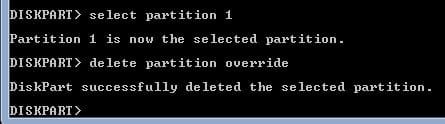
diskpart

sel dis 1

sel par 1

del par override
 

My Computers

System One System Two

  • Computer type
    PC/Desktop
    OS
    7 X64
    CPU
    i5 8400
    Motherboard
    gigabyte b365m ds3h
    Memory
    2x8gb 3200mhz
    Hard Drives
    various
    PSU
    pure power 11 400w cm
    Case
    Coolermaster
    Cooling
    cryorig m9i
  • Computer type
    PC/Desktop
    OS
    7x64
    CPU
    g5400
    Motherboard
    ga b365m ds3h
    Memory
    8gb ddr4 2400
    PSU
    xfx pro 450w
diskpart
sel dis 1
sel par 1
del par override

Got it - thx. Would never have known that from that screenshot I posted.

- - - Updated - - -

------------------------

Yup. What is the output of
diskpart
select disk 1
list partition
?

See below.

Problem solved; the above instruction set worked, and now I have one bmgr.

Thanks to you both!
 

Attachments

  • disc3.jpg
    disc3.jpg
    15.2 KB · Views: 5

My Computer

Computer type
PC/Desktop
Computer Manufacturer/Model Number
Custom
OS
W7 64 Ult
CPU
Intel Core i9-7940x
Motherboard
ASUS x299 TUF
Memory
GSkill 128GB
Graphics Card(s)
AMD Radeon RX 560
Sound Card
RME
Screen Resolution
1920x1080
Hard Drives
5
PSU
BeQuiet!
Case
BeQuiet!
Keyboard
HyperX
Mouse
Logitech
Browser
IE - what else is there?

My Computers

System One System Two

  • Computer type
    PC/Desktop
    OS
    7 X64
    CPU
    i5 8400
    Motherboard
    gigabyte b365m ds3h
    Memory
    2x8gb 3200mhz
    Hard Drives
    various
    PSU
    pure power 11 400w cm
    Case
    Coolermaster
    Cooling
    cryorig m9i
  • Computer type
    PC/Desktop
    OS
    7x64
    CPU
    g5400
    Motherboard
    ga b365m ds3h
    Memory
    8gb ddr4 2400
    PSU
    xfx pro 450w
Back
Top