
Solved I removed a hdd and then placed it back no windows 7 is not loading.

Jonesie85

New member
Member
Local time
10:30 PM
Messages
92
Quick description. i Removed the HDD froma computer, plugged it into a different pc then back. windows failed to load. now, HDD is unplugged and windows 7 starts up ok.

More Info,

-i placed a 3tb seagate drive into an enclosure and plugged the enclosure into a windows xp x86 system. the hdd was not valid.
- I loaded up my win7 pc without the drive attached.
- I plugged the enclosure into my win7 pc. It worked.
- I put the HDD back into the Win7 pc internally.
- Windows did not start up. It got stuck on the pulsating windows logo. I waited 15 minutes and the turned the machine off.
- I loaded up the winxp sp3 dual boot on my win7 machine. i did not install any new hardware,
- Restart of the computer. I selected win7 and a pre windows message said that winodws could not load. 2 options were given. 1/ attempt to fix and 2/ load windows normally.
- I selected to attempt a fix, it could not fix the issue.
- I then attempted to load as normal... it failed. i again turned the machine off.
- i removed the HDD from my win7 machine. it seemed that i had unplugged my reset swith io jumper. when i initially removed the hdd.
- I switched on the pc and it started up as normal.

Thank you for your time and patience.
 

My Computer My Computer

At a glance

Windows 7 Home x64 & Windows XP Pro x86AMD Phenom II 1100T x6.Corsair Vengeance 4x 4gb 1600mhz.XFX Radeon HD 6970 + Arctic Cooling Accelero ...
Computer Manufacturer/Model Number
User-built (and proud of it!)
OS
Windows 7 Home x64 & Windows XP Pro x86
CPU
AMD Phenom II 1100T x6.
Motherboard
Asus Sabertooth 990FX r2.0
Memory
Corsair Vengeance 4x 4gb 1600mhz.
Graphics Card(s)
XFX Radeon HD 6970 + Arctic Cooling Accelero Twin Turbo II
Sound Card
Onboard 7.1 Creative X-FI.
Monitor(s) Displays
LG 42LK450u 42" LCD HD TV
Screen Resolution
1920 x 1080.
Hard Drives
2x WD 20EARS 2TB.
PSU
Fractal Design Newton R2 1000W Modular.
Case
Antec 1200 V3 Full Tower.
Cooling
Zalman CPU Cooler CNPS9900-MAX Blue.
Keyboard
Trust Media Centre with Built in Trackball.
Mouse
Logitech Trackball.
Internet Speed
4.3 Mb/s download and 1.2 Mb/s Upload
Other Info
1x200mm Antec 3-speed Blue LED Fan.
5x120mm Antec 3-Speed Blue LED Fan.
Samsung Writemaster Sata DVD-RW.
2x300mm Blue Cold Cathodes.
2xBlue Cold Cathode Rods.
Trying to get a picture of this...

There are 3 machines:

  1. A PC with 2 OS's (W7 & XP) - PC#1
  2. A PC with XP only - PC#2
  3. An External enclosure
There are 3 Hard Drives:

  1. A primary drive in PC #1 with W7 & XP on it
  2. A primary drive in PC #2
  3. A 3TB secondary drive that is the "traveler" between the 3 machines.
Questions:

  1. What is on the secondary (3TB) drive? Is there an OS on that drive?
  2. Did the contents of the 3TB drive change from the time it was in PC#1 to the time it was in the enclosure?
  3. What is the boot order in the BIOS on PC#1? Does it boot from USB before HDD?
  4. Is the 3TB drive marked as "Active" in Disk Management?
 

My Computer My Computer

At a glance

Windows 7 64 Bit Home Premium SP1i7-3820GSkill F3-14900CL9Q - 16GBEVGA GeForce GTX660 - Driver 352.86
Computer type
PC/Desktop
Computer Manufacturer/Model Number
Home Built - Jan 2013
OS
Windows 7 64 Bit Home Premium SP1
CPU
i7-3820
Motherboard
Asus P9X79-PRO - Bios 4608
Memory
GSkill F3-14900CL9Q - 16GB
Graphics Card(s)
EVGA GeForce GTX660 - Driver 352.86
Sound Card
On board Realtek ALC898
Monitor(s) Displays
Acer S271HL
Screen Resolution
1920 x 1080
Hard Drives
#1- Samsung 840 Pro Series
#2- Western Digital WD1002FAEX Sata3 Black
#3- Western Digital WD1002FAEX Sata3 Black
PSU
Corsair CMPSU-850TX-V2 - 850 watt (by Seasonic)
Case
Corsair Obsidian 550D
Cooling
Standard 3 120mm case fans, Cooler Master Hyper 212 EVO
Keyboard
MS KC-0405
Mouse
Intellimouse 5-button
Internet Speed
56 Mbits/Sec (on a good day)
Antivirus
Avast & Malwarebytes
Browser
Firefox
Other Info
Asus DVD - DRW-24B1ST 24X
Trying to get a picture of this...

There are 3 machines:

  1. A PC with 2 OS's (W7 & XP) - PC#1
  2. A PC with XP only - PC#2
  3. An External enclosure
There are 3 Hard Drives:

  1. A primary drive in PC #1 with W7 & XP on it
  2. A primary drive in PC #2
  3. A 3TB secondary drive that is the "traveler" between the 3 machines.
Questions:

  1. What is on the secondary (3TB) drive? Is there an OS on that drive?
  2. Did the contents of the 3TB drive change from the time it was in PC#1 to the time it was in the enclosure?
  3. What is the boot order in the BIOS on PC#1? Does it boot from USB before HDD?
  4. Is the 3TB drive marked as "Active" in Disk Management?

1. Nothing. No OS. It was meant as a storage drive.
2. Unknown, but unlikely considering its a formatted but empty drive.
3. boot order is only boot drive then cdrom. unchanged.
4. it was initially, but after i took it out then put it back in. i doubt it changed. i couldnt get into windows to see anyway. driveis disconnected at the moment.

thank you for your time by the way.
 

My Computer My Computer

At a glance

Windows 7 Home x64 & Windows XP Pro x86AMD Phenom II 1100T x6.Corsair Vengeance 4x 4gb 1600mhz.XFX Radeon HD 6970 + Arctic Cooling Accelero ...
Computer Manufacturer/Model Number
User-built (and proud of it!)
OS
Windows 7 Home x64 & Windows XP Pro x86
CPU
AMD Phenom II 1100T x6.
Motherboard
Asus Sabertooth 990FX r2.0
Memory
Corsair Vengeance 4x 4gb 1600mhz.
Graphics Card(s)
XFX Radeon HD 6970 + Arctic Cooling Accelero Twin Turbo II
Sound Card
Onboard 7.1 Creative X-FI.
Monitor(s) Displays
LG 42LK450u 42" LCD HD TV
Screen Resolution
1920 x 1080.
Hard Drives
2x WD 20EARS 2TB.
PSU
Fractal Design Newton R2 1000W Modular.
Case
Antec 1200 V3 Full Tower.
Cooling
Zalman CPU Cooler CNPS9900-MAX Blue.
Keyboard
Trust Media Centre with Built in Trackball.
Mouse
Logitech Trackball.
Internet Speed
4.3 Mb/s download and 1.2 Mb/s Upload
Other Info
1x200mm Antec 3-speed Blue LED Fan.
5x120mm Antec 3-Speed Blue LED Fan.
Samsung Writemaster Sata DVD-RW.
2x300mm Blue Cold Cathodes.
2xBlue Cold Cathode Rods.
Trying to get a picture of this...

There are 3 machines:

  1. A PC with 2 OS's (W7 & XP) - PC#1
  2. A PC with XP only - PC#2
  3. An External enclosure
There are 3 Hard Drives:

  1. A primary drive in PC #1 with W7 & XP on it
  2. A primary drive in PC #2
  3. A 3TB secondary drive that is the "traveler" between the 3 machines.
Questions:

  1. What is on the secondary (3TB) drive? Is there an OS on that drive?
  2. Did the contents of the 3TB drive change from the time it was in PC#1 to the time it was in the enclosure?
  3. What is the boot order in the BIOS on PC#1? Does it boot from USB before HDD?
  4. Is the 3TB drive marked as "Active" in Disk Management?

1. Nothing. No OS. It was meant as a storage drive.
2. Unknown, but unlikely considering its a formatted but empty drive.
3. boot order is only boot drive then cdrom. unchanged.
4. it was initially, but after i took it out then put it back in. i doubt it changed. i couldnt get into windows to see anyway. driveis disconnected at the moment.

thank you for your time by the way.
Try this tutorial: http://www.sevenforums.com/tutorials/219533-troubleshooting-windows-7-failure-boot.html
 

My Computer My Computer

At a glance

Windows 7 Professional x64 Service Pack 1AMD Athlon X4 6456GB DDR3 1066Sapphire Radeon HD 5670 512MB GDDR5
Computer type
PC/Desktop
Computer Manufacturer/Model Number
HP Pavilion P7-1010
OS
Windows 7 Professional x64 Service Pack 1
CPU
AMD Athlon X4 645
Motherboard
Foxxcon N-Alvorix RS880
Memory
6GB DDR3 1066
Graphics Card(s)
Sapphire Radeon HD 5670 512MB GDDR5
Sound Card
Realtek Integrated Audio
Monitor(s) Displays
HP 2011x
Screen Resolution
1600x900
Hard Drives
1. Crucial M4 128GB SSD
2. 1TB Seagate Barracuda 7200.12 RPM
3. 1TB Western Digital Caviar Green 5400RPM
PSU
Seasonic S12 II Bronze 380 Watt
Case
HP OEM
Cooling
Coolermaster Heatsink, AVC Case Fan
Keyboard
HP OEM- Made by Chicony
Mouse
HP OEM- Made by Logitech
Internet Speed
20MBit Down/4 Up
Antivirus
Microsoft Security Essentials
Browser
Internet Explorer 10
The ACTIVE flag will remain on the partition on the external drive until you manually remove it. Unplugging it does not change anything.

I would try removing the active flag:
If there is no data on the drive then you can just delete the partition in Disk Management, creating just unallocated space. Then create a new volume (partition) and format it NTFS, but don't make it Active.

To do this you should have the drive in the enclosure (since you can use it with W7 that way). I can't say this will solve the problem but we have seen Windows balk at 2 active drives on a system.

If the drive does have data on it then you can remove the active flag this way:
http://www.sevenforums.com/tutorials/197157-partition-mark-inactive.html
 

My Computer My Computer

At a glance

Windows 7 64 Bit Home Premium SP1i7-3820GSkill F3-14900CL9Q - 16GBEVGA GeForce GTX660 - Driver 352.86
Computer type
PC/Desktop
Computer Manufacturer/Model Number
Home Built - Jan 2013
OS
Windows 7 64 Bit Home Premium SP1
CPU
i7-3820
Motherboard
Asus P9X79-PRO - Bios 4608
Memory
GSkill F3-14900CL9Q - 16GB
Graphics Card(s)
EVGA GeForce GTX660 - Driver 352.86
Sound Card
On board Realtek ALC898
Monitor(s) Displays
Acer S271HL
Screen Resolution
1920 x 1080
Hard Drives
#1- Samsung 840 Pro Series
#2- Western Digital WD1002FAEX Sata3 Black
#3- Western Digital WD1002FAEX Sata3 Black
PSU
Corsair CMPSU-850TX-V2 - 850 watt (by Seasonic)
Case
Corsair Obsidian 550D
Cooling
Standard 3 120mm case fans, Cooler Master Hyper 212 EVO
Keyboard
MS KC-0405
Mouse
Intellimouse 5-button
Internet Speed
56 Mbits/Sec (on a good day)
Antivirus
Avast & Malwarebytes
Browser
Firefox
Other Info
Asus DVD - DRW-24B1ST 24X
The ACTIVE flag will remain on the partition on the external drive until you manually remove it. Unplugging it does not change anything.

I would try removing the active flag:
If there is no data on the drive then you can just delete the partition in Disk Management, creating just unallocated space. Then create a new volume (partition) and format it NTFS, but don't make it Active.

To do this you should have the drive in the enclosure (since you can use it with W7 that way). I can't say this will solve the problem but we have seen Windows balk at 2 active drives on a system.

If the drive does have data on it then you can remove the active flag this way:
http://www.sevenforums.com/tutorials/197157-partition-mark-inactive.html

hello, i tried using the enclosure to access the drive. i then deleted the partition and then i re partitioned it to maximum however. the enclosure only allows 750ish gb hdd maimum. i tried plugging the hdd through the usb enclosure on a system startup to see what happens. the machine pops up saying something about appropriate boot drive location. in the bios it isnt set as a bootable hdd. even though my boot order has hdd as 1st boot in the list of bootable hdd's i have disabled the seagate 3tb hdd.

i have used seagates discwizard software on the drive. to create a partition. no success. i would attache the drive to my second machine but it is windows xp and also does not recognise more than 750gbs of the 3000gb hdd.

NOTE: Enclosure = Sumvision 3.5" Apex USB 3.0 External SATA HDD Enclosure

thank you for your time and patience.
 

My Computer My Computer

At a glance

Windows 7 Home x64 & Windows XP Pro x86AMD Phenom II 1100T x6.Corsair Vengeance 4x 4gb 1600mhz.XFX Radeon HD 6970 + Arctic Cooling Accelero ...
Computer Manufacturer/Model Number
User-built (and proud of it!)
OS
Windows 7 Home x64 & Windows XP Pro x86
CPU
AMD Phenom II 1100T x6.
Motherboard
Asus Sabertooth 990FX r2.0
Memory
Corsair Vengeance 4x 4gb 1600mhz.
Graphics Card(s)
XFX Radeon HD 6970 + Arctic Cooling Accelero Twin Turbo II
Sound Card
Onboard 7.1 Creative X-FI.
Monitor(s) Displays
LG 42LK450u 42" LCD HD TV
Screen Resolution
1920 x 1080.
Hard Drives
2x WD 20EARS 2TB.
PSU
Fractal Design Newton R2 1000W Modular.
Case
Antec 1200 V3 Full Tower.
Cooling
Zalman CPU Cooler CNPS9900-MAX Blue.
Keyboard
Trust Media Centre with Built in Trackball.
Mouse
Logitech Trackball.
Internet Speed
4.3 Mb/s download and 1.2 Mb/s Upload
Other Info
1x200mm Antec 3-speed Blue LED Fan.
5x120mm Antec 3-Speed Blue LED Fan.
Samsung Writemaster Sata DVD-RW.
2x300mm Blue Cold Cathodes.
2xBlue Cold Cathode Rods.
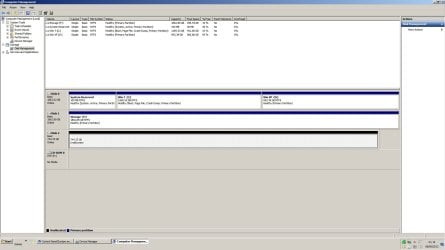
the hdd initially formatted on my win7 machine at the full 3tb single partition and i was able to transfer data to the drive so i believe that my machine can handle a 3tb drive. anyway got any other suggestions or translations?
 

My Computer My Computer

At a glance

Windows 7 Home x64 & Windows XP Pro x86AMD Phenom II 1100T x6.Corsair Vengeance 4x 4gb 1600mhz.XFX Radeon HD 6970 + Arctic Cooling Accelero ...
Computer Manufacturer/Model Number
User-built (and proud of it!)
OS
Windows 7 Home x64 & Windows XP Pro x86
CPU
AMD Phenom II 1100T x6.
Motherboard
Asus Sabertooth 990FX r2.0
Memory
Corsair Vengeance 4x 4gb 1600mhz.
Graphics Card(s)
XFX Radeon HD 6970 + Arctic Cooling Accelero Twin Turbo II
Sound Card
Onboard 7.1 Creative X-FI.
Monitor(s) Displays
LG 42LK450u 42" LCD HD TV
Screen Resolution
1920 x 1080.
Hard Drives
2x WD 20EARS 2TB.
PSU
Fractal Design Newton R2 1000W Modular.
Case
Antec 1200 V3 Full Tower.
Cooling
Zalman CPU Cooler CNPS9900-MAX Blue.
Keyboard
Trust Media Centre with Built in Trackball.
Mouse
Logitech Trackball.
Internet Speed
4.3 Mb/s download and 1.2 Mb/s Upload
Other Info
1x200mm Antec 3-speed Blue LED Fan.
5x120mm Antec 3-Speed Blue LED Fan.
Samsung Writemaster Sata DVD-RW.
2x300mm Blue Cold Cathodes.
2xBlue Cold Cathode Rods.
Well I think if you installed and used it only on the w7 64 bit machine then you would have no problems/issues, as w7 64 handles that size out-of-the-box.

But using it in a portable manner will likely result in some issues (formatted with a single 3TB partition).
 

My Computer My Computer

At a glance

Windows 7 Ultimate x64
OS
Windows 7 Ultimate x64

My Computer My Computer

At a glance

Windows 7 64 Bit Home Premium SP1i7-3820GSkill F3-14900CL9Q - 16GBEVGA GeForce GTX660 - Driver 352.86
Computer type
PC/Desktop
Computer Manufacturer/Model Number
Home Built - Jan 2013
OS
Windows 7 64 Bit Home Premium SP1
CPU
i7-3820
Motherboard
Asus P9X79-PRO - Bios 4608
Memory
GSkill F3-14900CL9Q - 16GB
Graphics Card(s)
EVGA GeForce GTX660 - Driver 352.86
Sound Card
On board Realtek ALC898
Monitor(s) Displays
Acer S271HL
Screen Resolution
1920 x 1080
Hard Drives
#1- Samsung 840 Pro Series
#2- Western Digital WD1002FAEX Sata3 Black
#3- Western Digital WD1002FAEX Sata3 Black
PSU
Corsair CMPSU-850TX-V2 - 850 watt (by Seasonic)
Case
Corsair Obsidian 550D
Cooling
Standard 3 120mm case fans, Cooler Master Hyper 212 EVO
Keyboard
MS KC-0405
Mouse
Intellimouse 5-button
Internet Speed
56 Mbits/Sec (on a good day)
Antivirus
Avast & Malwarebytes
Browser
Firefox
Other Info
Asus DVD - DRW-24B1ST 24X
Well I think if you installed and used it only on the w7 64 bit machine then you would have no problems/issues, as w7 64 handles that size out-of-the-box.

But using it in a portable manner will likely result in some issues (formatted with a single 3TB partition).

im not using it primarily as a removable drive. it was an attempt to format the drive without taking apart a computer. initially the hdd worked out of the box on my win7x64 machine. i dont intend to place the hdd in a winxp machine again or in an enclosure.
 

My Computer My Computer

At a glance

Windows 7 Home x64 & Windows XP Pro x86AMD Phenom II 1100T x6.Corsair Vengeance 4x 4gb 1600mhz.XFX Radeon HD 6970 + Arctic Cooling Accelero ...
Computer Manufacturer/Model Number
User-built (and proud of it!)
OS
Windows 7 Home x64 & Windows XP Pro x86
CPU
AMD Phenom II 1100T x6.
Motherboard
Asus Sabertooth 990FX r2.0
Memory
Corsair Vengeance 4x 4gb 1600mhz.
Graphics Card(s)
XFX Radeon HD 6970 + Arctic Cooling Accelero Twin Turbo II
Sound Card
Onboard 7.1 Creative X-FI.
Monitor(s) Displays
LG 42LK450u 42" LCD HD TV
Screen Resolution
1920 x 1080.
Hard Drives
2x WD 20EARS 2TB.
PSU
Fractal Design Newton R2 1000W Modular.
Case
Antec 1200 V3 Full Tower.
Cooling
Zalman CPU Cooler CNPS9900-MAX Blue.
Keyboard
Trust Media Centre with Built in Trackball.
Mouse
Logitech Trackball.
Internet Speed
4.3 Mb/s download and 1.2 Mb/s Upload
Other Info
1x200mm Antec 3-speed Blue LED Fan.
5x120mm Antec 3-Speed Blue LED Fan.
Samsung Writemaster Sata DVD-RW.
2x300mm Blue Cold Cathodes.
2xBlue Cold Cathode Rods.
is there a way during win7 startup that i can use to erase the 3tb drive completely. back to factory settings. so that windows may startup with the drive attached internally?
 

My Computer My Computer

At a glance

Windows 7 Home x64 & Windows XP Pro x86AMD Phenom II 1100T x6.Corsair Vengeance 4x 4gb 1600mhz.XFX Radeon HD 6970 + Arctic Cooling Accelero ...
Computer Manufacturer/Model Number
User-built (and proud of it!)
OS
Windows 7 Home x64 & Windows XP Pro x86
CPU
AMD Phenom II 1100T x6.
Motherboard
Asus Sabertooth 990FX r2.0
Memory
Corsair Vengeance 4x 4gb 1600mhz.
Graphics Card(s)
XFX Radeon HD 6970 + Arctic Cooling Accelero Twin Turbo II
Sound Card
Onboard 7.1 Creative X-FI.
Monitor(s) Displays
LG 42LK450u 42" LCD HD TV
Screen Resolution
1920 x 1080.
Hard Drives
2x WD 20EARS 2TB.
PSU
Fractal Design Newton R2 1000W Modular.
Case
Antec 1200 V3 Full Tower.
Cooling
Zalman CPU Cooler CNPS9900-MAX Blue.
Keyboard
Trust Media Centre with Built in Trackball.
Mouse
Logitech Trackball.
Internet Speed
4.3 Mb/s download and 1.2 Mb/s Upload
Other Info
1x200mm Antec 3-speed Blue LED Fan.
5x120mm Antec 3-Speed Blue LED Fan.
Samsung Writemaster Sata DVD-RW.
2x300mm Blue Cold Cathodes.
2xBlue Cold Cathode Rods.
is there a way during win7 startup that i can use to erase the 3tb drive completely. back to factory settings. so that windows may startup with the drive attached internally?

Do as TVeblen requests, posting a shot of Disk Management.
 

My Computer My Computer

At a glance

Windows 7 Ultimate x64
OS
Windows 7 Ultimate x64

Attachments

  • Untitled.jpg
    Untitled.jpg
    135.5 KB · Views: 16

My Computer My Computer

At a glance

Windows 7 Home x64 & Windows XP Pro x86AMD Phenom II 1100T x6.Corsair Vengeance 4x 4gb 1600mhz.XFX Radeon HD 6970 + Arctic Cooling Accelero ...
Computer Manufacturer/Model Number
User-built (and proud of it!)
OS
Windows 7 Home x64 & Windows XP Pro x86
CPU
AMD Phenom II 1100T x6.
Motherboard
Asus Sabertooth 990FX r2.0
Memory
Corsair Vengeance 4x 4gb 1600mhz.
Graphics Card(s)
XFX Radeon HD 6970 + Arctic Cooling Accelero Twin Turbo II
Sound Card
Onboard 7.1 Creative X-FI.
Monitor(s) Displays
LG 42LK450u 42" LCD HD TV
Screen Resolution
1920 x 1080.
Hard Drives
2x WD 20EARS 2TB.
PSU
Fractal Design Newton R2 1000W Modular.
Case
Antec 1200 V3 Full Tower.
Cooling
Zalman CPU Cooler CNPS9900-MAX Blue.
Keyboard
Trust Media Centre with Built in Trackball.
Mouse
Logitech Trackball.
Internet Speed
4.3 Mb/s download and 1.2 Mb/s Upload
Other Info
1x200mm Antec 3-speed Blue LED Fan.
5x120mm Antec 3-Speed Blue LED Fan.
Samsung Writemaster Sata DVD-RW.
2x300mm Blue Cold Cathodes.
2xBlue Cold Cathode Rods.
746GB is the magic number. It indicates, from what I have read, that the drive was formatted (somewhere along the way) with 512 byte sectors, standard for Windows legacy systems. GPT disks are formatted with 4KB sectors.

I read that these drives come with utilities from the manufacturer that handle the proper setup. I assume that came on the external drive and is now deleted. So the next thing would be to go to the manufacturer's website and see if you can download a copy to run it again.

http://www.seagate.com/support/downloads/discwizard/

In the meantime, with the drive as it is now (all unallocated space, can you install it internally in your system? If not, what happens?
 

My Computer My Computer

At a glance

Windows 7 64 Bit Home Premium SP1i7-3820GSkill F3-14900CL9Q - 16GBEVGA GeForce GTX660 - Driver 352.86
Computer type
PC/Desktop
Computer Manufacturer/Model Number
Home Built - Jan 2013
OS
Windows 7 64 Bit Home Premium SP1
CPU
i7-3820
Motherboard
Asus P9X79-PRO - Bios 4608
Memory
GSkill F3-14900CL9Q - 16GB
Graphics Card(s)
EVGA GeForce GTX660 - Driver 352.86
Sound Card
On board Realtek ALC898
Monitor(s) Displays
Acer S271HL
Screen Resolution
1920 x 1080
Hard Drives
#1- Samsung 840 Pro Series
#2- Western Digital WD1002FAEX Sata3 Black
#3- Western Digital WD1002FAEX Sata3 Black
PSU
Corsair CMPSU-850TX-V2 - 850 watt (by Seasonic)
Case
Corsair Obsidian 550D
Cooling
Standard 3 120mm case fans, Cooler Master Hyper 212 EVO
Keyboard
MS KC-0405
Mouse
Intellimouse 5-button
Internet Speed
56 Mbits/Sec (on a good day)
Antivirus
Avast & Malwarebytes
Browser
Firefox
Other Info
Asus DVD - DRW-24B1ST 24X
If your intent is to use the drive on a permanent basis in your w7 64-bit machine I think all you've got to do is reinstall it as suggested by TVeblen. Reboot and go into the BIOS, make sure it sees it as a 3TB drive. If it does, then boot into w7, open Disk Management, delete existing partitions, and create a new one, formatted with NTFS. It should create the new partition with 4096 byte allocation units and you'll be set to go.
 

My Computer My Computer

At a glance

Windows 7 Ultimate x64
OS
Windows 7 Ultimate x64
746GB is the magic number. It indicates, from what I have read, that the drive was formatted (somewhere along the way) with 512 byte sectors, standard for Windows legacy systems. GPT disks are formatted with 4KB sectors.

I read that these drives come with utilities from the manufacturer that handle the proper setup. I assume that came on the external drive and is now deleted. So the next thing would be to go to the manufacturer's website and see if you can download a copy to run it again.

DiscWizard | Seagate

In the meantime, with the drive as it is now (all unallocated space, can you install it internally in your system? If not, what happens?

the drive isnt external. its a oem internal hdd. i have just placed it into an enclosure on a temp basis. it came with no pre-installed files.

when i initially formatted it on win7 it formatted to the full 3tb and worked for a week until i placed it an enclosure.

my pc is a dual boot system (xxp x86 and 7 x64). i loaded up in xp i then used seagate discwizard to format the hdd. it achknoledged only 2tb of the 3tb existed. it was ignoring the 746 GB which was visible from the enclosure. discwizard set up a 2tb drive and a 746gb drive (not partitions). the program used something called drive extender to format the other 746gb.

Both partitions are usable in win xp. Winxp also boots up properly. Win7 does not bootup with the hdd inserted internally.

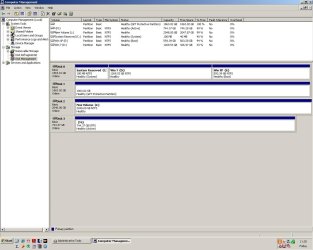
i took another screenshot of win disc manager but in winxp instead.

tthere are only 3 hdds in the machine in this shot.

hdd1 2TB (system reserved, winxp and win7 partitions).
hdd2 2TB (isnt accesable or viewable in winxp but works properly in win7).
hdd3 3TB (2 partitions shown as 2 seperate HDD's. boots up in winxp and works properly and does NOT boot in win7).

thank you for your time patience.
 

Attachments

  • untitled.JPG
    untitled.JPG
    102.4 KB · Views: 6

My Computer My Computer

At a glance

Windows 7 Home x64 & Windows XP Pro x86AMD Phenom II 1100T x6.Corsair Vengeance 4x 4gb 1600mhz.XFX Radeon HD 6970 + Arctic Cooling Accelero ...
Computer Manufacturer/Model Number
User-built (and proud of it!)
OS
Windows 7 Home x64 & Windows XP Pro x86
CPU
AMD Phenom II 1100T x6.
Motherboard
Asus Sabertooth 990FX r2.0
Memory
Corsair Vengeance 4x 4gb 1600mhz.
Graphics Card(s)
XFX Radeon HD 6970 + Arctic Cooling Accelero Twin Turbo II
Sound Card
Onboard 7.1 Creative X-FI.
Monitor(s) Displays
LG 42LK450u 42" LCD HD TV
Screen Resolution
1920 x 1080.
Hard Drives
2x WD 20EARS 2TB.
PSU
Fractal Design Newton R2 1000W Modular.
Case
Antec 1200 V3 Full Tower.
Cooling
Zalman CPU Cooler CNPS9900-MAX Blue.
Keyboard
Trust Media Centre with Built in Trackball.
Mouse
Logitech Trackball.
Internet Speed
4.3 Mb/s download and 1.2 Mb/s Upload
Other Info
1x200mm Antec 3-speed Blue LED Fan.
5x120mm Antec 3-Speed Blue LED Fan.
Samsung Writemaster Sata DVD-RW.
2x300mm Blue Cold Cathodes.
2xBlue Cold Cathode Rods.
When you say this:

when i initially formatted it on Windows 7 it formatted to the full 3tb and worked for a week until i placed it an enclosure.

Do you mean it worked properly with both XP and 7, both booting properly?
 

My Computer My Computer

At a glance

Windows 7 Ultimate x64
OS
Windows 7 Ultimate x64
Thank you for being patient with me. These "larger than 2.1TB" drives are fairly new, as are GUID file tables and UEFI bios. We are all just learning about the rules regarding these new systems.

You have also created a complicated system: 2 computers, 2 operating systems, and an external enclosure. Because of the new "rules" mentioned above, what works in one system/OS may not work in the other.

I have learned that some external enclosures do not recognize drives larger than 2.1TB. This is a problem on the circuit board inside the enclosure. Many people are surprised to learn (me) that the enclosure itself can be the bottleneck. So any problems you are having that involve the enclosure could be just that: you need a newer enclosure to use these large drives.

I also have read that W7 can not boot from a GUID partition unless the motherboard is using an UEFI BIOS. This may explain the problem you are having on that one machine. 64 bit Windows can recognize and read/write GUID partitions, it just can't be installed on one and boot without an upgraded motherboard or BIOS.

Many people comment that all these issues are eliminated on these large drives by just creating smaller partitions. That is where I was going with my thinking: Remove any Active Flag, Wipe the drive to remove any MBR, Use a third party utility to create a new GUID file table, then create 2 1.5TB partitions on the drive and format it NTFS.

Ain't new technology fun? :sarc:
 

My Computer My Computer

At a glance

Windows 7 64 Bit Home Premium SP1i7-3820GSkill F3-14900CL9Q - 16GBEVGA GeForce GTX660 - Driver 352.86
Computer type
PC/Desktop
Computer Manufacturer/Model Number
Home Built - Jan 2013
OS
Windows 7 64 Bit Home Premium SP1
CPU
i7-3820
Motherboard
Asus P9X79-PRO - Bios 4608
Memory
GSkill F3-14900CL9Q - 16GB
Graphics Card(s)
EVGA GeForce GTX660 - Driver 352.86
Sound Card
On board Realtek ALC898
Monitor(s) Displays
Acer S271HL
Screen Resolution
1920 x 1080
Hard Drives
#1- Samsung 840 Pro Series
#2- Western Digital WD1002FAEX Sata3 Black
#3- Western Digital WD1002FAEX Sata3 Black
PSU
Corsair CMPSU-850TX-V2 - 850 watt (by Seasonic)
Case
Corsair Obsidian 550D
Cooling
Standard 3 120mm case fans, Cooler Master Hyper 212 EVO
Keyboard
MS KC-0405
Mouse
Intellimouse 5-button
Internet Speed
56 Mbits/Sec (on a good day)
Antivirus
Avast & Malwarebytes
Browser
Firefox
Other Info
Asus DVD - DRW-24B1ST 24X
When you say this:

when i initially formatted it on Windows 7 it formatted to the full 3tb and worked for a week until i placed it an enclosure.
Do you mean it worked properly with both XP and 7, both booting properly?

the first machine i put it into was directly into my main pc. i only loaded up win7. the drive was detected automatically. i then started formatting the drive for the first time at the full capacity of the drive. the formatting took around 7-8 hours. then it worked for a week. then i put it into an external drive enclosure which was plugged into winxp (seperate winxp machine from my dual boot system.) when i tried to put it back into my dual boot system. i tried to load up win7 as normal but windows7 boot failed. then i tried loading it up in winxp. winxp booted up but the drive wasnt working. i installed seagate discwizard for winxp and after re-partitioning the drive it worked. however. the drive isnt partitioned into 2 partitions of the same drive it seems to have been partioned into 2 100%'s of 2 drives.

but to answer your question simply. it worked fine in win7 until it was removed.
 

My Computer My Computer

At a glance

Windows 7 Home x64 & Windows XP Pro x86AMD Phenom II 1100T x6.Corsair Vengeance 4x 4gb 1600mhz.XFX Radeon HD 6970 + Arctic Cooling Accelero ...
Computer Manufacturer/Model Number
User-built (and proud of it!)
OS
Windows 7 Home x64 & Windows XP Pro x86
CPU
AMD Phenom II 1100T x6.
Motherboard
Asus Sabertooth 990FX r2.0
Memory
Corsair Vengeance 4x 4gb 1600mhz.
Graphics Card(s)
XFX Radeon HD 6970 + Arctic Cooling Accelero Twin Turbo II
Sound Card
Onboard 7.1 Creative X-FI.
Monitor(s) Displays
LG 42LK450u 42" LCD HD TV
Screen Resolution
1920 x 1080.
Hard Drives
2x WD 20EARS 2TB.
PSU
Fractal Design Newton R2 1000W Modular.
Case
Antec 1200 V3 Full Tower.
Cooling
Zalman CPU Cooler CNPS9900-MAX Blue.
Keyboard
Trust Media Centre with Built in Trackball.
Mouse
Logitech Trackball.
Internet Speed
4.3 Mb/s download and 1.2 Mb/s Upload
Other Info
1x200mm Antec 3-speed Blue LED Fan.
5x120mm Antec 3-Speed Blue LED Fan.
Samsung Writemaster Sata DVD-RW.
2x300mm Blue Cold Cathodes.
2xBlue Cold Cathode Rods.
Back
Top