Solved i see just a black screen after samsung boot logo

rwds

New member
Local time
10:58 AM
Messages
9
Hello there, just a similar question, thought maybe i will get any kind of help here.
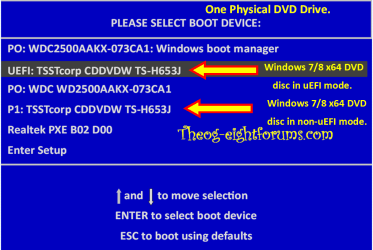
Situation is pretty obvious: i have got a Samsung Nb, model is NP355E5C, with windows 8 on board. Though it were simply to just erase it, i mean format partition and install windows 7 os. So what i have done: deleted all partitions, create one single partition and start installing windows on it. After first restart, just after Samsung boot logo, screen went black. Went to bios and saw, that boot priority set to dvd, hdd is second, pressed f10 for the restart. Same situation - black screen. After several tries i start pressing F8 or F9 button, quick boot option menu appeared - i chose dvd as for boot device, when on screen i saw PRESS ANY KEY TO.. i hit NOTHING, and hola - windows 7 installation goes on. With that trick i install Windows 7, but the problem that can start OS only with that trick - if i doing everything else, i see just a black screen after samsung boot logo.
What could be the solution for this ? Is this some bios changes i need to do or else ?
Thanks guys.
 

My Computer My Computer

At a glance

Windows 7 Ultimate x64
Computer type
PC/Desktop
OS
Windows 7 Ultimate x64
Hello there, just a similar question, thought maybe i will get any kind of help here.
Situation is pretty obvious: i have got a Samsung Nb, model is NP355E5C, with windows 8 on board. Though it were simply to just erase it, i mean format partition and install windows 7 os. So what i have done: deleted all partitions, create one single partition and start installing windows on it. After first restart, just after Samsung boot logo, screen went black. Went to bios and saw, that boot priority set to dvd, hdd is second, pressed f10 for the restart. Same situation - black screen. After several tries i start pressing F8 or F9 button, quick boot option menu appeared - i chose dvd as for boot device, when on screen i saw PRESS ANY KEY TO.. i hit NOTHING, and hola - windows 7 installation goes on. With that trick i install Windows 7, but the problem that can start OS only with that trick - if i doing everything else, i see just a black screen after samsung boot logo.
What could be the solution for this ? Is this some bios changes i need to do or else ?
Thanks guys.

To Downgrade to Windows 7.
Downgrade Windows 8 to Windows 7
Warning you must have the uEFI/BIOS firmware setting in Step Three set.
 

My Computer My Computer

At a glance

ME/XP/Vista/Win7
OS
ME/XP/Vista/Win7

My Computer My Computer

At a glance

Windows 7 Ultimate x64
Computer type
PC/Desktop
OS
Windows 7 Ultimate x64
Thanks, will try it.
 

My Computer My Computer

At a glance

Windows 7 Ultimate x64
Computer type
PC/Desktop
OS
Windows 7 Ultimate x64
Hello there, just a similar question, thought maybe i will get any kind of help here.
Situation is pretty obvious: i have got a Samsung Nb, model is NP355E5C, with windows 8 on board. Though it were simply to just erase it, i mean format partition and install windows 7 os. So what i have done: deleted all partitions, create one single partition and start installing windows on it. After first restart, just after Samsung boot logo, screen went black. Went to bios and saw, that boot priority set to dvd, hdd is second, pressed f10 for the restart. Same situation - black screen. After several tries i start pressing F8 or F9 button, quick boot option menu appeared - i chose dvd as for boot device, when on screen i saw PRESS ANY KEY TO.. i hit NOTHING, and hola - windows 7 installation goes on. With that trick i install Windows 7, but the problem that can start OS only with that trick - if i doing everything else, i see just a black screen after samsung boot logo.
What could be the solution for this ? Is this some bios changes i need to do or else ?
Thanks guys.

http://www.sevenforums.com/tutorials/104341-bootmgr-missing-fix.html

Boot from win7 install dvd. "repair computer"->command prompt

Code:
bootrec/fixmbr
bootrec/fixboot

Now boot normally. Most likely the mbr was still win8
 

My Computer My Computer

At a glance

Microsoft Windows 7 Home Premium 64-bits 7601...Intel(R) Core(TM) i3 CPU M 370 @ 2.40GHz4,00 GBATI Mobility Radeon HD 5400 Series
Computer type
Laptop
Computer Manufacturer/Model Number
ACER ASPIRE 5742G
OS
Microsoft Windows 7 Home Premium 64-bits 7601 Multiprocessor Free Service Pack 1
CPU
Intel(R) Core(TM) i3 CPU M 370 @ 2.40GHz
Motherboard
Acer Aspire 5742G
Memory
4,00 GB
Graphics Card(s)
ATI Mobility Radeon HD 5400 Series
Sound Card
(1) AMD High Definition Audio Device (2) Realtek High Defi
Screen Resolution
1366 x 768 x 32 bits (4294967296 colors) @ 60 Hz
Hard Drives
WDC WD5000BEVT-22ZAT0
Hello there, just a similar question, thought maybe i will get any kind of help here.
Situation is pretty obvious: i have got a Samsung Nb, model is NP355E5C, with windows 8 on board. Though it were simply to just erase it, i mean format partition and install windows 7 os. So what i have done: deleted all partitions, create one single partition and start installing windows on it. After first restart, just after Samsung boot logo, screen went black. Went to bios and saw, that boot priority set to dvd, hdd is second, pressed f10 for the restart. Same situation - black screen. After several tries i start pressing F8 or F9 button, quick boot option menu appeared - i chose dvd as for boot device, when on screen i saw PRESS ANY KEY TO.. i hit NOTHING, and hola - windows 7 installation goes on. With that trick i install Windows 7, but the problem that can start OS only with that trick - if i doing everything else, i see just a black screen after samsung boot logo.
What could be the solution for this ? Is this some bios changes i need to do or else ?
Thanks guys.

http://www.sevenforums.com/tutorials/104341-bootmgr-missing-fix.html

Boot from win7 install dvd. "repair computer"->command prompt

Code:
bootrec/fixmbr
bootrec/fixboot

Now boot normally. Most likely the mbr was still win8

Windows 7 has NO SECURE BOOT CODE. Therefore installing Windows 7 would a Secure Boot Violation.

Windows 8 Downgrade-003 SB.PNG
 

My Computer My Computer

At a glance

ME/XP/Vista/Win7
OS
ME/XP/Vista/Win7

My Computer My Computer

At a glance

Microsoft Windows 7 Home Premium 64-bits 7601...Intel(R) Core(TM) i3 CPU M 370 @ 2.40GHz4,00 GBATI Mobility Radeon HD 5400 Series
Computer type
Laptop
Computer Manufacturer/Model Number
ACER ASPIRE 5742G
OS
Microsoft Windows 7 Home Premium 64-bits 7601 Multiprocessor Free Service Pack 1
CPU
Intel(R) Core(TM) i3 CPU M 370 @ 2.40GHz
Motherboard
Acer Aspire 5742G
Memory
4,00 GB
Graphics Card(s)
ATI Mobility Radeon HD 5400 Series
Sound Card
(1) AMD High Definition Audio Device (2) Realtek High Defi
Screen Resolution
1366 x 768 x 32 bits (4294967296 colors) @ 60 Hz
Hard Drives
WDC WD5000BEVT-22ZAT0
When booted succesfully to win7 (with the insert dvd trick):
  1. Eject DVD
  2. Reboot windows (so not shutdown, but restart)
Same problem?
 

My Computer My Computer

At a glance

Microsoft Windows 7 Home Premium 64-bits 7601...Intel(R) Core(TM) i3 CPU M 370 @ 2.40GHz4,00 GBATI Mobility Radeon HD 5400 Series
Computer type
Laptop
Computer Manufacturer/Model Number
ACER ASPIRE 5742G
OS
Microsoft Windows 7 Home Premium 64-bits 7601 Multiprocessor Free Service Pack 1
CPU
Intel(R) Core(TM) i3 CPU M 370 @ 2.40GHz
Motherboard
Acer Aspire 5742G
Memory
4,00 GB
Graphics Card(s)
ATI Mobility Radeon HD 5400 Series
Sound Card
(1) AMD High Definition Audio Device (2) Realtek High Defi
Screen Resolution
1366 x 768 x 32 bits (4294967296 colors) @ 60 Hz
Hard Drives
WDC WD5000BEVT-22ZAT0
To Downgrade to Windows 7.

Downgrade Windows 8 to Windows 7

Warning you must have the uEFI/BIOS firmware setting in Step Three set.


theog said:
3) Reset BIOS to default, and reboot to BIOS make sure Secure Boot is disabled.
NOTE: Check your manufacturer's uEFI/BIOS firmware manual for settings.
Make sure CSM is ENABLED, & set to UEFI boot.


Technical Note: UEFI BIOS vs. Legacy BIOS - YouTube

Also enable Boot Menu.


Windows 8 - Access to Uefi Firmware Settings - From Change PC Settings - YouTube

Windows 8 - Access to Uefi Firmware Settings - Option - YouTube
 

My Computer My Computer

At a glance

ME/XP/Vista/Win7
OS
ME/XP/Vista/Win7
Last edited:

My Computer My Computer

At a glance

Windows 7 Ultimate x64
Computer type
PC/Desktop
OS
Windows 7 Ultimate x64
Looks fine to me, although I'm not a BIOS expert! Enter bios.... wait a few seconds ... exit bios without saving. Does boot fine?
 

My Computer My Computer

At a glance

Microsoft Windows 7 Home Premium 64-bits 7601...Intel(R) Core(TM) i3 CPU M 370 @ 2.40GHz4,00 GBATI Mobility Radeon HD 5400 Series
Computer type
Laptop
Computer Manufacturer/Model Number
ACER ASPIRE 5742G
OS
Microsoft Windows 7 Home Premium 64-bits 7601 Multiprocessor Free Service Pack 1
CPU
Intel(R) Core(TM) i3 CPU M 370 @ 2.40GHz
Motherboard
Acer Aspire 5742G
Memory
4,00 GB
Graphics Card(s)
ATI Mobility Radeon HD 5400 Series
Sound Card
(1) AMD High Definition Audio Device (2) Realtek High Defi
Screen Resolution
1366 x 768 x 32 bits (4294967296 colors) @ 60 Hz
Hard Drives
WDC WD5000BEVT-22ZAT0
nope, same black screen ;)
 

My Computer My Computer

At a glance

Windows 7 Ultimate x64
Computer type
PC/Desktop
OS
Windows 7 Ultimate x64
Enabling the boot device menu

Acer said:
On most Acer systems, you can use the F12 key on boot to select the drive or network from which loading the operating system. In case the F12 option does not work, you may need to enable this function.

SOLUTION

Enabling the F12 function:

1.Power on the system. As soon as the first logo screen appears, immediately press the F2 key, or the DEL key if you have a desktop, to enter the BIOS.
2.Press the right arrow key to select Main.
3.Use the arrow keys to navigate to F12 Boot Menu, and press ENTER.
4.Select Enabled, and press ENTER.
5.Press the F10 key to save changes and restart the system.


How to Enable or Disable Secure Boot

Acer said:
This article only applies to: Windows 8 Desktops

Bootable media from previous versions of Windows may not be recognized in Windows 8. You can change the Secure Boot setting and it should recognize the bootable device.

Use the following steps to change Secure Boot:

1.Completely shut down your computer.
2.Power on the system. As soon as the first logo screen appears, immediately press Delete to enter the BIOS.
3.Use the right arrow key to select Authentication.
4.With Secure Boot highlighted, press Enter and then the down arrow to select Disabled.
5.Use the right arrow key to select Boot Options.
6.With Launch CSM highlighted, press Enter and use the down arrow to select Always.
7.Press Enter.
8.Press the F10 key to save changes and restart the system
 

My Computer My Computer

At a glance

ME/XP/Vista/Win7
OS
ME/XP/Vista/Win7
theog hello one again, but this applies for acer, i have got samsung NB here (aptio setup utility, american megatrends)
 

My Computer My Computer

At a glance

Windows 7 Ultimate x64
Computer type
PC/Desktop
OS
Windows 7 Ultimate x64
Samsung UEFI/BIOS firmware has bug, If the Acer way does not work, try DISABLING UEFI & ENABLING Legacy BIOS in CSM.

Some OEM manufacturers are locking end-users out of the options in uEFI/BIOS firmware on consumer PC’s, on business PC’s there not.

Windows Hardware Certification Requirements for Client and Server Systems


Microsoft said:
Mandatory. On non-ARM systems, the platform MUST implement the ability for a physically present user to select between two Secure Boot modes in firmware setup: "Custom" and "Standard". Custom Mode allows for more flexibility as specified in the following:

It shall be possible for a physically present user to use the Custom Mode firmware setup option to modify the contents of the Secure Boot signature databases and the PK. This may be implemented by simply providing the option to clear all Secure Boot databases (PK, KEK, db, dbx), which puts the system into setup mode.

If the user ends up deleting the PK then, upon exiting the Custom Mode firmware setup, the system is operating in Setup Mode with SecureBoot turned off.

The firmware setup shall indicate if Secure Boot is turned on, and if it is operated in Standard or Custom Mode. The firmware setup must provide an option to return from Custom to Standard Mode which restores the factory defaults. On an ARM system, it is forbidden to enable Custom Mode. Only Standard Mode may be enabled.
 

My Computer My Computer

At a glance

ME/XP/Vista/Win7
OS
ME/XP/Vista/Win7
I will try once more, but i think thats tomorrow this samsung goes to nearest authorised servise.

Success, it boots now with Windows W7. Thanks a lot to all of you!
 
Last edited:

My Computer My Computer

At a glance

Windows 7 Ultimate x64
Computer type
PC/Desktop
OS
Windows 7 Ultimate x64
You are welcome, well done. :dinesh:
 

My Computer My Computer

At a glance

ME/XP/Vista/Win7
OS
ME/XP/Vista/Win7
Back
Top