Solved I started upgrading my HP Elite 8300 USFF PC. It' not going well!

Mike Lynch

New member
Pro User
VIP
Local time
3:12 AM
Messages
958
Location
Clearwater Florida
I started upgrading my HP Elite 8300 USFF PC. It' not going well!

I was able to partially install a 512GB mSATA Drive but it does not have enough capacity.
While the Clone went well, the Drive itself is +-67% filled.
I believe this is why the System itself seem to run slow.

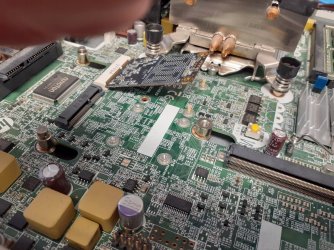
Having said that, my real problem is mounting the mSATA Drive itself.
The Drive came without any mounting screws.
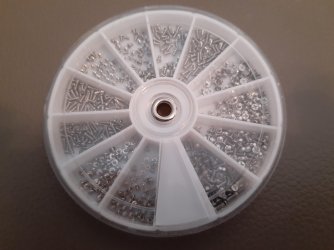
I ordered a small plastic Case of screws used to mount Device to PC Motherboards.
It arrived and there 12 individual sizes of screws in it.
I tried everyone but none were small enough to secure the mSATA board to the Motherboard.

Does any Member have an idea on what size screw I should try and buy?

I tried the local independent PC Store but they do not stock small screws at this time.
I will gladly but them but I just do not know what size they are.
I believe the tip of a "standard" round toothpick would just about fit.
I can barely see in the "nuts" on the Motherboard and they have threads in them.
To keep the mSATA board from popping up and hitting the 2.5" SATA Drive above it, I used folded cardboard.

What additional information can I provide to solve my dilemma?

Best regards,

Mike Lynch
 
Last edited:

My Computer My Computer

At a glance

Microsoft Windows 7 Professional 64-bit 7601 ...Intel(R) Core(TM) i7-3770 CPU @ 3.40GHz8.00 GBIntel(R) HD Graphics 4000
Computer type
PC/Desktop
Computer Manufacturer/Model Number
Two HP Desktops. One in the Laundry Room / Bed Room.
OS
Microsoft Windows 7 Professional 64-bit 7601 Multiprocessor Free Service Pack 1
CPU
Intel(R) Core(TM) i7-3770 CPU @ 3.40GHz
Motherboard
Hewlett-Packard 3396
Memory
8.00 GB
Graphics Card(s)
Intel(R) HD Graphics 4000
Sound Card
(1) Realtek High Definition Audio (2) Intel(R) Display Aud
Monitor(s) Displays
Hanns-G
Screen Resolution
1440 x 900 x 32 bits (4294967296 colors) @ 59 Hz
Hard Drives
(1) ATA WDC WD40EZRX-00S SCSI Disk Device (2) HP Officejet Pro 86 USB Device (3) WD My Book 1230 USB Device
PSU
Whatever came with the CMT.
Case
HP CMT Black.
Cooling
Whatever came with the CMT.
Keyboard
Logitech K740.
Mouse
Microsoft Optical Mouse 1000.
Internet Speed
Spectrum 25Mbs.
Antivirus
WebRoot, Microsoft Security Essentials.
Browser
EDGE
Other Info
HP Officejet Pro 8600 Plus.
WD MyBook 4TB.
mSATA is the absolute WRONG drive you should be using, and as that computer is just a small form factor computer, you should have used a traditional SSD with the SATA ports.

mSATA is going to be A) slower and B) prone to expedite MTBF (Mean Time Before Failure)

Edit-

I see this is an ULTRA Small Form Factor. That changes things. I'm having a hell of a time getting just the USFF specs. I want to know, this PC has a 2.5" drive? You indicated this. If that's the case, that's the MAIN drive you want to use. Not mSATA. Also, it appears the SATA speed may be just SATA II 3 Gb, not SATA III 6 Gb.

Lucky for you, I do have an mSATA drive sitting here and can measure the screw with my caliper and see if I can't use my thread gauge to tell you the thread count to hopefully buy this screw. The places that may carry the screw: Digikey, Mouser and the helpful hardware folks of Ace Hardware. When I have time I'll take the screws measurements, but I'm not sure if my thread gauge can go down that fine. It is a machine type screw however. If my thread gauge can't measure it, then now I have another excuse to buy yet another tool. :D

Adding this link for my reference: Blocked

First few there look like it. But I have to confirm measurements. Mouser doesn't appear to carry screws. I have yet to try Grainger. It's gonna be a Philips pan head machine screw. eBay is another source of awesome electronic, RF and appliance repair crap and what have you if you know what you're looking for.

Edit- Nope, count Grainger out. They carry bulk and more heavy duty industrial/commercial screws. Kinda figured.

Now why doesn't someone just create a website called screwsrus ? Gee... LOL
 
Last edited:

My Computer My Computer

At a glance

Windows 7 Ultimate x64
Computer type
PC/Desktop
OS
Windows 7 Ultimate x64
Two container of screws I purchased appears to have two categories of screws.
The first begin with the letter M and in some progression in a numerical order.
After using my "8088 CPU" the M must by the thickness and the number is the length.
Example M2 or M3 either on followed by a 1 or a 1.5 or a 2 like: M2-1.5.
The ones with the M3 designation are way too thick but the M2's are skinnier but not skinny enough.
I'm surmising there might be an M1 designation out there somewhere and I will try and find them.

Having miss understood the speeds of the mSATA vs SATA, your explanation really makes sense.
Now my intent with the Drives will be to use the 2.5" SATA as my C: Drive and the mSATA as my D: Drive.
C: would have the O/S, Applications and Data while the D: would be used for Cloning as Backup.
I prefer not to have an External Drive unless I have no other choice.

Thanks again for your research and help!

- - - Updated - - -

I found this explanation / chart of what I tried to describe.

50 500PCS M1 M1.2 M1.4 M1.6 M1.7 M2 M2.5 Round Head Screw Black Phillips Pan Head Screws Electronic Machine Screws and Bolts|Screws| - AliExpress

I will order an assortment of the M1 sizes as I do not know how long the screw should be.

The second diagram / image shows a Chart of the Screws by size.

Mike
 

My Computer My Computer

At a glance

Microsoft Windows 7 Professional 64-bit 7601 ...Intel(R) Core(TM) i7-3770 CPU @ 3.40GHz8.00 GBIntel(R) HD Graphics 4000
Computer type
PC/Desktop
Computer Manufacturer/Model Number
Two HP Desktops. One in the Laundry Room / Bed Room.
OS
Microsoft Windows 7 Professional 64-bit 7601 Multiprocessor Free Service Pack 1
CPU
Intel(R) Core(TM) i7-3770 CPU @ 3.40GHz
Motherboard
Hewlett-Packard 3396
Memory
8.00 GB
Graphics Card(s)
Intel(R) HD Graphics 4000
Sound Card
(1) Realtek High Definition Audio (2) Intel(R) Display Aud
Monitor(s) Displays
Hanns-G
Screen Resolution
1440 x 900 x 32 bits (4294967296 colors) @ 59 Hz
Hard Drives
(1) ATA WDC WD40EZRX-00S SCSI Disk Device (2) HP Officejet Pro 86 USB Device (3) WD My Book 1230 USB Device
PSU
Whatever came with the CMT.
Case
HP CMT Black.
Cooling
Whatever came with the CMT.
Keyboard
Logitech K740.
Mouse
Microsoft Optical Mouse 1000.
Internet Speed
Spectrum 25Mbs.
Antivirus
WebRoot, Microsoft Security Essentials.
Browser
EDGE
Other Info
HP Officejet Pro 8600 Plus.
WD MyBook 4TB.
So, I got around to measuring my screw for a mSATA drive. My thread gauge didn't appear to go down lower than a 40 (threads per inch) and it appears the threads are finer, higher than a 40. It looks like it's an M1.6 with a ~ 3MM head diameter and a ~ 4 MM overall screw length.

Yes, the M is the diameter. So, an M1.6 is 1.6 MM thread diameter. And M2 is 2MM in thread diameter.

My screws here are machine screws with philips wafer heads. That's what you most likely need. eBay's supply is all out of China. I wouldn't buy from Ali because that's out of China as well and will take a million years to arrive. Ace Hardware might have them.

This looks promising.

Again, What I have here. Yours might be different. But I'm sure the screw diameter is the same.


Head diameter: ~ 3MM

Overall screw length: ~ 4MM

Thread diameter: 1.6MM or M1.6. Fine, not coarse thread.

Head type: wafer.


Edit-

The screws you bought all look like course thread. You probably need fine.

- - - Updated - - -

I will order an assortment of the M1 sizes as I do not know how long the screw should be.

You want a micrometer with a depth gauge. Like this example with a depth blade on the end. But sometimes those depth blades are too wide, so you have to use a purpose made depth gauge like one of these.
 

My Computer My Computer

At a glance

Windows 7 Ultimate x64
Computer type
PC/Desktop
OS
Windows 7 Ultimate x64
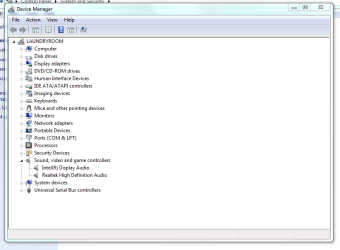
Speaker not working!

Looks like it should.

Any advice will be appreciated.

Mike
 

Attachments

  • Capture - Speaker not working..PNG
    Capture - Speaker not working..PNG
    24.3 KB · Views: 0

My Computer My Computer

At a glance

Microsoft Windows 7 Professional 64-bit 7601 ...Intel(R) Core(TM) i7-3770 CPU @ 3.40GHz8.00 GBIntel(R) HD Graphics 4000
Computer type
PC/Desktop
Computer Manufacturer/Model Number
Two HP Desktops. One in the Laundry Room / Bed Room.
OS
Microsoft Windows 7 Professional 64-bit 7601 Multiprocessor Free Service Pack 1
CPU
Intel(R) Core(TM) i7-3770 CPU @ 3.40GHz
Motherboard
Hewlett-Packard 3396
Memory
8.00 GB
Graphics Card(s)
Intel(R) HD Graphics 4000
Sound Card
(1) Realtek High Definition Audio (2) Intel(R) Display Aud
Monitor(s) Displays
Hanns-G
Screen Resolution
1440 x 900 x 32 bits (4294967296 colors) @ 59 Hz
Hard Drives
(1) ATA WDC WD40EZRX-00S SCSI Disk Device (2) HP Officejet Pro 86 USB Device (3) WD My Book 1230 USB Device
PSU
Whatever came with the CMT.
Case
HP CMT Black.
Cooling
Whatever came with the CMT.
Keyboard
Logitech K740.
Mouse
Microsoft Optical Mouse 1000.
Internet Speed
Spectrum 25Mbs.
Antivirus
WebRoot, Microsoft Security Essentials.
Browser
EDGE
Other Info
HP Officejet Pro 8600 Plus.
WD MyBook 4TB.
A set of external speakers like these may solve your sound issue.
They plug into and receive power from a USB port.
There is no audio cable or electrical cable to deal with.
I use them with my Dell Precision 3620 desktop.
Logitech S150 USB Stereo Speakers for Desktop or Laptop
 

My Computer My Computer

At a glance

Windows 7 Professional SP1 64-bitIntel Core i7-4790 3.60 GHz32 GB DDR3-1600 MHzIntegrated Intel HD Graphics 4600
Computer type
PC/Desktop
Computer Manufacturer/Model Number
Dell OptiPlex 9020
OS
Windows 7 Professional SP1 64-bit
CPU
Intel Core i7-4790 3.60 GHz
Memory
32 GB DDR3-1600 MHz
Graphics Card(s)
Integrated Intel HD Graphics 4600
Monitor(s) Displays
Viewsonic 32" LCD
Hard Drives
Kingston SATA 3 240 GB SSD
Internet Speed
Spectrum Internet 1000 Mbps
I'll give those a try.

Thank you.

Mike Lynch
 

My Computer My Computer

At a glance

Microsoft Windows 7 Professional 64-bit 7601 ...Intel(R) Core(TM) i7-3770 CPU @ 3.40GHz8.00 GBIntel(R) HD Graphics 4000
Computer type
PC/Desktop
Computer Manufacturer/Model Number
Two HP Desktops. One in the Laundry Room / Bed Room.
OS
Microsoft Windows 7 Professional 64-bit 7601 Multiprocessor Free Service Pack 1
CPU
Intel(R) Core(TM) i7-3770 CPU @ 3.40GHz
Motherboard
Hewlett-Packard 3396
Memory
8.00 GB
Graphics Card(s)
Intel(R) HD Graphics 4000
Sound Card
(1) Realtek High Definition Audio (2) Intel(R) Display Aud
Monitor(s) Displays
Hanns-G
Screen Resolution
1440 x 900 x 32 bits (4294967296 colors) @ 59 Hz
Hard Drives
(1) ATA WDC WD40EZRX-00S SCSI Disk Device (2) HP Officejet Pro 86 USB Device (3) WD My Book 1230 USB Device
PSU
Whatever came with the CMT.
Case
HP CMT Black.
Cooling
Whatever came with the CMT.
Keyboard
Logitech K740.
Mouse
Microsoft Optical Mouse 1000.
Internet Speed
Spectrum 25Mbs.
Antivirus
WebRoot, Microsoft Security Essentials.
Browser
EDGE
Other Info
HP Officejet Pro 8600 Plus.
WD MyBook 4TB.
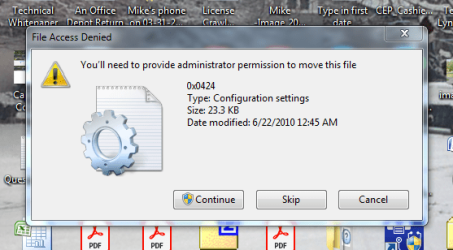
Your issue is probably the HDMI driver and audio... If your monitor doesn't use speakers, then ditch that HDMI crap driver and/or turn it off in the video settings.
 

My Computer My Computer

At a glance

Windows 7 Ultimate x64
Computer type
PC/Desktop
OS
Windows 7 Ultimate x64
You nailed it!
I followed your recommendation and removed the HDMI Driver.
It also saved me the expense of Hearing Aids.
Thank you again!

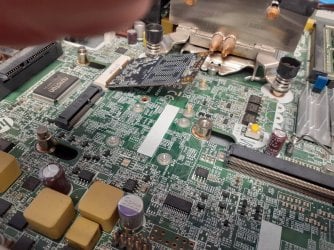
While we are here, any idea why, as "the" Administrator, I am unable to delete items from my Desktop?
My Desktop is almost full and I might need a larger Monitor to hold it's content.

Very best regards,
Mike Lynch
 

Attachments

  • A Capture.PNG
    A Capture.PNG
    45.7 KB · Views: 11
Last edited:

My Computer My Computer

At a glance

Microsoft Windows 7 Professional 64-bit 7601 ...Intel(R) Core(TM) i7-3770 CPU @ 3.40GHz8.00 GBIntel(R) HD Graphics 4000
Computer type
PC/Desktop
Computer Manufacturer/Model Number
Two HP Desktops. One in the Laundry Room / Bed Room.
OS
Microsoft Windows 7 Professional 64-bit 7601 Multiprocessor Free Service Pack 1
CPU
Intel(R) Core(TM) i7-3770 CPU @ 3.40GHz
Motherboard
Hewlett-Packard 3396
Memory
8.00 GB
Graphics Card(s)
Intel(R) HD Graphics 4000
Sound Card
(1) Realtek High Definition Audio (2) Intel(R) Display Aud
Monitor(s) Displays
Hanns-G
Screen Resolution
1440 x 900 x 32 bits (4294967296 colors) @ 59 Hz
Hard Drives
(1) ATA WDC WD40EZRX-00S SCSI Disk Device (2) HP Officejet Pro 86 USB Device (3) WD My Book 1230 USB Device
PSU
Whatever came with the CMT.
Case
HP CMT Black.
Cooling
Whatever came with the CMT.
Keyboard
Logitech K740.
Mouse
Microsoft Optical Mouse 1000.
Internet Speed
Spectrum 25Mbs.
Antivirus
WebRoot, Microsoft Security Essentials.
Browser
EDGE
Other Info
HP Officejet Pro 8600 Plus.
WD MyBook 4TB.
On its face it sounds like a user account mess up.

Go to C:\Users\[your username]\Desktop and right click the desktop folder. Select Properties and chose the Security tab. Do you have full control?

Have any other issues in your profile? Corrupt User Profile: Fix for Windows 10, 11, XP, Vista, 7, 8 (I hope when you installed software it was always for all users. This is what I do even if there's one account).

Any security software (anti-virus) preventing you from doing so?

It also saved me the expense of Hearing Aids.


Like a much needed tier 3 drug, they're priced on a tier 3 level of greed!
 

My Computer My Computer

At a glance

Windows 7 Ultimate x64
Computer type
PC/Desktop
OS
Windows 7 Ultimate x64
AGAIN!
You nailed it.
I do not know why these things happen.
I know it's from whatever I have done but what?
Thank you again!

Tier 3 Drugs.
My second oldest son died on December 21st.
One of the drugs keeping him alive was $685 per week.
Two Capsules a day.
He was incapacitated and unable to work for over three years.
He lived with my wife and I, in our home.
He died from alcoholism.
$685 / 14 = $48.93 per Capsule.
We bought them by the week as a 30-day supply was unaffordable.
YIKES!
 

My Computer My Computer

At a glance

Microsoft Windows 7 Professional 64-bit 7601 ...Intel(R) Core(TM) i7-3770 CPU @ 3.40GHz8.00 GBIntel(R) HD Graphics 4000
Computer type
PC/Desktop
Computer Manufacturer/Model Number
Two HP Desktops. One in the Laundry Room / Bed Room.
OS
Microsoft Windows 7 Professional 64-bit 7601 Multiprocessor Free Service Pack 1
CPU
Intel(R) Core(TM) i7-3770 CPU @ 3.40GHz
Motherboard
Hewlett-Packard 3396
Memory
8.00 GB
Graphics Card(s)
Intel(R) HD Graphics 4000
Sound Card
(1) Realtek High Definition Audio (2) Intel(R) Display Aud
Monitor(s) Displays
Hanns-G
Screen Resolution
1440 x 900 x 32 bits (4294967296 colors) @ 59 Hz
Hard Drives
(1) ATA WDC WD40EZRX-00S SCSI Disk Device (2) HP Officejet Pro 86 USB Device (3) WD My Book 1230 USB Device
PSU
Whatever came with the CMT.
Case
HP CMT Black.
Cooling
Whatever came with the CMT.
Keyboard
Logitech K740.
Mouse
Microsoft Optical Mouse 1000.
Internet Speed
Spectrum 25Mbs.
Antivirus
WebRoot, Microsoft Security Essentials.
Browser
EDGE
Other Info
HP Officejet Pro 8600 Plus.
WD MyBook 4TB.
I'm sorry to hear about the loss of your son to alcoholism.
My youngest sister's husband and daughter died from alcoholism several years apart before they reached 40 years old.
I haven't touched the stuff in 47 years.
 

My Computer My Computer

At a glance

Windows 7 Professional SP1 64-bitIntel Core i7-4790 3.60 GHz32 GB DDR3-1600 MHzIntegrated Intel HD Graphics 4600
Computer type
PC/Desktop
Computer Manufacturer/Model Number
Dell OptiPlex 9020
OS
Windows 7 Professional SP1 64-bit
CPU
Intel Core i7-4790 3.60 GHz
Memory
32 GB DDR3-1600 MHz
Graphics Card(s)
Integrated Intel HD Graphics 4600
Monitor(s) Displays
Viewsonic 32" LCD
Hard Drives
Kingston SATA 3 240 GB SSD
Internet Speed
Spectrum Internet 1000 Mbps
It's a terrible addiction!
His older brother died of the same, three years earlier.
I was one once but thank God I'm not now.

F22 SimPilot has solved many of the issues in this Post. I want to thank him for his extra effort on my behalf!

With regard to the problem of not being able to secure the mSATA Card to the Motherboard, I give up.


I had ordered and received three different "screw kits" that had multiple type M1, M2 and M3 screws in them.
None of the type M2 and M3 screws were small enough the fit the nuts on the Motherboard. If nuts is the correct term.
The type M1 screws did not fit either AND the screw top was so small, it could not grab the mSATA Board to secure it.
I am bewildered how / why a manufacture would design a system so unusual, it cannot easily be utilized.

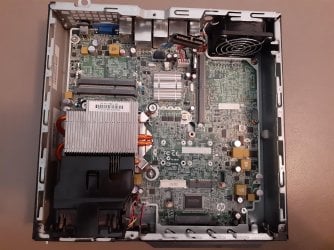
While not an exact solution, I will have to continue to use a small, folded piece of cardboard to keep the mSATA Card from popping up / falling out. I will try and post a photo of the Motherboard and the mSATA Card in a new Post for documentation. I am unable to do it now as I am entering this information on the PC in question and I will need to tear it down to get the photos.
 
Last edited:

My Computer My Computer

At a glance

Microsoft Windows 7 Professional 64-bit 7601 ...Intel(R) Core(TM) i7-3770 CPU @ 3.40GHz8.00 GBIntel(R) HD Graphics 4000
Computer type
PC/Desktop
Computer Manufacturer/Model Number
Two HP Desktops. One in the Laundry Room / Bed Room.
OS
Microsoft Windows 7 Professional 64-bit 7601 Multiprocessor Free Service Pack 1
CPU
Intel(R) Core(TM) i7-3770 CPU @ 3.40GHz
Motherboard
Hewlett-Packard 3396
Memory
8.00 GB
Graphics Card(s)
Intel(R) HD Graphics 4000
Sound Card
(1) Realtek High Definition Audio (2) Intel(R) Display Aud
Monitor(s) Displays
Hanns-G
Screen Resolution
1440 x 900 x 32 bits (4294967296 colors) @ 59 Hz
Hard Drives
(1) ATA WDC WD40EZRX-00S SCSI Disk Device (2) HP Officejet Pro 86 USB Device (3) WD My Book 1230 USB Device
PSU
Whatever came with the CMT.
Case
HP CMT Black.
Cooling
Whatever came with the CMT.
Keyboard
Logitech K740.
Mouse
Microsoft Optical Mouse 1000.
Internet Speed
Spectrum 25Mbs.
Antivirus
WebRoot, Microsoft Security Essentials.
Browser
EDGE
Other Info
HP Officejet Pro 8600 Plus.
WD MyBook 4TB.
Interesting stuff!

- - - Updated - - -

I do not know how to arrange the photos once they are uploaded so I will try and describe the problem as best I can.

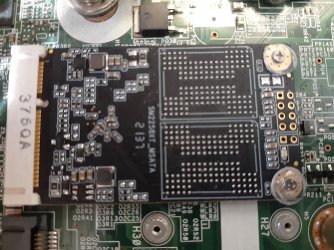
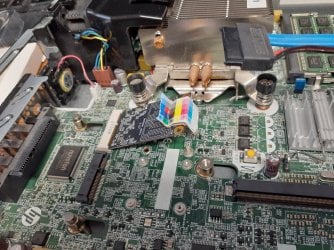
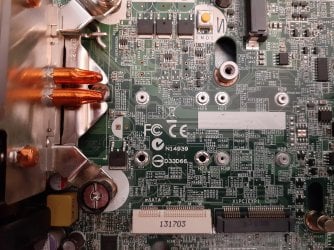
The mSATA Board in question has two sets of Holes in it.
The set near its center do not have a corresponding set of [FONT=&quot]inserts[/FONT] on the motherboard.
As a result, the mSATA board cannot be screwed down in place.
The set near the top do have a corresponding set of holes however finding the correct screws to use is a problem.
I have purchased screw sizes from 1 thru 3 with 3 being the largest, none of them fit the [FONT=&quot]inserts[/FONT] on the motherboard.
Screws in the size 1 I purchased came the closest but no cigar.
They are very small, so small that I was unable to get them aligned to try and screw them in.
Even if I could have done this, the heads of the screws are so small, they pass right through the holes on the mSATA board.
In lieu of the actual correct screw, I have used toothpick stubs to align the mSATA board folded cardboard to hold it down.
Not very pretty however, it works!
The mSATA adapter is # 131703 on the Motherboard, the [FONT=&quot]inserts[/FONT] are numbered # 25 and # 26.

Might any Forum Member know the correct size screw I should use and where I can purchase them?
 

Attachments

  • 20220416_100010.jpg
    20220416_100010.jpg
    1.3 MB · Views: 0
  • 20220416_100032.jpg
    20220416_100032.jpg
    1.3 MB · Views: 0
  • 20220416_085041.jpg
    20220416_085041.jpg
    1.6 MB · Views: 0
  • 20220416_085031.jpg
    20220416_085031.jpg
    1.4 MB · Views: 0
  • 20220416_100246.jpg
    20220416_100246.jpg
    1.3 MB · Views: 0
  • 20220416_100032.jpg
    20220416_100032.jpg
    1.3 MB · Views: 0
  • 20220416_100010.jpg
    20220416_100010.jpg
    1.3 MB · Views: 0
  • 20220416_085658.jpg
    20220416_085658.jpg
    810.3 KB · Views: 0

My Computer My Computer

At a glance

Microsoft Windows 7 Professional 64-bit 7601 ...Intel(R) Core(TM) i7-3770 CPU @ 3.40GHz8.00 GBIntel(R) HD Graphics 4000
Computer type
PC/Desktop
Computer Manufacturer/Model Number
Two HP Desktops. One in the Laundry Room / Bed Room.
OS
Microsoft Windows 7 Professional 64-bit 7601 Multiprocessor Free Service Pack 1
CPU
Intel(R) Core(TM) i7-3770 CPU @ 3.40GHz
Motherboard
Hewlett-Packard 3396
Memory
8.00 GB
Graphics Card(s)
Intel(R) HD Graphics 4000
Sound Card
(1) Realtek High Definition Audio (2) Intel(R) Display Aud
Monitor(s) Displays
Hanns-G
Screen Resolution
1440 x 900 x 32 bits (4294967296 colors) @ 59 Hz
Hard Drives
(1) ATA WDC WD40EZRX-00S SCSI Disk Device (2) HP Officejet Pro 86 USB Device (3) WD My Book 1230 USB Device
PSU
Whatever came with the CMT.
Case
HP CMT Black.
Cooling
Whatever came with the CMT.
Keyboard
Logitech K740.
Mouse
Microsoft Optical Mouse 1000.
Internet Speed
Spectrum 25Mbs.
Antivirus
WebRoot, Microsoft Security Essentials.
Browser
EDGE
Other Info
HP Officejet Pro 8600 Plus.
WD MyBook 4TB.
Yeah, I figured it was more propitiatory crap about screw sizes. Your absolute best bet about the EXACT screw size would have to be the HP support forums. Home - HP Support Community I've seen some good Info. from the Dell support forum, so maybe that's true for the HP support forum ass well. YMMV.

Like I did mention though. I said the screw may be an M1.6. Which means it's a screw that's 1.6 MM in diameter. So when you measure the width of the screw you'll get 1.6 MM. That's thread to thread. Threads stick out, thus this is the measuring base as opposed to the "floor" of the screw minus the threaded part. (I'm sure that part has a name. But may not be used except maybe for NASA or the Jet Propulsion Laboratory or what ever. LOL). I also noted the head diameter as well. However, this is taken from my screw, and knowing full well there are lots of proprietary/rare screws used for electronics your mileage may vary.

None of the type M2 and M3 screws were small enough the fit the nuts on the Motherboard. If nuts is the correct term.

Threaded stud or insert. Not "nut."

fastener - What's the term for a hole with a screw thread? - Home Improvement Stack Exchange


In absence of the screws, you could try an adhesive putty. Many manufactures make this stuff, but it appears the Gorilla Glue Company has an adhesive putty that "they say" holds up to 2 pounds. I'm sure there are certain specifics for the 2 pound rating. But the clamping force required to hold down an mSATA card should be no more than a pound if that. (1 pound is 16 Oz (dry, NOT liquid)! Without getting into specifics, a standard 16 Oz drinking bottle of water should weigh about ~1 LBS, 1.6 Oz. So Imagine that amount of force on the mSATA card holding it down. The putty claims 2 pounds. So about 2 LBS, 3 Oz. total holding capacity if compared to two 16 Oz bottles of water.

But, the question is whether this stuff is electrically conductive. So I searched and searched, and searched for the patent to see what this stuff was made of and found nothing. I did find this Wikipedia article on Blu Tack that suggests the stuff is not electrically conductive due to it being used in a Sinclair microcomputer. I also found this blog post on the stuff being used in a computer mouse repair. On the other hand, I'm sure the Gorilla putty is going to be made different since it holds 2 pounds and that version may have some electrical conductive properties I'm not aware of because of maybe a different formula. The best way of finding out is to buy some Gorilla putty and stick a positive lead from a 9v battery in the putty, set a multimeter to ohms and jam the positive probe into the putty, and the negative probe to the negative of the 9v battery. If you get a reading of resistance you know the putty is drawing some current. You want a 0 (zero) reading. Although, EVERYTHING is electrically conductive if enough voltage force is applied to it, believe me... The other test method would be just to use the multimeter's continuity test. You'd jam both probes into the putty and see if there's a continuity reading. I think the battery test might be more of a proper electrically conductive test rather than a continuity test for reasons.

Sidenote: What is ASTM D-4236? | Outlines Art Materials


=off topic=


Sorry to hear of your loss. I was in the same situation with my cousin. Only with him the alcohol was a contributor to getting esophagus cancer. Stage freaking IV! His dependency was so bad he'd get "the shakes" if he didn't drink anything. He went to AA, paid off his child support and tried, but it was too late. Departed down that cosmic runway at 55.

I believe in moderation in EVERYTHING. But that's extraordinary hard to practice when free will allows one to do as they wish. Doesn't matter if it's alcohol, chocolate, sugar, marijuana, *insert drug here*. On the other hand, there are some drugs you just don't touch. The synthetic crap in particular. But of all these vices that falsely create a virtue, alcohol would probably be the absolute worst by a long shot. Though, I've met people who were on certain drugs say they thought they hit rock bottom, but found out latter on at a treatment center what rock bottom really was.

It's really about replacement. For me, I used to drink a lot of Jack Daniels and Captain Morgan. Now I consume mostly music and coffee (with a side order of sugary treats). Though, I do drink alcohol at a restaurant every now and then, but that's about it and I do so in moderation. It's all about a learned behavior in my opinion. I don't think anyone is born a dependent on alcohol or drugs unless it's of the mother's doing. Though, maybe DNA has a factor as well, I'm not sure. What we do know however is everyone is born with a "choice", and therein lies the possible problem. I chose to eat sugary things because I developed a taste, a craving for sugary things over the course of decades of learned behavior. My mother baked, I licked the beaters... It seems life's little "devils" are just that. Damn tempting, great short term reward, but in the end it'll kick your ass if you over indulge. Sometimes it's best not to touch the thing in the first place.

=philosophical rant=

Being the deep thinker I am like freaking Pliny the Elder, I realize everything has a polarity to it. I call it part of the "Universal Truths." And the catalyst to it all is free will. Free will of life, both animate (biological) and inanimate (think stars, bodies of mass, etc). This is all part of a Universal "Constitution" of sorts of basic laws, a framework by which everything conforms. The examples of polarity here is celestial and atomic spin, hot and cold, high pressure, low pressure, light and dark, good and evil and a very real possible heaven and hell. Things are born and things die. But even then, another part of this "Universal framework", this "Constitution" I've come up with lies the truth. The truth that all former things that "die" live on in another state. And, well, today being Easter and all I guess we can say that this is quite possibly true based on the archeological record and its findings and those kept in museum basements and in the Vatican Apostolic Archive. Even though the date is derived from a computus, It's the principal moment in time that marks the fact even an hour glass can ALWAYS be rest... and lives on for eternity.

Happy Easter.

- - - Updated - - -

Tip:

If you don't know already, you can copy/paste a photo directly to your post by a right click mouse maneuver. Therefore, proper placement and ordering can be achieved...
 

My Computer My Computer

At a glance

Windows 7 Ultimate x64
Computer type
PC/Desktop
OS
Windows 7 Ultimate x64
Wow, thanks for your last reply.

I must have been messing with the photos as you were responding.

I'll edit the post to correct the verbiage and try the HP Forum.

Mike

PS I went to the HP Forum and posted a picture and the Insert location # with the Adapter #.
Thank you again for the advice

Khristos voskres! Voistinu voskres! Belated Resurrection Sunday greetings!


PS I came across this video by accident. It shows the Insert and the Screw (Fastener) I Need.

Replace the M.2 SSD Mini-Card | HP EliteBook 840 G3 Notebook PC | HP - YouTube

Hopefully, I can find the Screw (Fastener) called a: 2mm P1 Phillips Head Screw in the video.
So far, my searches for it only return Screw Drivers for this Screw (Fastener).

- - - Updated - - -

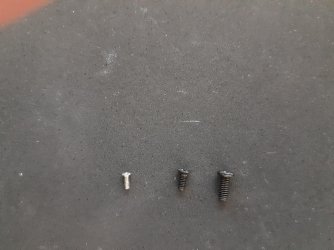
I accidently found a Fastener (Screw) that fits the Insert.

Now to find one that has the "head" large enough to snug the mSATA Board down to the Motherboard.

It's the silver one on the left.

It actually came in the Round Kit I pictured in the prior post photos.

I hadn't realized there were two different Screw set in the Assortment.

From left to right, they are H1, H2, H3.

- - - Updated - - -

This is what I need:

Replace the M.2 SSD Mini-Card | HP EliteBook 840 G3 Notebook PC | HP - YouTube

I'm still searching the Internet for it, but I haven't found a Vendor that has the Large Screw Head.

- - - Updated - - -

Thank you F22-SimPilot!
I used one of your Tag Lines and recalled "Flight of the Pheonix".
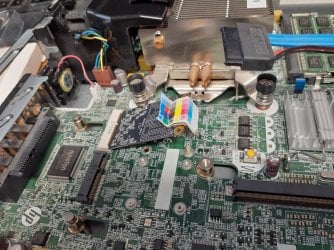
The mSATA Card is installed and operational, snugged down with the screws I found accidently.

Here is the story!

Your most powerful CPU is your brain. Use it! (One of your Tag Lines)
At 77, mine is still working but it idles roughly occasionally.

I remembered I had a Single Hole Paper Punch that we hadn't used in over 40, maybe 50 years.
I had it in my top dresser drawer with some old Boy Scout stuff I hadn't used in over 67 years.
I dug it out and looked for something resilient that I could punch through.
It turned out to be a wrapping / plastic box that had had a short RJ45 Cable in it.
I used the Punch and punched out three pieces.
"Flight of the Phoenix" caused me to punch three and immediately I dropped one of the three and could not find it.
Moving on, I asked my wife for a needle from her Sewing Kit and took out a Ladies Hat Pin as it was larger than the Needles.
I used it to make holes in the two pieces of plastic I had punched out of the box.
It worked but the holes were not big enough, so I used the Screwdriver I had used to turn in one of the Screws I had found.
It worked just fine after I forced the Screwdriver blade thru the holes I had made.
I put the screws in the holes of the plastic and they were snug but that's what I needed.
Next, I disassembled the Tooth Pick and Cardboard improvisation and installed the mSATA Card.
It's snugged down just right.
I hope you enjoy the Documentary and the accompanying Photos. (Just joking)
Thanks for the inspiration!

Best regards,

Mike Lynch

PS After the PC was put back together, you guessed it, I found the third piece of plastic.
 

Attachments

  • 20220417_232242.jpg
    20220417_232242.jpg
    1.2 MB · Views: 0
  • 20220418_172535.jpg
    20220418_172535.jpg
    1.2 MB · Views: 0
  • 20220418_174024.jpg
    20220418_174024.jpg
    1.5 MB · Views: 0
Last edited:

My Computer My Computer

At a glance

Microsoft Windows 7 Professional 64-bit 7601 ...Intel(R) Core(TM) i7-3770 CPU @ 3.40GHz8.00 GBIntel(R) HD Graphics 4000
Computer type
PC/Desktop
Computer Manufacturer/Model Number
Two HP Desktops. One in the Laundry Room / Bed Room.
OS
Microsoft Windows 7 Professional 64-bit 7601 Multiprocessor Free Service Pack 1
CPU
Intel(R) Core(TM) i7-3770 CPU @ 3.40GHz
Motherboard
Hewlett-Packard 3396
Memory
8.00 GB
Graphics Card(s)
Intel(R) HD Graphics 4000
Sound Card
(1) Realtek High Definition Audio (2) Intel(R) Display Aud
Monitor(s) Displays
Hanns-G
Screen Resolution
1440 x 900 x 32 bits (4294967296 colors) @ 59 Hz
Hard Drives
(1) ATA WDC WD40EZRX-00S SCSI Disk Device (2) HP Officejet Pro 86 USB Device (3) WD My Book 1230 USB Device
PSU
Whatever came with the CMT.
Case
HP CMT Black.
Cooling
Whatever came with the CMT.
Keyboard
Logitech K740.
Mouse
Microsoft Optical Mouse 1000.
Internet Speed
Spectrum 25Mbs.
Antivirus
WebRoot, Microsoft Security Essentials.
Browser
EDGE
Other Info
HP Officejet Pro 8600 Plus.
WD MyBook 4TB.
Now that was pretty good idea! HAHA Wish I thought of that rather than the idea of using some stupid putty. LOL!

The treads from the screw actually match the insert?

Instead of a needle and a screwdriver, a small block of wood and a small drill bit would have worked to make those holes as well. And Dremel has their tool for precision crafting. There are generic Dremel tools as well. I know Harbor Freight (China Harbor) has theirs.


ascvsdasadc.jpeg


Yeah, Flight of The Phoenix. About some morons that got saved by a dorkster because of his knowledge of aerodynamics pertaining to model aircraft. LOL!
 

My Computer My Computer

At a glance

Windows 7 Ultimate x64
Computer type
PC/Desktop
OS
Windows 7 Ultimate x64
[FONT=&quot]F22 Simpilot[/FONT]

Yes, they matched but I had initially missed them.
The "wheel" had two sizes, which I had not noticed.
I was in a hurry and need to slow down.

Thank you once again for your suggestions and encouragement on this and other projects.

Best regards,

Mike Lynch
 

My Computer My Computer

At a glance

Microsoft Windows 7 Professional 64-bit 7601 ...Intel(R) Core(TM) i7-3770 CPU @ 3.40GHz8.00 GBIntel(R) HD Graphics 4000
Computer type
PC/Desktop
Computer Manufacturer/Model Number
Two HP Desktops. One in the Laundry Room / Bed Room.
OS
Microsoft Windows 7 Professional 64-bit 7601 Multiprocessor Free Service Pack 1
CPU
Intel(R) Core(TM) i7-3770 CPU @ 3.40GHz
Motherboard
Hewlett-Packard 3396
Memory
8.00 GB
Graphics Card(s)
Intel(R) HD Graphics 4000
Sound Card
(1) Realtek High Definition Audio (2) Intel(R) Display Aud
Monitor(s) Displays
Hanns-G
Screen Resolution
1440 x 900 x 32 bits (4294967296 colors) @ 59 Hz
Hard Drives
(1) ATA WDC WD40EZRX-00S SCSI Disk Device (2) HP Officejet Pro 86 USB Device (3) WD My Book 1230 USB Device
PSU
Whatever came with the CMT.
Case
HP CMT Black.
Cooling
Whatever came with the CMT.
Keyboard
Logitech K740.
Mouse
Microsoft Optical Mouse 1000.
Internet Speed
Spectrum 25Mbs.
Antivirus
WebRoot, Microsoft Security Essentials.
Browser
EDGE
Other Info
HP Officejet Pro 8600 Plus.
WD MyBook 4TB.
Got it.
 

My Computer My Computer

At a glance

Windows 7 Ultimate x64
Computer type
PC/Desktop
OS
Windows 7 Ultimate x64
Hi Mike, I know it's a very old thread, but I'm curious to know if You can boot from the mSATA drive?
 

My Computers My Computers

  • At a glance

    Windows 7 SP1
    OS
    Windows 7 SP1
  • Computer type
    PC/Desktop
Back
Top