I think my network is blocking an IP

ChopperX

New member
Local time
6:45 PM
Messages
8
Hey guys I am having an issue with my network blocking an IP. I don't know how to unblock it and I have tried resetting my router and restarting my modem.

The IP that is apparently blocked is 75.126.17.104:27015
This is a game server for Day of Defeat Source. I know its online since some of my friends can play on it but I cant even connect to it at all.

I have Time Warner Cable here in SoCal and I'm running an older Netgear Router with DD-WRT installed. Had this installed for a few years no issues.
 

My Computer My Computer

Computer Manufacturer/Model Number
Custom Built
OS
Windows 7 Ultimate 64 bit
CPU
Intel Core 2 Quad Q6600
Motherboard
ASUS P5e X38
Memory
4GB G.Skill DDR2 800
Graphics Card(s)
EVGA GTX570
Screen Resolution
1680x1050
Hard Drives
1x 320GB Western Digital 7200RPM
PSU
Corsair 620W Modular
Case
Cooler Master CM690
Cooling
Artic Cooling Freezer 7 Pro
Keyboard
Dell
Mouse
Logitech
Internet Speed
10MBps
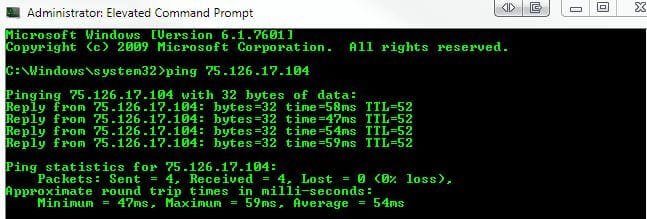
I would check your server filters and be sure it's not that. Also, try to ping the server in a command prompt : "ping 75.126.17.104", and see if you get a response. If the ping times are really high, you may see filter issues.

Hey guys I am having an issue with my network blocking an IP. I don't know how to unblock it and I have tried resetting my router and restarting my modem.

The IP that is apparently blocked is 75.126.17.104:27015
This is a game server for Day of Defeat Source. I know its online since some of my friends can play on it but I cant even connect to it at all.

I have Time Warner Cable here in SoCal and I'm running an older Netgear Router with DD-WRT installed. Had this installed for a few years no issues.
 

My Computer My Computer

Computer type
PC/Desktop
Computer Manufacturer/Model Number
iBuyPower NZXT
OS
Microsoft Windows 10 Home Build 15036
CPU
Intel(R) Core(TM) i7-860 @ 2.80GHz
Motherboard
Gigabyte Technology Co., Ltd. P55-UD3L
Memory
4.00 GB
Graphics Card(s)
NVIDIA GeForce GTX 750
Sound Card
(1) Line 6 UX2 (2) Realtek High Definition Audio
Monitor(s) Displays
23" acer
Screen Resolution
1920 x 1080 x 32 bits (4294967296 colors) @ 60 Hz
Hard Drives
(1) WDC WD5000AAKS-00D2B0 ATA Device (2) Seagate FreeAgent Go 250G USB Device
Cooling
Corsair H75 liquid cooler (Very easy to install, actually)
Internet Speed
60M cable modem-->Linksys E1200-->1Gbps net card
Browser
Chrome
Other Info
This is probably the longest I've ever had a Windows machine run without having to restore it to scratch. I'm used to restoring to "factory" about every 2 yrs. I've run with Win7 since new in 2009 and only recently (Nov, '14) restored to clean up the machine from all my 'xperimenting. LOL!! I may never need another machine.

Upgraded to 10 when it was still free, then installed 2017 update.
This is what I did and this is what came out of it.

Microsoft Windows [Version 6.1.7601]
Copyright (c) 2009 Microsoft Corporation. All rights reserved.

C:\Users\Eric>ping 75.126.17.104:27015
Ping request could not find host 75.126.17.104:27015. Please check the name and
try again.

C:\Users\Eric>ping 75.126.17.104

Pinging 75.126.17.104 with 32 bytes of data:
Request timed out.
Request timed out.
Request timed out.
Request timed out.

Ping statistics for 75.126.17.104:
Packets: Sent = 4, Received = 0, Lost = 4 (100% loss),
 

My Computer My Computer

Computer Manufacturer/Model Number
Custom Built
OS
Windows 7 Ultimate 64 bit
CPU
Intel Core 2 Quad Q6600
Motherboard
ASUS P5e X38
Memory
4GB G.Skill DDR2 800
Graphics Card(s)
EVGA GTX570
Screen Resolution
1680x1050
Hard Drives
1x 320GB Western Digital 7200RPM
PSU
Corsair 620W Modular
Case
Cooler Master CM690
Cooling
Artic Cooling Freezer 7 Pro
Keyboard
Dell
Mouse
Logitech
Internet Speed
10MBps
Then, I'm going to assume that a tracert command will do no good either, but try it for me and see what comes up. Tracert 75.126.17.104


My Computer My Computer

Computer type
PC/Desktop
Computer Manufacturer/Model Number
iBuyPower NZXT
OS
Microsoft Windows 10 Home Build 15036
CPU
Intel(R) Core(TM) i7-860 @ 2.80GHz
Motherboard
Gigabyte Technology Co., Ltd. P55-UD3L
Memory
4.00 GB
Graphics Card(s)
NVIDIA GeForce GTX 750
Sound Card
(1) Line 6 UX2 (2) Realtek High Definition Audio
Monitor(s) Displays
23" acer
Screen Resolution
1920 x 1080 x 32 bits (4294967296 colors) @ 60 Hz
Hard Drives
(1) WDC WD5000AAKS-00D2B0 ATA Device (2) Seagate FreeAgent Go 250G USB Device
Cooling
Corsair H75 liquid cooler (Very easy to install, actually)
Internet Speed
60M cable modem-->Linksys E1200-->1Gbps net card
Browser
Chrome
Other Info
This is probably the longest I've ever had a Windows machine run without having to restore it to scratch. I'm used to restoring to "factory" about every 2 yrs. I've run with Win7 since new in 2009 and only recently (Nov, '14) restored to clean up the machine from all my 'xperimenting. LOL!! I may never need another machine.

Upgraded to 10 when it was still free, then installed 2017 update.
Just for reference - Time Warner/SoCal here also, and I can't connect to that address either.

Ping looks fine though, so does tracert. Can't access though. :huh:

Capture2.JPG
 

My Computer My Computer

Computer type
PC/Desktop
Computer Manufacturer/Model Number
Airbot 2.0
OS
Windows 7 Ultimate x64 SP1
CPU
Core i7 920 (D0) @ 4Ghz, *26c idle *65c full load on air
Motherboard
Asus P6X58D Premium - Sata 6Gb/s - USB 3.0
Memory
12GB DDR3 Corsair Dominator -CMD12GX3M6A1600C8 at 1600MHz
Graphics Card(s)
Zotac Geforce GTX 770
Sound Card
ASUS Xonar D2X
Monitor(s) Displays
1 LG 24" Flatron W2453V-PF 1 Samsung 24" P2450H both 2ms RT
Screen Resolution
1920x1080@60hz
Hard Drives
1 Samsung 250GB 840 Evo SSD
1 OCZ Vertex2 180GB SSD
1 TB Samsung Spinpoint F1 7200RPM 32MB cache
2 500GB WD Caviar Blacks 7200RPM 32MB cache (WD5001AALS)

Pioneer DVD Burner DVR-S18M
PSU
Corsair HX1000W
Case
Cooler Master HAF 932
Cooling
Case Fans *3 230mm, *1 140mm/CPU - *Tuniq Tower 120 Extreme
Keyboard
Logitech Wireless MK700
Mouse
Logitech Wireless MK700
Internet Speed
DL 15 Mbps UL 0.98 Mbps
Antivirus
None
Browser
Firefox Nightly
Other Info
Processor-7.7 *RAM- 7.9 *Graphics-7.9 *Gaming Graphics- 7.9 *SSD- 7.8 W.E.I final score= 7.7
*Phone- LG Nexus 5
Ok well some of my friends can see it but this is what happens to me when i use Tracert

C:\Users\Eric>Tracert 75.126.17.104

Tracing route to 75.126.17.104-static.reverse.softlayer.com [75.126.17.104]
over a maximum of 30 hops:

1 <1 ms <1 ms <1 ms DD-WRT [192.168.1.1]
2 7 ms 9 ms 11 ms cpe-76-174-176-1.socal.res.rr.com [76.174.176.1]

3 11 ms 11 ms 9 ms cpe-76-167-16-169.socal.res.rr.com [76.167.16.16
9]
4 38 ms 10 ms 9 ms 66.75.151.50
5 16 ms 23 ms 23 ms be14-lsanca4-rtr1.socal.rr.com [66.75.151.3]
6 25 ms 23 ms 24 ms be10-tustca1-rtr1.socal.rr.com [66.75.161.48]
7 17 ms 29 ms 25 ms ae-5-0.cr0.lax30.tbone.rr.com [66.109.6.64]
8 17 ms 15 ms 15 ms ae-1-0.pr0.lax00.tbone.rr.com [66.109.6.129]
9 24 ms 22 ms 24 ms te1-6.bbr01.cs01.lax01.networklayer.com [66.109.
11.42]
10 24 ms 23 ms 23 ms po1.bbr02.cs01.lax01.networklayer.com [173.192.1
8.167]
11 54 ms 47 ms 47 ms po5.bbr01.eq01.dal01.networklayer.com [173.192.1
8.140]
12 52 ms 50 ms 54 ms po5.dar01.sr01.dal01.networklayer.com [173.192.1
8.191]
13 50 ms 47 ms 47 ms po1.fcr01.sr01.dal01.networklayer.com [66.228.11
8.154]
14 * * * Request timed out.
15 * * * Request timed out.
16 * * * Request timed out.
17 * * * Request timed out.
18 * * * Request timed out.
19 * * * Request timed out.
20 * * * Request timed out.
21 * * * Request timed out.
22 * * * Request timed out.
23 * * * Request timed out.
24 * * * Request timed out.
25 * * * Request timed out.
26 * * * Request timed out.
27 * * * Request timed out.
28 * * * Request timed out.
29 * * * Request timed out.
30 * * * Request timed out.

Trace complete.
 

My Computer My Computer

Computer Manufacturer/Model Number
Custom Built
OS
Windows 7 Ultimate 64 bit
CPU
Intel Core 2 Quad Q6600
Motherboard
ASUS P5e X38
Memory
4GB G.Skill DDR2 800
Graphics Card(s)
EVGA GTX570
Screen Resolution
1680x1050
Hard Drives
1x 320GB Western Digital 7200RPM
PSU
Corsair 620W Modular
Case
Cooler Master CM690
Cooling
Artic Cooling Freezer 7 Pro
Keyboard
Dell
Mouse
Logitech
Internet Speed
10MBps
Ok I have just solved the problem. Turns out my router has blocked the IP through its firewall. I am now connected directly into my modem. So pings are going though and I am able to connect to the server now.
 

My Computer My Computer

Computer Manufacturer/Model Number
Custom Built
OS
Windows 7 Ultimate 64 bit
CPU
Intel Core 2 Quad Q6600
Motherboard
ASUS P5e X38
Memory
4GB G.Skill DDR2 800
Graphics Card(s)
EVGA GTX570
Screen Resolution
1680x1050
Hard Drives
1x 320GB Western Digital 7200RPM
PSU
Corsair 620W Modular
Case
Cooler Master CM690
Cooling
Artic Cooling Freezer 7 Pro
Keyboard
Dell
Mouse
Logitech
Internet Speed
10MBps
Back in the day we used to have some problems connecting to some servers with DOD. Port forwarding often fixed the problem, you could have a look here which often helped out allot of the lads that couldn't connect to certain servers ;)

Port Forwarding Guides for Day of Defeat Source
 

My Computer My Computer

Computer type
PC/Desktop
Computer Manufacturer/Model Number
Self Built
OS
Windows 7 Ultimate 64bit
CPU
AMD Phenom Quad core 9950 black edition
Motherboard
Gigabyte
Memory
16Gb
Graphics Card(s)
2x XFX Radeon 5850
Sound Card
PCI Express X-Fi Titanium / Logitech G35
Monitor(s) Displays
2x HP 2410i
Screen Resolution
1920x1080
Hard Drives
2x 500Gb Seagate
1x 300Gb Seagate
1x 1Tb Seagate
2x 1Tb Hitatchi
PSU
Jean Tech Storm 700W
Case
Cooler Master COSMOS S
Cooling
Akasa Evo Blue Pro
Keyboard
Logitech G15
Mouse
Mad Catz M.M.O. 7
Internet Speed
12mb
Back
Top