
I think this is all to do with file searching

mipak

New member
Member
Local time
6:47 AM
Messages
61
Location
The Outer Hebrides
hi ...

i'm running w7 pro 32bit and use windows explorer a great deal and my problem concerns the larger of the 2 windows on the right-hand side of the main window. in detail view, this right-hand side is split into 4 columns ... name, size, type & date. i have no need of others except length when i'm dealing with music files. most of the time, name is the one that i use but sometimes, i also use the date column to get the files in date order.

now, my problem is this ... any and every time i click one of the other columns at the top of the right window to change the priority, a darkened bar starts to move across the one of the top bars containing the full path name at the top of the main window. as it progresses along this bar, it moves slower and slower towards the right and this of course, takes ages and is extremely annoying. a while back, i read that this could be caused by a file called thumbs.db which was to do with searching but could be deleted without doing harm. so i found that i had 12 files of that name, all to do with photos. i deleted all 12 which seemed to do the trick for a short while but now, i'm looking at the dark bar again.

does anyone know how i can get rid of this once and for all please? any & all help will be much appreciated.
 

My Computer My Computer

At a glance

W7Pro-64bitINTEL G4400 SKYLAKE 3.3GHZ 3MBCACHE LGA11512 X 8.00Gb DDR4 DIMMNVIDIA GeForce GT430
Computer type
PC/Desktop
Computer Manufacturer/Model Number
Custom build based on Asus
OS
W7Pro-64bit
CPU
INTEL G4400 SKYLAKE 3.3GHZ 3MBCACHE LGA1151
Motherboard
ASUS H110M-PLUS INTEL SKT1151 (25-03-2017)
Memory
2 X 8.00Gb DDR4 DIMM
Graphics Card(s)
NVIDIA GeForce GT430
Sound Card
Included on-board MB
Monitor(s) Displays
HP 1530
Screen Resolution
1024 x 768
Hard Drives
C: 120Gb SANDISK SATA3 SSD+
D: 160Gb SAMSUNG SATA
E: 500Gb WESTEN DIGITAL SATA
PSU
500w
Case
ATX Micro Tower
Cooling
2 fans (incl 1 in PSU)
Keyboard
Logitech K120
Mouse
Logitech B100
Internet Speed
D/L 38.5Mb // U/L 8.3
Browser
Pale Moon 28.16
Other Info
LAN ... Realtek 811H Gigabit LAN Controller
If you want to turn them off, there is a setting under File&Folder Options / View. If you want to use them, but clean them out periodically, you can use CCleaner, with the setting being under "Windows Explorer".
 

My Computer My Computer

At a glance

Linux Lite 3.2 x64; Windows 7, 8.1Core2Duo 2.46GB ddr2nVidia
Computer type
PC/Desktop
Computer Manufacturer/Model Number
dell precision t3400 tower
OS
Linux Lite 3.2 x64; Windows 7, 8.1
CPU
Core2Duo 2.4
Memory
6GB ddr2
Graphics Card(s)
nVidia
Hard Drives
120gb SSD, 1TB HD, 2TB HD; sata II
Internet Speed
12/2
Browser
Vivaldi, Slimjet (Chromium) x64
@ paul 1149, thank you for your suggestion ...
had a good look at file & folder oprions but couldn't see which setting you suggested.
i am familiar with ccleaner, i fact, i use it often.
sadly, my problem and question remains ...
 

My Computer My Computer

At a glance

W7Pro-64bitINTEL G4400 SKYLAKE 3.3GHZ 3MBCACHE LGA11512 X 8.00Gb DDR4 DIMMNVIDIA GeForce GT430
Computer type
PC/Desktop
Computer Manufacturer/Model Number
Custom build based on Asus
OS
W7Pro-64bit
CPU
INTEL G4400 SKYLAKE 3.3GHZ 3MBCACHE LGA1151
Motherboard
ASUS H110M-PLUS INTEL SKT1151 (25-03-2017)
Memory
2 X 8.00Gb DDR4 DIMM
Graphics Card(s)
NVIDIA GeForce GT430
Sound Card
Included on-board MB
Monitor(s) Displays
HP 1530
Screen Resolution
1024 x 768
Hard Drives
C: 120Gb SANDISK SATA3 SSD+
D: 160Gb SAMSUNG SATA
E: 500Gb WESTEN DIGITAL SATA
PSU
500w
Case
ATX Micro Tower
Cooling
2 fans (incl 1 in PSU)
Keyboard
Logitech K120
Mouse
Logitech B100
Internet Speed
D/L 38.5Mb // U/L 8.3
Browser
Pale Moon 28.16
Other Info
LAN ... Realtek 811H Gigabit LAN Controller
Try this:

To turn them off:

iu


To purge them:

iu
 

My Computer My Computer

At a glance

Linux Lite 3.2 x64; Windows 7, 8.1Core2Duo 2.46GB ddr2nVidia
Computer type
PC/Desktop
Computer Manufacturer/Model Number
dell precision t3400 tower
OS
Linux Lite 3.2 x64; Windows 7, 8.1
CPU
Core2Duo 2.4
Memory
6GB ddr2
Graphics Card(s)
nVidia
Hard Drives
120gb SSD, 1TB HD, 2TB HD; sata II
Internet Speed
12/2
Browser
Vivaldi, Slimjet (Chromium) x64
thank you ..
your ccleaner screenshot showed the same settings that i use.
as regards folder options/view-always show icons etc., i generally have it unticked but i ticked it to active.
unfortunately, there was no change and the dark bar still ploughed itself across the top of windows explorer so i reversed and unticked it again.
the problem remains ... it's annoying but perhaps it's something i'm just going to have to live with.
in my original message about this, i mentioned searching as a possible cause. perhaps it's nothing to do with that and is something else entirely.
anyway, thank you again for your suggestions.
 

My Computer My Computer

At a glance

W7Pro-64bitINTEL G4400 SKYLAKE 3.3GHZ 3MBCACHE LGA11512 X 8.00Gb DDR4 DIMMNVIDIA GeForce GT430
Computer type
PC/Desktop
Computer Manufacturer/Model Number
Custom build based on Asus
OS
W7Pro-64bit
CPU
INTEL G4400 SKYLAKE 3.3GHZ 3MBCACHE LGA1151
Motherboard
ASUS H110M-PLUS INTEL SKT1151 (25-03-2017)
Memory
2 X 8.00Gb DDR4 DIMM
Graphics Card(s)
NVIDIA GeForce GT430
Sound Card
Included on-board MB
Monitor(s) Displays
HP 1530
Screen Resolution
1024 x 768
Hard Drives
C: 120Gb SANDISK SATA3 SSD+
D: 160Gb SAMSUNG SATA
E: 500Gb WESTEN DIGITAL SATA
PSU
500w
Case
ATX Micro Tower
Cooling
2 fans (incl 1 in PSU)
Keyboard
Logitech K120
Mouse
Logitech B100
Internet Speed
D/L 38.5Mb // U/L 8.3
Browser
Pale Moon 28.16
Other Info
LAN ... Realtek 811H Gigabit LAN Controller
How is the system running otherwise? Maybe you should back up your data, then test the drive thoroughly.
 

My Computer My Computer

At a glance

Linux Lite 3.2 x64; Windows 7, 8.1Core2Duo 2.46GB ddr2nVidia
Computer type
PC/Desktop
Computer Manufacturer/Model Number
dell precision t3400 tower
OS
Linux Lite 3.2 x64; Windows 7, 8.1
CPU
Core2Duo 2.4
Memory
6GB ddr2
Graphics Card(s)
nVidia
Hard Drives
120gb SSD, 1TB HD, 2TB HD; sata II
Internet Speed
12/2
Browser
Vivaldi, Slimjet (Chromium) x64
believe it or not, the computer is running very well ... regular defrags, virus checking & i install all installations manually as well as regular checks inside control panel/programs & features to see if anything's lurking there that's not wanted. backups too are done regularly. i run separate 4 hard drives ... c: exclusively for w7, d: for personal stuff like photos, letters, home generated stuff etc., e: for music & videos and f: for all installed programmes. easy to keep track and whenever i do happen to get hit with a bad dose of nasties, it's only the c: drive that's affected which results in a re-partition/re-format. quite apart from that, i do that as a matter of course every six months or so anyway which gets rid of the rubbish. i'm no expert, not microsoft qualified or anything but i do tend to be pernickety. "a place for everything .... etc. etc."
so that's it from me ... probably over-answered your question but no worries.
cheers.
 

My Computer My Computer

At a glance

W7Pro-64bitINTEL G4400 SKYLAKE 3.3GHZ 3MBCACHE LGA11512 X 8.00Gb DDR4 DIMMNVIDIA GeForce GT430
Computer type
PC/Desktop
Computer Manufacturer/Model Number
Custom build based on Asus
OS
W7Pro-64bit
CPU
INTEL G4400 SKYLAKE 3.3GHZ 3MBCACHE LGA1151
Motherboard
ASUS H110M-PLUS INTEL SKT1151 (25-03-2017)
Memory
2 X 8.00Gb DDR4 DIMM
Graphics Card(s)
NVIDIA GeForce GT430
Sound Card
Included on-board MB
Monitor(s) Displays
HP 1530
Screen Resolution
1024 x 768
Hard Drives
C: 120Gb SANDISK SATA3 SSD+
D: 160Gb SAMSUNG SATA
E: 500Gb WESTEN DIGITAL SATA
PSU
500w
Case
ATX Micro Tower
Cooling
2 fans (incl 1 in PSU)
Keyboard
Logitech K120
Mouse
Logitech B100
Internet Speed
D/L 38.5Mb // U/L 8.3
Browser
Pale Moon 28.16
Other Info
LAN ... Realtek 811H Gigabit LAN Controller
These are separate drives, not merely partitions? And does this lag occur when explorer is focused on any one of the drives?
 

My Computer My Computer

At a glance

Linux Lite 3.2 x64; Windows 7, 8.1Core2Duo 2.46GB ddr2nVidia
Computer type
PC/Desktop
Computer Manufacturer/Model Number
dell precision t3400 tower
OS
Linux Lite 3.2 x64; Windows 7, 8.1
CPU
Core2Duo 2.4
Memory
6GB ddr2
Graphics Card(s)
nVidia
Hard Drives
120gb SSD, 1TB HD, 2TB HD; sata II
Internet Speed
12/2
Browser
Vivaldi, Slimjet (Chromium) x64
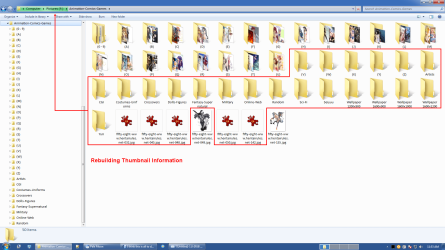
Rebuilding or Problems

If you delete the thumbnail cache, Windows Explorer will try to rebuild it the next time you open a folder that has images.
This can cause a noticeable delay and the Windows Explorer Address bar will display the green progress highlight.
WE Rebuild Thumbnail Info.png
This can also happen if:

  • There is a hardware problem (e.g. bad sectors or other HDD faults)
  • There is a HDD controller problem
  • There are multiple operations occurring on the same drive/partition
 

My Computer My Computer

At a glance

W7 Ultimate SP1, LM19.2 MATE, W10 Home 1703, ...AMD Phenom II x6 1100T, 3.3 GHz12GB DDR3 1333 G-Skill (4GB x 2), G-Skill (2G...NVIDIA GeForce GTX 660
Computer type
PC/Desktop
Computer Manufacturer/Model Number
n/a
OS
W7 Ultimate SP1, LM19.2 MATE, W10 Home 1703, W10 Pro 1703 VM, #All 64 bit
CPU
AMD Phenom II x6 1100T, 3.3 GHz
Motherboard
ASUS M4A88T-M/USB3 (AM3)
Memory
12GB DDR3 1333 G-Skill (4GB x 2), G-Skill (2GB x 2)
Graphics Card(s)
NVIDIA GeForce GTX 660
Sound Card
Realtek?
Monitor(s) Displays
Samsung S23B350
Screen Resolution
1920x1080
Hard Drives
WD Green 2TB (SATA), WD Green 3TB (SATA), WD Blue 4TB (SATA), WD Blue 6TB (SATA)
PSU
Cooler Master
Case
Antec GX300 Tower
Cooling
3x Antec TRICOOL 120mm Fans
Mouse
Wired Optical
Internet Speed
DSL
Antivirus
Avast
Browser
Pale Moon (64 bit)
Other Info
2018-12-27 Upgraded HDDs
2015-12-10 Upgraded case, graphics card, storage
2015-08-15 Upgraded motherboard & RAM
2015-07-15 Upgraded LM17.1 to LM17.2
the 4 drives are all separate, all with a single partition to its maximum (save for a few meg) and all fitted internally.
the delay only happens when i'm in w/explorer details view and want to change the order of any one of the 4 columns (eg: name/size/type/date). my file/folder target can be in any of the 4 drives. as soon as i click on the particular title at the top of any one of those columns to change its order, the path name in the address bar of the file/folder in question, starts to change colour as it moves across the window from left to right and the further it goes, the slower in moves.

i've always thought this process was to do with searching thus my title at the start of this series of posts ... thumbnails & rebuilding never came into my mind and i don't remember it ever happening when i ran xp. if it didn't happen then, why now in w7?
yesterday afternoon, i ran chkdsk on each of the 4 and all results reported no bad clusters etc.
i'm not sure how to check to see if there's an hdd controller problem suffice to say that all drives are always visible and accessible.
and finally, yes, there are multiple active operations running at any one time ... not many but more than one (numbers vary) ... for example, an antivirus check, music, emailing etc. etc.

hope this helps and my thanks to you both.
 

My Computer My Computer

At a glance

W7Pro-64bitINTEL G4400 SKYLAKE 3.3GHZ 3MBCACHE LGA11512 X 8.00Gb DDR4 DIMMNVIDIA GeForce GT430
Computer type
PC/Desktop
Computer Manufacturer/Model Number
Custom build based on Asus
OS
W7Pro-64bit
CPU
INTEL G4400 SKYLAKE 3.3GHZ 3MBCACHE LGA1151
Motherboard
ASUS H110M-PLUS INTEL SKT1151 (25-03-2017)
Memory
2 X 8.00Gb DDR4 DIMM
Graphics Card(s)
NVIDIA GeForce GT430
Sound Card
Included on-board MB
Monitor(s) Displays
HP 1530
Screen Resolution
1024 x 768
Hard Drives
C: 120Gb SANDISK SATA3 SSD+
D: 160Gb SAMSUNG SATA
E: 500Gb WESTEN DIGITAL SATA
PSU
500w
Case
ATX Micro Tower
Cooling
2 fans (incl 1 in PSU)
Keyboard
Logitech K120
Mouse
Logitech B100
Internet Speed
D/L 38.5Mb // U/L 8.3
Browser
Pale Moon 28.16
Other Info
LAN ... Realtek 811H Gigabit LAN Controller
the 4 drives are all separate, all with a single partition to its maximum (save for a few meg) and all fitted internally.
the delay only happens when i'm in w/explorer details view and want to change the order of any one of the 4 columns (eg: name/size/type/date). my file/folder target can be in any of the 4 drives. as soon as i click on the particular title at the top of any one of those columns to change its order, the path name in the address bar of the file/folder in question, starts to change colour as it moves across the window from left to right and the further it goes, the slower in moves.

i've always thought this process was to do with searching thus my title at the start of this series of posts ... thumbnails & rebuilding never came into my mind and i don't remember it ever happening when i ran xp. if it didn't happen then, why now in w7?
If there are a large number of files you will see the progress highlight in the Address bar as your data is filtered.

For example, I have a directory with >1000 images in it.
When I try to sort them by "Width", there is a noticeable delay and the progress highlight appears in the Address bar.

i'm not sure how to check to see if there's an hdd controller problem suffice to say that all drives are always visible and accessible.
I'm not sure how you check that either. :(

A couple of years ago I installed a new HDD and I noticed that whenever I accessed it, there was a delay like the one you described.
I swapped the HDD SATA cable to a different SATA connector on the motherboard and the delay went away.

and finally, yes, there are multiple active operations running at any one time ... not many but more than one (numbers vary) ... for example, an antivirus check, music, emailing etc. etc.
I meant something like writing a video file to a partition and then trying to access (read/write) another file on the same partition (or a partition on the same HDD).
 

My Computer My Computer

At a glance

W7 Ultimate SP1, LM19.2 MATE, W10 Home 1703, ...AMD Phenom II x6 1100T, 3.3 GHz12GB DDR3 1333 G-Skill (4GB x 2), G-Skill (2G...NVIDIA GeForce GTX 660
Computer type
PC/Desktop
Computer Manufacturer/Model Number
n/a
OS
W7 Ultimate SP1, LM19.2 MATE, W10 Home 1703, W10 Pro 1703 VM, #All 64 bit
CPU
AMD Phenom II x6 1100T, 3.3 GHz
Motherboard
ASUS M4A88T-M/USB3 (AM3)
Memory
12GB DDR3 1333 G-Skill (4GB x 2), G-Skill (2GB x 2)
Graphics Card(s)
NVIDIA GeForce GTX 660
Sound Card
Realtek?
Monitor(s) Displays
Samsung S23B350
Screen Resolution
1920x1080
Hard Drives
WD Green 2TB (SATA), WD Green 3TB (SATA), WD Blue 4TB (SATA), WD Blue 6TB (SATA)
PSU
Cooler Master
Case
Antec GX300 Tower
Cooling
3x Antec TRICOOL 120mm Fans
Mouse
Wired Optical
Internet Speed
DSL
Antivirus
Avast
Browser
Pale Moon (64 bit)
Other Info
2018-12-27 Upgraded HDDs
2015-12-10 Upgraded case, graphics card, storage
2015-08-15 Upgraded motherboard & RAM
2015-07-15 Upgraded LM17.1 to LM17.2
the first 2 points you raised to my last post is exactly the reason why i started this thread in the first place. it never happened in xp or at least, i never noticed a delay ... i'm sure i would've done. all i want to achieve is to stop the scrolling in the address bar.
the hdd controller problem ... when i put the question into google, it produced a large number of suggestions, most of which came up with a similar possible cause ... although the hard drive is physically in the computer, plugged in correctly and can be felt & heard to be working, the computer can't see it thus it can't be accessed ... there's no indication in windows explorer that it exists. in my computer, i can access all 4 drives and their contents so i've assumed that the controller is okay.
with multiple operations then my revised answer is no, i don't do anything like you suggested.
hope this clarifies.
 

My Computer My Computer

At a glance

W7Pro-64bitINTEL G4400 SKYLAKE 3.3GHZ 3MBCACHE LGA11512 X 8.00Gb DDR4 DIMMNVIDIA GeForce GT430
Computer type
PC/Desktop
Computer Manufacturer/Model Number
Custom build based on Asus
OS
W7Pro-64bit
CPU
INTEL G4400 SKYLAKE 3.3GHZ 3MBCACHE LGA1151
Motherboard
ASUS H110M-PLUS INTEL SKT1151 (25-03-2017)
Memory
2 X 8.00Gb DDR4 DIMM
Graphics Card(s)
NVIDIA GeForce GT430
Sound Card
Included on-board MB
Monitor(s) Displays
HP 1530
Screen Resolution
1024 x 768
Hard Drives
C: 120Gb SANDISK SATA3 SSD+
D: 160Gb SAMSUNG SATA
E: 500Gb WESTEN DIGITAL SATA
PSU
500w
Case
ATX Micro Tower
Cooling
2 fans (incl 1 in PSU)
Keyboard
Logitech K120
Mouse
Logitech B100
Internet Speed
D/L 38.5Mb // U/L 8.3
Browser
Pale Moon 28.16
Other Info
LAN ... Realtek 811H Gigabit LAN Controller
my file/folder target can be in any of the 4 drives.

yes, there are multiple active operations running at any one time ... not many but more than one (numbers vary) ... for example, an antivirus check, music, emailing etc. etc.

Ok then, you have a systemic problem. To check the software, you can run Task Manager on the side to see if CPU is limiting Win Exp. when the problem occurs. Or you can run Resource Manager to watch the disk I/O more carefully.
the hdd controller problem ... when i put the question into google, it produced a large number of suggestions, most of which came up with a similar possible cause

You might be able to catch something by running GSmartControl and looking at the log tab for each drive. Or run the Conveyance Test on each of the drives if it is available.
 

My Computer My Computer

At a glance

Linux Lite 3.2 x64; Windows 7, 8.1Core2Duo 2.46GB ddr2nVidia
Computer type
PC/Desktop
Computer Manufacturer/Model Number
dell precision t3400 tower
OS
Linux Lite 3.2 x64; Windows 7, 8.1
CPU
Core2Duo 2.4
Memory
6GB ddr2
Graphics Card(s)
nVidia
Hard Drives
120gb SSD, 1TB HD, 2TB HD; sata II
Internet Speed
12/2
Browser
Vivaldi, Slimjet (Chromium) x64
Back
Top