i tried various things to get two computers to connect properly

xplorer

New member
Local time
2:09 PM
Messages
5
hello !! it seems that a lot of peoples meet the same problem with win7. i too ..

i tried various things to get two computers to connect properly but i fail. what i did :

- trying this fixer,

https://support.microsoft.com/en-us/kb/2578723

which doesn't really fix, it just helps going from public to home, while remaining an unidentified network, and once you restart Windows, you have to start all over.

- i tried the two options from the beginning of this thread below, and it's the same story.

http://www.sevenforums.com/tutorials/71408-unidentified-networks-set-private-public.html

- one thing that helped, at least on only one pc is the solution of Rich Lang, page 3, who recommends to define the Gateway id, using the ip adress of one of the pc in the network. >>> one of the pc got identified and set as home once and for all, when i used the ip of the other pc, on this pc's Gateway id .... BUT, not the other one.

not sure what gets me stuck yet.

Windows firewall, i can't have access to it apparently. it's a new machine, and Norton internet security deals with the firewall instead of Windows. i suppose that Windows firewall's would work again if i'd uninstall Norton, but it isn't even the point i suppose.

please, any idea or test i could make please ? thanks for your attention.

i bought a second expensive machine, to establish a little 3d rendering farm, and if i'm stuck just because of windows's obscure paths ... it's really a pity !

i know i can transfer some files from one to the other, but i suspect that as long as the one pc's unidentified ethernet network ( both pc using their motherboard's ethernet port ) isn't set properly, my 3d render won't be able to work, and that's still the case for now.

should i buy a separate ethernet card or something ? it's really a pain in the ass.
i'm using some d-link dg-105 switch and some cat 6 cables.
 
Last edited by a moderator:

My Computer My Computer

At a glance

win 7 x64 proi7 5820k64 go DDR4GTX Titan
Computer type
PC/Desktop
OS
win 7 x64 pro
CPU
i7 5820k
Motherboard
x99
Memory
64 go DDR4
Graphics Card(s)
GTX Titan
Hard Drives
ssd 500 go
Antivirus
norton internet security
Browser
i explorer
I have a small render farm (C4D team render), and AFAIK the gateway addess is irrelevant for network render - that's the router. Your render machines just use the local LAN to communicate. My machines are set to home (or private in W10), have the same subnet mask, and IP's in the same range -

IP address 192.168.1.xxx
subnet mask 255.255.255.0
gateway 192.168.1.254 << router address set at factory

the machine IP's and the router IP must be in the same range to access the www's, but not for local traffic only. With my system I have to have static IP's so the render server can find the render clients, then the team render setup software did all the firewall stuff for me. It's possible that your render software doesn't work well with Norton - might be worthwhile trying with the Windows f/w only. Network problems are often down to firewall settings.

I have 6 render pcs, so I have

www - modem/router - 8 way switch - [all pcs go here]

I could disconnect the router, and my render farm would still work. My render boxes run headless (no monitor, kb or mouse) and I use remote desktop to keep an eye on things.
 

My Computer My Computer

At a glance

W10 Pro x64, W7 Pro x64 in VMwarei7 2600K @ 4.4GHz8GB Mushkin @ 1600MHzNvidia GTX 750 Ti
Computer type
PC/Desktop
Computer Manufacturer/Model Number
self build
OS
W10 Pro x64, W7 Pro x64 in VMware
CPU
i7 2600K @ 4.4GHz
Motherboard
MSI Z68A-GD80
Memory
8GB Mushkin @ 1600MHz
Graphics Card(s)
Nvidia GTX 750 Ti
Monitor(s) Displays
27" Benq + 27" LG
Screen Resolution
1080p
Hard Drives
500GB 850 Evo SSD + 3 * 2TB Seagate
PSU
EVGA 650 GS modular
Case
Antec 300
Cooling
Seidon 120V v2
Internet Speed
62/18 Mbps
Antivirus
Defender (W10) + MSE (W7)
Browser
Firefox
thanks wasnotwas. yes, i use c4d too, but with vray.

on one machine, the network is set to home, but on the other one, it is set to work while remaining unidentified.

setting a Gateway, like 192.168.x.x , the same as the ip adress of one of the machines ( the main machine ) , solved a bit the problem, i mean : when i restart the pc, the network doesn't go back to public automaticaly.
but one machine ( the main machine ) is still set to unidentified. i don't see how to solve this.

i suspect this to be the cause of the problem since even if i desactivate Norton internet security on both machines, it doesn't work.

do you think i should try by uninstalling Norton on both machines ?? i really need norton ..
 

My Computer My Computer

At a glance

win 7 x64 proi7 5820k64 go DDR4GTX Titan
Computer type
PC/Desktop
OS
win 7 x64 pro
CPU
i7 5820k
Motherboard
x99
Memory
64 go DDR4
Graphics Card(s)
GTX Titan
Hard Drives
ssd 500 go
Antivirus
norton internet security
Browser
i explorer
Do the pcs connect to the internet ? Can you post your IP settings. On my system, the Gateway IP cannot be altered, so if I put a different value in the gateway box, I get unidentified network. Can the machines ping each other ?
 

My Computer My Computer

At a glance

W10 Pro x64, W7 Pro x64 in VMwarei7 2600K @ 4.4GHz8GB Mushkin @ 1600MHzNvidia GTX 750 Ti
Computer type
PC/Desktop
Computer Manufacturer/Model Number
self build
OS
W10 Pro x64, W7 Pro x64 in VMware
CPU
i7 2600K @ 4.4GHz
Motherboard
MSI Z68A-GD80
Memory
8GB Mushkin @ 1600MHz
Graphics Card(s)
Nvidia GTX 750 Ti
Monitor(s) Displays
27" Benq + 27" LG
Screen Resolution
1080p
Hard Drives
500GB 850 Evo SSD + 3 * 2TB Seagate
PSU
EVGA 650 GS modular
Case
Antec 300
Cooling
Seidon 120V v2
Internet Speed
62/18 Mbps
Antivirus
Defender (W10) + MSE (W7)
Browser
Firefox
yes, my pc connects to internet through a wi fi usb key.

the ethernet network is used between both machines, using their motherboard's ethernet port and yes, i can transfer some files between both pc . but vray standalone doesn't work anyway.

the hard test would be to try by uninstalling both Norton on each machine, but it's a pain in the ass.

On my system, the Gateway IP cannot be altered, so if I put a different value
in the gateway box, I get unidentified network. Can the machines ping each other
?

i think they can ping each other yes, i should perhaps run a new test about it but since the files can be transfered ..

anyway, Microsoft couldn't help me to get this "work" network identified on this machine.

for the gateaway of both pc in ipv4, i see, and that's why i used the fixed ip adress of the main machine ... solving the problem of the second machine, not the main one.

that's where i am now. thanks for your help. any other ideas or tests i didn't imagine i could do perhaps ?
 

My Computer My Computer

At a glance

win 7 x64 proi7 5820k64 go DDR4GTX Titan
Computer type
PC/Desktop
OS
win 7 x64 pro
CPU
i7 5820k
Motherboard
x99
Memory
64 go DDR4
Graphics Card(s)
GTX Titan
Hard Drives
ssd 500 go
Antivirus
norton internet security
Browser
i explorer
I'm still not clear whether this is a network problem or a Vray problem.

You could try rendering with C4D Team Render (or Net Render if you are on R14), with Norton off and Windows firewall disabled. If that works, try with Win f/w. If still ok try again with Norton on (Win f/w off). If still ok it's a Vray problem.

When I switched from C4D NR to TR, I had a lot of hassle with machines not communicating. I tried the Bonjour app which kinda helped - showed me it was doable - but I wanted to solve it myself. Eventually I had to go into all the Win firewalls and allow TR thru inward and outward. If this is a Vray not LAN prob, maybe you also need to manually allow Vray in and out for both pcs (ditto C4D).

If it's def a Vray issue, you could try asking the experts at CG Talk and/or C4D Cafe forums.
 

My Computer My Computer

At a glance

W10 Pro x64, W7 Pro x64 in VMwarei7 2600K @ 4.4GHz8GB Mushkin @ 1600MHzNvidia GTX 750 Ti
Computer type
PC/Desktop
Computer Manufacturer/Model Number
self build
OS
W10 Pro x64, W7 Pro x64 in VMware
CPU
i7 2600K @ 4.4GHz
Motherboard
MSI Z68A-GD80
Memory
8GB Mushkin @ 1600MHz
Graphics Card(s)
Nvidia GTX 750 Ti
Monitor(s) Displays
27" Benq + 27" LG
Screen Resolution
1080p
Hard Drives
500GB 850 Evo SSD + 3 * 2TB Seagate
PSU
EVGA 650 GS modular
Case
Antec 300
Cooling
Seidon 120V v2
Internet Speed
62/18 Mbps
Antivirus
Defender (W10) + MSE (W7)
Browser
Firefox
Definitely some very good ideas in it ! thanks a lot ! i will try using c4d DR to see if it works. yes i'm on R14, never tried it and i'll have to learn how to set this up.

How did bonjour help you btw ?

Win firewalls : i can't have access to it, apparently it's because Norton has the hand on it in place of win. i get a message error if i try to access win's firewall.
Edit : oh .... actualy on the main machine, with the unidentified network , that's where i get this 0x6D9 error message when i try to access the Advanced security options of Windows firewall ...... while on the second machine ( identified network ) i can ! i'll probably uninstall Norton on the main machine, let Windows firewall active and restart from there, then reinstal norton.

at vray's forums they're stuck. you probably gave me the best advice. will test and report thanks !
 

My Computer My Computer

At a glance

win 7 x64 proi7 5820k64 go DDR4GTX Titan
Computer type
PC/Desktop
OS
win 7 x64 pro
CPU
i7 5820k
Motherboard
x99
Memory
64 go DDR4
Graphics Card(s)
GTX Titan
Hard Drives
ssd 500 go
Antivirus
norton internet security
Browser
i explorer
Hi wasnotwas !

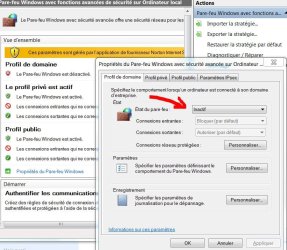
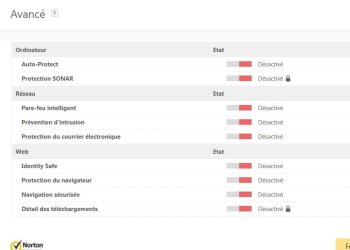
so i attempted to do a team render and add a machine, with the ip and port. but even when i desactivated Windows firewall and Norton, it didn't work.

so :

- is windows's firewall simple to desactivate ? i simply entered the Advanced parameters and set it to unactive.
- Norton : i desactivated everything i could.

how did you use bonjour to help you ?

thanks !
 

Attachments

  • 1.JPG
    1.JPG
    105.9 KB · Views: 0
  • 2.JPG
    2.JPG
    35.6 KB · Views: 0

My Computer My Computer

At a glance

win 7 x64 proi7 5820k64 go DDR4GTX Titan
Computer type
PC/Desktop
OS
win 7 x64 pro
CPU
i7 5820k
Motherboard
x99
Memory
64 go DDR4
Graphics Card(s)
GTX Titan
Hard Drives
ssd 500 go
Antivirus
norton internet security
Browser
i explorer
Back
Top