i-tunes

Ed B

New member
Local time
9:23 PM
Messages
5
Location
Tucson Az
I dont know where else to go, Im comp ileterate Im on a HP G60 445DX Notebook w/Windows7 6.1 AMDSprocessor Turion dual coreRM75 Hope thats enough info. Problem is I cant get I-Tunes to run it downloads ok but when I try to run it I get these messages. Registering I-Tunes Automation Service and gets stuck there, or I it locks uo on Authorization Service. I-tunes ran perfect untill I got a request to download some Apple update. I tried erasing all Apple and Quyick Time p;rograms and reload and no change. Apple wants nothing to do with Windows problems and all other sources of help have failed
Ed B
 

My Computer

Computer Manufacturer/Model Number
hp G60-445Dx Notebook
OS
windows 7
Please download the latest version of Quicktime here.

After you install Quicktime, restart your computer, then attempt to re-install iTunes.
 

My Computer

Computer Manufacturer/Model Number
Custom Built
OS
Windows 7 Ultimate
CPU
AMD Athlon II X2 245 2.90Ghz
Motherboard
Some Gigabyte one, dont remember model
Memory
3.00 GB
Graphics Card(s)
8800GTS 512MB
Sound Card
Sound Blaster X-Fi Titanium Fatal1ty
Monitor(s) Displays
Dual 22" widescreen
Hard Drives
250GB internal, 500GB internal
PSU
CORSAIR CMPSU-850TX 850W Power Supply
Case
Thermalkake Tsunami Dream
Cooling
Thermaltake Golden Orb II
Keyboard
Saitek Eclipse 2
Mouse
Logitech MX518
Also, check that you have the right version of Itunes. If you are running 64 bit Windows you will need the 64 bit edition of Itunes: Apple - iTunes - Download iTunes Now (left hand side)

Honestly though, I make this recommendation to everyone: If you dont need Itunes (IE if you dont have an Ipod/Ipad or an Ilife (that one was a joke ;)) then don't use it. It is sucha sh*tty buggy piece of software, and WLM can now do the one thing that Itunes used to be good for: mp4's
 

My Computer

Computer type
PC/Desktop
Computer Manufacturer/Model Number
Medion Erazer (note to self: insert model number) - with custom additions
OS
Windows 10 Pro x64
CPU
Intel Core i5 7400 @ 3.00GHz
Motherboard
OEM supllied with PC
Memory
8GB 2133Mhz DDR4 (OEM supplied)
Graphics Card(s)
Gygabyte Windforce GTX 1050Ti (Factory Overclocked)
Sound Card
Realtek
Monitor(s) Displays
Acer Al1980 + HKC
Screen Resolution
1360*768(HKC) / 1280*1024(Acer)
Hard Drives
1TB Toshiba
1TB WD Caviar Green
120GB Samsung Evo 840
PSU
OEM supplied (no power rating on case)
Case
OEM Supplied
Cooling
Stock
Keyboard
Logitech Wireless
Mouse
Logitect Wireless
Internet Speed
40Mb/s Down 10Mb/s Up
Antivirus
Defender
Browser
Firefox
I might be alone here, but I don't own an iPod (just use my droid), but I loooove iTunes!! Prolly just cause I've been using it forever :)
 

My Computer

Computer Manufacturer/Model Number
Custom Built
OS
Windows 7 Ultimate
CPU
AMD Athlon II X2 245 2.90Ghz
Motherboard
Some Gigabyte one, dont remember model
Memory
3.00 GB
Graphics Card(s)
8800GTS 512MB
Sound Card
Sound Blaster X-Fi Titanium Fatal1ty
Monitor(s) Displays
Dual 22" widescreen
Hard Drives
250GB internal, 500GB internal
PSU
CORSAIR CMPSU-850TX 850W Power Supply
Case
Thermalkake Tsunami Dream
Cooling
Thermaltake Golden Orb II
Keyboard
Saitek Eclipse 2
Mouse
Logitech MX518
Im not sure if I thank everybody at once or individually, bu thanks for the help but nothing changed install stalls on message (registerinbg automation service)
 

My Computer

Computer Manufacturer/Model Number
hp G60-445Dx Notebook
OS
windows 7
Could you post a screenshot of the problem please?
 

My Computer

Computer type
PC/Desktop
Computer Manufacturer/Model Number
Medion Erazer (note to self: insert model number) - with custom additions
OS
Windows 10 Pro x64
CPU
Intel Core i5 7400 @ 3.00GHz
Motherboard
OEM supllied with PC
Memory
8GB 2133Mhz DDR4 (OEM supplied)
Graphics Card(s)
Gygabyte Windforce GTX 1050Ti (Factory Overclocked)
Sound Card
Realtek
Monitor(s) Displays
Acer Al1980 + HKC
Screen Resolution
1360*768(HKC) / 1280*1024(Acer)
Hard Drives
1TB Toshiba
1TB WD Caviar Green
120GB Samsung Evo 840
PSU
OEM supplied (no power rating on case)
Case
OEM Supplied
Cooling
Stock
Keyboard
Logitech Wireless
Mouse
Logitect Wireless
Internet Speed
40Mb/s Down 10Mb/s Up
Antivirus
Defender
Browser
Firefox
Im not sure if I thank everybody at once or individually, bu thanks for the help but nothing changed install stalls on message (registerinbg automation service)
Good morning Ed, welcome to windows 7 support forums.
Please identify the microsoft Windows 7 version for us please? Is it X86 AKA 32 bit or did you install X64 ?
I would suggest that since you had a running version of Itunes perhaps using a different operationg system since you upgraded to Windows 7 there may have been drivers not recognised. Not to worry we have seen this issue in the past and we will walk you through the steps for a succesful re-install, please provide us with your system specs and we'll get you on your way.
 

My Computer

Computer Manufacturer/Model Number
Custom Build
OS
Windows 7 7600 1 X64
CPU
AMD PHENOM II X 550 PROCESSOR 3.1 ghz
Motherboard
ASUS M4A78-TE
Memory
Corsair 4 gig ddr 3
Graphics Card(s)
ati radeon 3300
Sound Card
ati hd
Monitor(s) Displays
syncmaster 2033sw
Screen Resolution
1600X900 60 hz refresh
Hard Drives
twin_seagates SATA's 1 TB & 500 Gig, hitachi_slimline 160 gig
PSU
antec_550 watt
Case
cooler master GLite
Cooling
stock_heat sink
Internet Speed
20mbs up/ 1.5mbs down
Other Info
favorite child "stewie"
favorite dog "brian"
How do I find what version of 7 I installed? It was an update that came with the computer also where do I find the computer specs you need
Ed
 

My Computer

Computer Manufacturer/Model Number
hp G60-445Dx Notebook
OS
windows 7

My Computer

Computer type
PC/Desktop
Computer Manufacturer/Model Number
Airbot 2.0
OS
Windows 7 Ultimate x64 SP1
CPU
Core i7 920 (D0) @ 4Ghz, *26c idle *65c full load on air
Motherboard
Asus P6X58D Premium - Sata 6Gb/s - USB 3.0
Memory
12GB DDR3 Corsair Dominator -CMD12GX3M6A1600C8 at 1600MHz
Graphics Card(s)
Zotac Geforce GTX 770
Sound Card
ASUS Xonar D2X
Monitor(s) Displays
1 LG 24" Flatron W2453V-PF 1 Samsung 24" P2450H both 2ms RT
Screen Resolution
1920x1080@60hz
Hard Drives
1 Samsung 250GB 840 Evo SSD
1 OCZ Vertex2 180GB SSD
1 TB Samsung Spinpoint F1 7200RPM 32MB cache
2 500GB WD Caviar Blacks 7200RPM 32MB cache (WD5001AALS)

Pioneer DVD Burner DVR-S18M
PSU
Corsair HX1000W
Case
Cooler Master HAF 932
Cooling
Case Fans *3 230mm, *1 140mm/CPU - *Tuniq Tower 120 Extreme
Keyboard
Logitech Wireless MK700
Mouse
Logitech Wireless MK700
Internet Speed
DL 15 Mbps UL 0.98 Mbps
Antivirus
None
Browser
Firefox Nightly
Other Info
Processor-7.7 *RAM- 7.9 *Graphics-7.9 *Gaming Graphics- 7.9 *SSD- 7.8 W.E.I final score= 7.7
*Phone- LG Nexus 5
How do I find what version of 7 I installed? It was an update that came with the computer also where do I find the computer specs you need
Ed

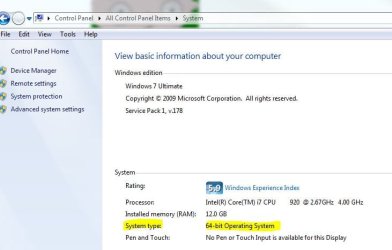
From the Start menu, right click on Computer and select properties. That should tell you everything you/we need to know.
 

My Computer

Computer Manufacturer/Model Number
Dell XPS 400
OS
Windows 7 X64 Professional
CPU
Intel® Pentium D Dual Core 3.6GHZ
Motherboard
DELL Dimension 9150 MotherBoard DXP051 XPS400 FJ030
Memory
4GB DDR2 PC2-5300
Graphics Card(s)
GeForce GT 440 (Fermi) 2GB 128-bit DDR3 PCI Express 2.0 x16
Sound Card
ASUS XONAR DG 5.1 Channels PCI Interface Xonar DG
Monitor(s) Displays
2 X 23" Apple Cinema Display
Screen Resolution
1920 X 1200p
Hard Drives
250GB Intel® 510 Series SSD SATA 6G (w/TRIM) [500MB/s Reads]
1.0TB Western Digital Caviar Black SATA 6G 7200rpm 64MB Cache
PSU
375 Watt Dell
Case
Dell XPS 400 BTX Case
Cooling
Dell XPS 400 Air Cooling
Keyboard
Logitech Illuminated Keyboard
Mouse
Logitech M705 Marathon
Internet Speed
+/- 9929 Kbps
Other Info
This machine was given to me when my dad bought a new computer. I keep throwing upgrades at it and it keeps on ticking. Think I've done everything to it that can be done outside a PSU upgrade so I can run an even BETTER GPU.
It says I have Windows 7 32 bit Home
 

My Computer

Computer Manufacturer/Model Number
hp G60-445Dx Notebook
OS
windows 7

My Computer

Computer Manufacturer/Model Number
Custom Built
OS
Windows 7 Ultimate
CPU
AMD Athlon II X2 245 2.90Ghz
Motherboard
Some Gigabyte one, dont remember model
Memory
3.00 GB
Graphics Card(s)
8800GTS 512MB
Sound Card
Sound Blaster X-Fi Titanium Fatal1ty
Monitor(s) Displays
Dual 22" widescreen
Hard Drives
250GB internal, 500GB internal
PSU
CORSAIR CMPSU-850TX 850W Power Supply
Case
Thermalkake Tsunami Dream
Cooling
Thermaltake Golden Orb II
Keyboard
Saitek Eclipse 2
Mouse
Logitech MX518
Well I tried everything suggested and still hangs up on registering authorization service
 

My Computer

Computer Manufacturer/Model Number
hp G60-445Dx Notebook
OS
windows 7
Well I tried everything suggested and still hangs up on registering authorization service
Hello Ed, welcome back. Since you have a corrupted installation you need to perform the following operations:
  1. Remove all Apple Software including the installer and Quicktime including AppleMobile software
  2. Reboot your system and ensure through the following methods that all Apple software and services and devices are removed. Through your device manager ensure that the apple usb device driver is removed, through your control panel review in the program window that any and all Apple software including "BONJOUR" are removed. Also review and ensure that quicktime is removed.
  3. Reboot your system
  4. Depending on which OS you have download from Apple the version of Itunes you need. Download it to your perferred location, I like it on the desktop.
  5. Point your mouse over the Apple Installer and right click your mouse, you will see a drop down menu and half way down you will see "Install/Run as administrator" Point your mouse over this option and left double click and the installation will begin.
Once the installation completes all the drivers and services should be up and running.
 

My Computer

Computer Manufacturer/Model Number
Custom Build
OS
Windows 7 7600 1 X64
CPU
AMD PHENOM II X 550 PROCESSOR 3.1 ghz
Motherboard
ASUS M4A78-TE
Memory
Corsair 4 gig ddr 3
Graphics Card(s)
ati radeon 3300
Sound Card
ati hd
Monitor(s) Displays
syncmaster 2033sw
Screen Resolution
1600X900 60 hz refresh
Hard Drives
twin_seagates SATA's 1 TB & 500 Gig, hitachi_slimline 160 gig
PSU
antec_550 watt
Case
cooler master GLite
Cooling
stock_heat sink
Internet Speed
20mbs up/ 1.5mbs down
Other Info
favorite child "stewie"
favorite dog "brian"
Back
Top