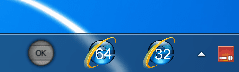
I use 32 & 64 bit IE versions but need unique taskbar icons for each

russellti

New member
Local time
9:39 AM
Messages
2
Location
Northern Michigan, USA
I use 32 & 64 bit IE versions but need unique taskbar icons for each

I have both the 32-bit and the 64-bit versions of MS-IE9. I have found for me at least, that there are instances where I need to use one or another or both. To make it easier I have each one of these program versions pinned to the taskbar. However, the icons for each of them is the same.

Q: How can I change these icons so that one reads 64-bit and the other reads 32-bit?

Thanks.

Russell
 

My Computer My Computer

At a glance

Windows 7 Home Premium 64bitIntel Core 2 Quad Q83006GB DDR3Intel GMA X4500 Integrated
Computer Manufacturer/Model Number
Gateway DX4820-01
OS
Windows 7 Home Premium 64bit
CPU
Intel Core 2 Quad Q8300
Motherboard
Acer G45T/G43T-AM3 V1.0
Memory
6GB DDR3
Graphics Card(s)
Intel GMA X4500 Integrated
Sound Card
Integrated
Monitor(s) Displays
HP Pavilion v72
Hard Drives
Drive #1 (data) - 750 GB-Seagate Barracuda, SATA, 32MB, 7200RPM --PLUS-- Drive #0: (boot) = 1 TB-Seagate Barracuda, SATA, 32MB, 7200RPM
PSU
LiteOn PS-6301
Case
Mid-Tower
Cooling
Yes
Hello russellti and welcome to Seven Forums.

I think this will help:

1. Right-click on the Taskbar icon you want to rename and choose "Unpin this program from Taskbar." This will remove the old version of the icon.
2. Locate the actual file, folder or desktop icon of the Taskbar icon you just removed.
3. Right-click the item and choose "Rename" from the context menu.
4. Type the new name and hit "Enter."
5. Click on the item once to select it.
6. Hold down your mouse button and drag the item to the bottom left corner of your Taskbar. You should see a new icon pinned on your Taskbar again, with the new name that you gave it.

If you want to change the actual icon image, this tutorial may help:

http://www.sevenforums.com/tutorials/920-desktop-icons-change-restore-default-icon.html
 

My Computer My Computer

At a glance

Win 7 Pro 64-bitIntel i5 2.4 Ghz8GB DDR3Intel HD 3000
Computer type
Laptop
Computer Manufacturer/Model Number
Sony Vaio VPCEB47GM Laptop
OS
Win 7 Pro 64-bit
CPU
Intel i5 2.4 Ghz
Memory
8GB DDR3
Graphics Card(s)
Intel HD 3000
Sound Card
IDT High Definition
Monitor(s) Displays
15.6 WGXA Anti-Glare LED
Screen Resolution
1280x800
Hard Drives
640Gb 7200rpm
Antivirus
MSE
Browser
Opera (primary) with IE9 backup
Thanks for the reply marsmimar. The two options you gave me didn't do what I wanted.

The icons that the 32 and 64-bit programs use are identical (they both just have the standard Ineternet Explorer letter-E icon). Yes, when I hover the mouse cursor over the icon in the taskbar I do see my unique "text". That is to say, when I hover over the 32-bit program icon I then see the text, "Internet Explorer (32-bit)" spring to life. Trouble is, I don't like waiting for this text to appear before deciding to click on one icon or the other. I suppose I could "get used to it" but then anyone else using this particular machine (a guest let's say), doesn't know why I've got two icons on the taskbar and that one is for 32 and the other is 64-bit programs. I really need to have two different graphic icons that read, "64-bit" and another, "32-bit" but I don't know where to find such or how to make one myself.

As for the second option you gave me, it doesn't really change the icon for a single program. It allows one to change the icon represented by a folder let's say, across the board. That is across the entire Windows 7 system. It's not allowing one to customize an icon.

Oh well, I'll keep crack'n at it and if I do find an answer "out there" somewhere, I'll leave a post here.

Thanks again,

Russell
 

My Computer My Computer

At a glance

Windows 7 Home Premium 64bitIntel Core 2 Quad Q83006GB DDR3Intel GMA X4500 Integrated
Computer Manufacturer/Model Number
Gateway DX4820-01
OS
Windows 7 Home Premium 64bit
CPU
Intel Core 2 Quad Q8300
Motherboard
Acer G45T/G43T-AM3 V1.0
Memory
6GB DDR3
Graphics Card(s)
Intel GMA X4500 Integrated
Sound Card
Integrated
Monitor(s) Displays
HP Pavilion v72
Hard Drives
Drive #1 (data) - 750 GB-Seagate Barracuda, SATA, 32MB, 7200RPM --PLUS-- Drive #0: (boot) = 1 TB-Seagate Barracuda, SATA, 32MB, 7200RPM
PSU
LiteOn PS-6301
Case
Mid-Tower
Cooling
Yes

My Computer My Computer

At a glance

Win 7 Pro 64-bitIntel i5 2.4 Ghz8GB DDR3Intel HD 3000
Computer type
Laptop
Computer Manufacturer/Model Number
Sony Vaio VPCEB47GM Laptop
OS
Win 7 Pro 64-bit
CPU
Intel i5 2.4 Ghz
Memory
8GB DDR3
Graphics Card(s)
Intel HD 3000
Sound Card
IDT High Definition
Monitor(s) Displays
15.6 WGXA Anti-Glare LED
Screen Resolution
1280x800
Hard Drives
640Gb 7200rpm
Antivirus
MSE
Browser
Opera (primary) with IE9 backup

My Computer My Computer

At a glance

Windows 7 Ultimate x86DualCore AMD Athlon 64 X2, 2600 MHz 5200+Samsung 2GB DDR2Onboard NVIDIA GeForce 6150SE nForce 430
Computer Manufacturer/Model Number
HP m8000n
OS
Windows 7 Ultimate x86
CPU
DualCore AMD Athlon 64 X2, 2600 MHz 5200+
Motherboard
Asus M2N68-LA (Narra)
Memory
Samsung 2GB DDR2
Graphics Card(s)
Onboard NVIDIA GeForce 6150SE nForce 430
Sound Card
Onboard nVIDIA nForce 6100-430 (MCP61P)
Monitor(s) Displays
Westinghouse 19" LED
Screen Resolution
1280x1024
Hard Drives
SATA II Seagate Barracuda 500GB
USB II WD Elements 500GB
USB II WD My Book 1TB
USB II WD My Book 2TB
PSU
Stock (HP)
Case
Stock (HP)
Cooling
Stock
Keyboard
Logitech Classic KB 200
Mouse
Standard HP opticle USB mouse
Like this?
Let me know and I can change the text color or size you want.
Jerry
Region.png
 

My Computer My Computer

At a glance

Win 7 Pro x64 / Win 10 ProIntel(R) Core(TM) i7-3630QM CPU @ 2.40GHz12 GB(1) Intel(R) HD Graphics 4000 (2) NVIDIA GeFo...
Computer type
Laptop
Computer Manufacturer/Model Number
Sager NP9170
OS
Win 7 Pro x64 / Win 10 Pro
CPU
Intel(R) Core(TM) i7-3630QM CPU @ 2.40GHz
Motherboard
CLEVO P170EM
Memory
12 GB
Graphics Card(s)
(1) Intel(R) HD Graphics 4000 (2) NVIDIA GeForce GTX 675M
Sound Card
(1) Realtek High Definition Audio (2) Intel(R) Display Aud
Monitor(s) Displays
17.3
Screen Resolution
1920x1080
Hard Drives
(1) Samsung 860 EVO 500GB(OS) (1) Samsung 860 EVO 500GB(Data)
Keyboard
Backlite
Antivirus
MSE, Malwarebytes Pro
Browser
Firefox
Other Info
DESKTOP: Custom-built.
OS: Win 10 Pro x64.
CASE: Rosewill R5.
CPU: Intel I5 4670K CPU @ 3.40GHz.
CPU COOLER: Cool Master Hyper 212 EVO.
MOTHERBOARD: Asus Z87-A.
MEMORY: Kingston HyperX 2x4 GB.
GPU: Nvidia Geforce 650 TI.
PSU: Corsair TX750.
DRIVES: (1) Samsung 840 120 GB SSD (2) Western Digital blue 500 GB 7200 RPM.
Back
Top