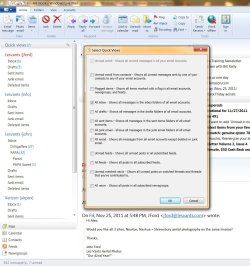
I want to add 'Unread e-mail' quick view, but it is grayed out.

airpix

New member
Local time
3:30 AM
Messages
37
Any ideas?

Thanks, Airpix / John
 

My Computer My Computer

At a glance

32 bit windows 7 pro
OS
32 bit windows 7 pro

My Computer My Computer

At a glance

Windows 10 Home x64INTEL Core i5-750 Quad-Core 3.37GHzHyperX Fury Black Series 8GB (2 x 4GB) 1866MhzEVGA GeForce GTX 750 Superclocked 1GB 128-Bit...
Computer type
PC/Desktop
OS
Windows 10 Home x64
CPU
INTEL Core i5-750 Quad-Core 3.37GHz
Motherboard
ASUS P7P55D
Memory
HyperX Fury Black Series 8GB (2 x 4GB) 1866Mhz
Graphics Card(s)
EVGA GeForce GTX 750 Superclocked 1GB 128-Bit GDDR5
Monitor(s) Displays
LG 32MA68HY 32" IPS
Screen Resolution
1920 x 1080
Hard Drives
Samsung 840 Evo 120GB, SEAGATE 500GB Barracuda® 7200.12, SATA 3 Gb/s, 7200 RPM, 16MB cache
PSU
ANTEC TruePower New TP-550, 80 PLUS, 550W
Case
ANTEC Three Hundred Illusion
Cooling
COOLER MASTER Hyper 212 Plus, 4 x 120mm 1 x 140mm Noctua's
Internet Speed
85 + Mbps
Antivirus
Avast
Browser
Vivaldi
Here's the screenshot and version info

As you can see I have All Inbox checked and the top selection is grayed out. No matter what selection I check or uncheck from the other 11 boxes the top selection remains grayed out. I would like the quickviews to show only unread mail. No matter what combination of boxes I check/uncheck my quickviews always shows 842 messages, most of them already read, and I have to scroll through all 842 to find the few unread messages.

Thanks, Airpix

 

Attachments

  • windows live email.jpg
    windows live email.jpg
    166 KB · Views: 10
  • windows live mail version.jpg
    windows live mail version.jpg
    59.4 KB · Views: 5

My Computer My Computer

At a glance

32 bit windows 7 pro
OS
32 bit windows 7 pro
Back
Top