Solved I want to factory reset!

Ripshock

New member
Local time
11:21 PM
Messages
96
Location
Bayt jala, Palestine
I want to factory reset! asus k55a (i can`t use recovery partition)

I am gonna cut to the chase:
i have clean installed windows 7, updated Bios, my bios boot configuration are reset, i have asus k55a and an OEM recover parition and after the clean install i can`t use f9 (as it shown in this site http://support.asus.com/Troubleshoo...3&s=386&os=&hashedid=K0x462Xrfr7kxIK4&no=1775) and i can`t use my oem parition i am sure it`s there as show in the screenshot so can anyone help me? i need factory reset because my warranty has expired lol
Thanks in advance
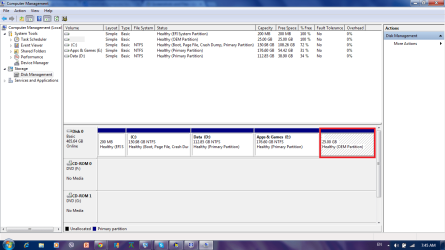


windows 7.png
 
Last edited:

My Computer My Computer

At a glance

windows 7 home premium 64 bitintel cor i3-3110mram 4gbintel hd graphics 4000
Computer type
Laptop
Computer Manufacturer/Model Number
Asus
OS
windows 7 home premium 64 bit
CPU
intel cor i3-3110m
Motherboard
k55a
Memory
ram 4gb
Graphics Card(s)
intel hd graphics 4000
Hard Drives
500gb
Cooling
within laptop
Keyboard
built-in
Mouse
touchpad built in
Internet Speed
4mbs
Antivirus
trend micro titanium internet security 2012
Browser
google chrome
i need factory reset because my warranty has expired lol

If warranty is already expired, why do you need a factory recovery ? ( when everybody usually want a clean install ). I am at a loss here.

In a MBR partitioned disk, giving OEM Recovery partition the "Active" mark can be used to kick start the recovery process. However GPT partition scheme changes everything and this old trick won't work anymore. If the installation image inside the "Recovery" partition is in "WIM" format, you may be able to manually restore the OS from it.
 

My Computer My Computer

At a glance

Windows 7 Ultimate x64
Computer type
PC/Desktop
OS
Windows 7 Ultimate x64
Why would you want to replace a Clean Reinstall - Factory OEM Windows 7 with the grossly inferior factory install - larded with bloatware and useless duplicate utilties that intefere with better versions built into Win7?

If you're having problems with Win7 then do the Clean Reinstall over again following the steps in the blue link to get it perfect, then afterwards create a Win7 backup image to use in place of future reinstalls.

If you want to restore to factory condition to sell the PC, you can try to Boot Recovery Partition using EasyBCD from within Win7.
 
Last edited:
Welcome to our Forum Ripshock.

Please remember we never try to give advice to hurt but only to help.
So I'm like the others, confused.
Could you tell us why you want to use the OEM PARTITION for.
After you did this
i have clean installed windows 7, updated Bios, my bios boot configuration are reset
,
What are you trying to do within the OEM partition.
 

My Computer My Computer

At a glance

Windows 10 Pro. 64/ version 1709 Windows 7 Pr...Intel i7-6800K @ 4.3Corsair Platinum 16 gig @2400EVGA GTX 1070 OC
Computer type
PC/Desktop
Computer Manufacturer/Model Number
Home made Desktop
OS
Windows 10 Pro. 64/ version 1709 Windows 7 Pro/64
CPU
Intel i7-6800K @ 4.3
Motherboard
ASUS X-99 Deluxe II
Memory
Corsair Platinum 16 gig @2400
Graphics Card(s)
EVGA GTX 1070 OC
Monitor(s) Displays
Asus 27" LED LCD/VE278Q
Screen Resolution
1920-1080 or 1280-720 HDMI
Hard Drives
INTEL SSD 730-240 Gb Sata 3.0/
PSU
EVGA Platium 1200W
Case
Phanteks Luxe Tempered Glass 8 fans/ one radiator
Cooling
XSPC/ Water Cooled CPU
Keyboard
Das 4 Professional
Mouse
Logitech M705/MX Anywhere 2-S
Internet Speed
100 mbits
Antivirus
Microsoft Security Essentials/ Malwarebytes Premium 3.0/ SAS
Browser
I.E. 11 default/Firefox/ ISP Time Warner Cable/Spectrum
Other Info
LG BluRay Burner/
Sound system-KLipsch-THX/
Icy Dock ssd Hot Swap bays.
Look, I have missed up my sis's pc and I told her I would fix it because she want her laptop as it was, besides the laptop were faster before I clean installed so just help me
 

My Computer My Computer

At a glance

windows 7 home premium 64 bitintel cor i3-3110mram 4gbintel hd graphics 4000
Computer type
Laptop
Computer Manufacturer/Model Number
Asus
OS
windows 7 home premium 64 bit
CPU
intel cor i3-3110m
Motherboard
k55a
Memory
ram 4gb
Graphics Card(s)
intel hd graphics 4000
Hard Drives
500gb
Cooling
within laptop
Keyboard
built-in
Mouse
touchpad built in
Internet Speed
4mbs
Antivirus
trend micro titanium internet security 2012
Browser
google chrome
I gave you a way to Boot Recovery Partition using EasyBCD if the Recovery partition has lost its ability to boot from hotkey due to reinstall.

Make sure to back up externally the data on the two data partitions because Factory Recovery sometimes will wipe the whole drive even if it offers to contain Recovery to C.

But remember there's no way a reinstall following the steps to http://www.sevenforums.com/tutorials/219487-clean-reinstall-factory-oem-windows-7-a.html#post1839164 would not be much better than the factory crapware install. Since you're here and we specialize in these reinstalls, why not do it right and make your sister really happy?
 
Watch how you talk to the volunteers here at the top tech forums on the web. You'll behave with nothing but gratitude or be ejected into cyberspace otherwise.

I gave you a way to Boot Recovery Partition using EasyBCD if the Recovery partition has lost its ability to boot from hotkey due to reinstall.

But there's no way a reinstall following the steps to http://www.sevenforums.com/tutorials/219487-clean-reinstall-factory-oem-windows-7-a.html#post1839164 would not be much better than the factory crapware install. You are at the top tech forums where we specialize in these reinstalls, so why not do it right and make your sister really happy?

But I can't set a letter on my oem partition using disk management or easeus
 

My Computer My Computer

At a glance

windows 7 home premium 64 bitintel cor i3-3110mram 4gbintel hd graphics 4000
Computer type
Laptop
Computer Manufacturer/Model Number
Asus
OS
windows 7 home premium 64 bit
CPU
intel cor i3-3110m
Motherboard
k55a
Memory
ram 4gb
Graphics Card(s)
intel hd graphics 4000
Hard Drives
500gb
Cooling
within laptop
Keyboard
built-in
Mouse
touchpad built in
Internet Speed
4mbs
Antivirus
trend micro titanium internet security 2012
Browser
google chrome

My Computer My Computer

At a glance

windows 7 home premium 64 bitintel cor i3-3110mram 4gbintel hd graphics 4000
Computer type
Laptop
Computer Manufacturer/Model Number
Asus
OS
windows 7 home premium 64 bit
CPU
intel cor i3-3110m
Motherboard
k55a
Memory
ram 4gb
Graphics Card(s)
intel hd graphics 4000
Hard Drives
500gb
Cooling
within laptop
Keyboard
built-in
Mouse
touchpad built in
Internet Speed
4mbs
Antivirus
trend micro titanium internet security 2012
Browser
google chrome
Try all System Recivery options methods to get to a Command Line that will work.

If you need bootable win7 installation flash stick see Steps 1 and 2 of Reinstall tutorial.

You'll boot Recovery from a Dual boot menu that EasyBCD creates.
 
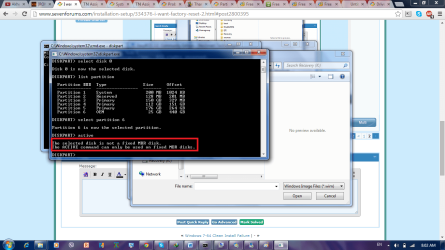
why the recovery partition with 25 gb size is not listed?
p.s this is not cmd at boot, does it make any difference?
wn7.png
 

My Computer My Computer

At a glance

windows 7 home premium 64 bitintel cor i3-3110mram 4gbintel hd graphics 4000
Computer type
Laptop
Computer Manufacturer/Model Number
Asus
OS
windows 7 home premium 64 bit
CPU
intel cor i3-3110m
Motherboard
k55a
Memory
ram 4gb
Graphics Card(s)
intel hd graphics 4000
Hard Drives
500gb
Cooling
within laptop
Keyboard
built-in
Mouse
touchpad built in
Internet Speed
4mbs
Antivirus
trend micro titanium internet security 2012
Browser
google chrome
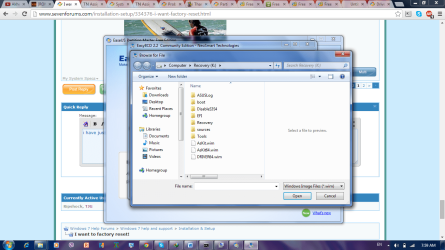
i have just added a letter with minitool patrition wizard but there is 3 .wim files which to use
wn71.png
 

My Computer My Computer

At a glance

windows 7 home premium 64 bitintel cor i3-3110mram 4gbintel hd graphics 4000
Computer type
Laptop
Computer Manufacturer/Model Number
Asus
OS
windows 7 home premium 64 bit
CPU
intel cor i3-3110m
Motherboard
k55a
Memory
ram 4gb
Graphics Card(s)
intel hd graphics 4000
Hard Drives
500gb
Cooling
within laptop
Keyboard
built-in
Mouse
touchpad built in
Internet Speed
4mbs
Antivirus
trend micro titanium internet security 2012
Browser
google chrome
and this s what i have got when i activate my oem patrition
wn72.png
 

My Computer My Computer

At a glance

windows 7 home premium 64 bitintel cor i3-3110mram 4gbintel hd graphics 4000
Computer type
Laptop
Computer Manufacturer/Model Number
Asus
OS
windows 7 home premium 64 bit
CPU
intel cor i3-3110m
Motherboard
k55a
Memory
ram 4gb
Graphics Card(s)
intel hd graphics 4000
Hard Drives
500gb
Cooling
within laptop
Keyboard
built-in
Mouse
touchpad built in
Internet Speed
4mbs
Antivirus
trend micro titanium internet security 2012
Browser
google chrome
Look in the Recovery and other folders on the drive to find the two .wim files specified in the instructions. Once you add the correct .wim file using EasyBCD you should reboot to a Dual Boot menu to choose Recovery to boot. You can then run Factory Recovery so your sister will have the worst possible install of Win7 one can have. :rolleyes:

Since you're using WIn7 now, did you think about telling us what the problems are so we can easily resolve them for you? I don't remember anyone ever giving up on a Clean Reinstall before they even tried the actual steps to do one. It's annoying that you don't want to follow the steps to do a Clean Reinstall - Factory OEM Windows 7 but instead ask us to do a very tricky workaround to boot your Recovery partition which results in a crap install.
 
Look in the Recovery and other folders on the drive to find the two .wim files specified in the instructions. Once you add the correct .wim file using EasyBCD you should reboot to a Dual Boot menu to choose Recovery to boot. You can then run Factory Recovery so your sister will have the worst possible install of Win7 one can have. :rolleyes:

Since you're using WIn7 now, did you think about telling us what the problems are so we can easily resolve them for you? I don't remember anyone ever giving up on a Clean Reinstall before they even tried the actual steps to do one. It's annoying that you don't want to follow the steps to do a Clean Reinstall - Factory OEM Windows 7 but instead ask us to do a very tricky workaround to boot your Recovery partition which results in a crap install.

Dude, calm down, why are you so obsist? I know you want to help but I have asked a couple of question and you answered them, you have suggested clean instal but idk, so if you wanna help do it, if you don't, it's ok, this is an open society, but either ways thank you.
About my problem, my windows 7 I have is worthless, my built in camera keep connecting and disconnecting and it's so slow, I even downloaded it from internet, also on oem windows 7, laptop was so smooth, you can't imagine how, despite the craps, it has but these craps are really usefull, it has everything I need.
Btw I have found winre.wim only
 

My Computer My Computer

At a glance

windows 7 home premium 64 bitintel cor i3-3110mram 4gbintel hd graphics 4000
Computer type
Laptop
Computer Manufacturer/Model Number
Asus
OS
windows 7 home premium 64 bit
CPU
intel cor i3-3110m
Motherboard
k55a
Memory
ram 4gb
Graphics Card(s)
intel hd graphics 4000
Hard Drives
500gb
Cooling
within laptop
Keyboard
built-in
Mouse
touchpad built in
Internet Speed
4mbs
Antivirus
trend micro titanium internet security 2012
Browser
google chrome
I am as calm as can be. But you need to know where you are: the top tech forums in web history. We don't like helping do things we recommend against here, and you are asking me to help you do the known worst without even trying the real steps to do a perfect Clean Reinstall - Factory OEM Windows 7. So I resist. ;)

Go to the Asus Support Downloads webpage for your exact model and import the Camera Software posted there. If you'll tell us the laptop's full model number we will help you find it. Rightclick the download's .exe to Run as Administrator, install the software to see if that resolves the problem.

What other problems are there with the Clean Reinstall - Factory OEM Windows 7?
Did you enable Automatically deliver drivers via Windows Update (Step 3) then run all Important and Optional Windows Updates, with requested reboots, until there are no more when you go back to Check for Updates? If you didn't then you don't have all the drivers WIn7 wants anyway.
 
Last edited:
I am as calm as can be. But you need to know where you are, the top tech forums in web history. We don't take well to being asked to do anything except the best, and you are asking me to help you do the known worst. So I resist. ;)

Go to the Asus Support Downloads webpage for your exact model and import the Camera Software posted there. If you'll tell us the laptop's full model number we will help you find it. Rightclick the download's .exe to Run as Administrator, install the software to see if that resolves the problem.

What other problems are there with the Clean Reinstall - Factory OEM Windows 7?
Did you enable Automatically deliver drivers via Windows Update (Step 3) then run all Important and Optional Windows Updates, with requested reboots, until there are no more when you go back to Check for Updates? If you didn't then you don't have all the drivers WIn7 wants anyway.

All my drivers are from asus support downloads which I have download after a clean install but it keeps doind this sound (like whe you unplug a device)
Now, k have found winre.wim only, do I use it? And when I dual noot from it, does it do samething like key f9?
 

My Computer My Computer

At a glance

windows 7 home premium 64 bitintel cor i3-3110mram 4gbintel hd graphics 4000
Computer type
Laptop
Computer Manufacturer/Model Number
Asus
OS
windows 7 home premium 64 bit
CPU
intel cor i3-3110m
Motherboard
k55a
Memory
ram 4gb
Graphics Card(s)
intel hd graphics 4000
Hard Drives
500gb
Cooling
within laptop
Keyboard
built-in
Mouse
touchpad built in
Internet Speed
4mbs
Antivirus
trend micro titanium internet security 2012
Browser
google chrome
Do not pretend you have tried a Clean Reinstall - Factory OEM Windows 7 when you have not done it correctly or even made an effort to get it sorted with those of us who have helped do tens of thousands without a single complaint.

You should not have imported any drivers from Asus SUpport Downloads webpage except those still missing after installing all Important and Optional Windows Update, which is where WIn7 delivers the driver it wants. There should be more than just a cam driver on the page, some sort of supporting software that allows you to see yourself in addition to the functions the cam can perform with just its driver connecting to a messenger, Facebook, etc.

If the PC is making a kerplunk sound then you can monitor the driver it is trying to install in the bottom right System tray animation if you click on it right away. Then you know which driver needs replacing, probably with the Windows Update driver you never installed because the steps were not followed.

You need Install.wim or winre.wim added to a Dual Boot menu exactly as shown in Boot Recovery Partition using EasyBCD which will reboot to a Dual Boot menu with the choice to commence Recovery. Have your files backed up as it will likely wipe out the entire hard drive unless you are given other choices.
 
Do not pretend you have tried a Clean Reinstall - Factory OEM Windows 7 when you have not done it correctly or even made an effort to get it sorted with those of us who have helped do tens of thousands without a single complaint.

You should not have imported any drivers from Asus SUpport Downloads webpage except those still missing after installing all Important and Optional Windows Update, which is where WIn7 delivers the driver it wants. There should be more than just a cam driver on the page, some sort of supporting software that allows you to see yourself in addition to the functions the cam can perform with just its driver connecting to a messenger, Facebook, etc.

If the PC is making a kerplunk sound then you can monitor the driver it is trying to install in the bottom right System tray animation if you click on it right away. Then you know which driver needs replacing, probably with the Windows Update driver you never installed because the steps were not followed.

You need Install.wim or winre.wim added to a Dual Boot menu exactly as shown in Boot Recovery Partition using EasyBCD which will reboot to a Dual Boot menu with the choice to commence Recovery. Have your files backed up as it will likely wipe out the entire hard drive unless you are given other choices.

Go to the first post and see the site that supports this function and kt gives three options, so if I've booted winre.wim, I would get these three options?
Also I have tried skype and I ca not make a video call unless I click repair on my virtual camera driver (which is from the site) also when it doss that sound there is no tray icon
 

My Computer My Computer

At a glance

windows 7 home premium 64 bitintel cor i3-3110mram 4gbintel hd graphics 4000
Computer type
Laptop
Computer Manufacturer/Model Number
Asus
OS
windows 7 home premium 64 bit
CPU
intel cor i3-3110m
Motherboard
k55a
Memory
ram 4gb
Graphics Card(s)
intel hd graphics 4000
Hard Drives
500gb
Cooling
within laptop
Keyboard
built-in
Mouse
touchpad built in
Internet Speed
4mbs
Antivirus
trend micro titanium internet security 2012
Browser
google chrome
@gregrocker if I change my disk from gpt to mbr, would I loose any data?
 

My Computer My Computer

At a glance

windows 7 home premium 64 bitintel cor i3-3110mram 4gbintel hd graphics 4000
Computer type
Laptop
Computer Manufacturer/Model Number
Asus
OS
windows 7 home premium 64 bit
CPU
intel cor i3-3110m
Motherboard
k55a
Memory
ram 4gb
Graphics Card(s)
intel hd graphics 4000
Hard Drives
500gb
Cooling
within laptop
Keyboard
built-in
Mouse
touchpad built in
Internet Speed
4mbs
Antivirus
trend micro titanium internet security 2012
Browser
google chrome
Back
Top