Solved I want to join 2 small AVI files without degrading the quality

Coming soon to your computer!...​


Video Editor Smackdown!!!
3 or more Video editors duke out. Which one will wear the Rusty Seal of Approval?

Don't miss it​
That's not a joke :D

If you really want a video editor that will provide a lossless encoding, you should use any GUI that uses h264 codes and capable to make B frame .

Gordianknot, AutoGK, VirtualDubMod, Handbrake, megui, avidemux, etc are just different GUIs, not mot than that . They all are based on h264 .
Does that mean they cannot deal lossless with other formats (other than h264).
 

My Computer My Computer

At a glance

Vista, Windows7, Mint Mate, Zorin, Windows 8from 1.6GHz Duo to i7
Computer Manufacturer/Model Number
HP, Dell, Gateway, Toshiba - 4 laptops and 2 desktops
OS
Vista, Windows7, Mint Mate, Zorin, Windows 8
CPU
from 1.6GHz Duo to i7
Monitor(s) Displays
2x HP w2207
Hard Drives
5x HDD, 7x SSD, 12x Externals
Keyboard
with trackball - no mices
Mouse
Trackball mice
Internet Speed
DSL 6000
I'm tinkering now, and I'm a total noob with videos. If y'all can be patient with me, my time comes in bits and pieces(sorta like my movies), and I have learned all I can with AVI Trimmer. It doesn't stitch together different movies, but does a simple job of trimming one AVI very quickly. All the others do this too, so it will probably sink to the bottom of the list. Tonight I'm working with Windows Movie Maker using WHS's tutorials. Thanks for that, WHS. I may move on to VirtualDub next.

Rusty
 

My Computer My Computer

At a glance

Windows 7 Home Premium - always up to dateIntel E2210 2.2Ghz3Gb DDR2NVIDIA GeForce 7050/610I GPU
Computer type
PC/Desktop
Computer Manufacturer/Model Number
eMachines ET1810-03 (Acer) - single user
OS
Windows 7 Home Premium - always up to date
CPU
Intel E2210 2.2Ghz
Motherboard
(OEM) ECS MCP73VT-PM with AMI BIOS R01-A3 (4-29-2009)
Memory
3Gb DDR2
Graphics Card(s)
NVIDIA GeForce 7050/610I GPU
Sound Card
Realtek ALC888/1200 8-channel HD integrated
Monitor(s) Displays
AOC 22" LED
Screen Resolution
1920 x 1080
Hard Drives
Internal - Seagate 320Gb SATA; External - Western Digital 320Gb USB (3.5" internal drive inside a RocketFish USB enclosure)
Keyboard
Wireless
Mouse
Logitech M705 laser wireless
Internet Speed
TWC Cable Broadband ~ 15 Mbps Down/1 Mbps Up
Antivirus
NIS
Browser
Chrome
Other Info
Microsoft Office 2007, incl Outlook SP3; Netgear router; ubee modem
Provided both files have the exact same settings, another alternative is YAMB.

Use the "Join Supported Files" Option.
Capture.JPG

Add your files and Mux them together.

The result will be a single .MP4, unless it absolutely must be a AVI file.

The Video itself will NOT be recoded, so theres no quality loss at all. Only a change in the container that holds them.


Also, MKVmerge will work just as well, but the result will be a MKV file. Again, no recoding, just a joining into another container.


If the files you wish to join are very different from eachother (in bitrate,codecs etc) then recoding may be needed to get the result you're looking for.
 

My Computer My Computer

At a glance

Windows 7 Home Premium 64bitIntel Core i7 2700k8GB Mushkin Redline Ridgebacks @1866EVGA GTX570 SC
Computer Manufacturer/Model Number
Custom (Self Build)
OS
Windows 7 Home Premium 64bit
CPU
Intel Core i7 2700k
Motherboard
eVGA P67 SLI
Memory
8GB Mushkin Redline Ridgebacks @1866
Graphics Card(s)
EVGA GTX570 SC
Sound Card
XiFi Titanium HD
Monitor(s) Displays
LG W2453V
Screen Resolution
1920x1080
Hard Drives
Intel 320 80GB -- Intel X25-V 40GB --WD Black 1TB x2 -- WD Blue 640GB
PSU
Seasonic x750
Case
Corsair 600T SE White
Cooling
eVGA Superclocked CPU Cooler
Keyboard
Saitek Cyborg
Antivirus
Kaspersky
Browser
IE
Other Info
LG BD/DVD
  • Like
Reactions: Arc
Okay, Wishmaster, YAMB is on the list of contenders. After the first round, Windows Live Movie Maker knocked out AVI Trimmer with one dismissive backhanded swat. No chance for recovery there. By the time I stitched together two good 2 minute movies of my model stunt flying exhibition, I was getting pretty good with it.
I guess the only option for saving locally is to save as a WMV. I need to learn more about packaging.
I'll let WLMM upload it to Youtube when I hit the sack in a little while. I couldn't tell if any quality was lost except for one jerky frame in one of the movies.
Maybe it was a one round fight, but after all the suggestions y'all have offered, I think I should try some others out. So, this weekend I will play with it some more.
 

My Computer My Computer

At a glance

Windows 7 Home Premium - always up to dateIntel E2210 2.2Ghz3Gb DDR2NVIDIA GeForce 7050/610I GPU
Computer type
PC/Desktop
Computer Manufacturer/Model Number
eMachines ET1810-03 (Acer) - single user
OS
Windows 7 Home Premium - always up to date
CPU
Intel E2210 2.2Ghz
Motherboard
(OEM) ECS MCP73VT-PM with AMI BIOS R01-A3 (4-29-2009)
Memory
3Gb DDR2
Graphics Card(s)
NVIDIA GeForce 7050/610I GPU
Sound Card
Realtek ALC888/1200 8-channel HD integrated
Monitor(s) Displays
AOC 22" LED
Screen Resolution
1920 x 1080
Hard Drives
Internal - Seagate 320Gb SATA; External - Western Digital 320Gb USB (3.5" internal drive inside a RocketFish USB enclosure)
Keyboard
Wireless
Mouse
Logitech M705 laser wireless
Internet Speed
TWC Cable Broadband ~ 15 Mbps Down/1 Mbps Up
Antivirus
NIS
Browser
Chrome
Other Info
Microsoft Office 2007, incl Outlook SP3; Netgear router; ubee modem
Here's one I did last night with WLMM. It has a couple of transitions and two segments stitched together.

‪Lil Jumpin Bean Aerobatics Sunday 7-24-2011‬‏ - YouTube

It should work at 720p HD without having to append "&fmt=22" to the URL. It looks okay at full screen considering Youtube recoded it. The second segment fades in at about 1:26. Keep in mind this was shot with a Samsung PL210 point and shoot camera, not a camcorder. I should have a similar video up with another plane in a couple of hours.
 

My Computer My Computer

At a glance

Windows 7 Home Premium - always up to dateIntel E2210 2.2Ghz3Gb DDR2NVIDIA GeForce 7050/610I GPU
Computer type
PC/Desktop
Computer Manufacturer/Model Number
eMachines ET1810-03 (Acer) - single user
OS
Windows 7 Home Premium - always up to date
CPU
Intel E2210 2.2Ghz
Motherboard
(OEM) ECS MCP73VT-PM with AMI BIOS R01-A3 (4-29-2009)
Memory
3Gb DDR2
Graphics Card(s)
NVIDIA GeForce 7050/610I GPU
Sound Card
Realtek ALC888/1200 8-channel HD integrated
Monitor(s) Displays
AOC 22" LED
Screen Resolution
1920 x 1080
Hard Drives
Internal - Seagate 320Gb SATA; External - Western Digital 320Gb USB (3.5" internal drive inside a RocketFish USB enclosure)
Keyboard
Wireless
Mouse
Logitech M705 laser wireless
Internet Speed
TWC Cable Broadband ~ 15 Mbps Down/1 Mbps Up
Antivirus
NIS
Browser
Chrome
Other Info
Microsoft Office 2007, incl Outlook SP3; Netgear router; ubee modem
Does that mean they cannot deal lossless with other formats (other than h264).
h264 is not a format, it is a codec, like xvid.... but a better one. Many a formats use this codec, like mp4, mkv and avi .
 

My Computer My Computer

At a glance

Microsoft Windows 10 Pro Insider Preview 64-bitIntel(R) Core(TM) i3-4130 CPU @ 3.40GHzCorsair Vengence 4GB x2 (8.00GB Dual-Channel ...2047MB GeForce GTS 450 (ZOTAC International)
Computer type
PC/Desktop
Computer Manufacturer/Model Number
Self Assembled
OS
Microsoft Windows 10 Pro Insider Preview 64-bit
CPU
Intel(R) Core(TM) i3-4130 CPU @ 3.40GHz
Motherboard
Gigabyte Technology Co., Ltd. B85M-D3H
Memory
Corsair Vengence 4GB x2 (8.00GB Dual-Channel DDR3 @ 798MHz)
Graphics Card(s)
2047MB GeForce GTS 450 (ZOTAC International)
Sound Card
Onboard (Realtek High Definition Audio)
Monitor(s) Displays
LG Flatron E2040T
Screen Resolution
1600x900
Hard Drives
Western Digital 1 TB
Seagate 500 GB
PSU
Corsair VS550
Case
Cooler Master K380
Cooling
Cooler Master Seidon 120V Plus
Keyboard
Logitech MK260r
Mouse
Logitech MK260r
Internet Speed
PMPL Broadband
Antivirus
Windows Defender + MBAM
Browser
Firefox
Other Info
Dell Studio 15" Laptop
Does that mean they cannot deal lossless with other formats (other than h264).
h264 is not a format, it is a codec, like xvid.... but a better one. Many a formats use this codec, like mp4, mkv and avi .
Hmm, I know that. Sorry for using "format" in lieu of "codec" - English is difficult, LOL. But back to my question - what if I have e.g. .wmv ??
 

My Computer My Computer

At a glance

Vista, Windows7, Mint Mate, Zorin, Windows 8from 1.6GHz Duo to i7
Computer Manufacturer/Model Number
HP, Dell, Gateway, Toshiba - 4 laptops and 2 desktops
OS
Vista, Windows7, Mint Mate, Zorin, Windows 8
CPU
from 1.6GHz Duo to i7
Monitor(s) Displays
2x HP w2207
Hard Drives
5x HDD, 7x SSD, 12x Externals
Keyboard
with trackball - no mices
Mouse
Trackball mice
Internet Speed
DSL 6000
Hmm, I know that. Sorry for using "format" in lieu of "codec" - English is difficult, LOL. But back to my question - what if I have e.g. .wmv ??
The GUIs I have mentioned in the earlier post can convert from any format to .mkv or .mp4 (.avi is somehow backdated, and a few GUIs dont support it nowadays) , and all the encoding they do are lossless.

Out of those, Handbrake is the most easy one to operate, but it cannot join/split a file .
 

My Computer My Computer

At a glance

Microsoft Windows 10 Pro Insider Preview 64-bitIntel(R) Core(TM) i3-4130 CPU @ 3.40GHzCorsair Vengence 4GB x2 (8.00GB Dual-Channel ...2047MB GeForce GTS 450 (ZOTAC International)
Computer type
PC/Desktop
Computer Manufacturer/Model Number
Self Assembled
OS
Microsoft Windows 10 Pro Insider Preview 64-bit
CPU
Intel(R) Core(TM) i3-4130 CPU @ 3.40GHz
Motherboard
Gigabyte Technology Co., Ltd. B85M-D3H
Memory
Corsair Vengence 4GB x2 (8.00GB Dual-Channel DDR3 @ 798MHz)
Graphics Card(s)
2047MB GeForce GTS 450 (ZOTAC International)
Sound Card
Onboard (Realtek High Definition Audio)
Monitor(s) Displays
LG Flatron E2040T
Screen Resolution
1600x900
Hard Drives
Western Digital 1 TB
Seagate 500 GB
PSU
Corsair VS550
Case
Cooler Master K380
Cooling
Cooler Master Seidon 120V Plus
Keyboard
Logitech MK260r
Mouse
Logitech MK260r
Internet Speed
PMPL Broadband
Antivirus
Windows Defender + MBAM
Browser
Firefox
Other Info
Dell Studio 15" Laptop
Hmm, I know that. Sorry for using "format" in lieu of "codec" - English is difficult, LOL. But back to my question - what if I have e.g. .wmv ??
The GUIs I have mentioned in the earlier post can convert from any format to .mkv or .mp4 (.avi is somehow backdated, and a few GUIs dont support it nowadays) , and all the encoding they do are lossless.

Out of those, Handbrake is the most easy one to operate, but it cannot join/split a file .
Thanks Arc for the info.
 

My Computer My Computer

At a glance

Vista, Windows7, Mint Mate, Zorin, Windows 8from 1.6GHz Duo to i7
Computer Manufacturer/Model Number
HP, Dell, Gateway, Toshiba - 4 laptops and 2 desktops
OS
Vista, Windows7, Mint Mate, Zorin, Windows 8
CPU
from 1.6GHz Duo to i7
Monitor(s) Displays
2x HP w2207
Hard Drives
5x HDD, 7x SSD, 12x Externals
Keyboard
with trackball - no mices
Mouse
Trackball mice
Internet Speed
DSL 6000
avi is somehow backdated, and a few GUIs dont support it nowadays) , and all the encoding they do are lossless.
.

In addition to Arcs info, I too have ran into a few instances where a .avi was not supported.

However, I found that by using the app I mentioned earlier (YAMB) it can remux a .avi's video/audio stream without recoding into a MP4 container to get around this issue.

So if if you run into this issue, and wish to use one of the programs he mentioned, this may be a good option. It can then work with the file easily.
An extra step, but it doesnt take but a minute.
 

My Computer My Computer

At a glance

Windows 7 Home Premium 64bitIntel Core i7 2700k8GB Mushkin Redline Ridgebacks @1866EVGA GTX570 SC
Computer Manufacturer/Model Number
Custom (Self Build)
OS
Windows 7 Home Premium 64bit
CPU
Intel Core i7 2700k
Motherboard
eVGA P67 SLI
Memory
8GB Mushkin Redline Ridgebacks @1866
Graphics Card(s)
EVGA GTX570 SC
Sound Card
XiFi Titanium HD
Monitor(s) Displays
LG W2453V
Screen Resolution
1920x1080
Hard Drives
Intel 320 80GB -- Intel X25-V 40GB --WD Black 1TB x2 -- WD Blue 640GB
PSU
Seasonic x750
Case
Corsair 600T SE White
Cooling
eVGA Superclocked CPU Cooler
Keyboard
Saitek Cyborg
Antivirus
Kaspersky
Browser
IE
Other Info
LG BD/DVD
Didn't want to leave this thread hanging.
Once I tried WLMM I was happy with my results, just for my simple purposes, as can be seen by the link in post #25. (here's one with a hotter airplane) If I get more ambitious I'll come back and try some more of everyone's suggestions.
Thanks for all the help,
Rusty
 

My Computer My Computer

At a glance

Windows 7 Home Premium - always up to dateIntel E2210 2.2Ghz3Gb DDR2NVIDIA GeForce 7050/610I GPU
Computer type
PC/Desktop
Computer Manufacturer/Model Number
eMachines ET1810-03 (Acer) - single user
OS
Windows 7 Home Premium - always up to date
CPU
Intel E2210 2.2Ghz
Motherboard
(OEM) ECS MCP73VT-PM with AMI BIOS R01-A3 (4-29-2009)
Memory
3Gb DDR2
Graphics Card(s)
NVIDIA GeForce 7050/610I GPU
Sound Card
Realtek ALC888/1200 8-channel HD integrated
Monitor(s) Displays
AOC 22" LED
Screen Resolution
1920 x 1080
Hard Drives
Internal - Seagate 320Gb SATA; External - Western Digital 320Gb USB (3.5" internal drive inside a RocketFish USB enclosure)
Keyboard
Wireless
Mouse
Logitech M705 laser wireless
Internet Speed
TWC Cable Broadband ~ 15 Mbps Down/1 Mbps Up
Antivirus
NIS
Browser
Chrome
Other Info
Microsoft Office 2007, incl Outlook SP3; Netgear router; ubee modem
Very good. How many windows has he flown it through?:D
 

My Computer My Computer

At a glance

Microsoft Windows 7 Home Premium 64-bit Servi...Intel(R) Core(TM) i3 CPU M 330 @ 2.13GHz8 GB DDR3Intel(R) HD Graphics
Computer type
Laptop
Computer Manufacturer/Model Number
Hewlett-Packard/G62-107SA Notebook
OS
Microsoft Windows 7 Home Premium 64-bit Service Pack 1
CPU
Intel(R) Core(TM) i3 CPU M 330 @ 2.13GHz
Motherboard
Hewlett-Packard 1425
Memory
8 GB DDR3
Graphics Card(s)
Intel(R) HD Graphics
Sound Card
Realtek High Definition Audio
Monitor(s) Displays
Builtin
Screen Resolution
1366 x 768 x 32 bits (4294967296 colors) @ 60 Hz
Hard Drives
250 GB SATA Hard Disk Drive 7200 rpm
2TB Seagate GoFlex USB 2 Drive
1TB Iomega Prestige USB 2 Drive
1.5TB Iomega Prestige USB 2 Drive (Samsung)
2TB WD MyBook Live NAS.
Mouse
Logitech Anywhere MX
Internet Speed
152 Mbs download 10 Mbs upload
Antivirus
Norton 360
Browser
Chrome
I have chopped a couple of tips off those oak trees but that's good for laughs if I have an audience. That courtyard is a church, so I really would hate to put it through one of their stained glass windows.
laugh-1.gif
Imagining choir practice and a plane comes crashing through bouncing off the walls.
It's a small courtyard so I have to keep a clear 100' circle and short lines, about 35' from the control handle. No problem.
 

My Computer My Computer

At a glance

Windows 7 Home Premium - always up to dateIntel E2210 2.2Ghz3Gb DDR2NVIDIA GeForce 7050/610I GPU
Computer type
PC/Desktop
Computer Manufacturer/Model Number
eMachines ET1810-03 (Acer) - single user
OS
Windows 7 Home Premium - always up to date
CPU
Intel E2210 2.2Ghz
Motherboard
(OEM) ECS MCP73VT-PM with AMI BIOS R01-A3 (4-29-2009)
Memory
3Gb DDR2
Graphics Card(s)
NVIDIA GeForce 7050/610I GPU
Sound Card
Realtek ALC888/1200 8-channel HD integrated
Monitor(s) Displays
AOC 22" LED
Screen Resolution
1920 x 1080
Hard Drives
Internal - Seagate 320Gb SATA; External - Western Digital 320Gb USB (3.5" internal drive inside a RocketFish USB enclosure)
Keyboard
Wireless
Mouse
Logitech M705 laser wireless
Internet Speed
TWC Cable Broadband ~ 15 Mbps Down/1 Mbps Up
Antivirus
NIS
Browser
Chrome
Other Info
Microsoft Office 2007, incl Outlook SP3; Netgear router; ubee modem
Yes. It still takes a great deal of skill though.
 

My Computer My Computer

At a glance

Microsoft Windows 7 Home Premium 64-bit Servi...Intel(R) Core(TM) i3 CPU M 330 @ 2.13GHz8 GB DDR3Intel(R) HD Graphics
Computer type
Laptop
Computer Manufacturer/Model Number
Hewlett-Packard/G62-107SA Notebook
OS
Microsoft Windows 7 Home Premium 64-bit Service Pack 1
CPU
Intel(R) Core(TM) i3 CPU M 330 @ 2.13GHz
Motherboard
Hewlett-Packard 1425
Memory
8 GB DDR3
Graphics Card(s)
Intel(R) HD Graphics
Sound Card
Realtek High Definition Audio
Monitor(s) Displays
Builtin
Screen Resolution
1366 x 768 x 32 bits (4294967296 colors) @ 60 Hz
Hard Drives
250 GB SATA Hard Disk Drive 7200 rpm
2TB Seagate GoFlex USB 2 Drive
1TB Iomega Prestige USB 2 Drive
1.5TB Iomega Prestige USB 2 Drive (Samsung)
2TB WD MyBook Live NAS.
Mouse
Logitech Anywhere MX
Internet Speed
152 Mbs download 10 Mbs upload
Antivirus
Norton 360
Browser
Chrome
I'm making videos of my model stunt airplane with a Samsung camera that records pretty good 720P AVI files. It moves very fast so I have to have decent quality just to follow the action. I tried Free Video Joiner and it's easy to use but it severely degrades the quality. Their home page says "Quickly join and without any quality loss... join AVI, WMV, MOV, MPEG, MPG files." But the output file is severely degraded. For example, I joined a 438 MB and a 330 MB AVI movie and the output file was a blurry 62 MB AVI. It wasn't worth using, especially after converting it to Flash for Youtube. Maybe I need a better program for that too.
Just in passing, I happen to own a license for the two Briz products "Video Joiner" and "AVI Splitter". I hadn't installed them in my latest Win7 reinstall, but your comment pushed me to try this out to see if your observations were correct. I had previously used the "joiner" program to join AVI files and it did exactly what it claimed to be able to do.

Note that there is a prerequisite for no re-compression, as stated on their product description:
MPEG and AVI files with identical parameters (such as frame size, frame rate) can be joined without recompression quickly and without quality loss.
So, I experimented by joining two H.264 AVI's: (1) about 142MB, and (2) about 120MB. These both are 1280x720p HD video clips, so they have the identical frame size and frame rate as required.

brizjoiner1.jpg


Sure enough, when I then pushed the "join files" function the dialog that asked me to specify the output file target location also had the "join without recompression" box checked, and all of the items below it (that could specify a new frame size, frame rate, compression codec, etc.) were all grayed out since it had pre-populated the "join without compression" checkbox. Obviously this could be done because the two AVI's satisfied the requirement that they were identical frame size/rate.

brizjoiner2.jpg


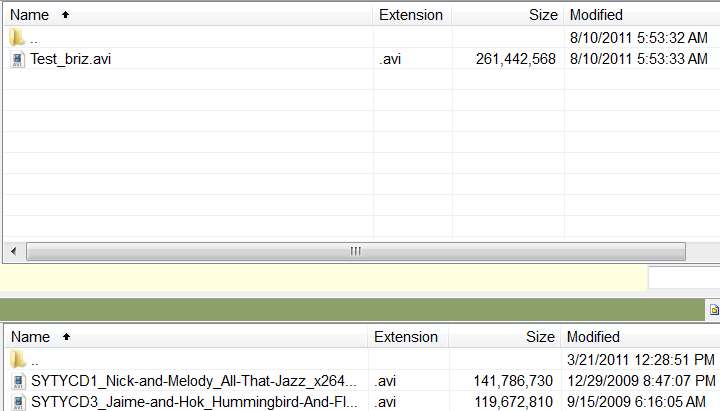
I then pushed the "join" button and the two AVI's were literally joined together with NO RE-COMPRESSION. The output file is about 262MB in size, and is absolutely the identical original two 1280x720p HD AVI clips now joined perfectly back-to-back with zero re-compression. Took about 3 seconds to do the whole thing.

brizjoiner3.jpg


I suspect your situation perhaps involved attempting to join two clips that did not have identical frame size/rate values, or perhaps you'd un-checked the "join without compression" checkbox so that the lower re-size/compress parameters now were active. Since the default new frame size is 320x240 and who knows what compression codec, this seems like the only explanation for why your output was so small and crummy. I can't imagine that the "free" version can't do this, but maybe that's how they get you to buy it.

Actually, I didn't think they offered a "free" version anyway. Were you trying it out via the 7-day trial period? Perhaps they disable the "join without compression" feature in the trial version so that you'll buy it, but it seems like unless the user could actually see that it would really work he wouldn't likely buy it anyway! So I'm puzzled about what you ran, what you did, whether you un-checked that box (if it was even available), and why you got the results you did.

Now granted, I have a paid license to the product and am not using the "free" version, so maybe that's the difference. But I can absolutely attest to the fact that this "Video Joiner" works perfectly, and exactly as advertised. The result IS a back-to-back input AVI files 1 and 2 with zero re-compression in the resulting output AVI file. And the program can do this because the two input files have identical frame size/rates.

I'm just reporting my results using this product.

 

My Computer My Computer

At a glance

Windows 7 Pro x64 (1), Win7 Pro X64 (2)i5-3350p 3.1Ghz/6MB-cache (1); E8400 3.0Ghz/6...8GB PC3-12800 DDR3 (1); 4GB PC3-10600 DDR3 (2)ATI HD7750 (1), (see TV cards); ATI R7 250 (2)
Computer type
PC/Desktop
Computer Manufacturer/Model Number
Home-built, two systems (1) and (2)
OS
Windows 7 Pro x64 (1), Win7 Pro X64 (2)
CPU
i5-3350p 3.1Ghz/6MB-cache (1); E8400 3.0Ghz/6MB-cache (2)
Motherboard
ASUS P8Z77-V Pro (1); ASUS P5Q3 (2)
Memory
8GB PC3-12800 DDR3 (1); 4GB PC3-10600 DDR3 (2)
Graphics Card(s)
ATI HD7750 (1), (see TV cards); ATI R7 250 (2)
Sound Card
Realtek ALC892 HD Audio (1); Realtek ALC1200 HD Audio (2)
Monitor(s) Displays
Eizo HD2441W LCD, Eizo S2433W (1); Eizo 24" S2433W (2)
Screen Resolution
1920x1200, 1920x1200 (1); 1920x1200 (2)
Hard Drives
(1) 1TB SATA-II (7200RPM), 2x2TB SATA-III (7200RPM), 250GB SATA-III (10000RPM) for OS; 2x2TB external USB 3.0

(2) 320GB SATA-II (7200RPM), 750GB SATA-II (7200RPM), 150GB SATA-II (10000RPM) for OS; 2TB external USB 3.0
PSU
Nesteq ECS-6001 600W (1); Nesteq ECS-5001 500W (2)
Case
Acousti-Case 360 (1) and (2)
Cooling
Noctua NH-U12P SE2 for CPU, 2x120mm case fans (1) and (2)
Keyboard
IBM PS/2 (1) and (2)
Mouse
Logitech MX Revolution wireless (1); Microsoft wired (2)
Internet Speed
100mbps down / 10mbps up
Antivirus
Microsoft Security Essentials; Malwarebyte Anti-Malware Pro
Browser
Firefox
Other Info
Ceton InfiniTV 4-tuner cablecard-enabled TV card as well as Hauppauge HVR-2250 OTA/ATSC 2-tuner TV card in (1), running under Win7 WMC
I'll revisit the software and see if I missed some options. I don't recall it having the ones in your screenshot, so I bet my version may be stripped. It is a free version with no trial limit. As far as there being differences in the two clips, the movies were shot back to back with the same Samsung point and shoot camera. I set it to video mode and handed it to my friend and as far as I know he did as instructed and just pushed the Record button.
 

My Computer My Computer

At a glance

Windows 7 Home Premium - always up to dateIntel E2210 2.2Ghz3Gb DDR2NVIDIA GeForce 7050/610I GPU
Computer type
PC/Desktop
Computer Manufacturer/Model Number
eMachines ET1810-03 (Acer) - single user
OS
Windows 7 Home Premium - always up to date
CPU
Intel E2210 2.2Ghz
Motherboard
(OEM) ECS MCP73VT-PM with AMI BIOS R01-A3 (4-29-2009)
Memory
3Gb DDR2
Graphics Card(s)
NVIDIA GeForce 7050/610I GPU
Sound Card
Realtek ALC888/1200 8-channel HD integrated
Monitor(s) Displays
AOC 22" LED
Screen Resolution
1920 x 1080
Hard Drives
Internal - Seagate 320Gb SATA; External - Western Digital 320Gb USB (3.5" internal drive inside a RocketFish USB enclosure)
Keyboard
Wireless
Mouse
Logitech M705 laser wireless
Internet Speed
TWC Cable Broadband ~ 15 Mbps Down/1 Mbps Up
Antivirus
NIS
Browser
Chrome
Other Info
Microsoft Office 2007, incl Outlook SP3; Netgear router; ubee modem
I'll revisit the software and see if I missed some options. I don't recall it having the ones in your screenshot, so I bet my version may be stripped. It is a free version with no trial limit.
Ahh... just checked your actual original link, to the program you had called "Free Video Joiner" in the text.

Turns out we're describing two different programs.

(a) Your program is, in fact, called "Free Video Joiner".

(b) The program I was referring to is from a software company named Briz, is named "Video Joiner", and is not free. You can download it for a 7-day trial. Purchase price is $19.95.

And the program I'm talking about DOES do exactly what you want, completing in seconds. As long as the input files have the same frame size and rate, the output will NOT be re-compressed or re-sized.


As far as there being differences in the two clips, the movies were shot back to back with the same Samsung point and shoot camera. I set it to video mode and handed it to my friend and as far as I know he did as instructed and just pushed the Record button.
Obviously the problem is not your input files. It's the fact that we were talking about two different programs.

Sorry for the confusion.

But I do suggest looking into the non-free Briz Video Joiner product, which though it is non-free is priced extremely reasonably and does EXACTLY what you want with an extremely simple user-interface.
 

My Computer My Computer

At a glance

Windows 7 Pro x64 (1), Win7 Pro X64 (2)i5-3350p 3.1Ghz/6MB-cache (1); E8400 3.0Ghz/6...8GB PC3-12800 DDR3 (1); 4GB PC3-10600 DDR3 (2)ATI HD7750 (1), (see TV cards); ATI R7 250 (2)
Computer type
PC/Desktop
Computer Manufacturer/Model Number
Home-built, two systems (1) and (2)
OS
Windows 7 Pro x64 (1), Win7 Pro X64 (2)
CPU
i5-3350p 3.1Ghz/6MB-cache (1); E8400 3.0Ghz/6MB-cache (2)
Motherboard
ASUS P8Z77-V Pro (1); ASUS P5Q3 (2)
Memory
8GB PC3-12800 DDR3 (1); 4GB PC3-10600 DDR3 (2)
Graphics Card(s)
ATI HD7750 (1), (see TV cards); ATI R7 250 (2)
Sound Card
Realtek ALC892 HD Audio (1); Realtek ALC1200 HD Audio (2)
Monitor(s) Displays
Eizo HD2441W LCD, Eizo S2433W (1); Eizo 24" S2433W (2)
Screen Resolution
1920x1200, 1920x1200 (1); 1920x1200 (2)
Hard Drives
(1) 1TB SATA-II (7200RPM), 2x2TB SATA-III (7200RPM), 250GB SATA-III (10000RPM) for OS; 2x2TB external USB 3.0

(2) 320GB SATA-II (7200RPM), 750GB SATA-II (7200RPM), 150GB SATA-II (10000RPM) for OS; 2TB external USB 3.0
PSU
Nesteq ECS-6001 600W (1); Nesteq ECS-5001 500W (2)
Case
Acousti-Case 360 (1) and (2)
Cooling
Noctua NH-U12P SE2 for CPU, 2x120mm case fans (1) and (2)
Keyboard
IBM PS/2 (1) and (2)
Mouse
Logitech MX Revolution wireless (1); Microsoft wired (2)
Internet Speed
100mbps down / 10mbps up
Antivirus
Microsoft Security Essentials; Malwarebyte Anti-Malware Pro
Browser
Firefox
Other Info
Ceton InfiniTV 4-tuner cablecard-enabled TV card as well as Hauppauge HVR-2250 OTA/ATSC 2-tuner TV card in (1), running under Win7 WMC
Back
Top