Solved I want to put my hard drive into another Pc and use it to boot

Not A Robot

New member
Local time
7:20 AM
Messages
31
Location
That little country by Australia
I have a IBM pc and another pc which I am not sure which brand it is (custom built).
Anyways I bought the custom built pc at a garage sale. The light on the computer turns on but on my monitor there is no display. I took it to a friend and he told me it's because there is no hard drive.

So I want to put my hard drive from my IBM pc into the other pc and use it to boot. I'm not very good with computers sorry so you might have to dumb it down a little .

Thanks

Not A Robot
 

My Computer My Computer

At a glance

Windows 7 Professional x32Intel Pentium 4 HT4 gbIntergrated Intel Chipset (82945G)
Computer type
PC/Desktop
Computer Manufacturer/Model Number
IBM
OS
Windows 7 Professional x32
CPU
Intel Pentium 4 HT
Memory
4 gb
Graphics Card(s)
Intergrated Intel Chipset (82945G)
Browser
Internet Explorer
If the PC works, you should still get the BIOS display even though there is no hard drive. If you are not getting that, there is more problems than just no hard drive. Get that problem sorted out before you try the hard drive (if it is compatible and keep in mind it could even mess it up, so I really wouldn't do it).
 

My Computer My Computer

At a glance

Windows 10 64 bitIntel i7 6700K16GB Corsair DominatorIntel CPU Graphics
Computer type
PC/Desktop
Computer Manufacturer/Model Number
My Own Build
OS
Windows 10 64 bit
CPU
Intel i7 6700K
Motherboard
ASUS ROG Maximus VIII Hero
Memory
16GB Corsair Dominator
Graphics Card(s)
Intel CPU Graphics
Sound Card
RealTek
Monitor(s) Displays
27" Dell S2719dgf
Screen Resolution
2560X1440
Hard Drives
1 TB Samsung 850 EVO SSD for Win 10 Pro
500GB Samsung 850 EVO SSD for Win 10 Insider
2 TB drive for backup
PSU
EVGA Supernova 750G2
Case
BeQuiet Silent Base 600
Cooling
Deepcool Captain 120EX
Keyboard
Microsoft Wireless 2000
Mouse
Microsoft wireless
Internet Speed
100 MB/sec (Cable)
Antivirus
Microsoft Defender and Malwarebytes
Browser
Edge/Firefox
Other Info
Cakewalk (Sonar) by BandLab and Studio One 4.1 Pro recording studio software. MOTU 896Mk3 Hybrid recording interface, Frontier Tranzport wireless control unit, Behringer X-Touch Control Surface.
Five USB connected optical drives for CD Audio production using Nero BurningROM
Hi there @Not A Robot and welcome to sevenforums!

I agree with @fireberd - the problem is not only related only to the missing hard drive in your computer. As long as there is nothing wrong with the core components, RAM, PSU, CPU, CPU heatsink, motherboard the computer should power on, with the fans spinning up, add a graphics card or use onboard video, and you should see the BIOS post screen.

As for moving your current boot drive in another computer to boot from, if your OS is OEM. That's because you can't 'move' a running installation (or Office install) from one computer to another, and the current install was done on a different computer, which means that the processor and chipset drivers installed will be different from those needed on the new machine.

Hope this helps and cheers! :)
 

My Computer My Computer

At a glance

Windows 7
Computer type
PC/Desktop
OS
Windows 7
Alright I'm not very good with pc's (I'm 13)
And I'm still quite confused. is it ok if I put in just one ram card in it as I am just testing.
I have plenty of graphics cards and I will put one In.

Those are the only things I understand, When talking about PSU,CPU and stuff like that I get a bit lost
If it is not too much too ask could you help me identify the problem with my CPU and stuff and maybe even add Pics.

Thanks

Not A Robot
 

My Computer My Computer

At a glance

Windows 7 Professional x32Intel Pentium 4 HT4 gbIntergrated Intel Chipset (82945G)
Computer type
PC/Desktop
Computer Manufacturer/Model Number
IBM
OS
Windows 7 Professional x32
CPU
Intel Pentium 4 HT
Memory
4 gb
Graphics Card(s)
Intergrated Intel Chipset (82945G)
Browser
Internet Explorer
I agree with everyone else. No hard drive is not your problem. There is some other issue you have.
 

My Computers My Computers

  • At a glance

    Windows 11 ProRyzen 9 5900X32GB G Skill DDR4-3600EVGA RTX 3080 FTW 3 Ultra
    Computer type
    PC/Desktop
    Computer Manufacturer/Model Number
    ALWAYS UNDER CONSTRUCTION
    OS
    Windows 11 Pro
    CPU
    Ryzen 9 5900X
    Motherboard
    Asus X570 Crosshair Viii Hero
    Memory
    32GB G Skill DDR4-3600
    Graphics Card(s)
    EVGA RTX 3080 FTW 3 Ultra
    Sound Card
    On Board/Sennheiser PC37X Headset
    Monitor(s) Displays
    3 X Asus 27"
    Screen Resolution
    2560x1440
    Hard Drives
    2 X 1 TB NVME drives
    PSU
    EVGA 850
    Case
    Phanteks Eclipse P400A
    Cooling
    EVGA 280 AIO
    Keyboard
    Logitech G510s/ Logitech G13
    Mouse
    Logitech G502
    Internet Speed
    24/1
    Antivirus
    ESET/MBAM Pro/SAS Pro
    Browser
    Chrome/ Firefox/ Edge
  • At a glance

    Windows 11 ProIntel Ultra 9 288V32 GB LPDDR5X 8533
    Computer type
    Laptop
    System Manufacturer/Model Number
    Dell 16 Plus
    OS
    Windows 11 Pro
    CPU
    Intel Ultra 9 288V
    Memory
    32 GB LPDDR5X 8533
    Monitor(s) Displays
    16" Mini-LED HDR600 Touch 90 Hz
    Screen Resolution
    2560X1600
    Hard Drives
    1 TB NVME
Yeah I know but Im terrible with pc's
 

My Computer My Computer

At a glance

Windows 7 Professional x32Intel Pentium 4 HT4 gbIntergrated Intel Chipset (82945G)
Computer type
PC/Desktop
Computer Manufacturer/Model Number
IBM
OS
Windows 7 Professional x32
CPU
Intel Pentium 4 HT
Memory
4 gb
Graphics Card(s)
Intergrated Intel Chipset (82945G)
Browser
Internet Explorer
You're not terrible, just no experience. Nothing to be concerned about. There are a lot of things I don't know about because I've never done them.
 

My Computers My Computers

  • At a glance

    Windows 11 ProRyzen 9 5900X32GB G Skill DDR4-3600EVGA RTX 3080 FTW 3 Ultra
    Computer type
    PC/Desktop
    Computer Manufacturer/Model Number
    ALWAYS UNDER CONSTRUCTION
    OS
    Windows 11 Pro
    CPU
    Ryzen 9 5900X
    Motherboard
    Asus X570 Crosshair Viii Hero
    Memory
    32GB G Skill DDR4-3600
    Graphics Card(s)
    EVGA RTX 3080 FTW 3 Ultra
    Sound Card
    On Board/Sennheiser PC37X Headset
    Monitor(s) Displays
    3 X Asus 27"
    Screen Resolution
    2560x1440
    Hard Drives
    2 X 1 TB NVME drives
    PSU
    EVGA 850
    Case
    Phanteks Eclipse P400A
    Cooling
    EVGA 280 AIO
    Keyboard
    Logitech G510s/ Logitech G13
    Mouse
    Logitech G502
    Internet Speed
    24/1
    Antivirus
    ESET/MBAM Pro/SAS Pro
    Browser
    Chrome/ Firefox/ Edge
  • At a glance

    Windows 11 ProIntel Ultra 9 288V32 GB LPDDR5X 8533
    Computer type
    Laptop
    System Manufacturer/Model Number
    Dell 16 Plus
    OS
    Windows 11 Pro
    CPU
    Intel Ultra 9 288V
    Memory
    32 GB LPDDR5X 8533
    Monitor(s) Displays
    16" Mini-LED HDR600 Touch 90 Hz
    Screen Resolution
    2560X1600
    Hard Drives
    1 TB NVME
Ok I tried the putting in a ram card and a video card but no luck
So what next?

Also when I start the pc up and flip the switch at the back the fan in the middle goes for a bit but then stops

What does this mean?
 

My Computer My Computer

At a glance

Windows 7 Professional x32Intel Pentium 4 HT4 gbIntergrated Intel Chipset (82945G)
Computer type
PC/Desktop
Computer Manufacturer/Model Number
IBM
OS
Windows 7 Professional x32
CPU
Intel Pentium 4 HT
Memory
4 gb
Graphics Card(s)
Intergrated Intel Chipset (82945G)
Browser
Internet Explorer
First of all, what type of GPU connection do you have? Turn your monitor on and make sure the input for the monitor is set to the type of connection you are using. Example, if you are using an HDMI cable, make sure your monitor's input is set to HDMI.

Check all of your Power Supply cables and make sure they are firmly connected.

Do you have LED lights on your motherboard? are they on even when the computer is not on?

Make sure the 24 pin cable (the big one usually on the right side of the motherboard) is connected completely and check the 8 pin power cable usually located above the CPU, is it plugged completely in?
 

My Computers My Computers

  • At a glance

    Windows 11 ProRyzen 9 5900X32GB G Skill DDR4-3600EVGA RTX 3080 FTW 3 Ultra
    Computer type
    PC/Desktop
    Computer Manufacturer/Model Number
    ALWAYS UNDER CONSTRUCTION
    OS
    Windows 11 Pro
    CPU
    Ryzen 9 5900X
    Motherboard
    Asus X570 Crosshair Viii Hero
    Memory
    32GB G Skill DDR4-3600
    Graphics Card(s)
    EVGA RTX 3080 FTW 3 Ultra
    Sound Card
    On Board/Sennheiser PC37X Headset
    Monitor(s) Displays
    3 X Asus 27"
    Screen Resolution
    2560x1440
    Hard Drives
    2 X 1 TB NVME drives
    PSU
    EVGA 850
    Case
    Phanteks Eclipse P400A
    Cooling
    EVGA 280 AIO
    Keyboard
    Logitech G510s/ Logitech G13
    Mouse
    Logitech G502
    Internet Speed
    24/1
    Antivirus
    ESET/MBAM Pro/SAS Pro
    Browser
    Chrome/ Firefox/ Edge
  • At a glance

    Windows 11 ProIntel Ultra 9 288V32 GB LPDDR5X 8533
    Computer type
    Laptop
    System Manufacturer/Model Number
    Dell 16 Plus
    OS
    Windows 11 Pro
    CPU
    Intel Ultra 9 288V
    Memory
    32 GB LPDDR5X 8533
    Monitor(s) Displays
    16" Mini-LED HDR600 Touch 90 Hz
    Screen Resolution
    2560X1600
    Hard Drives
    1 TB NVME
Ok I have checked it is on the right video display
24 pin thing is connected to power supply
Is the 8 pin cord (the one from the power supply) Is it supposed to be connected to something?
And the heat sink which is the fan right? spins for a bit on startup but stops

no motherboard leds

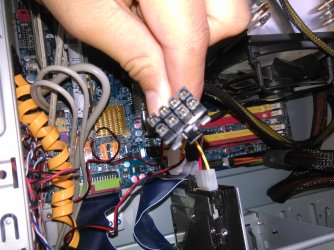
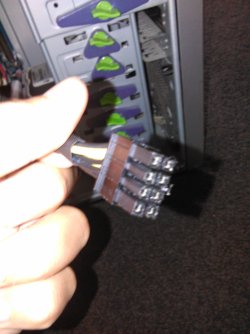
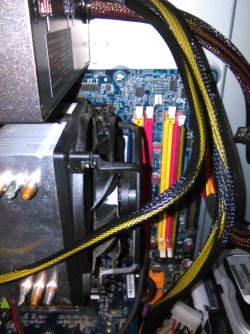
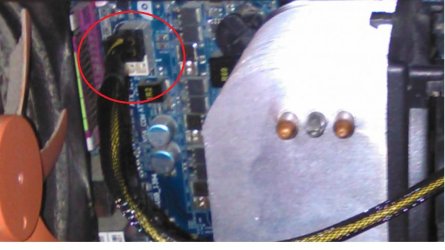
I've attached an image is that supposed to be connected to something if so where?
 

Attachments

  • IMG_20150505_105435.jpg
    IMG_20150505_105435.jpg
    202.8 KB · Views: 3

My Computer My Computer

At a glance

Windows 7 Professional x32Intel Pentium 4 HT4 gbIntergrated Intel Chipset (82945G)
Computer type
PC/Desktop
Computer Manufacturer/Model Number
IBM
OS
Windows 7 Professional x32
CPU
Intel Pentium 4 HT
Memory
4 gb
Graphics Card(s)
Intergrated Intel Chipset (82945G)
Browser
Internet Explorer
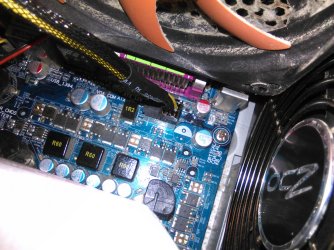
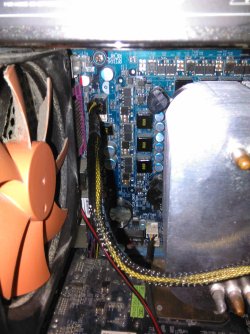
Please help I just connected that 8 pin cord from the power thing into the white port behind the heat sink and now there is no led lights at all
 

Attachments

  • 8 pin cord I was talking about.jpg
    8 pin cord I was talking about.jpg
    527.2 KB · Views: 1
  • another shot of where I put It in.jpg
    another shot of where I put It in.jpg
    479.5 KB · Views: 1
  • Where I plugged the 8 pin cord into.jpg
    Where I plugged the 8 pin cord into.jpg
    582.1 KB · Views: 1

My Computer My Computer

At a glance

Windows 7 Professional x32Intel Pentium 4 HT4 gbIntergrated Intel Chipset (82945G)
Computer type
PC/Desktop
Computer Manufacturer/Model Number
IBM
OS
Windows 7 Professional x32
CPU
Intel Pentium 4 HT
Memory
4 gb
Graphics Card(s)
Intergrated Intel Chipset (82945G)
Browser
Internet Explorer
The top picture I can't tell very well, but it looks like a sata cable which connects to a hard drive. can you take a better picture of the whole inside of the case? It is hard to get any perspective of what I am looking at. The 8 pin that plugs into the CPU power connector should say CPU on it, or they usually do. There should be a clip on one side, feel where it plugs in. There should be a small ridge on one side of where it plugs in. The clip goes over that ridge, to make sure you have it in the proper orientation. If the cable you have says PCIE, that is not the right cable for there.

Was there nothing plugged into the 8 pin receptacle before?

Don't force any of the cables in. They have to be in the exact correct position, but when they are they will go in with very little force.
 

My Computers My Computers

  • At a glance

    Windows 11 ProRyzen 9 5900X32GB G Skill DDR4-3600EVGA RTX 3080 FTW 3 Ultra
    Computer type
    PC/Desktop
    Computer Manufacturer/Model Number
    ALWAYS UNDER CONSTRUCTION
    OS
    Windows 11 Pro
    CPU
    Ryzen 9 5900X
    Motherboard
    Asus X570 Crosshair Viii Hero
    Memory
    32GB G Skill DDR4-3600
    Graphics Card(s)
    EVGA RTX 3080 FTW 3 Ultra
    Sound Card
    On Board/Sennheiser PC37X Headset
    Monitor(s) Displays
    3 X Asus 27"
    Screen Resolution
    2560x1440
    Hard Drives
    2 X 1 TB NVME drives
    PSU
    EVGA 850
    Case
    Phanteks Eclipse P400A
    Cooling
    EVGA 280 AIO
    Keyboard
    Logitech G510s/ Logitech G13
    Mouse
    Logitech G502
    Internet Speed
    24/1
    Antivirus
    ESET/MBAM Pro/SAS Pro
    Browser
    Chrome/ Firefox/ Edge
  • At a glance

    Windows 11 ProIntel Ultra 9 288V32 GB LPDDR5X 8533
    Computer type
    Laptop
    System Manufacturer/Model Number
    Dell 16 Plus
    OS
    Windows 11 Pro
    CPU
    Intel Ultra 9 288V
    Memory
    32 GB LPDDR5X 8533
    Monitor(s) Displays
    16" Mini-LED HDR600 Touch 90 Hz
    Screen Resolution
    2560X1600
    Hard Drives
    1 TB NVME
Ok I will take the picture now
but I need to know have I screwed something up because it wont turn on now
 

My Computer My Computer

At a glance

Windows 7 Professional x32Intel Pentium 4 HT4 gbIntergrated Intel Chipset (82945G)
Computer type
PC/Desktop
Computer Manufacturer/Model Number
IBM
OS
Windows 7 Professional x32
CPU
Intel Pentium 4 HT
Memory
4 gb
Graphics Card(s)
Intergrated Intel Chipset (82945G)
Browser
Internet Explorer
Remove it and see what happens.
 

My Computers My Computers

  • At a glance

    Windows 11 ProRyzen 9 5900X32GB G Skill DDR4-3600EVGA RTX 3080 FTW 3 Ultra
    Computer type
    PC/Desktop
    Computer Manufacturer/Model Number
    ALWAYS UNDER CONSTRUCTION
    OS
    Windows 11 Pro
    CPU
    Ryzen 9 5900X
    Motherboard
    Asus X570 Crosshair Viii Hero
    Memory
    32GB G Skill DDR4-3600
    Graphics Card(s)
    EVGA RTX 3080 FTW 3 Ultra
    Sound Card
    On Board/Sennheiser PC37X Headset
    Monitor(s) Displays
    3 X Asus 27"
    Screen Resolution
    2560x1440
    Hard Drives
    2 X 1 TB NVME drives
    PSU
    EVGA 850
    Case
    Phanteks Eclipse P400A
    Cooling
    EVGA 280 AIO
    Keyboard
    Logitech G510s/ Logitech G13
    Mouse
    Logitech G502
    Internet Speed
    24/1
    Antivirus
    ESET/MBAM Pro/SAS Pro
    Browser
    Chrome/ Firefox/ Edge
  • At a glance

    Windows 11 ProIntel Ultra 9 288V32 GB LPDDR5X 8533
    Computer type
    Laptop
    System Manufacturer/Model Number
    Dell 16 Plus
    OS
    Windows 11 Pro
    CPU
    Intel Ultra 9 288V
    Memory
    32 GB LPDDR5X 8533
    Monitor(s) Displays
    16" Mini-LED HDR600 Touch 90 Hz
    Screen Resolution
    2560X1600
    Hard Drives
    1 TB NVME
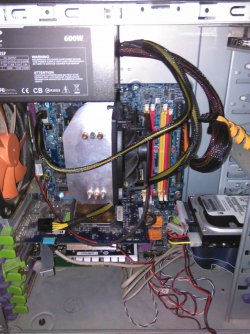
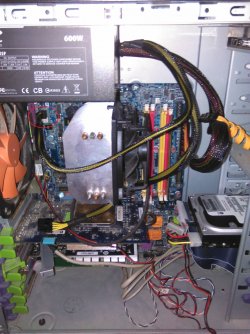
These are the pics I removed the 8 pin thing and put the original one back in (which was a 4 pin one)
Also you sound like you know your computers I know this is off task but my IBM computer has no pcie slot and I just ordered a pcie graphics card is there anything I can do. I cant get stuff online as my dad doesn't trust the interwebs
 

Attachments

  • IMG_20150505_114348.jpg
    IMG_20150505_114348.jpg
    534.4 KB · Views: 1
  • IMG_20150505_114315.jpg
    IMG_20150505_114315.jpg
    361 KB · Views: 1
  • IMG_20150505_114352.jpg
    IMG_20150505_114352.jpg
    514.9 KB · Views: 1
  • IMG_20150505_114341.jpg
    IMG_20150505_114341.jpg
    427.6 KB · Views: 1
  • IMG_20150505_114256.jpg
    IMG_20150505_114256.jpg
    516.7 KB · Views: 3

My Computer My Computer

At a glance

Windows 7 Professional x32Intel Pentium 4 HT4 gbIntergrated Intel Chipset (82945G)
Computer type
PC/Desktop
Computer Manufacturer/Model Number
IBM
OS
Windows 7 Professional x32
CPU
Intel Pentium 4 HT
Memory
4 gb
Graphics Card(s)
Intergrated Intel Chipset (82945G)
Browser
Internet Explorer
just thought i would mention older boards probably wont have an 8 pin connection be a four pin.
 

My Computer My Computer

At a glance

win 10
Computer type
PC/Desktop
Computer Manufacturer/Model Number
dell xps 9000
OS
win 10
I think this one does, but you are right. This one has an 8 pin but only 4 pins connected, I believe. What do you think, Oscar?

z1.JPG

For better perspective

z2.jpg
 

My Computers My Computers

  • At a glance

    Windows 11 ProRyzen 9 5900X32GB G Skill DDR4-3600EVGA RTX 3080 FTW 3 Ultra
    Computer type
    PC/Desktop
    Computer Manufacturer/Model Number
    ALWAYS UNDER CONSTRUCTION
    OS
    Windows 11 Pro
    CPU
    Ryzen 9 5900X
    Motherboard
    Asus X570 Crosshair Viii Hero
    Memory
    32GB G Skill DDR4-3600
    Graphics Card(s)
    EVGA RTX 3080 FTW 3 Ultra
    Sound Card
    On Board/Sennheiser PC37X Headset
    Monitor(s) Displays
    3 X Asus 27"
    Screen Resolution
    2560x1440
    Hard Drives
    2 X 1 TB NVME drives
    PSU
    EVGA 850
    Case
    Phanteks Eclipse P400A
    Cooling
    EVGA 280 AIO
    Keyboard
    Logitech G510s/ Logitech G13
    Mouse
    Logitech G502
    Internet Speed
    24/1
    Antivirus
    ESET/MBAM Pro/SAS Pro
    Browser
    Chrome/ Firefox/ Edge
  • At a glance

    Windows 11 ProIntel Ultra 9 288V32 GB LPDDR5X 8533
    Computer type
    Laptop
    System Manufacturer/Model Number
    Dell 16 Plus
    OS
    Windows 11 Pro
    CPU
    Intel Ultra 9 288V
    Memory
    32 GB LPDDR5X 8533
    Monitor(s) Displays
    16" Mini-LED HDR600 Touch 90 Hz
    Screen Resolution
    2560X1600
    Hard Drives
    1 TB NVME
I have to go take my medicine as I am sick, So I will be off but thank you for your guys help
I'm not saying its solved but I appreciate your guys help

Will be back later
Thanks

Not A Robot
 

My Computer My Computer

At a glance

Windows 7 Professional x32Intel Pentium 4 HT4 gbIntergrated Intel Chipset (82945G)
Computer type
PC/Desktop
Computer Manufacturer/Model Number
IBM
OS
Windows 7 Professional x32
CPU
Intel Pentium 4 HT
Memory
4 gb
Graphics Card(s)
Intergrated Intel Chipset (82945G)
Browser
Internet Explorer
No problem, whenever you feel like it. We never close.
 

My Computers My Computers

  • At a glance

    Windows 11 ProRyzen 9 5900X32GB G Skill DDR4-3600EVGA RTX 3080 FTW 3 Ultra
    Computer type
    PC/Desktop
    Computer Manufacturer/Model Number
    ALWAYS UNDER CONSTRUCTION
    OS
    Windows 11 Pro
    CPU
    Ryzen 9 5900X
    Motherboard
    Asus X570 Crosshair Viii Hero
    Memory
    32GB G Skill DDR4-3600
    Graphics Card(s)
    EVGA RTX 3080 FTW 3 Ultra
    Sound Card
    On Board/Sennheiser PC37X Headset
    Monitor(s) Displays
    3 X Asus 27"
    Screen Resolution
    2560x1440
    Hard Drives
    2 X 1 TB NVME drives
    PSU
    EVGA 850
    Case
    Phanteks Eclipse P400A
    Cooling
    EVGA 280 AIO
    Keyboard
    Logitech G510s/ Logitech G13
    Mouse
    Logitech G502
    Internet Speed
    24/1
    Antivirus
    ESET/MBAM Pro/SAS Pro
    Browser
    Chrome/ Firefox/ Edge
  • At a glance

    Windows 11 ProIntel Ultra 9 288V32 GB LPDDR5X 8533
    Computer type
    Laptop
    System Manufacturer/Model Number
    Dell 16 Plus
    OS
    Windows 11 Pro
    CPU
    Intel Ultra 9 288V
    Memory
    32 GB LPDDR5X 8533
    Monitor(s) Displays
    16" Mini-LED HDR600 Touch 90 Hz
    Screen Resolution
    2560X1600
    Hard Drives
    1 TB NVME
looks like an 8 pin to me from pictures
 

My Computer My Computer

At a glance

win 10
Computer type
PC/Desktop
Computer Manufacturer/Model Number
dell xps 9000
OS
win 10
Back
Top