i want to skrink HDD

khawar

New member
Local time
10:20 AM
Messages
6
i have just bought a hp laptop having hdd of 320gb. and my c drive has space of 288gb.. i want to skrink it. i want to make two c and d drive of 88 and 200 gb.. how can i do it???
 

My Computer My Computer

At a glance

windows 7 home premium 62bit
OS
windows 7 home premium 62bit

My Computer My Computer

At a glance

windows 7Phenom II AMD Dragon 3.5GhzDDR3 4GBATI Radeon 512Mb
Computer Manufacturer/Model Number
built up
OS
windows 7
CPU
Phenom II AMD Dragon 3.5Ghz
Memory
DDR3 4GB
Graphics Card(s)
ATI Radeon 512Mb
Monitor(s) Displays
HP L1506
Screen Resolution
1152 x 864
Hard Drives
WDC 1 TB SATA-II Green Power
Keyboard
HP wireless keyboard
Mouse
HP Optic
Internet Speed
1GB
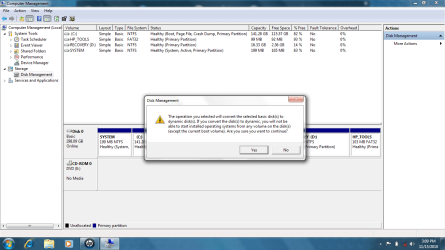
when i do this this... windows shows this dialouge box... what shold i do
 

Attachments

  • Untitled.png
    Untitled.png
    56.9 KB · Views: 14

My Computer My Computer

At a glance

windows 7 home premium 62bit
OS
windows 7 home premium 62bit
Beetter you use Partition Wizard Bootable CD . Burn it in a blank CD with IngBurn at 4x speed . Boot from it . Now if you follow the screenshots of the given link, you would be able to understand what to do with it . If there is a further problem, please post back .

But , before starting anything , you must ot have a http://www.sevenforums.com/tutorials/663-backup-complete-computer-create-image-backup.html ; so that in case of need you can easily restore the backup, and if you dont have the windows 7 DVD, download Windows 7 System Recovery Discs .
 

My Computer My Computer

At a glance

Microsoft Windows 10 Pro Insider Preview 64-bitIntel(R) Core(TM) i3-4130 CPU @ 3.40GHzCorsair Vengence 4GB x2 (8.00GB Dual-Channel ...2047MB GeForce GTS 450 (ZOTAC International)
Computer type
PC/Desktop
Computer Manufacturer/Model Number
Self Assembled
OS
Microsoft Windows 10 Pro Insider Preview 64-bit
CPU
Intel(R) Core(TM) i3-4130 CPU @ 3.40GHz
Motherboard
Gigabyte Technology Co., Ltd. B85M-D3H
Memory
Corsair Vengence 4GB x2 (8.00GB Dual-Channel DDR3 @ 798MHz)
Graphics Card(s)
2047MB GeForce GTS 450 (ZOTAC International)
Sound Card
Onboard (Realtek High Definition Audio)
Monitor(s) Displays
LG Flatron E2040T
Screen Resolution
1600x900
Hard Drives
Western Digital 1 TB
Seagate 500 GB
PSU
Corsair VS550
Case
Cooler Master K380
Cooling
Cooler Master Seidon 120V Plus
Keyboard
Logitech MK260r
Mouse
Logitech MK260r
Internet Speed
PMPL Broadband
Antivirus
Windows Defender + MBAM
Browser
Firefox
Other Info
Dell Studio 15" Laptop
i had a recovery drive d.. how this recovery drive is used.. i have no idea.. it is of 16 GB and almost full.. wt is the purpose of that drive...
 

My Computer My Computer

At a glance

windows 7 home premium 62bit
OS
windows 7 home premium 62bit
i had a recovery drive d.. how this recovery drive is used.. i have no idea.. it is of 16 GB and almost full.. wt is the purpose of that drive...
That is an image of your C drive and System Reserved Drive . You need either Windows 7 DVD or the recovery disk to use it . Booted form that disk, you will get an option to repair your computer .. if you choose that option , it will lead you to that partition and restore the image back .
 

My Computer My Computer

At a glance

Microsoft Windows 10 Pro Insider Preview 64-bitIntel(R) Core(TM) i3-4130 CPU @ 3.40GHzCorsair Vengence 4GB x2 (8.00GB Dual-Channel ...2047MB GeForce GTS 450 (ZOTAC International)
Computer type
PC/Desktop
Computer Manufacturer/Model Number
Self Assembled
OS
Microsoft Windows 10 Pro Insider Preview 64-bit
CPU
Intel(R) Core(TM) i3-4130 CPU @ 3.40GHz
Motherboard
Gigabyte Technology Co., Ltd. B85M-D3H
Memory
Corsair Vengence 4GB x2 (8.00GB Dual-Channel DDR3 @ 798MHz)
Graphics Card(s)
2047MB GeForce GTS 450 (ZOTAC International)
Sound Card
Onboard (Realtek High Definition Audio)
Monitor(s) Displays
LG Flatron E2040T
Screen Resolution
1600x900
Hard Drives
Western Digital 1 TB
Seagate 500 GB
PSU
Corsair VS550
Case
Cooler Master K380
Cooling
Cooler Master Seidon 120V Plus
Keyboard
Logitech MK260r
Mouse
Logitech MK260r
Internet Speed
PMPL Broadband
Antivirus
Windows Defender + MBAM
Browser
Firefox
Other Info
Dell Studio 15" Laptop
wt if dont do partition.. does it have any drawbacks....???

wt if i dont do partition and my original windows somehow becomes corrupt.. can i recover it back from my recovery drive d ..???
 

My Computer My Computer

At a glance

windows 7 home premium 62bit
OS
windows 7 home premium 62bit
wt if dont do partition.. does it have any drawbacks....???

wt if i dont do partition and my original windows somehow becomes corrupt.. can i recover it back from my recovery drive d ..???
Yes you can recover ... but upto that extent which is included in that partition ... not any of your recent data .
 

My Computer My Computer

At a glance

Microsoft Windows 10 Pro Insider Preview 64-bitIntel(R) Core(TM) i3-4130 CPU @ 3.40GHzCorsair Vengence 4GB x2 (8.00GB Dual-Channel ...2047MB GeForce GTS 450 (ZOTAC International)
Computer type
PC/Desktop
Computer Manufacturer/Model Number
Self Assembled
OS
Microsoft Windows 10 Pro Insider Preview 64-bit
CPU
Intel(R) Core(TM) i3-4130 CPU @ 3.40GHz
Motherboard
Gigabyte Technology Co., Ltd. B85M-D3H
Memory
Corsair Vengence 4GB x2 (8.00GB Dual-Channel DDR3 @ 798MHz)
Graphics Card(s)
2047MB GeForce GTS 450 (ZOTAC International)
Sound Card
Onboard (Realtek High Definition Audio)
Monitor(s) Displays
LG Flatron E2040T
Screen Resolution
1600x900
Hard Drives
Western Digital 1 TB
Seagate 500 GB
PSU
Corsair VS550
Case
Cooler Master K380
Cooling
Cooler Master Seidon 120V Plus
Keyboard
Logitech MK260r
Mouse
Logitech MK260r
Internet Speed
PMPL Broadband
Antivirus
Windows Defender + MBAM
Browser
Firefox
Other Info
Dell Studio 15" Laptop
suppose i have only one drive c.. where all my data and windows recides...
once it get corrupted.... will i be able to recover all my data... wt should i do to recover that...

should i have only 1 partition or two partitions... wts ur advice..??
 

My Computer My Computer

At a glance

windows 7 home premium 62bit
OS
windows 7 home premium 62bit
before starting anything , you must ot have a http://www.sevenforums.com/tutorials/663-backup-complete-computer-create-image-backup.html ; so that in case of need you can easily restore the backup, and if you dont have the windows 7 DVD, download Windows 7 System Recovery Discs .

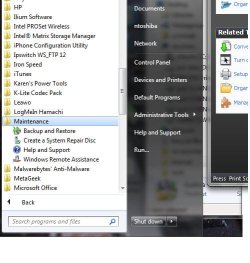
Windows 7 (or at least some versions) allow you to create a recovery disk
when you do an image backup of your system, prior to any modification of the
partitions.

If you would like a more versitile image and backup program, I recommend Acronis backup program.

My personal opinion of downloading microsoft products from a 3rd party source is not a good idea. That's where the bad guys prey on people.

YMMV
Rich
 

Attachments

  • windowsrecoverydisk.jpg
    windowsrecoverydisk.jpg
    41.2 KB · Views: 3

My Computer My Computer

At a glance

Windows 7 Pro x64 SP1Intel Core I716 GigsNVIDIA GeForce GTX 670M
Computer type
Laptop
Computer Manufacturer/Model Number
Toshiba Laptop Qosimo X870
OS
Windows 7 Pro x64 SP1
CPU
Intel Core I7
Motherboard
Toshiba Qosmio
Memory
16 Gigs
Graphics Card(s)
NVIDIA GeForce GTX 670M
Monitor(s) Displays
17.7" laptop
Screen Resolution
1600 x 900
Hard Drives
256 Gig SanDisk SSD for C
256 Gig Intel SSD for D
Internet Speed
50/25 FIOS
Antivirus
Vipre (all you can eat for 10 machines)
Browser
IE and FF
Other Info
I have dos 6.22, wfwg 3.11, win98, 2000 and xp VHD's available for testing. MS's Virtual PC works great.
i have to make backup on regular intervals to recover my windows and data... if all my data is in c drive..

can u tell tell me an easy way to partition my c drive without having the problm i mention eariler.. soo that i dont have to backup all my stuff.. i only need backup windows... am i correct???
 

My Computer My Computer

At a glance

windows 7 home premium 62bit
OS
windows 7 home premium 62bit
The best way is (as the lappy is brand new , and so having a little personal data I guess) to do it from the beginning , if you have windows 7 DVD to install windows 7 .

Boot from partition wizard boot CD , and make a primary C partition, and a logical D partition . Now install windows in C (the System Reserved partition will be automatically created during installation ) . After installing windows , all the other programs and having all the needful customizations done , Back C and System Reserved up (preferably in DVDs , as there is only one HDD).

But if you dont have Win 7 DVD , you are to shrink your HDD to create free space for a new partition . I posted the link of grtting the Partition Wizard Bootable CD in previous page . Use it , follow the tutorial http://www.sevenforums.com/tutorials/93322-partition-wizard-use-bootable-cd.html ; specially the OPTION ONE : Shrink / Create a (fourth) Primary Partition .
 
Last edited by a moderator:

My Computer My Computer

At a glance

Microsoft Windows 10 Pro Insider Preview 64-bitIntel(R) Core(TM) i3-4130 CPU @ 3.40GHzCorsair Vengence 4GB x2 (8.00GB Dual-Channel ...2047MB GeForce GTS 450 (ZOTAC International)
Computer type
PC/Desktop
Computer Manufacturer/Model Number
Self Assembled
OS
Microsoft Windows 10 Pro Insider Preview 64-bit
CPU
Intel(R) Core(TM) i3-4130 CPU @ 3.40GHz
Motherboard
Gigabyte Technology Co., Ltd. B85M-D3H
Memory
Corsair Vengence 4GB x2 (8.00GB Dual-Channel DDR3 @ 798MHz)
Graphics Card(s)
2047MB GeForce GTS 450 (ZOTAC International)
Sound Card
Onboard (Realtek High Definition Audio)
Monitor(s) Displays
LG Flatron E2040T
Screen Resolution
1600x900
Hard Drives
Western Digital 1 TB
Seagate 500 GB
PSU
Corsair VS550
Case
Cooler Master K380
Cooling
Cooler Master Seidon 120V Plus
Keyboard
Logitech MK260r
Mouse
Logitech MK260r
Internet Speed
PMPL Broadband
Antivirus
Windows Defender + MBAM
Browser
Firefox
Other Info
Dell Studio 15" Laptop
Back
Top