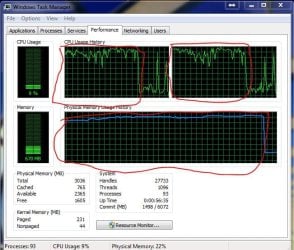
I was playing Planetside 2 and it crashed. Pic inside

Brennanathome

New member
Local time
12:31 AM
Messages
22
Location
USA
I was playing planetside 2 and getting into the middle of the battle, when things started to get a little choppy. I looked at my performance and this was there... is this normal while running on a Dell Studio 1555 laptop?

Thanks,
Brennan
 

Attachments

  • Capture.JPG
    Capture.JPG
    79.8 KB · Views: 27

My Computer My Computer

At a glance

windows 7 home premium 64 bitIntel core-i5 25008gb Hyperx 1300Sapphire AMD radeon 7770
Computer Manufacturer/Model Number
ME
OS
windows 7 home premium 64 bit
CPU
Intel core-i5 2500
Motherboard
ASRock Pro3 Z68
Memory
8gb Hyperx 1300
Graphics Card(s)
Sapphire AMD radeon 7770
Monitor(s) Displays
AOC 21 inch
Screen Resolution
1600x900
Hard Drives
500 gb seagate barricuda HDD
PSU
Diablotek DA series 600 watt
Case
thermite V9 black edition
Cooling
stock fans/heatsink
Keyboard
Microsoft comfort curve 200
Mouse
Microsoft Comfort optical mouse 1000
Internet Speed
http://www.speedtest.net/result/2041187314.png
Hello Brennan. My usual disclaimer: I'm not an expert at anything. :) But here are a couple of things you could check for.

Run a full scan with your resident anti-virus suite. Since no anti-malware product will be 100% effective 100% of the time, it wouldn't hurt to double-check with a couple of free on-demand scanners.

Malwarebytes

ESET Online Scanner

You could also check for any damaged or corrupt system files by running a system file checker scan from an elevated command prompt (Option two.) If problems are found, run the scan 3 tiems and reboot the computer after each scan.

http://www.sevenforums.com/tutorials/1538-sfc-scannow-command-system-file-checker.html

I'm guessing you've been playing planetside 2 before without any issues. So that raises the question: has something about your computer recently changed? New Windows updates? New USB devices? Other new programs installed? Etc. If yes, you could try using a restore point to roll back your machine to a date/time prior to these performance issues first appearing.

http://www.sevenforums.com/tutorials/700-system-restore.html

You could also see if there are any application conflicts that might be affecting game play. Try doing a clean boot (AKA clean startup) to rule out any conflicts.

http://www.sevenforums.com/tutorial...ation-conflicts-performing-clean-startup.html

And a couple of Microsoft KB articles that may help.

Fixing game performance problems

Game crashes or closes unexpectedly
 

My Computer My Computer

At a glance

Win 7 Pro 64-bitIntel i5 2.4 Ghz8GB DDR3Intel HD 3000
Computer type
Laptop
Computer Manufacturer/Model Number
Sony Vaio VPCEB47GM Laptop
OS
Win 7 Pro 64-bit
CPU
Intel i5 2.4 Ghz
Memory
8GB DDR3
Graphics Card(s)
Intel HD 3000
Sound Card
IDT High Definition
Monitor(s) Displays
15.6 WGXA Anti-Glare LED
Screen Resolution
1280x800
Hard Drives
640Gb 7200rpm
Antivirus
MSE
Browser
Opera (primary) with IE9 backup
It's unlikely that malware is crashing your game.

It is normal to see an increase in CPU and memory usage while playing a game of that magnitude on a device such as yours. The crash could result from many issues, such as the game itself or your software/hardware. I would first attempt to lower the graphics settings in the game and see how running in Windowed mode does (just for troubleshooting purposes).

If that doesn't work then reinstall the game. Then reinstall your drivers.

Try to find any error log that could help troubleshoot this issue. I believe Event Viewer could have application logs for this game.
 

My Computer My Computer

At a glance

Windows 7 Pro x64Intel Core i7 920Corsair XMS3 12GB (3x2GB) DDR3 1333EVGA GTX 470 1280MB GDDR5 DX11
Computer Manufacturer/Model Number
Me
OS
Windows 7 Pro x64
CPU
Intel Core i7 920
Motherboard
ASUS P6T Deluxe V2
Memory
Corsair XMS3 12GB (3x2GB) DDR3 1333
Graphics Card(s)
EVGA GTX 470 1280MB GDDR5 DX11
Monitor(s) Displays
ASUS VW246H | ACER AL2216W
Screen Resolution
3600x1080
Hard Drives
1x Corsair Vertex 3 SSD (120GB)
1x Corsair Vertex 2 SSD (60GB)
2x Western Digital Black (500GB/1TB)
1x External WD Green eSATA (1TB)
PSU
Corsair 850HX
Case
Velocity Micro FullTower
Keyboard
Logitech G110
Mouse
Logitech G500
Internet Speed
http://www.speedtest.net/result/1226664359.png
Antivirus
MSE
Browser
Chrome
Other Info
Logitech Z-5500 5.1 Surround Sound
Logitech C260 Webcam
Creative Fatal1ty Headset
I can never read what that CPU history is trying to tell me but I would do what the others have suggested... it can only make your laptop faster ;)

Now, one thing I noticed from looking at that image is:

93 Processes Running? what in the name of all that is pure are you running in the background that requires you to run all those processes? :eek: :shock:

If you are running all those processes and also playing a game, well, I would suspect your CPU is crying wolf! ;)
 

My Computer My Computer

At a glance

Windows 7 x64 (Ultimate)Intel i5-4670K8GBs Ripjaws 2133MhzAsus GTX660 (2GBs)
Computer type
PC/Desktop
Computer Manufacturer/Model Number
Custom Built... Intel/Nvidia/ASRock
OS
Windows 7 x64 (Ultimate)
CPU
Intel i5-4670K
Motherboard
ASRock Z87 Extreme 6
Memory
8GBs Ripjaws 2133Mhz
Graphics Card(s)
Asus GTX660 (2GBs)
Sound Card
Onboard Realtek HD
Monitor(s) Displays
Acer AL2216W
Screen Resolution
1680 x 1050
Hard Drives
Samsung 840 SSD 120GBs
Samsung 750GB 32MB cache
1.5 TB
PSU
PC Cooling 750w Silencer
Case
Thermaltake Spedo Advance
Cooling
Std Cooler
Keyboard
Logitech G15
Mouse
Logitech G9
Internet Speed
Comcast 20Mbit
Antivirus
Avast
Browser
Firefox
@AstaLaVista Well I'm no expert at computers so i dont know what processes could be a problem, and what is simply the system. If someone could help with that, i am guessing that it might help overall performance as well?

Thanks,
Brennan
 

My Computer My Computer

At a glance

windows 7 home premium 64 bitIntel core-i5 25008gb Hyperx 1300Sapphire AMD radeon 7770
Computer Manufacturer/Model Number
ME
OS
windows 7 home premium 64 bit
CPU
Intel core-i5 2500
Motherboard
ASRock Pro3 Z68
Memory
8gb Hyperx 1300
Graphics Card(s)
Sapphire AMD radeon 7770
Monitor(s) Displays
AOC 21 inch
Screen Resolution
1600x900
Hard Drives
500 gb seagate barricuda HDD
PSU
Diablotek DA series 600 watt
Case
thermite V9 black edition
Cooling
stock fans/heatsink
Keyboard
Microsoft comfort curve 200
Mouse
Microsoft Comfort optical mouse 1000
Internet Speed
http://www.speedtest.net/result/2041187314.png
+1 for lowering your settings. I've played a bit of PS2 myself and its a pretty demanding game. If i run it at max settings my FPS can be as low as 30.
 

My Computer My Computer

At a glance

Win7 Home Premium x64 SP1i7 4770k8Gb Kingston HyperX Beast 2400MHz @2133MHz 11...MSI GTX 780ti Gaming Oc x2
Computer type
PC/Desktop
Computer Manufacturer/Model Number
Custom build
OS
Win7 Home Premium x64 SP1
CPU
i7 4770k
Motherboard
Asus maximus VI Hero
Memory
8Gb Kingston HyperX Beast 2400MHz @2133MHz 11-12-11-30
Graphics Card(s)
MSI GTX 780ti Gaming Oc x2
Sound Card
Onboard ROG SupremeFX
Monitor(s) Displays
Asus VG248QE
Screen Resolution
3840X1080 144Hz
Hard Drives
Samung Evo 256Gb, OCZ Agility4 128Gb
1x1TB hitachi storage
PSU
EVGA Supernova 1000w Platinum
Case
Corsair Air 540
Cooling
Corsair H100i
Keyboard
Coolermaster Quickfire Pro
Mouse
Corsair M65 RGB
Internet Speed
74mb dwn/16up
Antivirus
MSE,Malwarebytes
Browser
Chrome
@AstaLaVista Well I'm no expert at computers so i dont know what processes could be a problem, and what is simply the system. If someone could help with that, i am guessing that it might help overall performance as well?

Thanks,
Brennan

Again no expert but, if you take a snap of your Processes (2 tabs to the left of the screen you posted), we may be able to help further.

Another thing you can do is... click on the Orb (old Start Button) and type 'msconfig' on the search window and hit enter, the System Configuration window will pop up, click on the StartUp tab and look at all the StartUp items you have that are Enable to start and Disable those that you know you don't need at startup (when windows starts).

Things you don't need Starting. For Example... Adobe Reader or any Adobe Crap. HP Software Update or Tracking Usages. What I did was, I went to Safe mode and looked at the Startup Tab and made sure to only enable those first, then I started enabling other things that I really needed to start... the majority is crap and you don't need them to start until you need to use the application.

Also, if you click on the 'Services' tab and click on "Hide all Microsoft Services", you will also find a lot of process being Enabled that you don't need and you can stop them from starting. Again, Safe mode could help with this and if you find something is not letting you proceed, you can go ahead and enable it.

Yes, time consuming and perhaps a bit complex but you have to do this only once and your computer and your gaming will Thank you later.

 

My Computer My Computer

At a glance

Windows 7 x64 (Ultimate)Intel i5-4670K8GBs Ripjaws 2133MhzAsus GTX660 (2GBs)
Computer type
PC/Desktop
Computer Manufacturer/Model Number
Custom Built... Intel/Nvidia/ASRock
OS
Windows 7 x64 (Ultimate)
CPU
Intel i5-4670K
Motherboard
ASRock Z87 Extreme 6
Memory
8GBs Ripjaws 2133Mhz
Graphics Card(s)
Asus GTX660 (2GBs)
Sound Card
Onboard Realtek HD
Monitor(s) Displays
Acer AL2216W
Screen Resolution
1680 x 1050
Hard Drives
Samsung 840 SSD 120GBs
Samsung 750GB 32MB cache
1.5 TB
PSU
PC Cooling 750w Silencer
Case
Thermaltake Spedo Advance
Cooling
Std Cooler
Keyboard
Logitech G15
Mouse
Logitech G9
Internet Speed
Comcast 20Mbit
Antivirus
Avast
Browser
Firefox
Back
Top