I would like Word to open links in Firefox instead of Chrome

Chiliem

New member
Local time
4:16 PM
Messages
13
I would like Word to open links in Firefox instead of Chrome, but I only get two options - no browse button ...
 
Last edited:

My Computer My Computer

At a glance

Windows 7 Ultimate x64AMD Phenom II X4 965, 3400 Mhz, 4 cores, 4 lo...4GBNVIDIA GeForce GTX 460
OS
Windows 7 Ultimate x64
CPU
AMD Phenom II X4 965, 3400 Mhz, 4 cores, 4 logical processor
Memory
4GB
Graphics Card(s)
NVIDIA GeForce GTX 460
Sound Card
NVIDIA High Definition Audio
Monitor(s) Displays
SyncMaster B2230W
Screen Resolution
1680x1050
Hard Drives
500GB
Case
CM 690 II Advanced Black
Keyboard
Wave Keyboard
Mouse
Laser Mouse G9X
Internet Speed
wireless

My Computer My Computer

At a glance

Windows 7 Home Premium 64bitIntel(R) Core(TM) i3-2120 CPU @ 3.30GHz3.00 GB(1) Intel(R) HD Graphics (2) VNC Mirror Driver
Computer type
PC/Desktop
Computer Manufacturer/Model Number
Packard Bell
OS
Windows 7 Home Premium 64bit
CPU
Intel(R) Core(TM) i3-2120 CPU @ 3.30GHz
Motherboard
Packard Bell IPISB-AG
Memory
3.00 GB
Graphics Card(s)
(1) Intel(R) HD Graphics (2) VNC Mirror Driver
Sound Card
Realtek High Definition Audio
Monitor(s) Displays
AIO LCD
Screen Resolution
1920 x 1080
Hard Drives
WDC WD10EADX-22TDHB0 ATA Device
Fixed hard disk media
4 partitions
931.51 GB
Keyboard
Wireless
Mouse
Wireless
Antivirus
Microsoft Security Essentials
Browser
IE; Firefox
Other Info
Also:
Samsung N220 Plus Netbook - Windows 7 Home
HP laptop
iPad 5
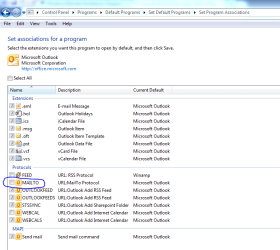
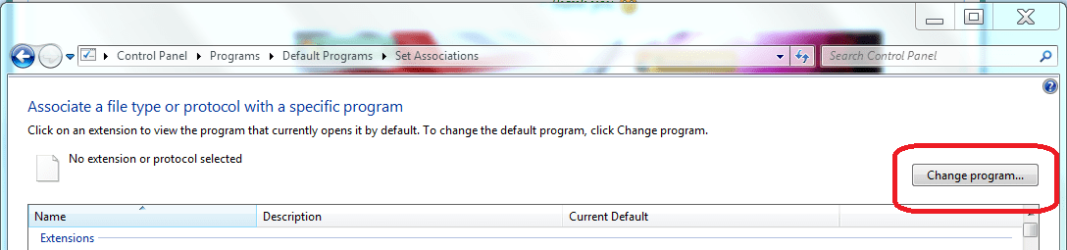
Firefox already is set as my default browser :) It appears this problem of the browsing button not appearing only exists with the protocols, listed at the bottom in the same window.
 

My Computer My Computer

At a glance

Windows 7 Ultimate x64AMD Phenom II X4 965, 3400 Mhz, 4 cores, 4 lo...4GBNVIDIA GeForce GTX 460
OS
Windows 7 Ultimate x64
CPU
AMD Phenom II X4 965, 3400 Mhz, 4 cores, 4 logical processor
Memory
4GB
Graphics Card(s)
NVIDIA GeForce GTX 460
Sound Card
NVIDIA High Definition Audio
Monitor(s) Displays
SyncMaster B2230W
Screen Resolution
1680x1050
Hard Drives
500GB
Case
CM 690 II Advanced Black
Keyboard
Wave Keyboard
Mouse
Laser Mouse G9X
Internet Speed
wireless

My Computer My Computer

At a glance

Windows 7 Home Premium 64bitIntel(R) Core(TM) i3-2120 CPU @ 3.30GHz3.00 GB(1) Intel(R) HD Graphics (2) VNC Mirror Driver
Computer type
PC/Desktop
Computer Manufacturer/Model Number
Packard Bell
OS
Windows 7 Home Premium 64bit
CPU
Intel(R) Core(TM) i3-2120 CPU @ 3.30GHz
Motherboard
Packard Bell IPISB-AG
Memory
3.00 GB
Graphics Card(s)
(1) Intel(R) HD Graphics (2) VNC Mirror Driver
Sound Card
Realtek High Definition Audio
Monitor(s) Displays
AIO LCD
Screen Resolution
1920 x 1080
Hard Drives
WDC WD10EADX-22TDHB0 ATA Device
Fixed hard disk media
4 partitions
931.51 GB
Keyboard
Wireless
Mouse
Wireless
Antivirus
Microsoft Security Essentials
Browser
IE; Firefox
Other Info
Also:
Samsung N220 Plus Netbook - Windows 7 Home
HP laptop
iPad 5
Sorry, but that looks like the same answer in other words :)
The problem is that when clicking the 'mailto' protocol near the bottom of the list (in the window 'Control Panel\Programs\Default Programs\Set Associations'), I don't see a 'Browse...' button as is the case when clicking one of the file extensions above the listed protocols. In case of the 'mailto' protocol there's only Google Chrome and Microsoft Outlook to choose from.
 

My Computer My Computer

At a glance

Windows 7 Ultimate x64AMD Phenom II X4 965, 3400 Mhz, 4 cores, 4 lo...4GBNVIDIA GeForce GTX 460
OS
Windows 7 Ultimate x64
CPU
AMD Phenom II X4 965, 3400 Mhz, 4 cores, 4 logical processor
Memory
4GB
Graphics Card(s)
NVIDIA GeForce GTX 460
Sound Card
NVIDIA High Definition Audio
Monitor(s) Displays
SyncMaster B2230W
Screen Resolution
1680x1050
Hard Drives
500GB
Case
CM 690 II Advanced Black
Keyboard
Wave Keyboard
Mouse
Laser Mouse G9X
Internet Speed
wireless
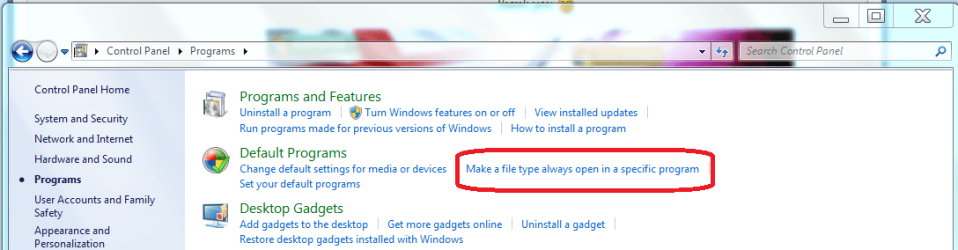
When I use the following path, I have the option to change the program for the file type extension:

Control panel / Programs / Make a file type always open a specific program / then select the file extension. On the top right-hand side is a button labelled 'Change', after this point, the recommended programs are listed and a browse button on bottom right. Do you not get this option?
.
.
 

Attachments

  • Open specific program.PNG
    Open specific program.PNG
    37.7 KB · Views: 14
  • change program.PNG
    change program.PNG
    25.9 KB · Views: 8
  • Browse option.PNG
    Browse option.PNG
    14.8 KB · Views: 9

My Computer My Computer

At a glance

Windows 7 Home Premium 64bitIntel(R) Core(TM) i3-2120 CPU @ 3.30GHz3.00 GB(1) Intel(R) HD Graphics (2) VNC Mirror Driver
Computer type
PC/Desktop
Computer Manufacturer/Model Number
Packard Bell
OS
Windows 7 Home Premium 64bit
CPU
Intel(R) Core(TM) i3-2120 CPU @ 3.30GHz
Motherboard
Packard Bell IPISB-AG
Memory
3.00 GB
Graphics Card(s)
(1) Intel(R) HD Graphics (2) VNC Mirror Driver
Sound Card
Realtek High Definition Audio
Monitor(s) Displays
AIO LCD
Screen Resolution
1920 x 1080
Hard Drives
WDC WD10EADX-22TDHB0 ATA Device
Fixed hard disk media
4 partitions
931.51 GB
Keyboard
Wireless
Mouse
Wireless
Antivirus
Microsoft Security Essentials
Browser
IE; Firefox
Other Info
Also:
Samsung N220 Plus Netbook - Windows 7 Home
HP laptop
iPad 5
Look in Control Panel\Default Programs -> Set Associations
sort your list by Current Default
look for anything associated with chrome
change what you need to firefox

It's probably .url (Internet shortcut) that associates links in Word but I'm not certain.

Did that work?
 

My Computer My Computer

At a glance

x64 (6.3.9600) Win8.1 Pro & soon dual boot x6...AMD A6-3420M APU with Radeon(tm) HD Graphics6.00 GBAMD Radeon(TM) HD 6520G
Computer type
Laptop
Computer Manufacturer/Model Number
HP Pavilion dv6-6c10us
OS
x64 (6.3.9600) Win8.1 Pro & soon dual boot x64 (6.1.7601) Win7_SP1 HomePrem
CPU
AMD A6-3420M APU with Radeon(tm) HD Graphics
Motherboard
Hewlett-Packard 1805
Memory
6.00 GB
Graphics Card(s)
AMD Radeon(TM) HD 6520G
Sound Card
(1) AMD High Definition Audio Device (2) IDT High Definiti
Monitor(s) Displays
HP W2072a 20" LCD (1600 x 900) @ 60 Hz
Screen Resolution
1366 x 768 x 32 bits (4294967296 colors) @ 60 Hz
Hard Drives
ST640LM0 00 HM641JI SATA Disk Device
Keyboard
Logitech k520 wireless KB
Mouse
Logitech m320 wireless mouse (bundled with KB)
Internet Speed
15/5 | 54 MB Wireless 'n'
Antivirus
Realtime: Defender or Avast | On-demand: Malwarebytes, ESET
Browser
IE 11 on Win8, IE 10 on win 7
Other Info
Media: [Gimp, Audacity, VLC] || Comm: [WEmail 2012, Skype] || Productivity: [OpenOffice,| Textpad] || Utils: [Sysinternals, cCleaner, Speccy, Defraggler]
As for the extensions: I have no defaults set for Google Chrome. I've taken a look at the program associated with the .url extension and it was 'Internet Browser' (with 'Microsoft Corporation' underneath that). I changed that to Mozilla Firefox and again tried to open a link in Word, hoping this time it would launch Firefox, but it didn't.
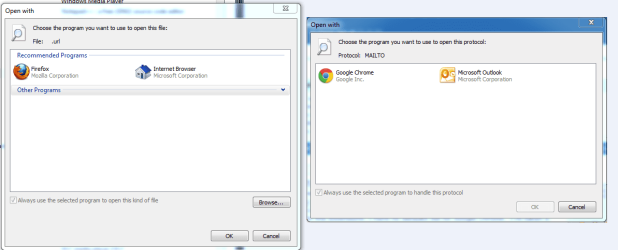
The only things I have associated with Google Chrome are two protocols: 'MAILTO' and 'WEBCAL'; none of which I can change - whichever protocol I want to change, I never get a 'Browse...' button as when clicking the extensions.
Compare the left window (when clicking an extension to change it) to the right ( ~ protocol ~)
 

Attachments

  • problem.PNG
    problem.PNG
    23.3 KB · Views: 10
Last edited:

My Computer My Computer

At a glance

Windows 7 Ultimate x64AMD Phenom II X4 965, 3400 Mhz, 4 cores, 4 lo...4GBNVIDIA GeForce GTX 460
OS
Windows 7 Ultimate x64
CPU
AMD Phenom II X4 965, 3400 Mhz, 4 cores, 4 logical processor
Memory
4GB
Graphics Card(s)
NVIDIA GeForce GTX 460
Sound Card
NVIDIA High Definition Audio
Monitor(s) Displays
SyncMaster B2230W
Screen Resolution
1680x1050
Hard Drives
500GB
Case
CM 690 II Advanced Black
Keyboard
Wave Keyboard
Mouse
Laser Mouse G9X
Internet Speed
wireless
thanks!
 
Last edited:

My Computer My Computer

At a glance

Windows 7 Ultimate x64AMD Phenom II X4 965, 3400 Mhz, 4 cores, 4 lo...4GBNVIDIA GeForce GTX 460
OS
Windows 7 Ultimate x64
CPU
AMD Phenom II X4 965, 3400 Mhz, 4 cores, 4 logical processor
Memory
4GB
Graphics Card(s)
NVIDIA GeForce GTX 460
Sound Card
NVIDIA High Definition Audio
Monitor(s) Displays
SyncMaster B2230W
Screen Resolution
1680x1050
Hard Drives
500GB
Case
CM 690 II Advanced Black
Keyboard
Wave Keyboard
Mouse
Laser Mouse G9X
Internet Speed
wireless
Ok, was this solved and how? I don't think I see THE solution.
 

My Computer My Computer

At a glance

x64 (6.3.9600) Win8.1 Pro & soon dual boot x6...AMD A6-3420M APU with Radeon(tm) HD Graphics6.00 GBAMD Radeon(TM) HD 6520G
Computer type
Laptop
Computer Manufacturer/Model Number
HP Pavilion dv6-6c10us
OS
x64 (6.3.9600) Win8.1 Pro & soon dual boot x64 (6.1.7601) Win7_SP1 HomePrem
CPU
AMD A6-3420M APU with Radeon(tm) HD Graphics
Motherboard
Hewlett-Packard 1805
Memory
6.00 GB
Graphics Card(s)
AMD Radeon(TM) HD 6520G
Sound Card
(1) AMD High Definition Audio Device (2) IDT High Definiti
Monitor(s) Displays
HP W2072a 20" LCD (1600 x 900) @ 60 Hz
Screen Resolution
1366 x 768 x 32 bits (4294967296 colors) @ 60 Hz
Hard Drives
ST640LM0 00 HM641JI SATA Disk Device
Keyboard
Logitech k520 wireless KB
Mouse
Logitech m320 wireless mouse (bundled with KB)
Internet Speed
15/5 | 54 MB Wireless 'n'
Antivirus
Realtime: Defender or Avast | On-demand: Malwarebytes, ESET
Browser
IE 11 on Win8, IE 10 on win 7
Other Info
Media: [Gimp, Audacity, VLC] || Comm: [WEmail 2012, Skype] || Productivity: [OpenOffice,| Textpad] || Utils: [Sysinternals, cCleaner, Speccy, Defraggler]
Nope, hit the button prematurely *blush*
Still no solution.
 

My Computer My Computer

At a glance

Windows 7 Ultimate x64AMD Phenom II X4 965, 3400 Mhz, 4 cores, 4 lo...4GBNVIDIA GeForce GTX 460
OS
Windows 7 Ultimate x64
CPU
AMD Phenom II X4 965, 3400 Mhz, 4 cores, 4 logical processor
Memory
4GB
Graphics Card(s)
NVIDIA GeForce GTX 460
Sound Card
NVIDIA High Definition Audio
Monitor(s) Displays
SyncMaster B2230W
Screen Resolution
1680x1050
Hard Drives
500GB
Case
CM 690 II Advanced Black
Keyboard
Wave Keyboard
Mouse
Laser Mouse G9X
Internet Speed
wireless
Ok, I thought that might have been the case. I did read a bit on the subject and there's some concern out there about MS's lock on Word / Internet Shortcuts. This is probably due to unfamiliarity (my case) or limited documentation (also my case). ni haven't used word for many years and I'm checking on an older system.

Check Control Panel\Default Programs
Program access and defaults - change what's obvious or post an image and i''l try to help, but there's reaaly not much there to choose from.
-> probably a custom configuration

also check
set your default programs -
choose FF - set this to be the default
and
make sure FF has all of it's defaults (there should be a select all defaults box on the left side of the dialog)

Close any Office app and reopen - any good?

If i recall, MS Office has it's own special configuration for HyperLinks, but can't find a reference.
 

My Computer My Computer

At a glance

x64 (6.3.9600) Win8.1 Pro & soon dual boot x6...AMD A6-3420M APU with Radeon(tm) HD Graphics6.00 GBAMD Radeon(TM) HD 6520G
Computer type
Laptop
Computer Manufacturer/Model Number
HP Pavilion dv6-6c10us
OS
x64 (6.3.9600) Win8.1 Pro & soon dual boot x64 (6.1.7601) Win7_SP1 HomePrem
CPU
AMD A6-3420M APU with Radeon(tm) HD Graphics
Motherboard
Hewlett-Packard 1805
Memory
6.00 GB
Graphics Card(s)
AMD Radeon(TM) HD 6520G
Sound Card
(1) AMD High Definition Audio Device (2) IDT High Definiti
Monitor(s) Displays
HP W2072a 20" LCD (1600 x 900) @ 60 Hz
Screen Resolution
1366 x 768 x 32 bits (4294967296 colors) @ 60 Hz
Hard Drives
ST640LM0 00 HM641JI SATA Disk Device
Keyboard
Logitech k520 wireless KB
Mouse
Logitech m320 wireless mouse (bundled with KB)
Internet Speed
15/5 | 54 MB Wireless 'n'
Antivirus
Realtime: Defender or Avast | On-demand: Malwarebytes, ESET
Browser
IE 11 on Win8, IE 10 on win 7
Other Info
Media: [Gimp, Audacity, VLC] || Comm: [WEmail 2012, Skype] || Productivity: [OpenOffice,| Textpad] || Utils: [Sysinternals, cCleaner, Speccy, Defraggler]
Could you possibly show an example of the type of link you would like to open in Firefox?

Does 'the link' show any extension?

What happens if you right-click it? - can you see 'Properties' listed at all? If so, look in there for any relevant information.
 

My Computer My Computer

At a glance

Windows 7 Home Premium 64bitIntel(R) Core(TM) i3-2120 CPU @ 3.30GHz3.00 GB(1) Intel(R) HD Graphics (2) VNC Mirror Driver
Computer type
PC/Desktop
Computer Manufacturer/Model Number
Packard Bell
OS
Windows 7 Home Premium 64bit
CPU
Intel(R) Core(TM) i3-2120 CPU @ 3.30GHz
Motherboard
Packard Bell IPISB-AG
Memory
3.00 GB
Graphics Card(s)
(1) Intel(R) HD Graphics (2) VNC Mirror Driver
Sound Card
Realtek High Definition Audio
Monitor(s) Displays
AIO LCD
Screen Resolution
1920 x 1080
Hard Drives
WDC WD10EADX-22TDHB0 ATA Device
Fixed hard disk media
4 partitions
931.51 GB
Keyboard
Wireless
Mouse
Wireless
Antivirus
Microsoft Security Essentials
Browser
IE; Firefox
Other Info
Also:
Samsung N220 Plus Netbook - Windows 7 Home
HP laptop
iPad 5
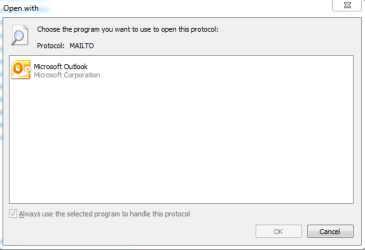
Hmm, this is strange. The box next to mailto isn't ticked, yet the e-maillinks I open within a Word document open in Outlook.
By the way; I've temporarily uninstalled Google Chrome. Now, double clicking the MAILTO protocol to choose the associated program, there's only Microsoft Outlook to choose from and still no 'Browse...' button.
 

Attachments

  • Capture.PNG
    Capture.PNG
    23.5 KB · Views: 3
  • Capture2.PNG
    Capture2.PNG
    6.9 KB · Views: 1
Last edited:

My Computer My Computer

At a glance

Windows 7 Ultimate x64AMD Phenom II X4 965, 3400 Mhz, 4 cores, 4 lo...4GBNVIDIA GeForce GTX 460
OS
Windows 7 Ultimate x64
CPU
AMD Phenom II X4 965, 3400 Mhz, 4 cores, 4 logical processor
Memory
4GB
Graphics Card(s)
NVIDIA GeForce GTX 460
Sound Card
NVIDIA High Definition Audio
Monitor(s) Displays
SyncMaster B2230W
Screen Resolution
1680x1050
Hard Drives
500GB
Case
CM 690 II Advanced Black
Keyboard
Wave Keyboard
Mouse
Laser Mouse G9X
Internet Speed
wireless
Just to recap:

Control Panel -> Default Programs

Set Associations
.url - you added open with FF

Set Default Pgms
- Selected FF
---> clicked Set this pgm as default
and
---> choose defaults for this pgm, ticked select all

- Set pgm accesss...
---> custom, FF is the default browser selected (it's probably showing "Use my default..." as selected) - make sure by ticking the FF radio button only and ok all the way out.

What version of Office are you running? Probably should have asked that earlier.
 

My Computer My Computer

At a glance

x64 (6.3.9600) Win8.1 Pro & soon dual boot x6...AMD A6-3420M APU with Radeon(tm) HD Graphics6.00 GBAMD Radeon(TM) HD 6520G
Computer type
Laptop
Computer Manufacturer/Model Number
HP Pavilion dv6-6c10us
OS
x64 (6.3.9600) Win8.1 Pro & soon dual boot x64 (6.1.7601) Win7_SP1 HomePrem
CPU
AMD A6-3420M APU with Radeon(tm) HD Graphics
Motherboard
Hewlett-Packard 1805
Memory
6.00 GB
Graphics Card(s)
AMD Radeon(TM) HD 6520G
Sound Card
(1) AMD High Definition Audio Device (2) IDT High Definiti
Monitor(s) Displays
HP W2072a 20" LCD (1600 x 900) @ 60 Hz
Screen Resolution
1366 x 768 x 32 bits (4294967296 colors) @ 60 Hz
Hard Drives
ST640LM0 00 HM641JI SATA Disk Device
Keyboard
Logitech k520 wireless KB
Mouse
Logitech m320 wireless mouse (bundled with KB)
Internet Speed
15/5 | 54 MB Wireless 'n'
Antivirus
Realtime: Defender or Avast | On-demand: Malwarebytes, ESET
Browser
IE 11 on Win8, IE 10 on win 7
Other Info
Media: [Gimp, Audacity, VLC] || Comm: [WEmail 2012, Skype] || Productivity: [OpenOffice,| Textpad] || Utils: [Sysinternals, cCleaner, Speccy, Defraggler]
the latest version
 

My Computer My Computer

At a glance

Windows 7 Ultimate x64AMD Phenom II X4 965, 3400 Mhz, 4 cores, 4 lo...4GBNVIDIA GeForce GTX 460
OS
Windows 7 Ultimate x64
CPU
AMD Phenom II X4 965, 3400 Mhz, 4 cores, 4 logical processor
Memory
4GB
Graphics Card(s)
NVIDIA GeForce GTX 460
Sound Card
NVIDIA High Definition Audio
Monitor(s) Displays
SyncMaster B2230W
Screen Resolution
1680x1050
Hard Drives
500GB
Case
CM 690 II Advanced Black
Keyboard
Wave Keyboard
Mouse
Laser Mouse G9X
Internet Speed
wireless
Latest version doesn't really tell me much.

Office 201?

Word 201?

Office Live?
 

My Computer My Computer

At a glance

x64 (6.3.9600) Win8.1 Pro & soon dual boot x6...AMD A6-3420M APU with Radeon(tm) HD Graphics6.00 GBAMD Radeon(TM) HD 6520G
Computer type
Laptop
Computer Manufacturer/Model Number
HP Pavilion dv6-6c10us
OS
x64 (6.3.9600) Win8.1 Pro & soon dual boot x64 (6.1.7601) Win7_SP1 HomePrem
CPU
AMD A6-3420M APU with Radeon(tm) HD Graphics
Motherboard
Hewlett-Packard 1805
Memory
6.00 GB
Graphics Card(s)
AMD Radeon(TM) HD 6520G
Sound Card
(1) AMD High Definition Audio Device (2) IDT High Definiti
Monitor(s) Displays
HP W2072a 20" LCD (1600 x 900) @ 60 Hz
Screen Resolution
1366 x 768 x 32 bits (4294967296 colors) @ 60 Hz
Hard Drives
ST640LM0 00 HM641JI SATA Disk Device
Keyboard
Logitech k520 wireless KB
Mouse
Logitech m320 wireless mouse (bundled with KB)
Internet Speed
15/5 | 54 MB Wireless 'n'
Antivirus
Realtime: Defender or Avast | On-demand: Malwarebytes, ESET
Browser
IE 11 on Win8, IE 10 on win 7
Other Info
Media: [Gimp, Audacity, VLC] || Comm: [WEmail 2012, Skype] || Productivity: [OpenOffice,| Textpad] || Utils: [Sysinternals, cCleaner, Speccy, Defraggler]
Sorry, Office 2010 that is
 

My Computer My Computer

At a glance

Windows 7 Ultimate x64AMD Phenom II X4 965, 3400 Mhz, 4 cores, 4 lo...4GBNVIDIA GeForce GTX 460
OS
Windows 7 Ultimate x64
CPU
AMD Phenom II X4 965, 3400 Mhz, 4 cores, 4 logical processor
Memory
4GB
Graphics Card(s)
NVIDIA GeForce GTX 460
Sound Card
NVIDIA High Definition Audio
Monitor(s) Displays
SyncMaster B2230W
Screen Resolution
1680x1050
Hard Drives
500GB
Case
CM 690 II Advanced Black
Keyboard
Wave Keyboard
Mouse
Laser Mouse G9X
Internet Speed
wireless
Thanks, it does help to know the vesion.

No real solution pops out, but a few common sense suggestions did.

Start fresh with regards to browsers.
Uninstall Firefox
Uninstall Chrome
Make sure IE is the default browser
Reboot
Install firefox
Make FF the default
Double check Control Panel Default Programs, but don't change anything yet - just look
Reboot
Try a link in word - IE or FF?

If IE - tell me what the following filetypes point to
.url
.htm
.html
.shtml
.xhtm
.xhtml

--> don't change anything yet - just look
--> they should all point to Firefox

I found a few registry imports, but it isn't clear that they will actually solve the issue for you. I need to research the keys and values before I post them.

If what's in this post (the un/re browser, set FF to default and the filetypes are ok) fixes it, great. I'm curious about the issue and will wait to see how you do.
 

My Computer My Computer

At a glance

x64 (6.3.9600) Win8.1 Pro & soon dual boot x6...AMD A6-3420M APU with Radeon(tm) HD Graphics6.00 GBAMD Radeon(TM) HD 6520G
Computer type
Laptop
Computer Manufacturer/Model Number
HP Pavilion dv6-6c10us
OS
x64 (6.3.9600) Win8.1 Pro & soon dual boot x64 (6.1.7601) Win7_SP1 HomePrem
CPU
AMD A6-3420M APU with Radeon(tm) HD Graphics
Motherboard
Hewlett-Packard 1805
Memory
6.00 GB
Graphics Card(s)
AMD Radeon(TM) HD 6520G
Sound Card
(1) AMD High Definition Audio Device (2) IDT High Definiti
Monitor(s) Displays
HP W2072a 20" LCD (1600 x 900) @ 60 Hz
Screen Resolution
1366 x 768 x 32 bits (4294967296 colors) @ 60 Hz
Hard Drives
ST640LM0 00 HM641JI SATA Disk Device
Keyboard
Logitech k520 wireless KB
Mouse
Logitech m320 wireless mouse (bundled with KB)
Internet Speed
15/5 | 54 MB Wireless 'n'
Antivirus
Realtime: Defender or Avast | On-demand: Malwarebytes, ESET
Browser
IE 11 on Win8, IE 10 on win 7
Other Info
Media: [Gimp, Audacity, VLC] || Comm: [WEmail 2012, Skype] || Productivity: [OpenOffice,| Textpad] || Utils: [Sysinternals, cCleaner, Speccy, Defraggler]
Back
Top