I would like Word to open links in Firefox instead of Chrome

mailto links in Word => GC, other hyperlinks => FF

I hadn't yet checked this, but it seems regular hyperlinks in Word do launch Mozilla Firefox. So in Word, it's only the e-mailaddresses that keep open up in Google Chrome.
Maybe your situation could help me. Do you have FF set as the default browser? What browser is launched when you click an e-mail link within Word?
What programs appear in the window to change the program associated with the MAILTO protocol? Do you have a 'Browse...' button there?
 

My Computer My Computer

At a glance

Windows 7 Ultimate x64AMD Phenom II X4 965, 3400 Mhz, 4 cores, 4 lo...4GBNVIDIA GeForce GTX 460
OS
Windows 7 Ultimate x64
CPU
AMD Phenom II X4 965, 3400 Mhz, 4 cores, 4 logical processor
Memory
4GB
Graphics Card(s)
NVIDIA GeForce GTX 460
Sound Card
NVIDIA High Definition Audio
Monitor(s) Displays
SyncMaster B2230W
Screen Resolution
1680x1050
Hard Drives
500GB
Case
CM 690 II Advanced Black
Keyboard
Wave Keyboard
Mouse
Laser Mouse G9X
Internet Speed
wireless
Chiliem: Where do you see this configuration?
mailto links in Word => GC, other hyperlinks => FF

Is this an observation of how Word behaves when you click on a hyperlink or is it a configuration in Word or the Control Panel Set Defaults?

Forget about the Browse button.

Control Panel -> Default Programs -> Set Associations
scroll down to the bottom of the list, you're looking for the protocols area
What is the MAILTO protocol pointing to? Chrome?

Control Panel -> Default Programs -> Set Default Programs
What are the protocols set for the program that is defined to open MAILTO? Chrome?
Whatever application you use fro Mail should be the default handler and have the MAILTO protocol feature ticked.
Now you have to look at the other applications and see if they have the MAILTO protocol ticked - if they do, untick the feature from that application.
The objective is to make sure that the application you want opens the filetype/protocol you want.
FF opens .url (plus others)
Window Live Mail opens MAILTO (plus others) - WLM is just an example mail app - if you use something diffent, then that should be the app to open MAILTO.
Note that it's possible for more than one app to open a filetype / protocol (a greyed checked box), the default app says "Use me when you click on an object".

Control Panel -> Default Programs -> Set Program Access
What is set for mail?

What are you using for eMail? It helps to know so I can research if necessary or speak about the app without guessing.

Thanks.
 

My Computer My Computer

At a glance

x64 (6.3.9600) Win8.1 Pro & soon dual boot x6...AMD A6-3420M APU with Radeon(tm) HD Graphics6.00 GBAMD Radeon(TM) HD 6520G
Computer type
Laptop
Computer Manufacturer/Model Number
HP Pavilion dv6-6c10us
OS
x64 (6.3.9600) Win8.1 Pro & soon dual boot x64 (6.1.7601) Win7_SP1 HomePrem
CPU
AMD A6-3420M APU with Radeon(tm) HD Graphics
Motherboard
Hewlett-Packard 1805
Memory
6.00 GB
Graphics Card(s)
AMD Radeon(TM) HD 6520G
Sound Card
(1) AMD High Definition Audio Device (2) IDT High Definiti
Monitor(s) Displays
HP W2072a 20" LCD (1600 x 900) @ 60 Hz
Screen Resolution
1366 x 768 x 32 bits (4294967296 colors) @ 60 Hz
Hard Drives
ST640LM0 00 HM641JI SATA Disk Device
Keyboard
Logitech k520 wireless KB
Mouse
Logitech m320 wireless mouse (bundled with KB)
Internet Speed
15/5 | 54 MB Wireless 'n'
Antivirus
Realtime: Defender or Avast | On-demand: Malwarebytes, ESET
Browser
IE 11 on Win8, IE 10 on win 7
Other Info
Media: [Gimp, Audacity, VLC] || Comm: [WEmail 2012, Skype] || Productivity: [OpenOffice,| Textpad] || Utils: [Sysinternals, cCleaner, Speccy, Defraggler]
What is the MAILTO protocol pointing to? Chrome?

It's Outlook (reinstalled it)

Control Panel -> Default Programs -> Set Default Programs
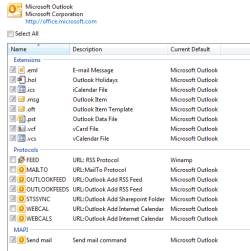
What are the protocols set for the program that is defined to open MAILTO?

see inserted image

Whatever application you use fro Mail should be the default handler and have the MAILTO protocol feature ticked.
Now you have to look at the other applications and see if they have the MAILTO protocol ticked - if they do, untick the feature from that application.
The objective is to make sure that the application you want opens the filetype/protocol you want.
FF opens .url (plus others)
Window Live Mail opens MAILTO (plus others) - WLM is just an example mail app - if you use something diffent, then that should be the app to open MAILTO.
Note that it's possible for more than one app to open a filetype / protocol (a greyed checked box), the default app says "Use me when you click on an object".

Control Panel -> Default Programs -> Set Program Access
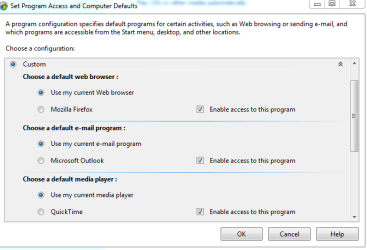
What is set for mail?
'Use my current e-mail program' (see inserted image)

What are you using for eMail?

I use check my Gmail through Firefox.
 

Attachments

  • protocols_Outlook.PNG
    protocols_Outlook.PNG
    11.1 KB · Views: 6
  • program access.PNG
    program access.PNG
    13 KB · Views: 3

My Computer My Computer

At a glance

Windows 7 Ultimate x64AMD Phenom II X4 965, 3400 Mhz, 4 cores, 4 lo...4GBNVIDIA GeForce GTX 460
OS
Windows 7 Ultimate x64
CPU
AMD Phenom II X4 965, 3400 Mhz, 4 cores, 4 logical processor
Memory
4GB
Graphics Card(s)
NVIDIA GeForce GTX 460
Sound Card
NVIDIA High Definition Audio
Monitor(s) Displays
SyncMaster B2230W
Screen Resolution
1680x1050
Hard Drives
500GB
Case
CM 690 II Advanced Black
Keyboard
Wave Keyboard
Mouse
Laser Mouse G9X
Internet Speed
wireless
Ok good stuff - thanks.

The MAILTO protocol is not checked - it points to Outlook, but isn't selected.

If you want Outlook to handle the MAILTO protocol - tick that feature.

If you're trying to get FF to open Gmail for MAILTO, that's a completely different thing.
I can only really help if the issue you're trying to solve is explained well. We started trying to solve links in Word, then eMail links in Word. I'm just not sure what you're trying to accomplish, or if we have accomplished anything. Was there a link in Word issue and did we fix that or was the issue always MAILTO?

If it's a MAILTO issue, then let's close this thread as solved and you can open a new thread
"Word 2010: MAILTO protocol opens wrong app"

I'll follow this thread to the new thread and see what I can do to help, but I think this issue is done. Adding more would not help other people trying to solve a Word / Hyperlink issue.

Bill
.
 

My Computer My Computer

At a glance

x64 (6.3.9600) Win8.1 Pro & soon dual boot x6...AMD A6-3420M APU with Radeon(tm) HD Graphics6.00 GBAMD Radeon(TM) HD 6520G
Computer type
Laptop
Computer Manufacturer/Model Number
HP Pavilion dv6-6c10us
OS
x64 (6.3.9600) Win8.1 Pro & soon dual boot x64 (6.1.7601) Win7_SP1 HomePrem
CPU
AMD A6-3420M APU with Radeon(tm) HD Graphics
Motherboard
Hewlett-Packard 1805
Memory
6.00 GB
Graphics Card(s)
AMD Radeon(TM) HD 6520G
Sound Card
(1) AMD High Definition Audio Device (2) IDT High Definiti
Monitor(s) Displays
HP W2072a 20" LCD (1600 x 900) @ 60 Hz
Screen Resolution
1366 x 768 x 32 bits (4294967296 colors) @ 60 Hz
Hard Drives
ST640LM0 00 HM641JI SATA Disk Device
Keyboard
Logitech k520 wireless KB
Mouse
Logitech m320 wireless mouse (bundled with KB)
Internet Speed
15/5 | 54 MB Wireless 'n'
Antivirus
Realtime: Defender or Avast | On-demand: Malwarebytes, ESET
Browser
IE 11 on Win8, IE 10 on win 7
Other Info
Media: [Gimp, Audacity, VLC] || Comm: [WEmail 2012, Skype] || Productivity: [OpenOffice,| Textpad] || Utils: [Sysinternals, cCleaner, Speccy, Defraggler]
Back
Top