i5 2500K core voltage?

77273GU

New member
Power User
Local time
2:43 AM
Messages
62
Hello,
In what range should the core voltage of an i5 2500K (no OC) be under load? I ask because last night I was playing a game and noticed it was at 1.3. Not sure if this is normal when I see others posting about their OC and a voltage under 1.4. When its not under load its 1.0 V.

Heres a pic of cpu-z playing a game.
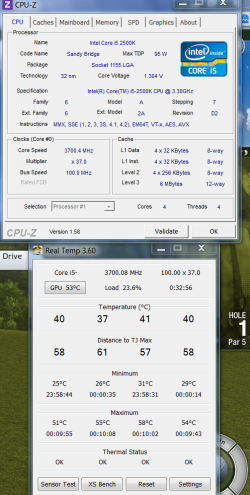
Game.PNG

Heres a pic of cpu-z running prime95 blend mode.
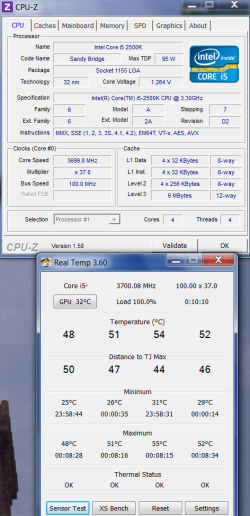
Prime95.PNG

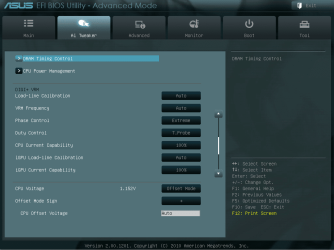
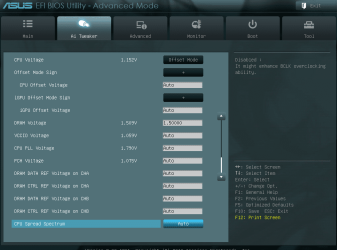
Heres some pics of the AI tweaker section of my bios. I changed PLL over voltage to disabled and AI overclock tuner to XMP. Everything else is at default.
AI_Tweaker1.PNG
AI_Tweaker2.PNG
AI_Tweaker3.PNG

Thanks
 

My Computer

Computer type
PC/Desktop
Computer Manufacturer/Model Number
Born on date-10-7-2011
OS
Windows 7 Home Premium 64bit
CPU
Intel Core i5-2500 K
Motherboard
Asus P8Z68-V Bios 0902
Memory
8GB J Skill- F312800CLD-8GBXM
Graphics Card(s)
Saphire 6870 & Intel HD 3000
Sound Card
Realtek HD Audio
Monitor(s) Displays
Asus VE258Q
Screen Resolution
1920 X 1080
Hard Drives
64g Crucial M4 SSD, 750g WD Caviar Black
PSU
Corsair TX 650 V2
Case
Corsair Carbide 400R
Cooling
Corsair H60
Keyboard
CM Storm Trigger Cherry Blues
Mouse
Logitech G500, G700
I have an i5-2500, not the K model. Not overclocked at all.

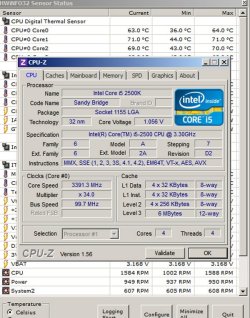
Cpuz shows my core voltage at 1.056 at idle and at major load using IntelBurnTest.

Not sure how that helps you. Oddly, Cpuz also mis-identifies my processor as a K model.
 

Attachments

  • Untitled-1.jpg
    Untitled-1.jpg
    117.1 KB · Views: 525

My Computer

Computer type
PC/Desktop
Computer Manufacturer/Model Number
Ignatz Special; 4 speed manual gearbox; factory air conditioning; one of one
OS
Windows 7 Home Premium SP1, 64-bit
CPU
Intel Skylake i5-6600K, not overclocked
Motherboard
AsRock Z170M Extreme 4, micro ATX
Memory
8 GB HyperX DDR4-2666 (2 x 4 GB)
Graphics Card(s)
none; graphics are integrated on CPU
Sound Card
onboard: Realtek ALC1150; external: USB Behringer UF0-202
Monitor(s) Displays
Dell S2340M 23 inch IPS
Screen Resolution
1600 x 900
Hard Drives
System: Crucial MX100 series SSD, 128 GB;
Data: Samsung Spinpoint 103SJ, 1 TB;
Backup: WD Caviar Green WD30EZRX-00D8PB0, 3 TB
PSU
Rosewill SilentNight 500 watt fanless, semi-modular
Case
Antec Solo II
Cooling
Noctua NH-U12S; Noctua F12 intake, Noctua S12A exhaust
Keyboard
Microsoft 200 6JH-00001 USB
Mouse
Dell or Microsoft optical wired; USB
Antivirus
Microsoft Security Essentials and Malwarebytes Premium
Browser
Pale Moon
Other Info
All fans PWM; speeds at idle: CPU circa 500 rpm; intake circa 600 rpm; exhaust circa 600 rpm; CPU temps 27 idle and 47 C load in a warm room (27 C/81 F) when running Intel Extreme Tuning Utility stress test.
I'm overclocked to 4.2. I idle at about 1.0, Prime blend uses the same voltage as your CPUz screenshot.
 

My Computers

System One System Two

  • Computer type
    PC/Desktop
    Computer Manufacturer/Model Number
    ALWAYS UNDER CONSTRUCTION
    OS
    Windows 11 Pro
    CPU
    Ryzen 9 5900X
    Motherboard
    Asus X570 Crosshair Viii Hero
    Memory
    32GB G Skill DDR4-3600
    Graphics Card(s)
    EVGA RTX 3080 FTW 3 Ultra
    Sound Card
    On Board/Sennheiser PC37X Headset
    Monitor(s) Displays
    3 X Asus 27"
    Screen Resolution
    2560x1440
    Hard Drives
    2 X 1 TB NVME drives
    PSU
    EVGA 850
    Case
    Phanteks Eclipse P400A
    Cooling
    EVGA 280 AIO
    Keyboard
    Logitech G510s/ Logitech G13
    Mouse
    Logitech G502
    Internet Speed
    24/1
    Antivirus
    ESET/MBAM Pro/SAS Pro
    Browser
    Chrome/ Firefox/ Edge
  • Computer type
    Laptop
    System Manufacturer/Model Number
    Dell 16 Plus
    OS
    Windows 11 Pro
    CPU
    Intel Ultra 9 288V
    Memory
    32 GB LPDDR5X 8533
    Monitor(s) Displays
    16" Mini-LED HDR600 Touch 90 Hz
    Screen Resolution
    2560X1600
    Hard Drives
    1 TB NVME
Thanks for the replies.
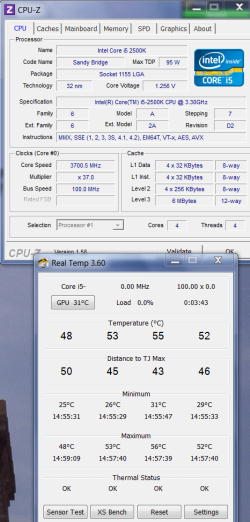
I ran Intel Burn Test and got about the same voltage as I did with Prime95.
IntelBurnTest.PNG

Its odd that the game voltage is higher than the the 2 stress tests. I was playing Tiger Woods Online with all settings at the highest. Have to try some other games and keep an eye on it.

My video card came with a Dirt 3 download from Steam so that will be the next test. Its been a while since I played PC games so I have to read up on and join steam.
 

My Computer

Computer type
PC/Desktop
Computer Manufacturer/Model Number
Born on date-10-7-2011
OS
Windows 7 Home Premium 64bit
CPU
Intel Core i5-2500 K
Motherboard
Asus P8Z68-V Bios 0902
Memory
8GB J Skill- F312800CLD-8GBXM
Graphics Card(s)
Saphire 6870 & Intel HD 3000
Sound Card
Realtek HD Audio
Monitor(s) Displays
Asus VE258Q
Screen Resolution
1920 X 1080
Hard Drives
64g Crucial M4 SSD, 750g WD Caviar Black
PSU
Corsair TX 650 V2
Case
Corsair Carbide 400R
Cooling
Corsair H60
Keyboard
CM Storm Trigger Cherry Blues
Mouse
Logitech G500, G700
When I play Dirt3, my CPU rarely ever goes over 9% and Vcore is less than 1.2V. Just to give you an idea.
 

My Computers

System One System Two

  • Computer type
    PC/Desktop
    Computer Manufacturer/Model Number
    ALWAYS UNDER CONSTRUCTION
    OS
    Windows 11 Pro
    CPU
    Ryzen 9 5900X
    Motherboard
    Asus X570 Crosshair Viii Hero
    Memory
    32GB G Skill DDR4-3600
    Graphics Card(s)
    EVGA RTX 3080 FTW 3 Ultra
    Sound Card
    On Board/Sennheiser PC37X Headset
    Monitor(s) Displays
    3 X Asus 27"
    Screen Resolution
    2560x1440
    Hard Drives
    2 X 1 TB NVME drives
    PSU
    EVGA 850
    Case
    Phanteks Eclipse P400A
    Cooling
    EVGA 280 AIO
    Keyboard
    Logitech G510s/ Logitech G13
    Mouse
    Logitech G502
    Internet Speed
    24/1
    Antivirus
    ESET/MBAM Pro/SAS Pro
    Browser
    Chrome/ Firefox/ Edge
  • Computer type
    Laptop
    System Manufacturer/Model Number
    Dell 16 Plus
    OS
    Windows 11 Pro
    CPU
    Intel Ultra 9 288V
    Memory
    32 GB LPDDR5X 8533
    Monitor(s) Displays
    16" Mini-LED HDR600 Touch 90 Hz
    Screen Resolution
    2560X1600
    Hard Drives
    1 TB NVME
Here is an article from bit-tec that is about overclocking a 2500K. But, even if you don't want to oC it is a good read as it explains all of the bios settings and what they do.
 

My Computers

System One System Two

  • Computer type
    PC/Desktop
    Computer Manufacturer/Model Number
    ALWAYS UNDER CONSTRUCTION
    OS
    Windows 11 Pro
    CPU
    Ryzen 9 5900X
    Motherboard
    Asus X570 Crosshair Viii Hero
    Memory
    32GB G Skill DDR4-3600
    Graphics Card(s)
    EVGA RTX 3080 FTW 3 Ultra
    Sound Card
    On Board/Sennheiser PC37X Headset
    Monitor(s) Displays
    3 X Asus 27"
    Screen Resolution
    2560x1440
    Hard Drives
    2 X 1 TB NVME drives
    PSU
    EVGA 850
    Case
    Phanteks Eclipse P400A
    Cooling
    EVGA 280 AIO
    Keyboard
    Logitech G510s/ Logitech G13
    Mouse
    Logitech G502
    Internet Speed
    24/1
    Antivirus
    ESET/MBAM Pro/SAS Pro
    Browser
    Chrome/ Firefox/ Edge
  • Computer type
    Laptop
    System Manufacturer/Model Number
    Dell 16 Plus
    OS
    Windows 11 Pro
    CPU
    Intel Ultra 9 288V
    Memory
    32 GB LPDDR5X 8533
    Monitor(s) Displays
    16" Mini-LED HDR600 Touch 90 Hz
    Screen Resolution
    2560X1600
    Hard Drives
    1 TB NVME
I downloaded Steam and Dirt 3. Had to download Games for Windows Live also. Played the game and got the same voltage as before.

Then I tried a few things in bios. Heres what seamed to work: I changed AI Overclock Tuner from XMP to auto and set the ram voltage manually to 1.5 and the CPU voltage went down. Then ran Intel Burn Test and Prime95 and passed. Didn't run Prime95 for long. I checked the ram timings and they were at 11-11-11-28. They should be at 8-8-8-24. I manually set the correct timings in bios and the CPU voltage went back up to what it was previously. Does this make any sense?

Next I updated to the latest bios and no change to the CPU voltage.

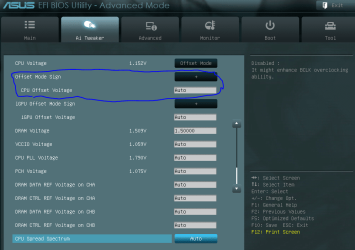
After much googleing, reading and trying different settings I lowered the voltage through the CPU voltage offset. Overclocking Using Offset Mode for CPU Core Voltage I changed the offset mode from + to - (neg) and the offset voltage from auto to -.02. I Dont know if this is best way to lower the CPU voltage but? At idle the voltage is around .980 and in games 1.27 to 1.28. Passes Intel Burn Test and Prime95 with a voltage around 1.25.
CPU-Offset.PNG

What do you think?
 
Last edited:

My Computer

Computer type
PC/Desktop
Computer Manufacturer/Model Number
Born on date-10-7-2011
OS
Windows 7 Home Premium 64bit
CPU
Intel Core i5-2500 K
Motherboard
Asus P8Z68-V Bios 0902
Memory
8GB J Skill- F312800CLD-8GBXM
Graphics Card(s)
Saphire 6870 & Intel HD 3000
Sound Card
Realtek HD Audio
Monitor(s) Displays
Asus VE258Q
Screen Resolution
1920 X 1080
Hard Drives
64g Crucial M4 SSD, 750g WD Caviar Black
PSU
Corsair TX 650 V2
Case
Corsair Carbide 400R
Cooling
Corsair H60
Keyboard
CM Storm Trigger Cherry Blues
Mouse
Logitech G500, G700
If it runs right and passes all tests, I think it is OK. Using offset mode to change CPU voltage is the correct way to do it. If you use manual instead of offset, the cpu will still idle at 1.6 but the cpu voltage will not go down. So, offset is the correct way. Like you, I don't understand how changing ram timings would increase the CPU voltage. But, I think it seems to be OK now. I have a different board than you but I could post my settings if you think it will help you. But different boards work differen, so I'm not sure it would help..
 

My Computers

System One System Two

  • Computer type
    PC/Desktop
    Computer Manufacturer/Model Number
    ALWAYS UNDER CONSTRUCTION
    OS
    Windows 11 Pro
    CPU
    Ryzen 9 5900X
    Motherboard
    Asus X570 Crosshair Viii Hero
    Memory
    32GB G Skill DDR4-3600
    Graphics Card(s)
    EVGA RTX 3080 FTW 3 Ultra
    Sound Card
    On Board/Sennheiser PC37X Headset
    Monitor(s) Displays
    3 X Asus 27"
    Screen Resolution
    2560x1440
    Hard Drives
    2 X 1 TB NVME drives
    PSU
    EVGA 850
    Case
    Phanteks Eclipse P400A
    Cooling
    EVGA 280 AIO
    Keyboard
    Logitech G510s/ Logitech G13
    Mouse
    Logitech G502
    Internet Speed
    24/1
    Antivirus
    ESET/MBAM Pro/SAS Pro
    Browser
    Chrome/ Firefox/ Edge
  • Computer type
    Laptop
    System Manufacturer/Model Number
    Dell 16 Plus
    OS
    Windows 11 Pro
    CPU
    Intel Ultra 9 288V
    Memory
    32 GB LPDDR5X 8533
    Monitor(s) Displays
    16" Mini-LED HDR600 Touch 90 Hz
    Screen Resolution
    2560X1600
    Hard Drives
    1 TB NVME
Thanks essenbe, Ill take you up your offer, when you get a chance you can PM me your settings or post them, whatever you like. I took a quick look and Asrock does have a similar bios. I understand the boards will OC differently. As I read more, all those settings in bios are starting to make sense. :) I have to read it more than once but its sinking in. ;)
 

My Computer

Computer type
PC/Desktop
Computer Manufacturer/Model Number
Born on date-10-7-2011
OS
Windows 7 Home Premium 64bit
CPU
Intel Core i5-2500 K
Motherboard
Asus P8Z68-V Bios 0902
Memory
8GB J Skill- F312800CLD-8GBXM
Graphics Card(s)
Saphire 6870 & Intel HD 3000
Sound Card
Realtek HD Audio
Monitor(s) Displays
Asus VE258Q
Screen Resolution
1920 X 1080
Hard Drives
64g Crucial M4 SSD, 750g WD Caviar Black
PSU
Corsair TX 650 V2
Case
Corsair Carbide 400R
Cooling
Corsair H60
Keyboard
CM Storm Trigger Cherry Blues
Mouse
Logitech G500, G700
If you will take a look at the link in post#6, it will explain some of the settings in bios.

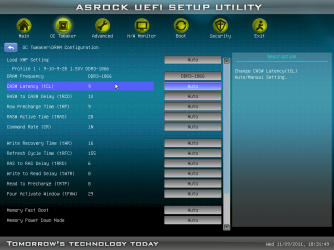
This is from bios. These are the ram settings.
ram settings.png

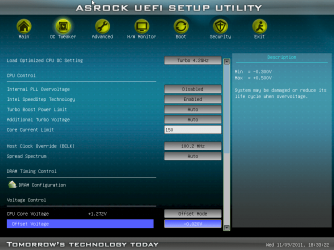
These are the overclock settings. Remember I'm running at 4.2
bios #1.png

bios #2.png
 

My Computers

System One System Two

  • Computer type
    PC/Desktop
    Computer Manufacturer/Model Number
    ALWAYS UNDER CONSTRUCTION
    OS
    Windows 11 Pro
    CPU
    Ryzen 9 5900X
    Motherboard
    Asus X570 Crosshair Viii Hero
    Memory
    32GB G Skill DDR4-3600
    Graphics Card(s)
    EVGA RTX 3080 FTW 3 Ultra
    Sound Card
    On Board/Sennheiser PC37X Headset
    Monitor(s) Displays
    3 X Asus 27"
    Screen Resolution
    2560x1440
    Hard Drives
    2 X 1 TB NVME drives
    PSU
    EVGA 850
    Case
    Phanteks Eclipse P400A
    Cooling
    EVGA 280 AIO
    Keyboard
    Logitech G510s/ Logitech G13
    Mouse
    Logitech G502
    Internet Speed
    24/1
    Antivirus
    ESET/MBAM Pro/SAS Pro
    Browser
    Chrome/ Firefox/ Edge
  • Computer type
    Laptop
    System Manufacturer/Model Number
    Dell 16 Plus
    OS
    Windows 11 Pro
    CPU
    Intel Ultra 9 288V
    Memory
    32 GB LPDDR5X 8533
    Monitor(s) Displays
    16" Mini-LED HDR600 Touch 90 Hz
    Screen Resolution
    2560X1600
    Hard Drives
    1 TB NVME
Back
Top