i5 overheating?

MiserySyndrome

New member
Member
Local time
2:16 AM
Messages
47
I got this Dell Vostro 3700.
And when i paly games like Burnout Paradise (max settings) Dead Rising 2 or any other full screen game, my CPU gets kinda hot..
So i thought i might check it out, and i ran a stability test from Everest Ultimate..
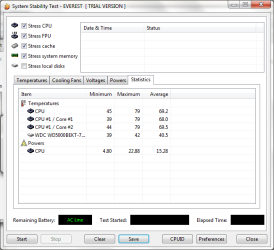
I let it run for about 20 minutes. and i got these results (attachment)
Is it getting to hot?
If yes, how can i keep it cooler?
thanks.
 

Attachments

  • stabilitytest.png
    stabilitytest.png
    21.5 KB · Views: 135

My Computer

Computer Manufacturer/Model Number
Dell Vostro 3700
OS
Microsoft Windows 7 Professional (x64) 6.1.7601
CPU
Intel(R) Core(TM) i5 CPU M 520 @ 2.40GHz (4 CPUs), ~2
Memory
4096MB RAM
Graphics Card(s)
NVIDIA GeForce GT 330M
Sound Card
nVIDIA GT216 - High Definition Audio Controller
Monitor(s) Displays
Integrated 17"
Screen Resolution
1600 x 900
Hard Drives
OS (C:) 451,07 GB
Recovery: 14,65 GB
Case
Standard
Keyboard
integrated
Internet Speed
2.4 Mbps
75 degrees under testing doesnt seem too high. You havent indicated your gaming temps or ambient temps.

You can use a cooling pad to chill it down a few notches, also try keep away dust and lint from under the back cover.
 

My Computer

Computer Manufacturer/Model Number
Too many to describe...
OS
Windows 7 x64 pro/ Windows 7 x86 Pro/ XP SP3 x86
75 degrees under testing doesnt seem too high. You havent indicated your gaming temps or ambient temps.

You can use a cooling pad to chill it down a few notches, also try keep away dust and lint from under the back cover.

I opened it and played burnout for a while..
now i got these results:
 

Attachments

  • stabilitytest.png
    stabilitytest.png
    18.6 KB · Views: 93

My Computer

Computer Manufacturer/Model Number
Dell Vostro 3700
OS
Microsoft Windows 7 Professional (x64) 6.1.7601
CPU
Intel(R) Core(TM) i5 CPU M 520 @ 2.40GHz (4 CPUs), ~2
Memory
4096MB RAM
Graphics Card(s)
NVIDIA GeForce GT 330M
Sound Card
nVIDIA GT216 - High Definition Audio Controller
Monitor(s) Displays
Integrated 17"
Screen Resolution
1600 x 900
Hard Drives
OS (C:) 451,07 GB
Recovery: 14,65 GB
Case
Standard
Keyboard
integrated
Internet Speed
2.4 Mbps
That's not terrible for a CPU in a cramped space with a small heatsink. Like Bill2 said, pick up a cooling pad. You should notice the difference.
 

My Computer

Computer Manufacturer/Model Number
Pugh Technologies
OS
W7 Professional x64
CPU
AMD Athlon II X3 445 Rana 3.10 GHz
Motherboard
MSI 870A-G54
Memory
PNY XLR DDR3 1600 4x2GB
Graphics Card(s)
NVIDIA GeForce GTS 450 (fermi) 1GB GDDR5
Sound Card
Realtek ALC892 onboard
Monitor(s) Displays
ASUS VE205t, Viewsonic VX2035WM
Screen Resolution
1600x900, 1600x1050
Hard Drives
977GB Hitachi Hitachi HDS721010CLA332
244GB Western Digital WDC WD2500AAJS-65B4A0
488GB Western Digital WDC WD5000AAJS-00A8B0
488GB Western Digital WDC WD5000AAKS-00UU3A0
PSU
Antec EarthWatts EA650 650W
Case
ThermalTake Armor A90 Mid Tower
Cooling
3x 120mm in, 1x 120mm & 200mm out, self built hydro-cooler
Keyboard
Logitec 55
Mouse
Razer Deathadder
Internet Speed
20 Mbps D/L, 9 Mbps U/L
Basically, keep the ventilation working- methods like aiming a fan blast at the machine work quite well. As far as I know Vostro is a 17'' laptop so space isnt really cramped. Buying a laptop cooler should help.

This seems to be a new machine so there wont be accumulated dust, if you are handy with opening up things, you can try replacing the thermal compound though that might void warranty. Though its a shame to have a problem right at the beginning.

Do your fans run frequently at high speed? If possible (either natively or via 3rd party utility) crank up fan speed to max. Check for bios updates for your machine, also update chipset and video drivers, if available.
 

My Computer

Computer Manufacturer/Model Number
Too many to describe...
OS
Windows 7 x64 pro/ Windows 7 x86 Pro/ XP SP3 x86
Basically, keep the ventilation working- methods like aiming a fan blast at the machine work quite well. As far as I know Vostro is a 17'' laptop so space isnt really cramped. Buying a laptop cooler should help.

This seems to be a new machine so there wont be accumulated dust, if you are handy with opening up things, you can try replacing the thermal compound though that might void warranty. Though its a shame to have a problem right at the beginning.

Do your fans run frequently at high speed? If possible (either natively or via 3rd party utility) crank up fan speed to max. Check for bios updates for your machine, also update chipset and video drivers, if available.

I saw with a program that they're running at 100% (i can slightly hear them when it's getting a little warm) and yes, it's new. i only got it a few weeks. I want to keep it clean and everything running smooth :)
so i check on everything if it keeps running smooth :)
wouldn't want it to be a piece of crap after a few weeks.. :geek:
 

My Computer

Computer Manufacturer/Model Number
Dell Vostro 3700
OS
Microsoft Windows 7 Professional (x64) 6.1.7601
CPU
Intel(R) Core(TM) i5 CPU M 520 @ 2.40GHz (4 CPUs), ~2
Memory
4096MB RAM
Graphics Card(s)
NVIDIA GeForce GT 330M
Sound Card
nVIDIA GT216 - High Definition Audio Controller
Monitor(s) Displays
Integrated 17"
Screen Resolution
1600 x 900
Hard Drives
OS (C:) 451,07 GB
Recovery: 14,65 GB
Case
Standard
Keyboard
integrated
Internet Speed
2.4 Mbps
Back
Top